

The invitation sounds like a meeting you shouldn’t miss: senior government officials, an urgent international situation, and a request to keep the discussion confidential.
When the video conference begins, familiar faces appear on screen. Your attendance seems expected, and the conversation already sounds official.
Overview
A private government briefing was a fabricated video meeting
The Singapore government Zoom scam uses fake official invitations and fabricated video participants to draw business professionals into a payment request.
Singapore Police documented multiple cases involving impersonated senior officials in May 2026. One victim lost at least S$4.9 million after a Zoom meeting and WhatsApp exchanges.
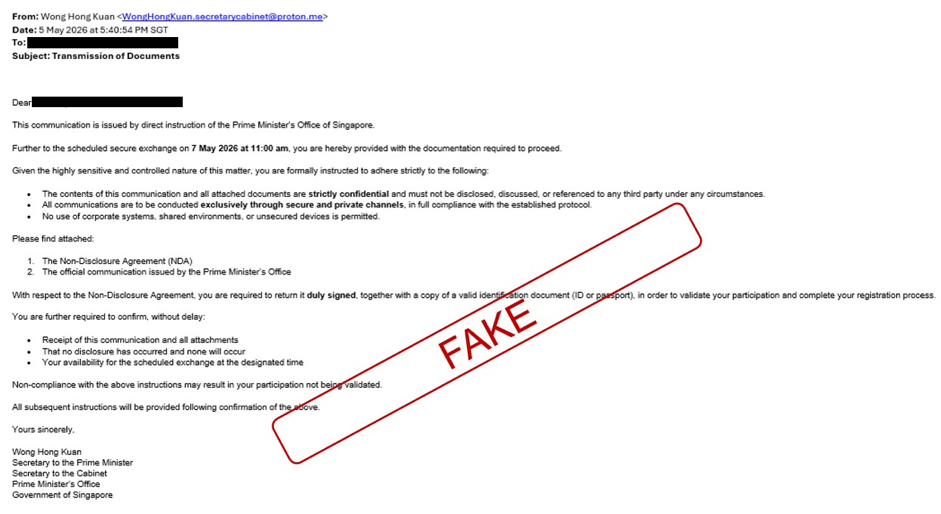
The police advisory about the fake Cabinet approach includes the original email above, with the issuer’s redactions and “FAKE” marking retained.
This is a documented impersonation campaign, not a claim that Singapore’s government or Zoom organized a fraudulent fundraiser.
The paperwork helped make a money request look official
The approach borrowed the identity of the Secretary to the Cabinet and invited targets to meet apparently senior government figures.
Recipients were asked for a signed nondisclosure agreement and identification. A supposed guarantee promised reimbursement within 15 business days in one reported case.
- A private invitation establishes apparent access to senior officials.
- Confidentiality paperwork discourages ordinary outside discussion.
- Fabricated officials appear in a video conference about the Straits of Hormuz.
- A claimed government guarantee reduces anxiety about advancing money.
- Follow-up messages move the target toward a bank transfer.
Police analyzed the actual meeting footage
In a separate analysis of recovered Zoom footage, police confirmed the use of deepfakes impersonating senior government officials.
A participant playing a lawyer followed up separately to persuade the victim to transfer money. The financial instruction didn’t need to occur inside the video itself.
Don’t send money because apparent officials attended a private meeting. Verify the request through the real organization’s established channels before sharing documents or approving a transfer.
Why an Invitation Can Feel More Credible Than a Cold Call
This approach targeted business professionals, including people with prior interactions with government agencies. A high-level invitation could therefore seem unusual without feeling impossible.
The recipient isn’t simply told they won something. They’re given a role in an apparently serious discussion and treated as someone whose participation matters.
That can make verification feel socially awkward. You may hesitate to challenge an invitation that appears to come from people you respect.
Confidentiality raises another barrier. The target can be made to feel that asking a colleague or familiar government contact would breach the meeting’s rules.
But the sender doesn’t get to decide how you verify their identity. A claimed secret meeting is still a claim requiring independent confirmation.
The supposed reimbursement guarantee adds a separate reassurance. It reframes a transfer as a temporary advance backed by government rather than an unrecoverable payment.
Don’t confuse a document promising repayment with proof that the government issued it. That distinction matters most before the first transfer.
How the Fake Government Zoom Meeting Works
Step 1: A supposed Cabinet contact opens a private channel
The scammer presents themselves as an official arranging a sensitive discussion. The identity and photograph of a real public figure can make the introduction familiar.
In the documented case, WhatsApp contact was followed by an email using a Proton address and the Secretary to the Cabinet’s name.
The email provider alone isn’t the entire case against it. Police confirmed the impersonation, and the real official later disavowed the approach.
Don’t authenticate an official by their profile photo or signature. Reach the office through an independently obtained government contact.
Step 2: An NDA and identification request formalize the invitation
The false email asks for a signed confidentiality agreement and an identity document before the meeting. It also emphasizes private handling.
These requests make the invitation resemble an organized administrative process. They can also cause recipients to disclose sensitive documents before any money is discussed.
The published email goes further than an ordinary confidentiality reminder. It tells the recipient not to use corporate systems, shared environments, or unsecured devices.
It also directs communication into private channels. For someone following those instructions, the invitation can become separated from the workplace systems normally used for review.
That matters even before a transfer. A finance colleague or security team can’t question a request they aren’t told exists.
Avoid moving the discussion to a personal account simply because the sender says that makes it secure. First establish who is making the instruction.
Verification belongs before document submission. A signed form doesn’t establish who received it, and a file reference doesn’t establish who created it.
If confidentiality terms worry you, consult your own legal adviser. Don’t let the person whose identity is disputed decide whom you may ask for help.
Step 3: The video supplies apparent eyewitness confirmation
The target joins a Zoom discussion that appears to involve prominent officials and institutional participants. The topic gives the meeting an urgent international context.
Police described fabricated appearances of Prime Minister Lawrence Wong and other senior figures in the recovered footage.
Seeing a familiar face can feel like confirmation of everything in the invitation. Here, the apparent confirmation was part of the deception.
The recipient’s own presence doesn’t authenticate the other participants. A working Zoom meeting only establishes that a meeting connection exists.
Step 4: A personal acknowledgment makes the performance feel interactive
In the recovered footage, an apparent official acknowledged the victim’s attendance. Hearing that recognition can make the meeting feel personal, not like a video playing for strangers.
Don’t assume a familiar name being spoken proves the speaker’s identity. Personalization and authenticity are different questions.
The target may already have supplied their name, role, and documents through the invitation process. The conversation can draw on information the target volunteered.
The practical check remains external: did the genuine office arrange this meeting and authorize the specific request now being made?
Step 5: A follow-up turns the meeting into a financial instruction
Police’s footage analysis describes a separate follow-up by someone impersonating a lawyer. That person persuaded the victim to transfer money.
In the case detailed in the earlier advisory, a forged guarantee and WhatsApp exchanges supported transfers to a supplied corporate bank account.
The promise was reimbursement within 15 business days. It was a scammer’s assurance, not an actual government commitment to repay the victim.
A corporate account name doesn’t validate the meeting or guarantee. Confirm the recipient and legal basis through your own established payment controls.
Step 6: Independent contact exposes the false authority
The victim contacted the real Secretary to the Cabinet on May 14 and learned the approach wasn’t genuine.
By then, at least S$4.9 million had been lost in that case. The amount illustrates the consequence of verification arriving after transfers.
You don’t need to wait for a meeting to unravel before making that check. Move it ahead of documents, guarantees, and payment approvals.
What the Deepfake Clues Do and Don’t Tell You
Police identified several inconsistencies in the recovered conference. Lip movements didn’t match the audio, and audio came through one account.
Background and Zoom presentation details also looked wrong. Those observations help explain this particular recording rather than providing a universal detection test.
A poor connection can cause genuine video problems. Conversely, a more convincing fake might not display the same visible mistakes.
Don’t make a payment decision depend on whether you can spot a glitch. You shouldn’t need to become a video analyst to protect a bank account.
The stronger safeguard is a separate verification route that the meeting organizer doesn’t control. Confirm the exact invitation, purpose, and payment authority with the real office.
Don’t ask another participant inside the suspicious conference to vouch for the host. That person may be part of the same staged conversation.
Likewise, a contact introduced as a lawyer by the organizer isn’t an independent adviser. Use your own legal or finance contacts.
Keep Business Payment Controls Outside the Meeting
A sensitive invitation shouldn’t override the rules your business normally uses for transfers. A senior name on screen isn’t a substitute for authorization.
Keep beneficiary checks, internal approval, and written purpose separate from the private chat. Don’t let the host appoint the person who verifies their own request.
Check the actual beneficiary proposed for each transfer, not only the name on the guarantee. The repayment promise and destination account are separate claims.
If an instruction changes from the original document to a later WhatsApp message, preserve both. The change needs independent review before a payment is approved.
For a business, record who received the invitation and who was asked to authorize funds. That helps prevent the same private request reaching another employee unchallenged.
For a personal transfer, don’t assume business-style paperwork provides business-level protection. Ask your bank about the real payment, not the status the sender assigns you.
If a payment is described as a temporary advance, ask your own finance or legal team to review the underlying authority and repayment claim.
Don’t circulate identity documents through a newly created group just because the conversation appears prestigious. Limit access while the invitation is being checked.
A useful internal rule is simple: unusual external requests receive an independent callback before money moves, regardless of the apparent seniority of the people involved.
The callback should reach a previously established contact or an office found through an authentic public directory, not a number supplied in the invitation.
If the request is genuine, the real organization can explain the process. A sender’s insistence that verification is forbidden shouldn’t decide your next action.
What to Do if You Have Fallen Victim to This Scam
-
Stop any pending or additional transfers. Don’t pay a final amount to activate a guarantee, recover earlier money, or keep the alleged arrangement confidential.
If your business has scheduled a payment, alert the person who can pause it immediately. Don’t assume leaving the Zoom meeting cancels a bank instruction.
-
Contact your bank’s fraud team now. Explain that fabricated government officials and follow-up messages induced the payment.
Provide transaction times, amounts, recipient accounts, and references. Ask about stopping or recalling funds, but don’t rely on a promised reimbursement from the sender.
-
Notify the appropriate people inside your organization. Bring in finance, security, and legal contacts through your normal internal channels.
Tell them whether company funds, identity documents, or confidential business material were shared. Those exposures may require different containment steps.
-
Preserve the invitation and meeting evidence. Keep original emails, headers, supplied documents, chat history, participant details, and recordings already lawfully available to you.
Don’t rejoin the meeting or install an extra recorder at the scammer’s request. Preserve what you have without creating another exposure.
-
Verify the impersonation with the actual office. Use an established government contact or authentic public directory, not the invitation’s reply address.
Record the response and any reporting instructions. Let investigators assess the sender rather than confronting someone using a borrowed identity.
-
Make a police report and describe document exposure. Include the payment trail and any identification or signed forms you supplied.
For Singapore scam guidance, use ScamShield’s official service or its 1799 helpline. Urgent fund questions still need the bank’s immediate attention.
-
Secure accounts only where there was a relevant exposure. If credentials were shared, reset them through the genuine service and involve your IT team.
A fake video meeting doesn’t by itself establish malware infection. Separately report any unusual software installation, login prompt, or remote-access request.
Don’t Wait for the Claimed Reimbursement Date
The 15-business-day promise was one of the reassurances in the documented case. Waiting for it can delay the bank report that matters now.
If a request has been independently identified as fraudulent, treat the transfer as urgent. A promised future repayment isn’t a reason to postpone reporting.
Be equally wary of a later supposed lawyer, official, or recovery specialist asking for a release charge. A new identity doesn’t make the money safer.
Continue through the bank and investigators you reached independently. Keep their case references together and don’t accept a stranger’s instructions to withdraw a report.
If you feel embarrassed about the apparent seniority of the people involved, report anyway. The campaign was designed to exploit precisely that credibility.
Frequently Asked Questions
Was the Singapore government Zoom meeting actually a deepfake?
Police analyzed recovered footage and confirmed fabricated appearances of senior officials. This conclusion comes from the documented case, not a generic AI-detector score.
Does this mean Zoom itself is a scam?
No. The service was used for impersonation. The false invitation, fabricated participants, and resulting financial instructions are the scam.
What if an apparent official personally acknowledged me?
A personalized acknowledgment doesn’t establish identity. Verify the specific meeting and request through the real office using a separate trusted channel.
Does a government guarantee make the transfer safe?
Not when the document is supplied by an impersonator. The reported reimbursement promise was false, so don’t rely on it when deciding whether to pay.
Should I keep quiet because I signed an NDA?
Don’t let the suspicious sender prevent independent verification or reporting. If you’re concerned about a document you signed, consult your own legal adviser.
Must I wait 15 business days before contacting the bank?
No. If you suspect fraud, contact the bank immediately. The scammer’s reimbursement timetable doesn’t protect the money or improve your recovery options.
The Bottom Line
Don’t transfer money on the authority of a private government Zoom briefing. Verify the real office and exact payment request outside the organizer’s channels.
If you’ve already paid, call your bank now and report the Singapore government Zoom scam. Preserve the invitation, documents, and messages instead of waiting for reimbursement.

Join the discussion
0 commentsShare your experience or ask a question about this article.
Discussion
Start the conversation
Have a question or something useful to share? Add the first comment.