

A mother-and-daughter boutique says it is leaving Savannah after years of dressing local women. The closing sale sounds personal enough to reward with one final order.
Behind that sentimental storefront, the policies tell a much colder commercial story. Buyers should read both versions before trusting the discount.
Overview
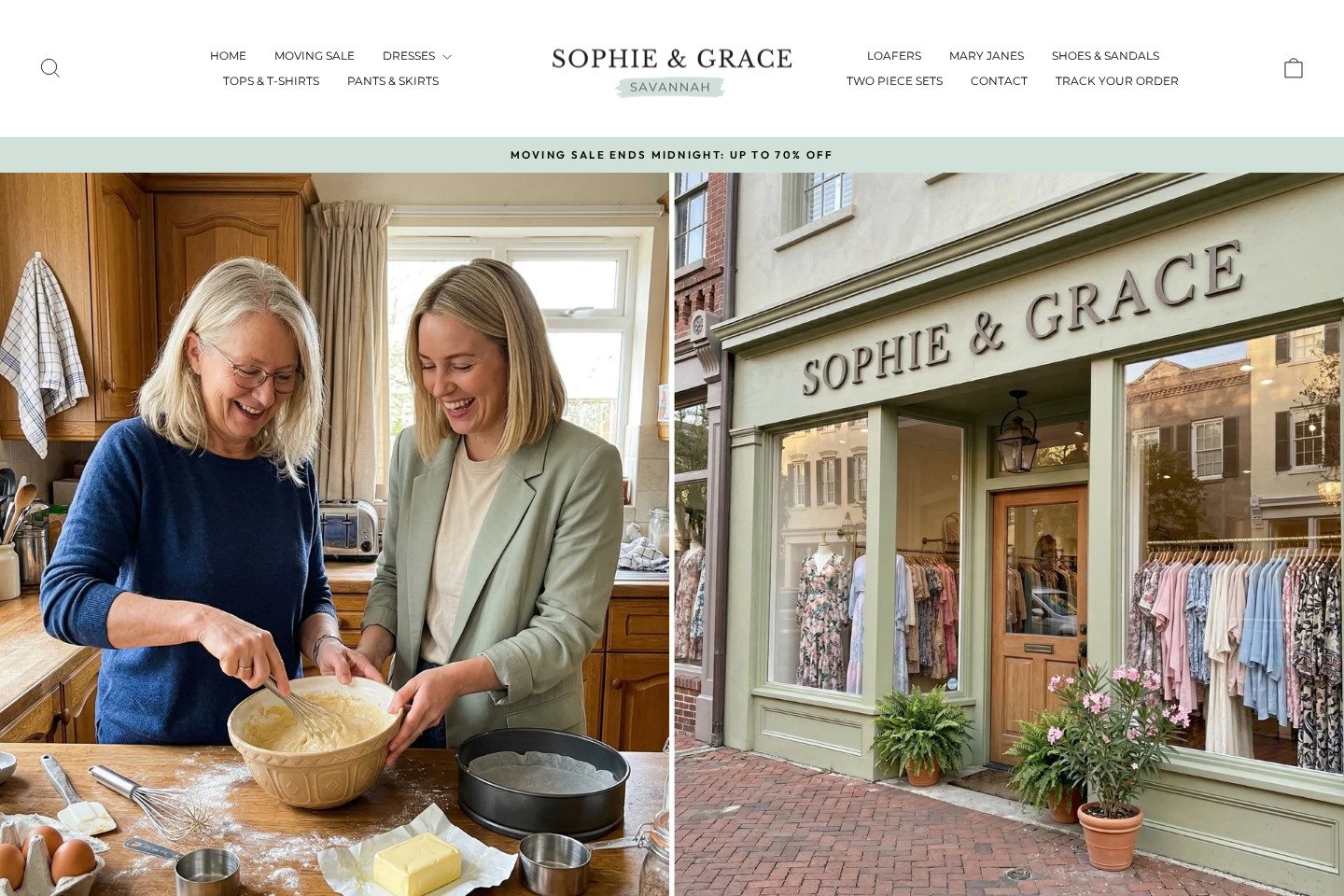
The website presents a local Savannah farewell
Sophie & Grace Savannah describes itself as a family-owned boutique built by a mother and daughter.
The homepage pairs that identity with a moving sale offering discounts of up to 70%.
Warm photographs, customer names, and a farewell message create the feeling of a neighborhood shop reaching its final days.
A midnight deadline encourages visitors to act before the supposed closing opportunity disappears.
This emotional presentation is central to the purchase, not merely decorative branding.
The legal and return details point far beyond Georgia
The contact page provides an email address but no visible Savannah street address or telephone number.
The terms state that disputes are governed by the laws of the Netherlands.
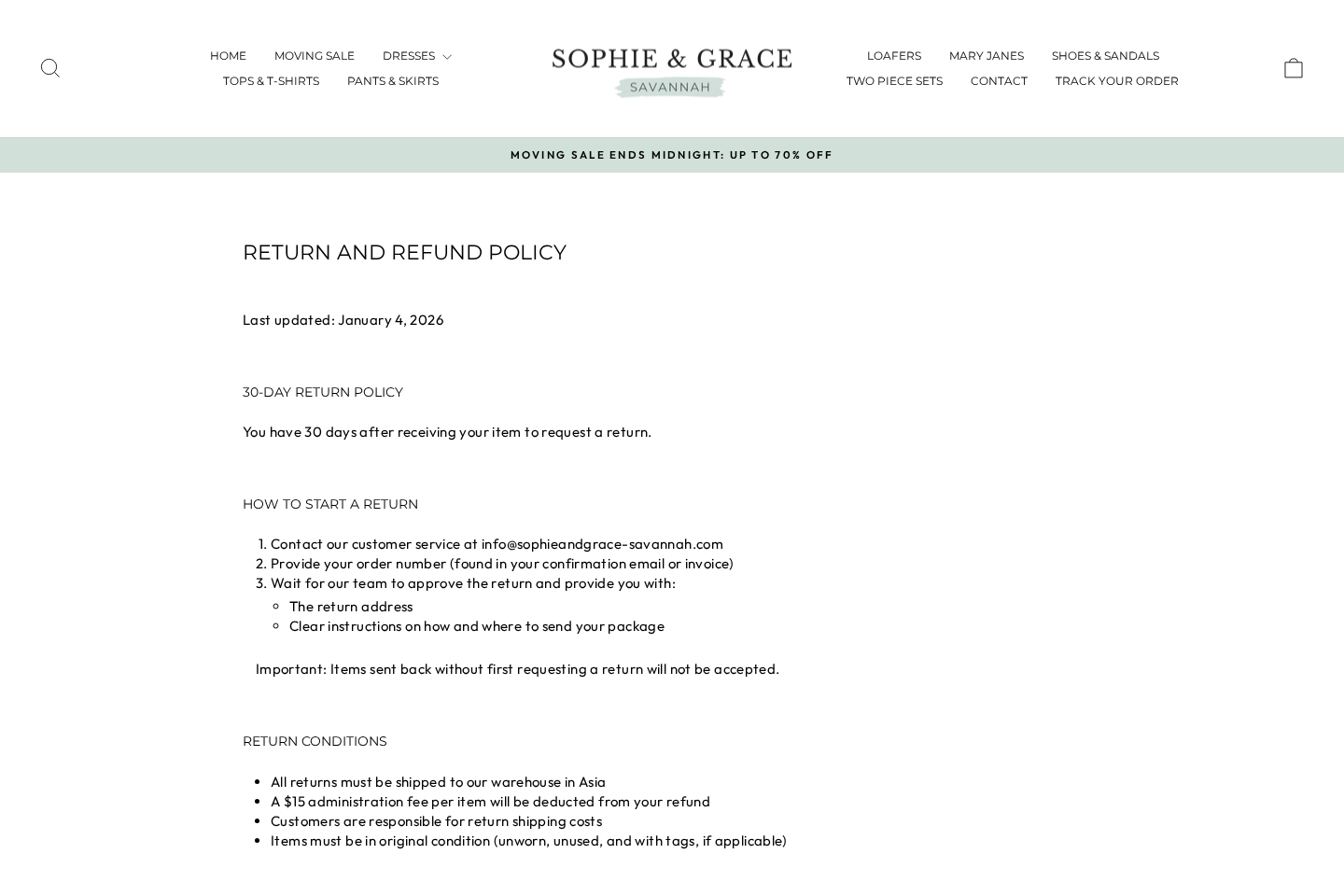
The return policy tells customers to ship approved returns to a warehouse in Asia.
Buyers pay that international postage and face a $15 administration fee for each returned item.
Those disclosures conflict sharply with the impression of a closing American boutique handling local inventory.
Customer reports describe difficult refunds and disappointing goods
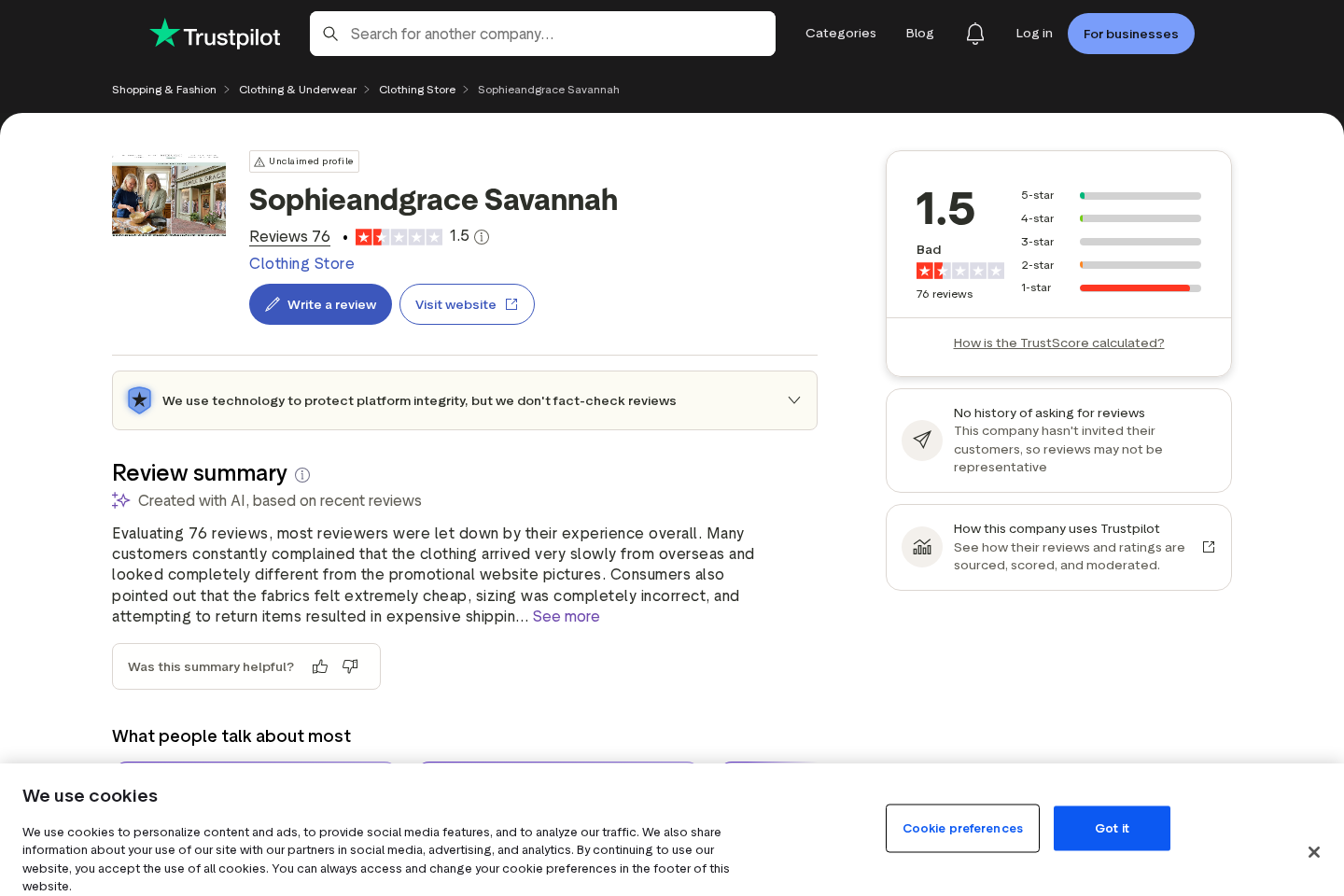
Trustpilot displayed a 1.5 rating with 76 reviews during our examination, including an overwhelming share of one-star feedback.
Reviewers repeatedly alleged that garments differed from photographs, arrived in poor quality, or did not fit as expected.
Several said support offered partial refunds while requiring costly overseas returns for full reimbursement.
The strongest warning points include:
- A local Savannah identity without a published Savannah shop address.
- A perpetual-style moving deadline attached to broad discounts.
- Terms governed by a country never highlighted in the boutique story.
- Returns directed to Asia at the customer’s expense.
- A separate administration fee charged for every returned item.
- No visible support telephone line for urgent order problems.
- Numerous complaints alleging products differed from promotional photographs.
- Partial-refund negotiations that can make exercising the guarantee expensive.
Why the Savannah Story Matters
Online stores can use brand names inspired by any city without operating a physical shop there.
The problem begins when the location story creates a material impression that the business cannot substantiate.
A shopper may reasonably expect domestic stock, familiar consumer service, and an ordinary United States return address.
Those assumptions influence willingness to order clothing that cannot be tried on first.
The mother-and-daughter narrative further lowers skepticism by attaching real human stakes to the sale.
Closing-down language can make comparison feel selfish or untimely.
Buyers may accept a higher price because they believe they are supporting an independent family rather than an international dropshipping operation.
That belief deserves evidence such as a shop location, local business record, historical photographs, or verifiable community presence.
The website claims a history dating to 2015, yet the visible company details do not clearly document that decade.
A store history should exist beyond the current marketing page.
Look for archived local listings, older reviews, social posts spanning years, news coverage, and consistent contact information.
A recently established web presence cannot automatically prove the story false.
However, it should not borrow ten years of confidence without showing where that history occurred.
Terms governed by Dutch law add another unexplained layer.
A genuine Savannah operation might have international owners, but transparent sellers explain their legal entity and operating locations clearly.
The Return Policy Changes the Real Cost
Clothing purchases carry predictable fit, color, fabric, and sizing risks.
A practical return process is therefore part of the product’s value.
Sophie & Grace requires customers to contact support before sending anything back.
Unapproved parcels may be rejected, so simply using an address from the package can fail.
The customer bears return shipping to an Asian warehouse.
Tracked international postage can be expensive compared with the price of a discounted dress or blouse.
The policy also describes a $15 administration charge for each item.
A three-item order could therefore lose $45 before postage, even if all items travel in one parcel.
That deduction changes the meaning of a broad refund promise.
The website also imposes a narrow 24-hour period for order cancellation.
After fulfillment begins, buyers may be pushed into the international return route.
Consumers should calculate the worst-case recovery before treating the purchase as risk-free.
For example, compare the order value with tracked postage, administration charges, currency conversion, and possible customs paperwork.
If those costs consume most of the refund, the written right offers limited practical protection.
Save the policy visible on the ordering date because online terms can be revised later.
How the Savannah Boutique Sales Funnel Works
Step 1: A sentimental advertisement introduces the boutique
Social media promotions describe a family business facing a move or emotional final chapter.
Photographs and first names make the operation feel intimate and rooted in Savannah.
The message invites viewers to support real people while receiving a large discount.
That sympathy arrives before the shopper investigates the legal operator.
Step 2: Closing language creates a deadline
The homepage says the moving sale ends at midnight.
Such wording discourages leaving the site to compare products or study independent feedback.
Scarcity also explains deep discounts, making the prices seem like exceptional final inventory.
Buyers should revisit later and record whether the deadline genuinely changes.
Step 3: Boutique photography sets expectations
Garments appear through polished model images, elegant names, and carefully arranged collections.
The presentation implies a curated fashion business rather than generic catalog merchandise.
Customer complaints become important when they allege that delivered fabric, cut, color, or finish differs noticeably.
A beautiful photograph cannot establish who manufactured the actual item shipped.
Step 4: The checkout feels ordinary and reassuring
The store uses familiar ecommerce design, common payment methods, and Shopify infrastructure.
Legitimate technology can host either excellent or poor merchants.
A secure connection protects data in transit, but does not validate the Savannah narrative or garment quality.
Shoppers still need to identify the contracting business and return destination.
Step 5: Overseas fulfillment becomes visible after purchase
Tracking and packaging may reveal that merchandise moves through international fulfillment rather than a Georgia boutique.
Long delivery times can reduce the remaining period for resolving an occasion-specific clothing purchase.
Packaging may show another logistics name that does not match the storefront.
That arrangement resembles dropshipping, although the exact supply chain is not publicly documented.
Step 6: Dissatisfied buyers enter a negotiation
A customer reports poor fit, unexpected fabric, damage, or substantial difference from the pictures.
Support may request photographs and then suggest keeping the item for a partial refund.
Some shoppers accept because Asian return postage and per-item fees make full recovery uneconomical.
The negotiation transfers much of the quality risk back to the buyer.
Step 7: The story can outlast individual complaints
New advertisements continually reach people who have never encountered the review history.
A local-sounding name and fresh countdown recreate urgency for each visitor.
Even negative feedback may rank below sponsored promotions during a quick mobile search.
Independent research therefore matters before, not after, the package arrives.
What Independent Complaints Reveal
No collection of online reviews is perfectly representative.
Angry customers post more often, companies can solicit praise, and individual experiences differ.
Patterns nevertheless become useful when separate reviewers describe the same operational problem.
For Sophie & Grace, recurring themes include material quality, inaccurate appearance, sizing, slow resolution, and overseas returns.
The 1.5 Trustpilot score is not proof that every transaction fails.
It is a strong reason to inspect the complaints instead of relying on testimonials placed by the seller.
Read recent reviews and older entries to determine whether service improves or the same issues continue.
Look for detailed accounts containing order dates, support replies, return quotes, and final outcomes.
Generic one-line praise or attacks provide less information than a documented sequence.
Also examine how the company responds publicly.
A useful response identifies the policy, offers a concrete route, and avoids blaming every customer.
Repeated invitations to continue privately may be necessary for privacy, but they do not show whether refunds actually arrive.
Compare complaint wording with the store’s current terms.
When customers describe Asian returns and the policy confirms them, that point carries more weight than speculation.
Keep conclusions tied to evidence. Poor products and restrictive returns are serious without inventing claims about criminal ownership.
Company, Address, and Fulfillment Checks
No named Savannah storefront is shown
The contact page lists email support but does not identify a walk-in shop, local telephone line, or Georgia office.
Search business directories for the exact name and request a street address from support.
A city inside a domain or logo is marketing, not evidence of physical presence.
Do not plan an in-person return unless the merchant confirms a genuine retail location.
The legal operator remains difficult to identify
The terms describe the website as the operator without prominently naming a registered company.
They select Netherlands law despite the American boutique identity.
Buyers should ask for the legal business name, registration number, jurisdiction, and service address.
Without them, responsibility is scattered across branding, website hosting, payments, and logistics.
Customer service is narrow and remote
An email address is the principal visible contact method.
Send questions about measurements, fabrics, shipping origin, return fees, and refunds before ordering.
If specific questions receive vague templates, assume post-sale disputes may follow the same pattern.
Save message headers and complete replies because a web contact form leaves little proof by itself.
The Asian warehouse explains the fulfillment risk
The return policy explicitly points approved returns toward Asia, not Savannah.
That location may be a mass fulfillment center serving numerous rapidly branded apparel stores.
Goods may be manufactured at scale in China or elsewhere, then promoted with localized boutique stories.
Overseas manufacture is not automatically bad, but concealing the supply chain prevents buyers from judging quality and practical returns.
How to Shop More Safely From a Closing Boutique
Search the store name with “return,” “complaint,” “warehouse,” and “address” before entering payment information.
Check whether older social posts support the claimed years in business.
Ask for a physical location and determine whether local directories recognize it.
Copy a product image into reverse-image search to see whether other stores sell the same design.
Compare fabric composition, measurements, care instructions, and country-of-origin details across those listings.
Do not rely on small, medium, or large labels because sizing standards vary widely.
Request precise garment measurements when the chart appears generic.
Calculate the order’s full value after discounts, shipping, duties, and return risks.
Pay by a method that offers a formal dispute process for undelivered or materially misrepresented merchandise.
Avoid bank transfers, cryptocurrency, and informal person-to-person payments for an unfamiliar clothing store.
Record the product page, selected size, promised delivery, and policy at checkout.
Open the parcel promptly and film any damage, incorrect items, or obvious difference from the listing.
Contact support within the shortest applicable deadline, even if you are still gathering photographs.
Never send a return to the package label without written authorization.
Use tracked postage and retain customs documents when an overseas return remains economically sensible.
What Each Clothing Listing Should Disclose
A reliable listing identifies exact fiber composition, not vague descriptions such as premium blend.
Measurements should correspond to that garment rather than a generic chart reused across the entire catalog.
Photographs should show the actual item from several angles and disclose when colors vary by screen.
Close views of seams, fasteners, lining, and texture help shoppers judge quality.
The page should explain whether the garment is stocked locally, imported after ordering, or made on demand.
Expected dispatch and delivery times must reflect that fulfillment method.
Care instructions matter because fragile fabric can shrink or distort before a buyer discovers the return limitations.
Country-of-origin and manufacturer information provide accountability when labels conflict with the website story.
Model height and worn size are useful only when the measurements themselves remain accurate.
Review widgets should explain whether every purchaser can submit feedback and whether negative entries remain visible.
Silence on these basics shifts uncertainty from the merchant onto the customer.
A 70% discount cannot compensate for merchandise that was never described precisely enough to evaluate.
What to Do if You Have Fallen Victim to This Scam
- Photograph the delivered goods. Capture labels, fabric, stitching, size markings, defects, package, and side-by-side differences from the listing.
- Complain within the policy window. Email the merchant immediately, describe the exact mismatch, and request a full resolution in writing.
- Demand complete return terms. Obtain the authorized address, required tracking, deductions, deadline, and expected refund date before mailing anything.
- Calculate recovery honestly. Compare international postage and $15 per-item fees against the amount that would actually return to your account.
- Escalate through the payment provider. Supply product screenshots, photographs, correspondence, policies, and delivery records when merchandise was materially misrepresented.
- Monitor the card. Report unexpected additional charges and ask the issuer whether the merchant retains any continuing payment authority.
- Protect login details. Change reused passwords if you created an account and enable multifactor authentication on the associated email.
- Check suspicious follow-up files. Run Malwarebytes if a supposed refund representative sends software, archives, or remote-control instructions.
- Reduce clone-store exposure. AdGuard can block many deceptive advertising paths, although it cannot guarantee a retailer is trustworthy.
- Publish factual feedback. Describe dates, goods, policy terms, and refund outcome without speculation, helping later shoppers evaluate the same risks.
Is Your Device Infected? Run a Free Malware Scan
Slow performance, constant pop-ups, or strange behavior? These are classic signs of a malware infection. The fastest way to find out is to scan your device with Malwarebytes Free — one of the most trusted malware removal tools available.
The free version detects and removes the most common threats, including:
- Adware — the cause of those annoying pop-ups
- Browser hijackers — unwanted redirects and changed homepages
- Trojans and spyware — hidden programs stealing your data
- Potentially unwanted programs (PUPs) — software you never asked for
👉 Select your device below — Windows, Mac, or Android — then follow the simple steps to download Malwarebytes, scan your system, and remove any threats it finds. The scan usually takes 5 to 20 minutes.
Run a Malware Scan with Malwarebytes for Windows
Malwarebytes is one of the most popular and trusted anti-malware tools for Windows — and it’s completely free for removing infections. It catches threats that many antivirus programs miss, including adware, browser hijackers, and trojans. Follow the steps below to scan and clean your PC in just a few minutes.
Download Malwarebytes
Click the button below to download the latest version of Malwarebytes for Windows from the official source. The free version is all you need — it will scan your computer and remove adware, browser hijackers, and other malicious software at no cost.
Download MalwarebytesOfficial installer for Windows 11 and 10. Your download starts right away.Want real-time protection? See Malwarebytes Premium Malwarebytes Free for WindowsScans and removes malware at no cost
-
Install Malwarebytes
When the download finishes, open your Downloads folder and double-click the MBSetup file. If Windows shows a User Account Control pop-up, click “Yes” to allow the installation.

Follow the On-Screen Prompts to Install Malwarebytes
The setup wizard will walk you through a few quick screens:
-
Choose where you’re installing the program — “Personal Computer” or “Work Computer” — then click Next.

-
Malwarebytes will now install on your device. This usually takes under a minute.

-
When installation is complete, the “Welcome to Malwarebytes” screen will open automatically.

-
On the final screen, click Open Malwarebytes to launch the program.

-
Enable “Scan for Rootkits”
Before scanning, turn on rootkit detection so Malwarebytes can find even the most hidden threats. Click the Settings gear icon on the left side of the screen.

In the settings menu, find “Scan for rootkits” and click the toggle so it turns blue.

Done? Click “Dashboard” in the left pane to return to the main screen.
Start the Scan
Click the blue Scan button. Malwarebytes will automatically update its virus database and start checking your computer for malware.

-
Wait for the Scan to Finish
The scan checks your entire system for browser hijackers and other malicious programs, so it can take 5 to 20 minutes depending on your computer. Feel free to do something else — just check back occasionally to see the progress.

-
Quarantine the Detected Threats
When the scan is done, you’ll see a list of everything Malwarebytes found — malware, adware, and potentially unwanted programs. Click the “Quarantine” button to remove all of them at once.

Malwarebytes will now remove the malicious files and registry entries and move them safely into quarantine.

-
Restart Your Computer
Some threats can only be fully removed after a reboot. If Malwarebytes asks you to restart, click Yes. Once you’re logged back in, Malwarebytes has finished removing the threats it found.

That’s it — your Windows PC is now clean of trojans, adware, and other malware, and should be back to running smoothly.
If you are still having problems with your computer after completing these instructions, then please follow one of the steps:
- Run a computer scan with ESET Online Scanner
- Ask for help in our Windows Malware Removal Help & Support forum.
Run a Malware Scan with Malwarebytes for Mac
Malwarebytes for Mac is a free on-demand scanner that removes the malware other security software tends to miss — adware, browser hijackers, and unwanted programs included. Cleaning an infected Mac with Malwarebytes has always been completely free, and it’s our go-to recommendation. Follow the steps below to scan and clean your Mac in just a few minutes.
-
Download Malwarebytes for Mac
Click the button below to download the latest version of Malwarebytes for Mac.
Download MalwarebytesOfficial installer for macOS. Your download starts right away.Want real-time protection? See Malwarebytes PremiumMalwarebytes Free for MacScans and removes malware at no cost -
Open the Malwarebytes setup file
When the download finishes, open your Downloads folder and double-click the setup file to begin the installation.

-
Follow the On-Screen Prompts to Install Malwarebytes
The Malwarebytes for Mac Installer will guide you through a few quick screens. Click “Continue” and keep following the prompts until the installation completes.



When the installation is complete, Malwarebytes opens to the Welcome to Malwarebytes screen. Click “Get started“.
-
Select “Personal Computer” or “Work Computer”
Malwarebytes will ask what type of computer you’re installing it on. Click either Personal Computer or Work Computer, whichever applies.

-
Start the Scan
Click the “Scan” button. Malwarebytes will automatically update its detection database and begin checking your Mac for malware.

-
Wait for the Scan to Finish
Malwarebytes will scan your Mac for adware, browser hijackers, and other malicious programs. This can take a few minutes, so feel free to do something else — just check back occasionally to see the progress.

-
Quarantine the Detected Threats
When the scan is done, you’ll see a list of everything Malwarebytes found. Click the “Quarantine” button to remove all the threats at once.

-
Restart Your Mac
Malwarebytes will now remove all the malicious files it found. Some threats can only be fully removed after a reboot — if Malwarebytes asks you to restart, allow it. Once you’re logged back in, your Mac is clean.

That’s it — your Mac is now free of adware, rogue browser extensions, and other potentially harmful software.
If you are still experiencing problems while trying to remove a malicious program from your computer, please ask for help in our Mac Malware Removal Help & Support forum.
Run a Malware Scan with Malwarebytes for Android
Malwarebytes for Android automatically detects and removes dangerous threats like malware and ransomware so you don’t have to worry about your most-used device being compromised. Aggressive detection of adware and potentially unwanted programs keeps your Android phone or tablet running smooth.
-
Download Malwarebytes for Android.
You can download Malwarebytes for Android by clicking the link below.
Get Malwarebytes for AndroidOpens Google Play in a new tab.Want real-time protection? See Malwarebytes Premium for AndroidMalwarebytes for AndroidScans your phone and removes malware at no cost -
Install Malwarebytes for Android on your phone.
In the Google Play Store, tap “Install” to install Malwarebytes for Android on your device.

When the installation process has finished, tap “Open” to begin using Malwarebytes for Android. You can also open Malwarebytes by tapping on its icon in your phone menu or home screen.

-
Follow the on-screen prompts to complete the setup process
When Malwarebytes will open, you will see the Malwarebytes Setup Wizard which will guide you through a series of permissions and other setup options.
This is the first of two screens that explain the difference between the Premium and Free versions. Swipe this screen to continue.
Tap on “Got it” to proceed to the next step.
Malwarebytes for Android will now ask for a set of permissions that are required to scan your device and protect it from malware. Tap on “Give permission” to continue.
Tap on “Allow” to permit Malwarebytes to access the files on your phone.
-
Update database and run a scan with Malwarebytes for Android
You will now be prompted to update the Malwarebytes database and run a full system scan.

Click on “Update database” to update the Malwarebytes for Android definitions to the latest version, then click on “Run full scan” to perform a system scan.

-
Wait for the Malwarebytes scan to complete.
Malwarebytes will now start scanning your phone for adware and other malicious apps. This process can take a few minutes, so we suggest you do something else and periodically check on the status of the scan to see when it is finished.

-
Click on “Remove Selected”.
When the scan has been completed, you will be presented with a screen showing the malware infections that Malwarebytes for Android has detected. To remove the malicious apps that Malwarebytes has found, tap on the “Remove Selected” button.

-
Restart your phone.
Malwarebytes for Android will now remove all the malicious apps that it has found. To complete the malware removal process, Malwarebytes may ask you to restart your device.
That’s it — your Android phone is now clean — no more malicious apps, adware, or browser redirects.
If you are still having problems with your phone after completing these instructions, then please follow one of the steps:
- Restore your phone to factory settings by going to Settings > General management > Reset > Factory data reset.
- Ask for help in our Mobile Malware Removal Help & Support forum.
Stay Protected: Block Ads and Malicious Sites
Now that your device is clean, keep it that way. Most infections start with a malicious ad or a fake download button — so blocking them at the source is your best defense.
We recommend AdGuard, which blocks malicious ads, phishing pages, and dangerous redirects before they can reach you.
👉 Download AdGuard and browse safely
Frequently Asked Questions
Is Sophie & Grace Savannah a real local boutique?
The website sells clothing, but we found no clear Savannah shop address. Its legal and return terms point to the Netherlands and Asia.
Where must customers send approved returns?
The published policy says returns go to a warehouse in Asia, with shipping paid by the customer.
What is the $15 administration charge?
The policy describes a $15 fee for each returned item, separate from the buyer’s international postage expense.
Does Shopify prove the merchant is trustworthy?
No. Shopify supplies ecommerce technology to many businesses, but it does not make every store’s story, product claim, or refund practice reliable.
Are all customer reviews negative?
No, but the profile examined carried a very low overall rating and a dominant share of one-star reports.
Should I accept a partial refund?
Compare it with realistic return costs and dispute rights. Obtain the offer in writing before giving up any claim to the remaining amount.
The Bottom Line
Sophie & Grace Savannah sells through a heartfelt local-boutique narrative that clashes with its Netherlands-law terms, Asian return warehouse, and restrictive refund costs.
The strongest evidence supports a risky dropshipping-style operation, not the reassuring neighborhood farewell suggested by its marketing. Research first and document every promise.

Join the discussion
0 commentsShare your experience or ask a question about this article.
Discussion
Start the conversation
Have a question or something useful to share? Add the first comment.