

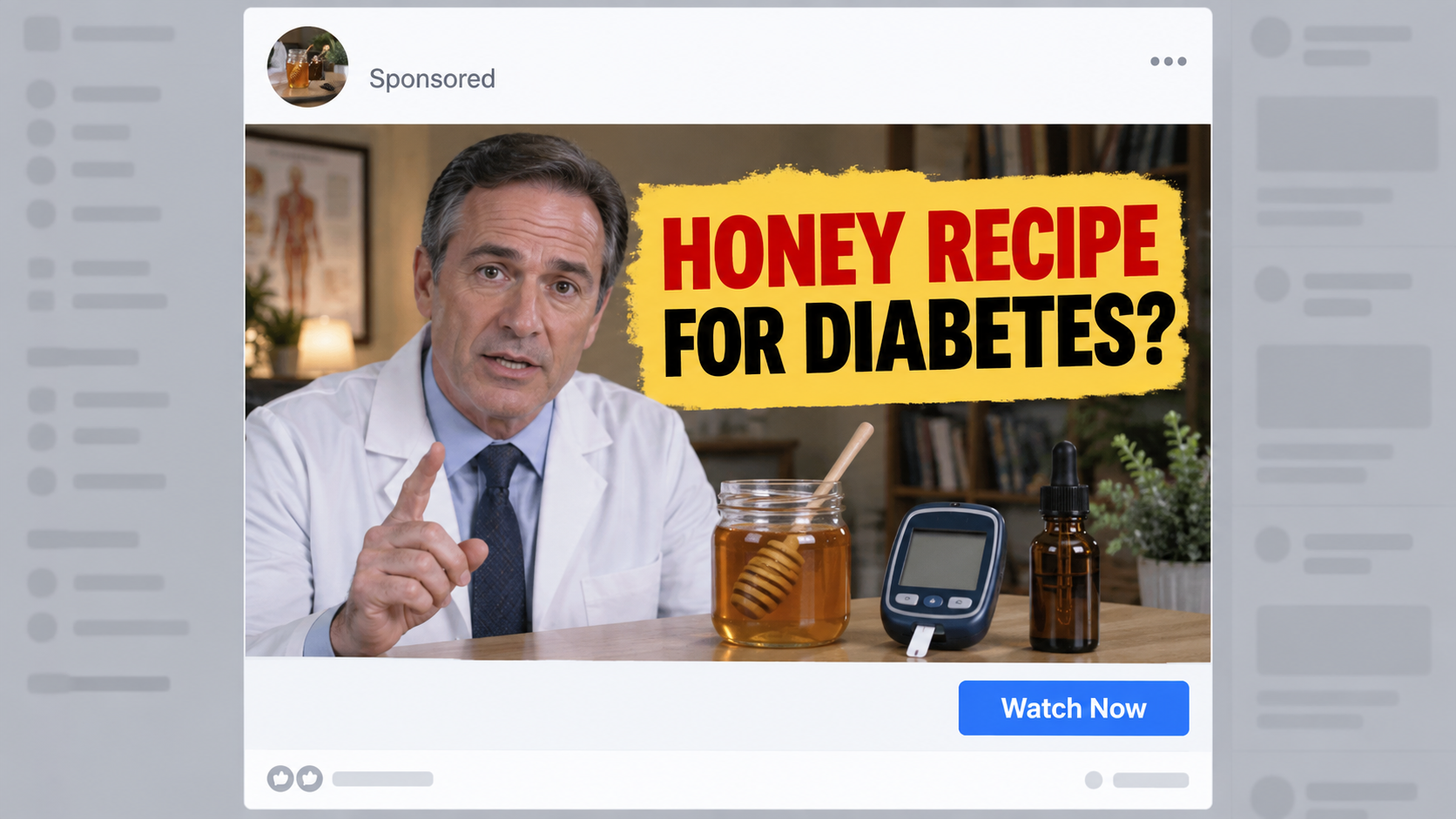
A familiar doctor appears beside a jar of honey and promises an unusually simple answer to diabetes. The clip feels personal, polished, and difficult to ignore.
That combination has reached social feeds through videos that look remarkably convincing. Before trusting the recipe, buyers should examine what sits behind the presentation.
Overview
The advertisement borrows a respected medical identity
The campaign presents Dr. William Li as though he recorded a private warning about a honey recipe that supposedly controls high blood sugar.
His face, voice, and medical reputation give an extraordinary claim an immediate layer of credibility.
Viewers may recognize him from interviews about nutrition, disease prevention, and food science.
That recognition is precisely what makes an imitation valuable. The advertiser receives trust before offering any verifiable clinical evidence.
The video often resembles a candid podcast excerpt rather than a conventional commercial.
The story turns an ordinary ingredient into a secret treatment
Honey becomes the emotional center of the pitch because it feels familiar, inexpensive, and less intimidating than medicine.
The narration may describe a special mixture, timing ritual, or missing ingredient that conventional care supposedly ignores.
Instead of presenting a testable medical argument, the promotion creates suspense around information allegedly hidden by powerful interests.
That framing encourages viewers to distrust ordinary questions about dosage, evidence, interactions, and realistic outcomes.
The promised recipe usually serves as a bridge. A commercial offer appears after the viewer has invested time and hope.
Our findings point to impersonation, not a verified endorsement
We found no matching honey diabetes cure endorsement on Dr. Li’s official website or established public channels.
The Federal Trade Commission warns that scammers alter celebrity video and audio to make endorsements appear genuine.
Diabetes organizations do not describe honey as a cure or replacement for prescribed treatment.
Several warning signs appear together:
- A well-known doctor appears in an advertisement published by an unrelated account.
- The voice promises a dramatic result from a simple kitchen ingredient.
- The clip moves toward a long presentation instead of a complete medical explanation.
- The page suggests that doctors, drug companies, or news outlets suppressed the discovery.
- Testimonials replace published trials involving the exact advertised formula.
- A countdown, limited supply notice, or special discount pushes an immediate order.
- The checkout reveals a supplement that was barely named in the opening advertisement.
- Seller details become harder to locate as the purchasing path continues.
Why the Video Can Look So Convincing
Modern face replacement can preserve natural blinking, head movement, lighting, and familiar facial expressions.
Voice cloning can reproduce cadence and tone from interviews already available online.
A scammer does not need a flawless production. The viewer watches on a small phone screen, often while scrolling quickly.
Compression, captions, background music, and rapid editing hide many visual or audio imperfections.
The speaker may move stiffly around the mouth, yet the surrounding footage feels authentic enough to carry the illusion.
Promoters also copy the appearance of podcasts, television segments, hospital interviews, or conference recordings.
A fake lower-third title can identify the person as a physician, researcher, or award-winning specialist.
None of those visual elements proves that the person approved the message.
Look for abrupt changes in voice quality, lip movement that trails speech, strange teeth, blurred earrings, or unstable eyeglass frames.
Those clues can help, but their absence never establishes authenticity.
The safer test happens outside the advertisement. Search the person’s official pages for the exact claim and product name.
Use several distinct phrases from the video. Genuine major medical announcements normally appear in complete interviews, transcripts, or institutional statements.
A cropped clip without an original program, date, interviewer, or full discussion deserves skepticism.
Scammers frequently disable comments or fill them with copied praise, making the promotion appear widely accepted.
Real comments may describe unauthorized charges or failed refunds, then disappear when the advertiser launches another account.

What the Medical Claim Leaves Out
Diabetes is not one condition with one simple cause. Type 1, type 2, gestational diabetes, and other forms require different clinical decisions.
Blood glucose also responds to medication, illness, activity, sleep, stress, meals, alcohol, and individual physiology.
Honey contains sugars. Calling it natural does not remove its effect on carbohydrate intake or blood glucose.
A clinician may help someone include small amounts within an appropriate eating plan. That is very different from advertising honey as treatment.
No short social video can safely account for kidney disease, pregnancy, allergies, insulin use, or medicine interactions.
Someone who changes medication after watching the clip can face dangerously high glucose or other preventable complications.
Another danger is delayed care. A person may spend weeks testing a promoted ritual while symptoms worsen.
Extreme thirst, frequent urination, confusion, vomiting, abdominal pain, or difficulty breathing can require urgent medical attention.
Marketing pages rarely discuss those realities because nuance weakens the promise of a universal breakthrough.
They may display laboratory graphics without naming a study, journal, participant group, dosage, or measured outcome.
A cited ingredient study cannot automatically prove the effectiveness of a finished supplement.
The product may contain different amounts, additional compounds, or a delivery method never tested in that research.
Customer stories also cannot establish cause. Glucose levels change for many reasons, including simultaneous treatment and dietary adjustments.
Before purchasing, ask whether a randomized human trial tested the exact formula at the advertised dose.
Then check who funded the trial, whether the results were peer reviewed, and whether adverse events were reported.
How the Dr. William Li Honey Recipe Scam Works
Step 1: A paid social post finds worried viewers
The campaign targets people interested in diabetes, weight control, natural remedies, or familiar medical personalities.
Its opening line may mention a rising glucose reading, medication frustration, or a relative suffering complications.
That emotional match makes the viewer pause before checking who purchased the advertisement.
Multiple advertiser pages can run nearly identical footage, then disappear after complaints accumulate.
Step 2: Artificial media places the doctor inside the pitch
Edited footage makes Dr. Li appear to describe a honey discovery in his own words.
The copied voice may use casual pauses and personal anecdotes to imitate an authentic interview.
On-screen captions reinforce the false statement, even when the audio contains small distortions.
The actual person did not need to film anything for this imitation to exist.
Step 3: A hidden breakthrough story lowers skepticism
The script claims the answer was overlooked, censored, or intentionally concealed.
This story explains why viewers have not heard the claim from their own physicians.
It also turns reasonable criticism into supposed proof that the discovery threatens an industry.
Once that belief takes hold, missing evidence can feel less important than joining early.
Step 4: The click opens an advertorial disguised as reporting
The destination may imitate a news article, health magazine, interview transcript, or television feature.
Logos, comment boxes, dates, and author portraits create the appearance of independent coverage.
Most navigation links may lead to the same sales presentation rather than separate editorial pages.
The domain usually does not belong to the publication suggested by the design.
Step 5: The recipe slowly becomes a supplement offer
A long video delays the product name while repeating dramatic patient stories and warnings about conventional treatment.
The honey hook keeps viewers waiting for a household solution.
Near the end, the narrator says ordinary honey is insufficient without a proprietary blend or activation process.
The supposedly free revelation therefore ends at a commercial checkout.
Step 6: Bundles and urgency reshape the expected price
The page highlights a low per-bottle figure while preselecting several bottles.
Shipping, handling, taxes, add-ons, or continuity terms may appear later than the headline price.
A timer or inventory warning discourages readers from studying the policies.
The resulting charge can exceed what a hurried buyer believed one bottle would cost.
Step 7: Seller friction appears after payment
Confirmation emails, card descriptors, and support names may differ from the brand shown in the advertisement.
Some buyers encounter recurring shipments, restrictive return instructions, or pressure to accept partial refunds.
The exact terms vary between funnels because promoters can replace products and processors quickly.
That flexibility is why the deceptive celebrity story matters more than any temporary bottle name.
Company, Address, and Fulfillment Checks
The bottle name may not identify the merchant
Read the footer, checkout terms, receipt, and card statement. Four different names can appear across one transaction.
A brand printed on a label is not automatically the legal entity responsible for refunds.
If no business registration, jurisdiction, or accountable operator appears, recovery becomes more difficult.
Capture every identity before ordering because the landing page can change without notice.
An address can be a warehouse or borrowed location
Search the complete address and inspect the property through reputable map and business records.
Some supplement funnels list fulfillment centers that receive returns for numerous unrelated brands.
Others display virtual mailboxes, residential addresses, incomplete suites, or locations belonging to another company.
A package return facility does not prove where the product was designed, manufactured, or controlled.
Unresponsive contact details are a serious warning
Call the published number before paying and ask the representative to name the exact product and renewal policy.
Send a specific email about cancellations, unopened returns, fees, and the location of the return warehouse.
Disconnected numbers, generic replies, and unanswered messages reveal how support may behave after a disputed charge.
Never trust contact information displayed only inside the fake medical presentation.
Unknown manufacturing deserves caution
Some white-label supplements are produced cheaply overseas and sold under rapidly changing names.
Country of manufacture cannot alone prove danger, but hidden factories and missing batch details prevent meaningful accountability.
Look for a complete Supplement Facts panel, actual amounts, lot information, warnings, and a traceable manufacturer.
An attractive bottle render does not demonstrate purity, accurate dosing, or independent contamination testing.
How to Verify a Celebrity Health Claim
Begin with the celebrity or physician’s verified website, not the link attached to the advertisement.
Search for the exact product, recipe, claimed quote, and interview title.
Then locate the original full-length recording. A genuine endorsement should survive outside a cropped advertising clip.
Compare the publisher domain character by character with the real broadcaster or newspaper address.
Do not rely on a familiar logo because copying an image requires no relationship with that organization.
Search the advertised company separately and read policies before looking at testimonials.
Check the renewal language around each bundle, including small boxes beside discounts or free shipping.
Use the final checkout total, not the price displayed for one unit within a larger package.
Ask a pharmacist or treating clinician about ingredients, especially when using insulin or glucose-lowering medicines.
Bring the complete label rather than repeating the advertisement’s description of a secret natural blend.
Beware of any seller demanding that medication stop before the promoted method begins.
A legitimate health professional will not diagnose every viewer through a prerecorded advertisement.
Keep screenshots of claims that influenced the purchase. They can disappear once regulators, platforms, or payment companies receive complaints.
Search the card descriptor after checkout. A recognizable product name may not appear on the banking record.
Finally, leave the page and wait. A sound treatment decision remains sound after a countdown reaches zero.
Why Disappearing Advertisements Complicate a Refund
Social advertisements can stop running minutes after enough complaints reach the platform.
The same video may return through another page, slightly altered headline, or newly registered sales domain.
A buyer who saved only the bottle page can lose evidence of the fake medical endorsement.
Record the advertiser name, platform library entry, publication date, and full destination address.
Screen recording is useful when the funnel redirects through several pages before reaching checkout.
Include the moment when the doctor appears and the moment when the commercial product finally emerges.
Payment disputes work best when evidence connects the deceptive promise directly to the charged order.
Keep screenshots showing selected quantity, renewal choice, total, and any guarantee displayed beside the purchase button.
Archive confirmation messages before clicking unsubscribe links that could remove access to the customer portal.
If a page changes later, dated material shows what a reasonable shopper saw when authorizing payment.
Tell investigators which statements affected the decision instead of submitting hundreds of unorganized images.
A short timeline can connect advertisement, order, delivery, cancellation request, additional charge, and merchant response.
What to Do if You Have Fallen Victim to This Scam
- Do not change diabetes treatment alone. Contact the clinician managing your condition and describe everything taken, skipped, or replaced.
- Check urgent symptoms promptly. Seek immediate medical care for severe weakness, confusion, vomiting, breathing difficulty, or dangerously abnormal glucose readings.
- Save the complete trail. Preserve the advertisement, video address, checkout, policies, receipt, package, label, messages, and card descriptor.
- Contact the merchant in writing. Request cancellation and a refund, quoting the advertised promise and applicable return language.
- Notify the payment provider. Dispute unauthorized renewals or materially misrepresented goods within the issuer’s deadline, supplying organized evidence.
- Watch for continuing charges. Replacing a card may not cancel every recurring merchant token, so ask the issuer about future billing blocks.
- Report the impersonation. Send the advertisement to the social platform, the FTC, and the real doctor’s official organization.
- Remove anything installed by fake support. Run Malwarebytes if an agent asked you to download software, open files, or grant device access.
- Reduce dangerous advertising exposure. AdGuard can block many malicious ad domains, although careful verification remains essential.
- Record health effects. Photograph packaging, keep the lot number, and report suspected supplement reactions to a clinician and the appropriate regulator.
Is Your Device Infected? Run a Free Malware Scan
Slow performance, constant pop-ups, or strange behavior? These are classic signs of a malware infection. The fastest way to find out is to scan your device with Malwarebytes Free — one of the most trusted malware removal tools available.
The free version detects and removes the most common threats, including:
- Adware — the cause of those annoying pop-ups
- Browser hijackers — unwanted redirects and changed homepages
- Trojans and spyware — hidden programs stealing your data
- Potentially unwanted programs (PUPs) — software you never asked for
👉 Select your device below — Windows, Mac, or Android — then follow the simple steps to download Malwarebytes, scan your system, and remove any threats it finds. The scan usually takes 5 to 20 minutes.
Run a Malware Scan with Malwarebytes for Windows
Malwarebytes is one of the most popular and trusted anti-malware tools for Windows — and it’s completely free for removing infections. It catches threats that many antivirus programs miss, including adware, browser hijackers, and trojans. Follow the steps below to scan and clean your PC in just a few minutes.
Download Malwarebytes
Click the button below to download the latest version of Malwarebytes for Windows from the official source. The free version is all you need — it will scan your computer and remove adware, browser hijackers, and other malicious software at no cost.
Download MalwarebytesOfficial installer for Windows 11 and 10. Your download starts right away.Want real-time protection? See Malwarebytes Premium Malwarebytes Free for WindowsScans and removes malware at no cost
-
Install Malwarebytes
When the download finishes, open your Downloads folder and double-click the MBSetup file. If Windows shows a User Account Control pop-up, click “Yes” to allow the installation.

Follow the On-Screen Prompts to Install Malwarebytes
The setup wizard will walk you through a few quick screens:
-
Choose where you’re installing the program — “Personal Computer” or “Work Computer” — then click Next.

-
Malwarebytes will now install on your device. This usually takes under a minute.

-
When installation is complete, the “Welcome to Malwarebytes” screen will open automatically.

-
On the final screen, click Open Malwarebytes to launch the program.

-
Enable “Scan for Rootkits”
Before scanning, turn on rootkit detection so Malwarebytes can find even the most hidden threats. Click the Settings gear icon on the left side of the screen.

In the settings menu, find “Scan for rootkits” and click the toggle so it turns blue.

Done? Click “Dashboard” in the left pane to return to the main screen.
Start the Scan
Click the blue Scan button. Malwarebytes will automatically update its virus database and start checking your computer for malware.

-
Wait for the Scan to Finish
The scan checks your entire system for browser hijackers and other malicious programs, so it can take 5 to 20 minutes depending on your computer. Feel free to do something else — just check back occasionally to see the progress.

-
Quarantine the Detected Threats
When the scan is done, you’ll see a list of everything Malwarebytes found — malware, adware, and potentially unwanted programs. Click the “Quarantine” button to remove all of them at once.

Malwarebytes will now remove the malicious files and registry entries and move them safely into quarantine.

-
Restart Your Computer
Some threats can only be fully removed after a reboot. If Malwarebytes asks you to restart, click Yes. Once you’re logged back in, Malwarebytes has finished removing the threats it found.

That’s it — your Windows PC is now clean of trojans, adware, and other malware, and should be back to running smoothly.
If you are still having problems with your computer after completing these instructions, then please follow one of the steps:
- Run a computer scan with ESET Online Scanner
- Ask for help in our Windows Malware Removal Help & Support forum.
Run a Malware Scan with Malwarebytes for Mac
Malwarebytes for Mac is a free on-demand scanner that removes the malware other security software tends to miss — adware, browser hijackers, and unwanted programs included. Cleaning an infected Mac with Malwarebytes has always been completely free, and it’s our go-to recommendation. Follow the steps below to scan and clean your Mac in just a few minutes.
-
Download Malwarebytes for Mac
Click the button below to download the latest version of Malwarebytes for Mac.
Download MalwarebytesOfficial installer for macOS. Your download starts right away.Want real-time protection? See Malwarebytes PremiumMalwarebytes Free for MacScans and removes malware at no cost -
Open the Malwarebytes setup file
When the download finishes, open your Downloads folder and double-click the setup file to begin the installation.

-
Follow the On-Screen Prompts to Install Malwarebytes
The Malwarebytes for Mac Installer will guide you through a few quick screens. Click “Continue” and keep following the prompts until the installation completes.



When the installation is complete, Malwarebytes opens to the Welcome to Malwarebytes screen. Click “Get started“.
-
Select “Personal Computer” or “Work Computer”
Malwarebytes will ask what type of computer you’re installing it on. Click either Personal Computer or Work Computer, whichever applies.

-
Start the Scan
Click the “Scan” button. Malwarebytes will automatically update its detection database and begin checking your Mac for malware.

-
Wait for the Scan to Finish
Malwarebytes will scan your Mac for adware, browser hijackers, and other malicious programs. This can take a few minutes, so feel free to do something else — just check back occasionally to see the progress.

-
Quarantine the Detected Threats
When the scan is done, you’ll see a list of everything Malwarebytes found. Click the “Quarantine” button to remove all the threats at once.

-
Restart Your Mac
Malwarebytes will now remove all the malicious files it found. Some threats can only be fully removed after a reboot — if Malwarebytes asks you to restart, allow it. Once you’re logged back in, your Mac is clean.

That’s it — your Mac is now free of adware, rogue browser extensions, and other potentially harmful software.
If you are still experiencing problems while trying to remove a malicious program from your computer, please ask for help in our Mac Malware Removal Help & Support forum.
Run a Malware Scan with Malwarebytes for Android
Malwarebytes for Android automatically detects and removes dangerous threats like malware and ransomware so you don’t have to worry about your most-used device being compromised. Aggressive detection of adware and potentially unwanted programs keeps your Android phone or tablet running smooth.
-
Download Malwarebytes for Android.
You can download Malwarebytes for Android by clicking the link below.
Get Malwarebytes for AndroidOpens Google Play in a new tab.Want real-time protection? See Malwarebytes Premium for AndroidMalwarebytes for AndroidScans your phone and removes malware at no cost -
Install Malwarebytes for Android on your phone.
In the Google Play Store, tap “Install” to install Malwarebytes for Android on your device.

When the installation process has finished, tap “Open” to begin using Malwarebytes for Android. You can also open Malwarebytes by tapping on its icon in your phone menu or home screen.

-
Follow the on-screen prompts to complete the setup process
When Malwarebytes will open, you will see the Malwarebytes Setup Wizard which will guide you through a series of permissions and other setup options.
This is the first of two screens that explain the difference between the Premium and Free versions. Swipe this screen to continue.
Tap on “Got it” to proceed to the next step.
Malwarebytes for Android will now ask for a set of permissions that are required to scan your device and protect it from malware. Tap on “Give permission” to continue.
Tap on “Allow” to permit Malwarebytes to access the files on your phone.
-
Update database and run a scan with Malwarebytes for Android
You will now be prompted to update the Malwarebytes database and run a full system scan.

Click on “Update database” to update the Malwarebytes for Android definitions to the latest version, then click on “Run full scan” to perform a system scan.

-
Wait for the Malwarebytes scan to complete.
Malwarebytes will now start scanning your phone for adware and other malicious apps. This process can take a few minutes, so we suggest you do something else and periodically check on the status of the scan to see when it is finished.

-
Click on “Remove Selected”.
When the scan has been completed, you will be presented with a screen showing the malware infections that Malwarebytes for Android has detected. To remove the malicious apps that Malwarebytes has found, tap on the “Remove Selected” button.

-
Restart your phone.
Malwarebytes for Android will now remove all the malicious apps that it has found. To complete the malware removal process, Malwarebytes may ask you to restart your device.
That’s it — your Android phone is now clean — no more malicious apps, adware, or browser redirects.
If you are still having problems with your phone after completing these instructions, then please follow one of the steps:
- Restore your phone to factory settings by going to Settings > General management > Reset > Factory data reset.
- Ask for help in our Mobile Malware Removal Help & Support forum.
Stay Protected: Block Ads and Malicious Sites
Now that your device is clean, keep it that way. Most infections start with a malicious ad or a fake download button — so blocking them at the source is your best defense.
We recommend AdGuard, which blocks malicious ads, phishing pages, and dangerous redirects before they can reach you.
👉 Download AdGuard and browse safely
Frequently Asked Questions
Did Dr. William Li endorse a honey cure for diabetes?
We found no verified endorsement matching the advertisement. The presentation carries strong signs of unauthorized AI impersonation.
Can honey cure diabetes naturally?
No reliable medical guidance supports honey as a diabetes cure. It contains sugars and should be discussed within an individualized eating plan.
Why does the voice sound exactly like the doctor?
Voice-cloning systems can learn tone and rhythm from public recordings, producing speech the real person never made.
Does a real-looking news page prove the story?
No. Promoters can copy logos, layouts, timestamps, comments, and presenter graphics without permission from the organization being imitated.
Is every supplement promoted after the video identical?
No. Operators can rotate brands and checkout pages while keeping the same celebrity footage, honey story, and sales sequence.
What is the safest first response after ordering?
Preserve the evidence, contact the seller in writing, monitor the payment account, and speak with your clinician before consuming the product.
The Bottom Line
The Dr. William Li honey recipe promotion is not a trustworthy medical endorsement. It uses a convincing identity and familiar ingredient to sell an unsupported solution.
Verify the speaker through official channels, protect ongoing treatment, and judge the hidden merchant as carefully as the health promise.

Join the discussion
0 commentsShare your experience or ask a question about this article.
Discussion
Start the conversation
Have a question or something useful to share? Add the first comment.