

The story sounded personal: a beloved Hamptons boutique, decades of memories, and one final sale before the doors closed forever.
Sophie’s Boutique wrapped ordinary online shopping in that farewell, giving every discounted dress the feeling of a last meaningful purchase.
Overview
The Hamptons boutique story does not match the evidence
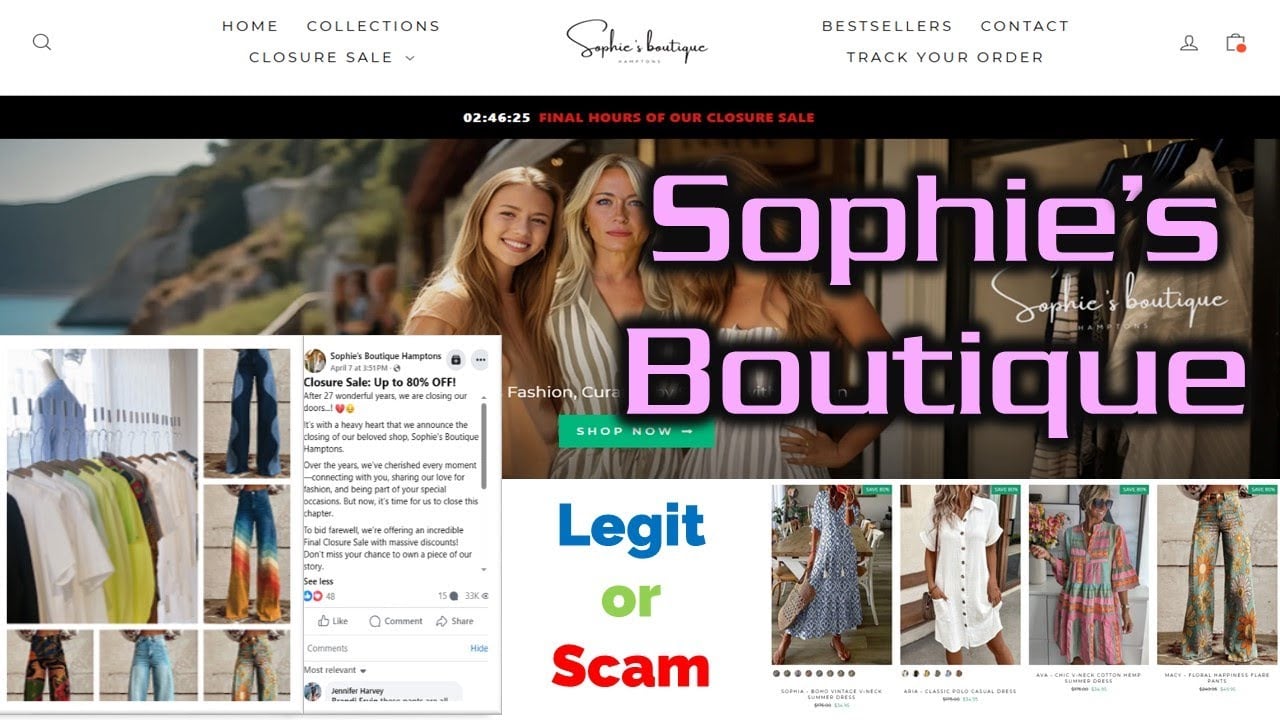
Sophie’s Boutique claimed a history beginning in 1997 and presented its closure as the emotional end of a family fashion business.
Customer reports instead describe overseas fulfillment, inexpensive synthetic garments, inaccurate photographs, and returns directed to China.
The domain’s recent history did not support a decades-old online business, while no verifiable Hamptons storefront matched the story.
The closing sale behaved like a permanent sales device
The site displayed final-hours messaging, discounts reaching 80%, countdown pressure, and language suggesting shoppers would never get another opportunity.
That urgency remained central even as reviews accumulated from buyers describing slow delivery, poor quality, and expensive international returns.
A genuine closure can involve discounts. A fabricated history and endlessly urgent farewell turn sympathy into manipulation.
The domain now redirects away from the boutique entirely
During our September 2026 review, the former boutique domain redirected to an unrelated Indonesian gambling page.
That does not reveal whether the domain was sold, abandoned, compromised, or intentionally repurposed.
- The 1997 family-boutique narrative lacked matching history.
- Shoppers reported goods arriving from overseas.
- Many complaints described polyester items unlike the pictures.
- Returns reportedly required costly shipping to China.
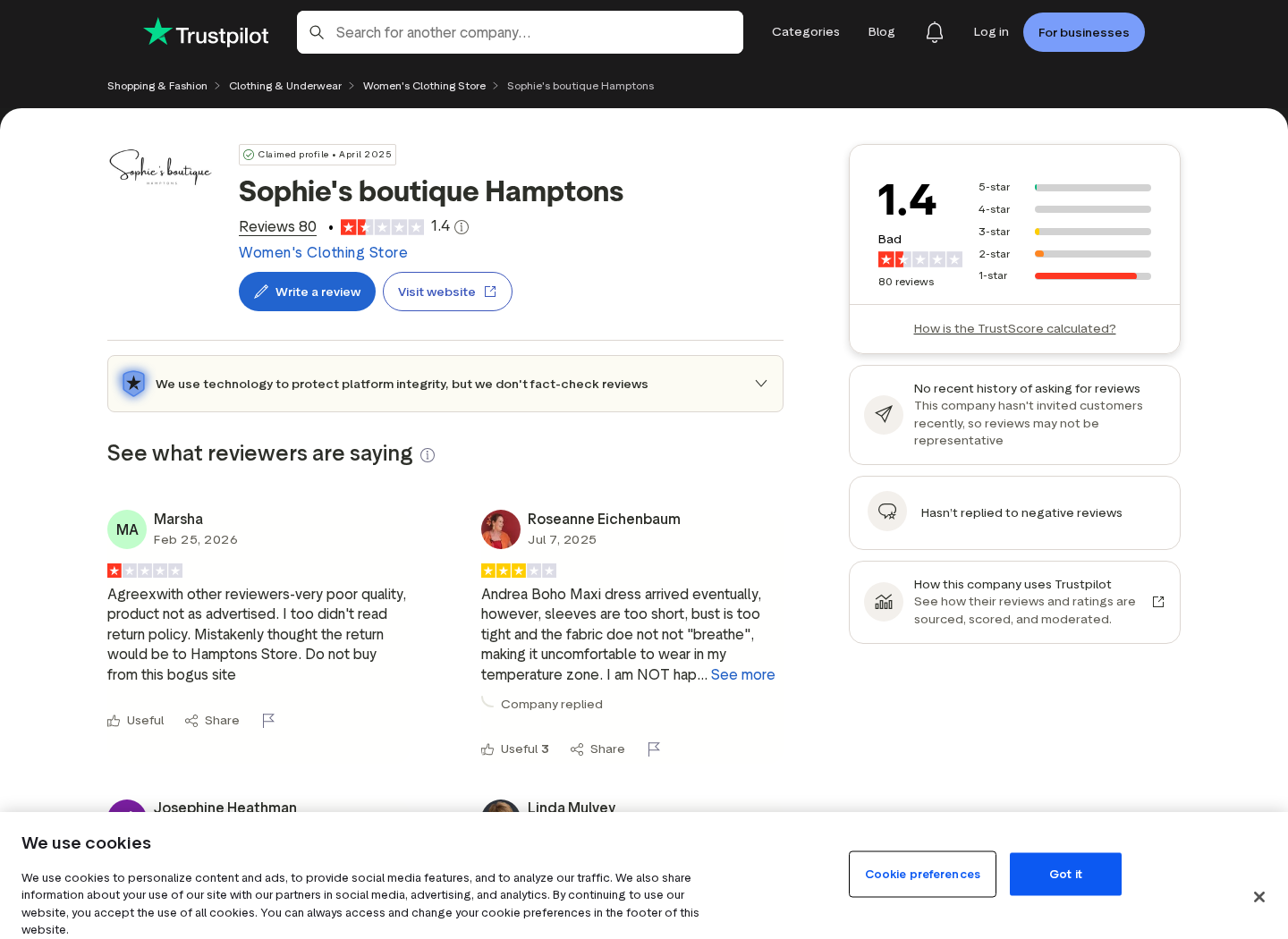
- Trustpilot showed a 1.4 score during our review.
- The former store domain now redirects to unrelated gambling content.
How the Sophie’s Boutique Hamptons Scam Works
Step 1: A family story turns an advertisement into a farewell
The advertisement does not begin with fabric, sizing, or a legal company. It begins with a woman named Sophie and years of devotion.
Photographs of smiling women, boutique racks, and handwritten-looking branding make the store feel personal and local.
The shopper is invited to support a small business during a bittersweet transition, not merely purchase a mass-produced garment.
This emotional framing lowers skepticism because questioning the sale can feel like doubting a vulnerable family.
Step 2: The Hamptons name creates an upscale location
The Hamptons suggests affluent customers, curated fashion, coastal taste, local service, and a physical boutique with a recognizable community history.
That geographic association can justify higher original prices while making an online stranger feel like a trusted American retailer.
Yet reviewers repeatedly said orders came through an overseas supply chain and returns were directed to China.
A place name in a brand is not proof of an office, shop, inventory location, or domestic return facility.
Step 3: The closure timer removes time for verification
Banners warned that final hours remained and framed discounts as the last chance to preserve part of Sophie’s story.
A shopper worried about missing a dress may skip domain checks, reverse-image searches, policy reading, and independent reviews.
Countdowns can be created by simple scripts and reset for every visitor without reflecting actual inventory or closure dates.
Real liquidation terms should provide fixed dates, business identification, store history, and clear consumer remedies.
Step 4: Product photographs sell quality that may never arrive
Models appear in flowing cotton dresses, tailored outfits, leather-looking shoes, and colorful prints photographed in attractive settings.
Complaints describe thin polyester, printed imitations, wrong proportions, inaccurate colors, chemical odors, and goods unlike the listing.
Some reviewers alleged the images were taken from other sellers. Reverse-image searches can test that claim before purchase.
The transaction depends on the photograph because most shoppers cannot touch the fabric or inspect construction first.
Step 5: Large discounts increase the basket
An 80% markdown makes three dresses feel affordable compared with the supposed original value of one.
Free-shipping thresholds, bestselling labels, stock warnings, and final-sale categories encourage buyers to add more before checkout.
The buyer assumes the discount exists because a real boutique must clear inventory, reinforcing the fabricated business story.
When the original price is artificial, the percentage does not measure savings. It measures the seller’s chosen presentation.
Step 6: Overseas fulfillment appears only after ordering
Tracking and delivery times can reveal an international supply chain that the Hamptons story never made prominent.
A domestic last-mile sender may appear on the parcel even when the goods originated abroad.
That sender may be a fulfillment warehouse with no connection to refunds, product design, customer service, or the fictional boutique.
Slow shipping also consumes part of the return period before the customer can inspect the item.
Step 7: The return policy becomes the real business model
The store advertised easy, hassle-free returns within 30 days, a phrase that suggests a familiar domestic process.
Reviewers instead describe support offering small partial refunds before requiring customers to pay tracked postage to China.
Quotes of $50, $78, or more can make returning low-value clothing economically irrational.
The seller keeps most of the payment, avoids reverse logistics, and leaves the customer with unusable merchandise.
Step 8: The store disappears and the domain changes purpose
The former boutique domain now redirects visitors to unrelated gambling content rather than order support or an archived closure notice.
Consumers following old order links can therefore reach content carrying completely different financial and security risks.
The domain’s new behavior demonstrates why receipts, policies, screenshots, and support messages must be saved outside the website.
Once a storefront vanishes, the card issuer may be the only practical path toward recovery.
What Customer Complaints Consistently Describe
The product does not resemble the listing
Multiple reviewers describe garments as thin, plastic-like, poorly sewn, incorrectly sized, or materially different from the advertised fabric.
Several specifically mention expecting cotton and receiving inexpensive polyester. Others report shoes or dresses unlike the photographs.
These remain individual accounts, but the repetition across independent reviews creates a coherent risk pattern.
Delivery can be slow or incomplete
Reviewers describe waiting weeks, receiving orders in separate parcels, or discovering that part of an order never arrived.
Split shipments complicate disputes because the merchant may point to one delivered tracking number for a larger purchase.
Photograph every parcel label and compare its weight and contents with each line on the invoice.
The refund conversation follows a familiar ladder
Complaints describe offers beginning around 10% or 15%, then increasing when customers refuse to keep the merchandise.
Only later does the overseas return address appear, often with shipping costs approaching the purchase value.
This negotiation consumes time and can push a card dispute closer to its deadline.
Why the Boutique Story Was So Persuasive
The founder narrative made the sale feel personal
A farewell from a supposed owner creates sympathy that an ordinary clearance banner cannot reproduce.
Shoppers may imagine helping a small family business through its final days, rather than purchasing from an anonymous international storefront.
That emotional frame discourages hard questions. Requesting an address or company registration can feel rude when the advertisement presents a struggling shopkeeper.
Authentic local businesses usually leave traces across years, including maps, photographs, community mentions, registrations, local events, and consistent contact details.
The Hamptons name supplied borrowed prestige
The location evokes affluent towns, independent boutiques, seasonal shopping, and curated fashion. Those associations can raise perceived quality before any evidence appears.
A place name inside a brand does not prove a physical store exists there. The claim should match an address and independent local footprint.
Customers should search maps, business records, archived pages, telephone listings, and older reviews rather than accepting a location implied by typography.
When those records remain absent, the prestigious setting functions as advertising language instead of verifiable business history.
The closing sale converted doubt into urgency
A customer who believes stock will vanish tonight has little incentive to compare images, inspect policies, or wait for support.
Large markdowns also create an anchor. The crossed-out price makes a modest garment appear valuable even when the supposed original price lacks history.
Return to the page later or use an archive. If the final day keeps moving, the closure language is a reusable conversion device.
A genuine closing business may discount inventory, but urgency does not excuse false location claims, unclear ownership, or impractical overseas returns.
The redirect shows why screenshots matter
By September 2026, the former boutique domain no longer provided the clothing storefront and instead redirected toward unrelated gambling content.
A later visitor cannot reconstruct the original promises from that destination. The seller’s history effectively disappears unless buyers preserved evidence.
Screenshots should include the full URL, date, product description, price, guarantee, return wording, and any story about the shop’s history.
That record can help a card issuer understand why an ordinary clothing charge involved material misrepresentation rather than simple buyer’s remorse.
Customer photographs are equally valuable. Capture the package before opening, then document labels, fabric tags, measurements, defects, and differences from the listing.
Place the delivered garment beside the advertisement on screen. A direct comparison communicates discrepancies more clearly than an angry description alone.
Keep any offer of a small partial refund. It may demonstrate that the seller recognized a problem while discouraging the promised return.
Do not mail merchandise to an unverified address. Obtain written authorization and use tracked shipping if a return remains financially sensible.
When a domain changes purpose, communicate through the payment provider rather than entering personal details into its new destination.
The redirect itself should be treated as unsafe and unrelated to resolving an old clothing order.
Use archived evidence and transaction records instead of trusting whatever business now controls the former boutique address.
A card dispute should emphasize the documented mismatch, false business story, and unusable return path, not merely dissatisfaction with the style.
Company, Address, Support, and Fulfillment Checks
The supposed 1997 business lacked a matching footprint
A retailer operating for decades should leave business registrations, directories, local reporting, historical photographs, maps, customer references, and archived websites.
The reviewed evidence did not establish that long-running Hamptons boutique behind the online story.
A newly visible website cannot borrow decades of credibility merely by writing “since 1997” beside lifestyle photographs.
The contact email did not solve accountability
The store published support@sophiesboutique-hamptons.com, but some reviewers reported failed delivery or unproductive exchanges.
An email at the store domain looks professional while the domain remains active. It does not identify the legal operator.
Now that the domain redirects elsewhere, buyers should not trust new messages claiming to represent the former boutique.
The return location revealed the overseas structure
Reports of mandatory returns to China sharply conflict with the easy local-boutique impression created by the Hamptons branding.
A U.S. address on a parcel may belong only to a forwarding or fulfillment company and may reject customer returns.
Always obtain written authorization. Sending goods to an unapproved address can give the seller another reason to deny reimbursement.
The current redirect is a serious security warning
The former boutique address now resolves through unrelated infrastructure to Indonesian gambling material.
Do not create an account, deposit money, install software, or reuse the boutique password on the redirected destination.
Old bookmarks, order emails, and social posts should be treated as unsafe entry points unless independently verified.
What to Do If You Ordered From Sophie’s Boutique
- Do not revisit old links casually. The former domain now redirects to unrelated gambling content and should not be trusted for order support.
- Assemble a complete file. Save advertisements, product pages, fabric claims, photographs, cart, receipt, tracking, card descriptor, policies, and every support exchange.
- Document what arrived. Photograph or film the sealed parcel, labels, each garment, sizing, materials, defects, missing items, and comparison with the listing.
- Send one precise refund demand. Identify the misrepresentation, requested amount, order number, dates, and a reasonable response deadline.
- Do not ship blindly. Obtain an authorized address in writing, calculate tracked postage, and preserve photographs, weight, receipt, and delivery proof.
- Contact the payment provider promptly. Explain non-delivery or material misrepresentation and provide evidence before dispute deadlines expire.
- Secure your devices and accounts. Change reused passwords, run Malwarebytes, and use AdGuard to block malicious redirects and lookalike closure-sale advertisements.
- Report the campaign. Notify the advertising platform, consumer authorities, card network, and any designer whose photographs or trademarks were copied.
Is Your Device Infected? Run a Free Malware Scan
Slow performance, constant pop-ups, or strange behavior? These are classic signs of a malware infection. The fastest way to find out is to scan your device with Malwarebytes Free — one of the most trusted malware removal tools available.
The free version detects and removes the most common threats, including:
- Adware — the cause of those annoying pop-ups
- Browser hijackers — unwanted redirects and changed homepages
- Trojans and spyware — hidden programs stealing your data
- Potentially unwanted programs (PUPs) — software you never asked for
👉 Select your device below — Windows, Mac, or Android — then follow the simple steps to download Malwarebytes, scan your system, and remove any threats it finds. The scan usually takes 5 to 20 minutes.
Run a Malware Scan with Malwarebytes for Windows
Malwarebytes is one of the most popular and trusted anti-malware tools for Windows — and it’s completely free for removing infections. It catches threats that many antivirus programs miss, including adware, browser hijackers, and trojans. Follow the steps below to scan and clean your PC in just a few minutes.
Download Malwarebytes
Click the button below to download the latest version of Malwarebytes for Windows from the official source. The free version is all you need — it will scan your computer and remove adware, browser hijackers, and other malicious software at no cost.
Download MalwarebytesOfficial installer for Windows 11 and 10. Your download starts right away.Want real-time protection? See Malwarebytes Premium Malwarebytes Free for WindowsScans and removes malware at no cost
-
Install Malwarebytes
When the download finishes, open your Downloads folder and double-click the MBSetup file. If Windows shows a User Account Control pop-up, click “Yes” to allow the installation.

Follow the On-Screen Prompts to Install Malwarebytes
The setup wizard will walk you through a few quick screens:
-
Choose where you’re installing the program — “Personal Computer” or “Work Computer” — then click Next.

-
Malwarebytes will now install on your device. This usually takes under a minute.

-
When installation is complete, the “Welcome to Malwarebytes” screen will open automatically.

-
On the final screen, click Open Malwarebytes to launch the program.

-
Enable “Scan for Rootkits”
Before scanning, turn on rootkit detection so Malwarebytes can find even the most hidden threats. Click the Settings gear icon on the left side of the screen.

In the settings menu, find “Scan for rootkits” and click the toggle so it turns blue.

Done? Click “Dashboard” in the left pane to return to the main screen.
Start the Scan
Click the blue Scan button. Malwarebytes will automatically update its virus database and start checking your computer for malware.

-
Wait for the Scan to Finish
The scan checks your entire system for browser hijackers and other malicious programs, so it can take 5 to 20 minutes depending on your computer. Feel free to do something else — just check back occasionally to see the progress.

-
Quarantine the Detected Threats
When the scan is done, you’ll see a list of everything Malwarebytes found — malware, adware, and potentially unwanted programs. Click the “Quarantine” button to remove all of them at once.

Malwarebytes will now remove the malicious files and registry entries and move them safely into quarantine.

-
Restart Your Computer
Some threats can only be fully removed after a reboot. If Malwarebytes asks you to restart, click Yes. Once you’re logged back in, Malwarebytes has finished removing the threats it found.

That’s it — your Windows PC is now clean of trojans, adware, and other malware, and should be back to running smoothly.
If you are still having problems with your computer after completing these instructions, then please follow one of the steps:
- Run a computer scan with ESET Online Scanner
- Ask for help in our Windows Malware Removal Help & Support forum.
Run a Malware Scan with Malwarebytes for Mac
Malwarebytes for Mac is a free on-demand scanner that removes the malware other security software tends to miss — adware, browser hijackers, and unwanted programs included. Cleaning an infected Mac with Malwarebytes has always been completely free, and it’s our go-to recommendation. Follow the steps below to scan and clean your Mac in just a few minutes.
-
Download Malwarebytes for Mac
Click the button below to download the latest version of Malwarebytes for Mac.
Download MalwarebytesOfficial installer for macOS. Your download starts right away.Want real-time protection? See Malwarebytes PremiumMalwarebytes Free for MacScans and removes malware at no cost -
Open the Malwarebytes setup file
When the download finishes, open your Downloads folder and double-click the setup file to begin the installation.

-
Follow the On-Screen Prompts to Install Malwarebytes
The Malwarebytes for Mac Installer will guide you through a few quick screens. Click “Continue” and keep following the prompts until the installation completes.



When the installation is complete, Malwarebytes opens to the Welcome to Malwarebytes screen. Click “Get started“.
-
Select “Personal Computer” or “Work Computer”
Malwarebytes will ask what type of computer you’re installing it on. Click either Personal Computer or Work Computer, whichever applies.

-
Start the Scan
Click the “Scan” button. Malwarebytes will automatically update its detection database and begin checking your Mac for malware.

-
Wait for the Scan to Finish
Malwarebytes will scan your Mac for adware, browser hijackers, and other malicious programs. This can take a few minutes, so feel free to do something else — just check back occasionally to see the progress.

-
Quarantine the Detected Threats
When the scan is done, you’ll see a list of everything Malwarebytes found. Click the “Quarantine” button to remove all the threats at once.

-
Restart Your Mac
Malwarebytes will now remove all the malicious files it found. Some threats can only be fully removed after a reboot — if Malwarebytes asks you to restart, allow it. Once you’re logged back in, your Mac is clean.

That’s it — your Mac is now free of adware, rogue browser extensions, and other potentially harmful software.
If you are still experiencing problems while trying to remove a malicious program from your computer, please ask for help in our Mac Malware Removal Help & Support forum.
Run a Malware Scan with Malwarebytes for Android
Malwarebytes for Android automatically detects and removes dangerous threats like malware and ransomware so you don’t have to worry about your most-used device being compromised. Aggressive detection of adware and potentially unwanted programs keeps your Android phone or tablet running smooth.
-
Download Malwarebytes for Android.
You can download Malwarebytes for Android by clicking the link below.
Get Malwarebytes for AndroidOpens Google Play in a new tab.Want real-time protection? See Malwarebytes Premium for AndroidMalwarebytes for AndroidScans your phone and removes malware at no cost -
Install Malwarebytes for Android on your phone.
In the Google Play Store, tap “Install” to install Malwarebytes for Android on your device.

When the installation process has finished, tap “Open” to begin using Malwarebytes for Android. You can also open Malwarebytes by tapping on its icon in your phone menu or home screen.

-
Follow the on-screen prompts to complete the setup process
When Malwarebytes will open, you will see the Malwarebytes Setup Wizard which will guide you through a series of permissions and other setup options.
This is the first of two screens that explain the difference between the Premium and Free versions. Swipe this screen to continue.
Tap on “Got it” to proceed to the next step.
Malwarebytes for Android will now ask for a set of permissions that are required to scan your device and protect it from malware. Tap on “Give permission” to continue.
Tap on “Allow” to permit Malwarebytes to access the files on your phone.
-
Update database and run a scan with Malwarebytes for Android
You will now be prompted to update the Malwarebytes database and run a full system scan.

Click on “Update database” to update the Malwarebytes for Android definitions to the latest version, then click on “Run full scan” to perform a system scan.

-
Wait for the Malwarebytes scan to complete.
Malwarebytes will now start scanning your phone for adware and other malicious apps. This process can take a few minutes, so we suggest you do something else and periodically check on the status of the scan to see when it is finished.

-
Click on “Remove Selected”.
When the scan has been completed, you will be presented with a screen showing the malware infections that Malwarebytes for Android has detected. To remove the malicious apps that Malwarebytes has found, tap on the “Remove Selected” button.

-
Restart your phone.
Malwarebytes for Android will now remove all the malicious apps that it has found. To complete the malware removal process, Malwarebytes may ask you to restart your device.
That’s it — your Android phone is now clean — no more malicious apps, adware, or browser redirects.
If you are still having problems with your phone after completing these instructions, then please follow one of the steps:
- Restore your phone to factory settings by going to Settings > General management > Reset > Factory data reset.
- Ask for help in our Mobile Malware Removal Help & Support forum.
Stay Protected: Block Ads and Malicious Sites
Now that your device is clean, keep it that way. Most infections start with a malicious ad or a fake download button — so blocking them at the source is your best defense.
We recommend AdGuard, which blocks malicious ads, phishing pages, and dangerous redirects before they can reach you.
👉 Download AdGuard and browse safely
Frequently Asked Questions
Was Sophie’s Boutique really located in the Hamptons?
We did not verify a matching long-running Hamptons shop. Customer reports instead point toward overseas fulfillment and China-based returns.
Was the boutique really founded in 1997?
The public evidence reviewed did not support the claimed decades-long history behind the recently visible online storefront.
Did buyers receive clothing?
Many reviewers say products arrived, but frequently describe poor materials, wrong sizing, inaccurate designs, missing items, and long shipping times.
Why were returns so expensive?
Reviewers report being directed to China and required to pay tracked international shipping, sometimes costing nearly as much as the order.
What happened to the website?
As of our September 2026 check, the former boutique domain redirected to unrelated Indonesian gambling content.
Can I still request a chargeback?
Possibly. Deadlines vary by issuer and payment method, so contact the provider immediately with the transaction and misrepresentation evidence.
The Bottom Line
Sophie’s Boutique Hamptons sold more than clothing. It sold a sentimental local-business story that customer experiences and domain history did not support.
The former shop now redirects elsewhere. Avoid old links, preserve transaction evidence, and treat similar permanent closing sales as unverified until proven otherwise.

Join the discussion
0 commentsShare your experience or ask a question about this article.
Discussion
Start the conversation
Have a question or something useful to share? Add the first comment.