

A polished blood-pressure supplement video can feel reassuring when ordinary advice has become frustrating, repetitive, or difficult to follow.
Vital BP arrives with a confident medical story, recognizable ingredients, and an offer designed to make waiting feel unnecessary.
Overview
Vital BP is a real supplement sold through an aggressive health funnel
Vital BP is a 60-capsule cardiovascular supplement sold through VitalBP.com and regional storefronts carrying similar branding.
The label lists nattokinase, L-citrulline, cacao extract, blueberry extract, CoQ10, vitamin D3, and vitamin K2.
Those are recognizable ingredients. Their presence does not establish that this finished formula lowers blood pressure or replaces prescribed treatment.
The marketing stretches beyond ordinary nutritional support
The sales story connects Vital BP with cleaner arteries, stronger circulation, greater energy, improved sexual vitality, and healthier blood-pressure readings.
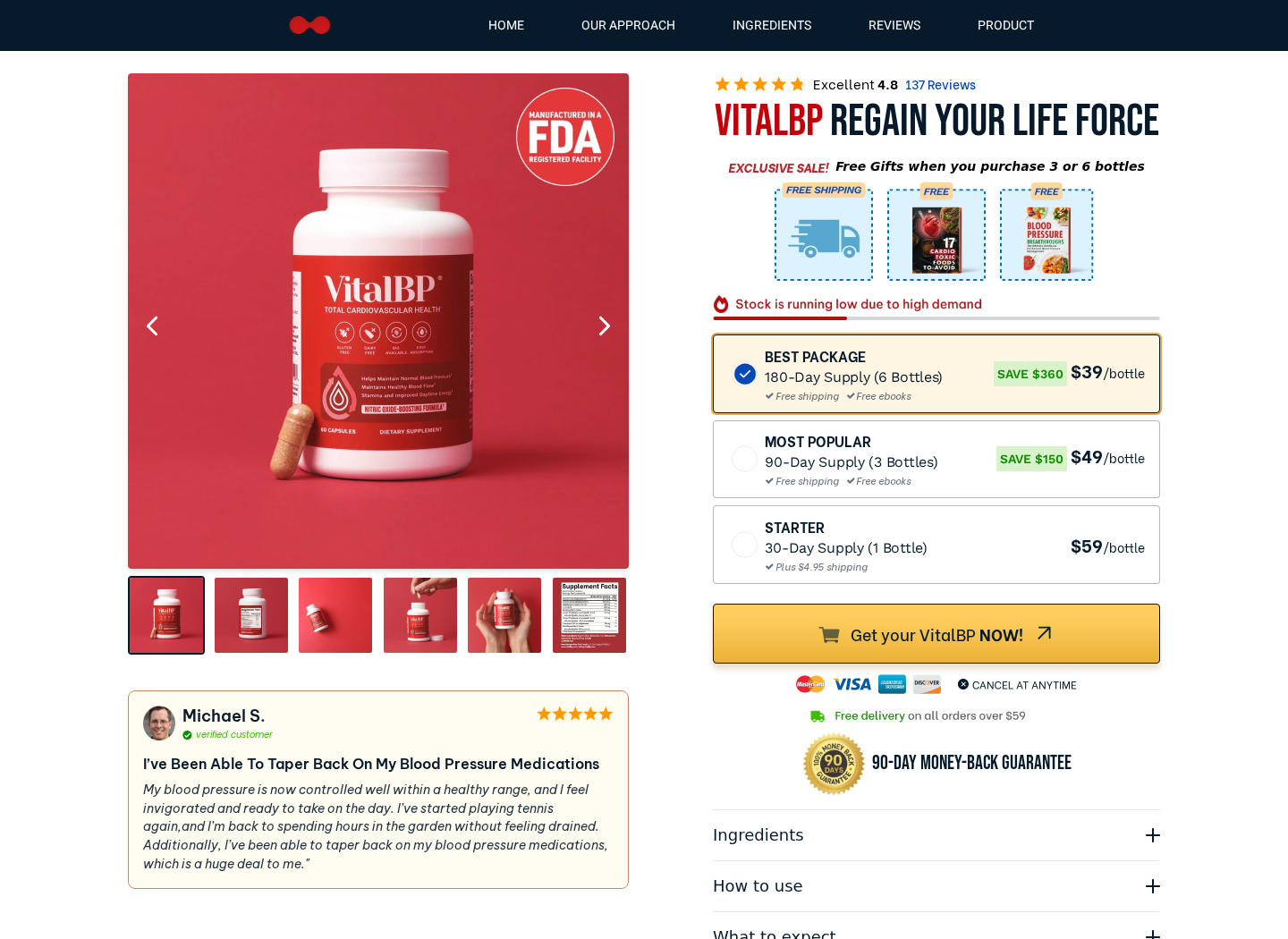
A testimonial on the product page even describes tapering blood-pressure medication, although the standard supplement disclaimer appears elsewhere.
That contrast matters. A consumer may remember the dramatic outcome while overlooking the legal language limiting what the product claims to do.
Our conclusion is cautious, not absolute
We found a purchasable product, published policies, ingredients, customer support, and named businesses connected with the operation.
We also found medical-looking persuasion, bundle pressure, restrictive order changes, identity confusion, and recent complaints about unexpectedly large charges.
- Vital BP appears to be a real physical supplement.
- The finished formula is not proven to replace hypertension treatment.
- The funnel uses authority, urgency, testimonials, and larger bundles.
- Recent consumer complaints describe price and refund disputes.
- The legal entity changes across public-facing materials.
- Anyone taking cardiovascular medication needs professional guidance before using it.
How the Vital BP Sales Funnel Works
Step 1: A worrying symptom opens the story
The promotion begins with problems many adults recognize, including fatigue, swollen ankles, reduced stamina, poor circulation, or stubborn blood-pressure readings.
These symptoms are emotionally powerful because they can suggest aging, lost independence, or fear of a future cardiovascular event.
The viewer is encouraged to keep watching before receiving ordinary product details, complete ingredients, contraindications, or a final price.
Step 2: A doctor figure supplies borrowed authority
Vital BP pages prominently present a man identified as Dr. Luis Martinez, described as a leading Miami physician.
The page calls him a top longevity doctor and says Vital BP is doctor recommended, creating a strong impression of clinical endorsement.
A photograph, title, and city are not substitutes for a verifiable license, specialty record, disclosure, or product-specific research publication.
Consumers should independently confirm professional credentials and determine whether the person approved the exact wording used in the advertisement.
Step 3: The “Japanese paradox” makes the solution feel discovered
The long presentation reportedly builds around a supposed Japanese cardiovascular secret involving foods, arteries, and nitric-oxide support.
This framing turns familiar nutrients into a hidden discovery that conventional advice allegedly overlooks or misunderstands.
Nattokinase, cacao, berries, and citrulline can each be researched separately. That research does not automatically validate this bottle or sales narrative.
Ingredient-level evidence cannot prove the exact mixture, dose, manufacturing quality, absorption, or promised result of a finished commercial product.
Step 4: Testimonials turn support claims into treatment expectations
The storefront presents ratings, verified-customer labels, and personal stories about energy, circulation, and blood-pressure improvement.
One visible testimonial says the customer tapered blood-pressure medication after using Vital BP. That is an unusually consequential marketing message.
Testimonials cannot establish cause. Medication changes, diet, activity, measurement technique, other treatments, and natural variation can affect readings.
Never reduce prescribed medication because an online testimonial sounds familiar. Abrupt or unguided changes can create serious health risks.
Step 5: The buying page favors the largest package
The product page displays one, three, and six-bottle choices, with the six-bottle supply preselected as the “best package.”
The largest bundle advertises a lower per-bottle price, free shipping, free books, and a headline saving of $360.
A stock warning says inventory is running low because of high demand. This pushes a medical decision toward urgency.
The single-bottle option appears less economical, even though it exposes the buyer to much less financial and product risk.
Step 6: The guarantee reduces hesitation before payment
A 90-day money-back guarantee appears near the purchase button, making a multi-bottle order feel reversible.
However, a guarantee is only as useful as its conditions, response time, return address, postage cost, and refund execution.
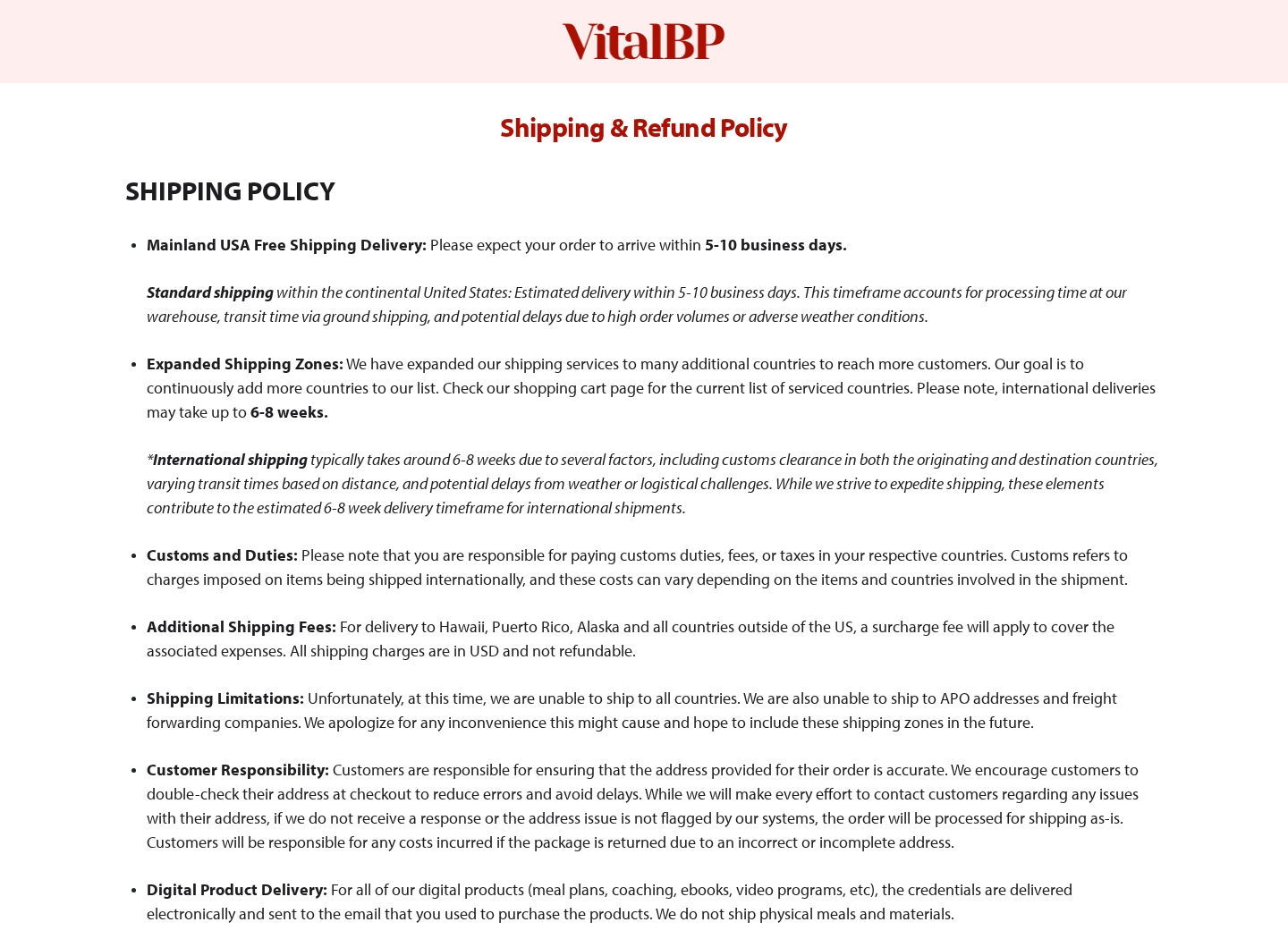
The refund policy says supplement returns must follow eligibility rules and may require authorization, documentation, and returned bottles.
It also says orders cannot be cancelled or modified after placement, a crucial limitation for anyone who immediately notices a pricing problem.
Step 7: Billing complaints surface after the decision
Recent Trustpilot reviewers describe attempted or completed charges larger than the amount they believed the checkout displayed.
One reviewer described a $147 order followed by an attempted $237.60 charge. Another described a promotion near $26.99 becoming more than $300.
These are consumer allegations, not court findings. They are still relevant because several complaints describe a similar checkout misunderstanding.
Always capture the cart, quantity, currency, taxes, shipping, upsells, and final authorization amount before submitting any supplement order.
Step 8: Refund friction protects the completed sale
When an order cannot be changed, the customer must wait, receive the package, contact support, obtain instructions, and meet return conditions.
That sequence consumes time inside a limited guarantee window and can make a large bundle harder to unwind.
A seller may legally require reasonable return steps. The concern arises when prominent “risk-free” language obscures practical costs and restrictions.
Keep every bottle, mailer, invoice, tracking page, advertisement, and support message until the money is back in your account.
What the Ingredients Can and Cannot Prove
Nattokinase deserves medication screening
Nattokinase is an enzyme associated with fermented soy. It is often discussed for fibrin activity and cardiovascular research.
That mechanism also creates interaction concerns, especially for people taking anticoagulants, antiplatelet drugs, or medicines affecting bleeding.
Surgery plans, bleeding disorders, pregnancy, and complex medication schedules make professional advice particularly important.
Vitamin K2 can conflict with anticoagulation plans
Vitamin K participates in clotting pathways. People using warfarin are commonly advised to keep vitamin K intake consistent.
A supplement containing K2 should not be added casually when a clinician is adjusting anticoagulant dosing through laboratory monitoring.
The label should be shown to the prescriber or pharmacist, including every amount and the suggested daily serving.
L-citrulline and cacao do not create a guaranteed outcome
L-citrulline participates in nitric-oxide pathways. Cacao contains compounds studied for vascular effects.
Effects depend on dose, formulation, health status, concurrent treatment, and study design. A marketing page rarely communicates that uncertainty clearly.
Even a modest blood-pressure effect would not prove plaque removal, medication replacement, or protection from a cardiovascular emergency.
The FDA facility badge is not product approval
The bottle image carries language about manufacture in an FDA-registered facility. That is not the same as FDA approval.
Dietary supplements are not preapproved like prescription drugs for proving treatment effectiveness before sale.
Registration concerns the facility’s relationship with regulators. It does not mean the agency endorsed the formula or every advertisement.
Questions the Sales Page Does Not Answer
How much of every active ingredient reaches one serving?
A list of fashionable ingredients sounds impressive, but dosage determines whether research on an individual substance has any relevance to the finished capsules.
Buyers should compare the current Supplement Facts panel with the amounts used in human trials, not rely on ingredient names alone.
They should also ask whether the extracts are standardized, which form of vitamin K appears, and whether independent testing confirms label accuracy.
If a promotional page emphasizes a discovery while making the label difficult to inspect, the storytelling is doing more work than the evidence.
What happens when a customer already takes medication?
Blood-pressure customers are especially likely to use prescriptions, anticoagulants, antiplatelet drugs, diabetes medicines, or several cardiovascular products together.
Nattokinase and vitamin K2 make that context important. A supplement checkout cannot replace a clinician who understands the customer’s diagnosis and complete medication list.
A responsible seller should place interaction warnings where customers see them before payment, not bury them beneath testimonials and bundle discounts.
Customers should never reduce prescribed medicine because an advertisement, testimonial, or online presenter suggests that a supplement has corrected the underlying problem.
Can the advertised guarantee be used in practice?
A 90-day promise sounds generous, yet its value depends on deadlines, return instructions, package requirements, shipping costs, and the seller’s responsiveness.
Ask whether opened bottles qualify, whether every container must be mailed back, and whether original shipping or handling fees remain nonrefundable.
Request the destination country before ordering. An overseas tracked return can cost enough to make a nominal refund commercially pointless.
Keep a dated copy of the guarantee shown during purchase. Policies can change, while a screenshot records the terms that influenced your decision.
Why checkout totals deserve a deliberate pause
Bundle funnels often highlight a per-bottle figure more prominently than the complete amount that will reach the card.
That presentation can make six bottles feel like a modest commitment even when the immediate transaction is several times the headline number.
Before submitting, record the quantity, subtotal, shipping, taxes, optional add-ons, currency, and whether any recurring delivery language appears.
Use a payment method with dispute rights and instant alerts. Do not approve a bank verification prompt until its displayed total matches your checkout.
Company, Address, Support, and Fulfillment Checks
The legal identity is harder to follow than the bottle name
Public Vital BP materials reference Vital Health LLC, while terms and related records also connect Konscious LLC, Enclave LLC, or associated entities.
Multiple entities can participate legitimately. The checkout, receipt, card descriptor, privacy policy, and refund instructions should explain their roles consistently.
If those names differ, ask which company accepted payment and which company legally owes the refund.
A support email is not the same as accountable ownership
The website publishes hello@vitalbp.com and a support route. That gives customers a starting point for written requests.
Before buying, send a simple question about cancellation, returns, subscriptions, and the legal seller. Preserve the complete response.
An unanswered message before purchase is a warning about what may happen when a substantial charge requires recovery.
Fulfillment details matter when a guarantee requires a return
A fulfillment center can receive or ship packages without being the manufacturer, headquarters, laboratory, or company controlling the charge.
Do not return supplements to the sender address automatically. Obtain written authorization and the exact approved destination first.
Use tracked shipping, photograph the contents, and keep the carrier receipt showing weight and delivery.
Traceability should include the actual bottle
Check the received label for a lot number, expiration date, manufacturer or distributor, complete Supplement Facts panel, warnings, and tamper seal.
Photograph everything before opening. Compare the formula with the page saved on the purchase date.
A generic facility badge, “doctor formulated” phrase, or American mailbox does not reveal where the capsules were manufactured or tested.
What to Do If You Bought Vital BP and Want Help
- Do not change prescribed medication. Contact your clinician or pharmacist before starting Vital BP, especially with anticoagulants, heart drugs, or blood-pressure treatment.
- Capture the entire transaction. Save the advertisement, video claims, cart, quantity, final price, currency, confirmation, card descriptor, policies, and guarantee displayed when ordering.
- Contact support in writing. State the order number, purchase date, amount, requested remedy, and deadline. Ask for a cancellation or return authorization explicitly.
- Preserve every bottle. Keep opened and unopened containers, packaging, lot numbers, invoices, tracking labels, and photographs until the matter is resolved.
- Challenge an incorrect charge quickly. If the authorization exceeded the confirmed amount, contact the card issuer and provide your screenshots and correspondence.
- Report adverse effects. Seek medical advice for unusual bleeding, dizziness, faintness, allergic symptoms, or concerning blood-pressure changes. U.S. consumers can use FDA MedWatch.
- Secure the browser. Run Malwarebytes after suspicious redirects or downloads, and use AdGuard to reduce aggressive supplement advertisements and malicious follow-up pages.
- Watch future statements. Even when no subscription was obvious, monitor the card for unfamiliar descriptors and preserve any renewal or shipment email.
Is Your Device Infected? Run a Free Malware Scan
Slow performance, constant pop-ups, or strange behavior? These are classic signs of a malware infection. The fastest way to find out is to scan your device with Malwarebytes Free — one of the most trusted malware removal tools available.
The free version detects and removes the most common threats, including:
- Adware — the cause of those annoying pop-ups
- Browser hijackers — unwanted redirects and changed homepages
- Trojans and spyware — hidden programs stealing your data
- Potentially unwanted programs (PUPs) — software you never asked for
👉 Select your device below — Windows, Mac, or Android — then follow the simple steps to download Malwarebytes, scan your system, and remove any threats it finds. The scan usually takes 5 to 20 minutes.
Run a Malware Scan with Malwarebytes for Windows
Malwarebytes is one of the most popular and trusted anti-malware tools for Windows — and it’s completely free for removing infections. It catches threats that many antivirus programs miss, including adware, browser hijackers, and trojans. Follow the steps below to scan and clean your PC in just a few minutes.
Download Malwarebytes
Click the button below to download the latest version of Malwarebytes for Windows from the official source. The free version is all you need — it will scan your computer and remove adware, browser hijackers, and other malicious software at no cost.
Download MalwarebytesOfficial installer for Windows 11 and 10. Your download starts right away.Want real-time protection? See Malwarebytes Premium Malwarebytes Free for WindowsScans and removes malware at no cost
-
Install Malwarebytes
When the download finishes, open your Downloads folder and double-click the MBSetup file. If Windows shows a User Account Control pop-up, click “Yes” to allow the installation.

Follow the On-Screen Prompts to Install Malwarebytes
The setup wizard will walk you through a few quick screens:
-
Choose where you’re installing the program — “Personal Computer” or “Work Computer” — then click Next.

-
Malwarebytes will now install on your device. This usually takes under a minute.

-
When installation is complete, the “Welcome to Malwarebytes” screen will open automatically.

-
On the final screen, click Open Malwarebytes to launch the program.

-
Enable “Scan for Rootkits”
Before scanning, turn on rootkit detection so Malwarebytes can find even the most hidden threats. Click the Settings gear icon on the left side of the screen.

In the settings menu, find “Scan for rootkits” and click the toggle so it turns blue.

Done? Click “Dashboard” in the left pane to return to the main screen.
Start the Scan
Click the blue Scan button. Malwarebytes will automatically update its virus database and start checking your computer for malware.

-
Wait for the Scan to Finish
The scan checks your entire system for browser hijackers and other malicious programs, so it can take 5 to 20 minutes depending on your computer. Feel free to do something else — just check back occasionally to see the progress.

-
Quarantine the Detected Threats
When the scan is done, you’ll see a list of everything Malwarebytes found — malware, adware, and potentially unwanted programs. Click the “Quarantine” button to remove all of them at once.

Malwarebytes will now remove the malicious files and registry entries and move them safely into quarantine.

-
Restart Your Computer
Some threats can only be fully removed after a reboot. If Malwarebytes asks you to restart, click Yes. Once you’re logged back in, Malwarebytes has finished removing the threats it found.

That’s it — your Windows PC is now clean of trojans, adware, and other malware, and should be back to running smoothly.
If you are still having problems with your computer after completing these instructions, then please follow one of the steps:
- Run a computer scan with ESET Online Scanner
- Ask for help in our Windows Malware Removal Help & Support forum.
Run a Malware Scan with Malwarebytes for Mac
Malwarebytes for Mac is a free on-demand scanner that removes the malware other security software tends to miss — adware, browser hijackers, and unwanted programs included. Cleaning an infected Mac with Malwarebytes has always been completely free, and it’s our go-to recommendation. Follow the steps below to scan and clean your Mac in just a few minutes.
-
Download Malwarebytes for Mac
Click the button below to download the latest version of Malwarebytes for Mac.
Download MalwarebytesOfficial installer for macOS. Your download starts right away.Want real-time protection? See Malwarebytes PremiumMalwarebytes Free for MacScans and removes malware at no cost -
Open the Malwarebytes setup file
When the download finishes, open your Downloads folder and double-click the setup file to begin the installation.

-
Follow the On-Screen Prompts to Install Malwarebytes
The Malwarebytes for Mac Installer will guide you through a few quick screens. Click “Continue” and keep following the prompts until the installation completes.



When the installation is complete, Malwarebytes opens to the Welcome to Malwarebytes screen. Click “Get started“.
-
Select “Personal Computer” or “Work Computer”
Malwarebytes will ask what type of computer you’re installing it on. Click either Personal Computer or Work Computer, whichever applies.

-
Start the Scan
Click the “Scan” button. Malwarebytes will automatically update its detection database and begin checking your Mac for malware.

-
Wait for the Scan to Finish
Malwarebytes will scan your Mac for adware, browser hijackers, and other malicious programs. This can take a few minutes, so feel free to do something else — just check back occasionally to see the progress.

-
Quarantine the Detected Threats
When the scan is done, you’ll see a list of everything Malwarebytes found. Click the “Quarantine” button to remove all the threats at once.

-
Restart Your Mac
Malwarebytes will now remove all the malicious files it found. Some threats can only be fully removed after a reboot — if Malwarebytes asks you to restart, allow it. Once you’re logged back in, your Mac is clean.

That’s it — your Mac is now free of adware, rogue browser extensions, and other potentially harmful software.
If you are still experiencing problems while trying to remove a malicious program from your computer, please ask for help in our Mac Malware Removal Help & Support forum.
Run a Malware Scan with Malwarebytes for Android
Malwarebytes for Android automatically detects and removes dangerous threats like malware and ransomware so you don’t have to worry about your most-used device being compromised. Aggressive detection of adware and potentially unwanted programs keeps your Android phone or tablet running smooth.
-
Download Malwarebytes for Android.
You can download Malwarebytes for Android by clicking the link below.
Get Malwarebytes for AndroidOpens Google Play in a new tab.Want real-time protection? See Malwarebytes Premium for AndroidMalwarebytes for AndroidScans your phone and removes malware at no cost -
Install Malwarebytes for Android on your phone.
In the Google Play Store, tap “Install” to install Malwarebytes for Android on your device.

When the installation process has finished, tap “Open” to begin using Malwarebytes for Android. You can also open Malwarebytes by tapping on its icon in your phone menu or home screen.

-
Follow the on-screen prompts to complete the setup process
When Malwarebytes will open, you will see the Malwarebytes Setup Wizard which will guide you through a series of permissions and other setup options.
This is the first of two screens that explain the difference between the Premium and Free versions. Swipe this screen to continue.
Tap on “Got it” to proceed to the next step.
Malwarebytes for Android will now ask for a set of permissions that are required to scan your device and protect it from malware. Tap on “Give permission” to continue.
Tap on “Allow” to permit Malwarebytes to access the files on your phone.
-
Update database and run a scan with Malwarebytes for Android
You will now be prompted to update the Malwarebytes database and run a full system scan.

Click on “Update database” to update the Malwarebytes for Android definitions to the latest version, then click on “Run full scan” to perform a system scan.

-
Wait for the Malwarebytes scan to complete.
Malwarebytes will now start scanning your phone for adware and other malicious apps. This process can take a few minutes, so we suggest you do something else and periodically check on the status of the scan to see when it is finished.

-
Click on “Remove Selected”.
When the scan has been completed, you will be presented with a screen showing the malware infections that Malwarebytes for Android has detected. To remove the malicious apps that Malwarebytes has found, tap on the “Remove Selected” button.

-
Restart your phone.
Malwarebytes for Android will now remove all the malicious apps that it has found. To complete the malware removal process, Malwarebytes may ask you to restart your device.
That’s it — your Android phone is now clean — no more malicious apps, adware, or browser redirects.
If you are still having problems with your phone after completing these instructions, then please follow one of the steps:
- Restore your phone to factory settings by going to Settings > General management > Reset > Factory data reset.
- Ask for help in our Mobile Malware Removal Help & Support forum.
Stay Protected: Block Ads and Malicious Sites
Now that your device is clean, keep it that way. Most infections start with a malicious ad or a fake download button — so blocking them at the source is your best defense.
We recommend AdGuard, which blocks malicious ads, phishing pages, and dangerous redirects before they can reach you.
👉 Download AdGuard and browse safely
Frequently Asked Questions
Is Vital BP a fake product?
No. A physical supplement appears to be sold and delivered. The major concerns involve marketing claims, checkout complaints, interactions, and refund friction.
Can Vital BP replace blood-pressure medicine?
No credible evidence reviewed establishes Vital BP as a replacement. Medication changes require guidance from the clinician managing your condition.
Is Vital BP FDA approved?
No FDA approval for treating hypertension was established. An FDA-registered manufacturing facility is not the same as an approved finished product.
Does Vital BP use automatic subscription billing?
The reviewed product page displayed “cancel at anytime,” but confirm the final checkout. Save any recurring-shipment terms before authorizing payment.
Why do buyers report larger charges?
Complaints describe quantity, bundle, currency, or checkout differences. They remain allegations, so your own screenshots and statement provide the strongest evidence.
What should I verify before ordering?
Verify the seller, complete price, quantity, subscription status, return destination, medication interactions, label amounts, and the evidence behind every health claim.
The Bottom Line
Vital BP is a real supplement wrapped in a sales funnel that makes its benefits feel far more certain than the public evidence supports.
The doctor framing, medication testimonial, large bundles, order restrictions, and billing complaints justify caution. Treat hypertension medically, not through an urgent online checkout.

Join the discussion
0 commentsShare your experience or ask a question about this article.
Discussion
Start the conversation
Have a question or something useful to share? Add the first comment.