

Hair loss rarely feels like an ordinary shopping problem. When the mirror changes faster than expected, a weekly home treatment can look easier than another medical appointment.
SØREN enters that vulnerable moment with polished before-and-after photographs, a needle-tipped applicator, confident timelines, and subscription savings that deserve a much closer reading.
Overview
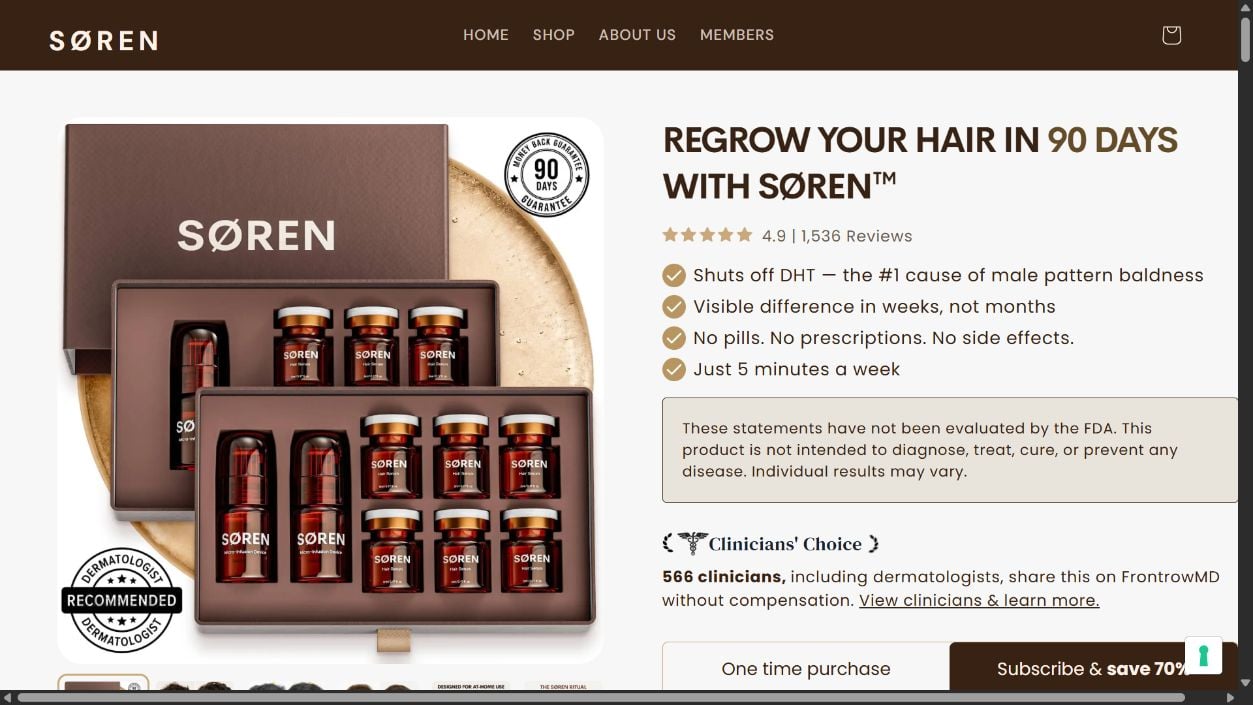
SØREN sells a cosmetic serum through a home micro-infusion routine
The SØREN Hair Regrowth System combines disposable needle heads, a stamping device, and small serum vials intended for regular scalp application.
The sales page tells users to fill the device, tap it across thinning areas, and apply remaining serum.
The company presents this process as a short weekly ritual rather than a prescription treatment or clinic procedure.
Its formula is described with peptides, botanical extracts, vitamins, and familiar hair-care ingredients. That combination sounds technical, but ingredients alone do not prove regrowth.
The headline promises are stronger than the supporting evidence shown
The reviewed page says SØREN can regrow hair in 90 days, shut off DHT, produce visible differences within weeks, and avoid side effects.
Those statements reach far beyond ordinary cosmetic conditioning. They describe biological action and a predictable result for a problem with many possible causes.
The same page carries an FDA disclaimer and says individual results may vary. A disclaimer does not erase a prominent performance promise.
No complete SØREN-specific clinical trial, participant data, control group, adverse-event table, or peer-reviewed publication appears beside the main claims.
The discounted choice creates automatic recurring shipments
The page offers one-time purchases and a “Subscribe & save 70%” option. Subscription bundles renew every 30, 60, or 90 days until canceled.
Renewal pricing is visible on the current product page, which is better than a completely hidden continuity plan.
However, the discount is large enough to pull attention toward the recurring option. Buyers must understand the total schedule, not only the treatment price.
The main concerns are straightforward:
- Regrowth and DHT claims appear without a complete product trial.
- The system combines needles with a topical cosmetic at home.
- The FDA has not cleared microneedling devices for hair-loss treatment.
- The FDA has not cleared microneedling devices for delivering cosmetics.
- Prominent copy says there are no side effects.
- Some featured customers were compensated for sharing their stories.
- Subscription plans renew at fixed intervals until canceled.
- A 90-day guarantee includes conditions buyers should save.
What the Evidence Actually Supports
Hair thinning is not one diagnosis. Genetics, hormones, immune conditions, medications, nutritional problems, stress, infection, and scarring can produce similar visible changes.
A photograph cannot determine the cause. That matters because treatments that help one pattern may be useless or inappropriate for another.
The SØREN presentation focuses heavily on male pattern hair loss and DHT. It does not show that every visitor has that condition.
Microneedling is a real procedure studied for several cosmetic uses. Its existence does not validate every device, needle depth, serum, schedule, or promised outcome.
The FDA says it has authorized certain microneedling devices for specific facial and abdominal aesthetic uses in adults.
The agency also states that it has not cleared microneedling devices for hair-loss use.
It further explains that microneedling devices are not approved for delivering cosmetics, topical medicines, vitamin solutions, drugs, or blood products into skin.
That guidance is especially relevant here because SØREN markets penetration as the reason its formula reaches where ordinary topicals supposedly cannot.
Needle length and actual penetration matter. A blunt cosmetic stamp acting on surface cells is different from sharp needles reaching living skin layers.
The product page should state needle specifications, sterility controls, single-use instructions, contraindications, and testing clearly enough for a buyer to evaluate that distinction.
The FDA lists possible microneedling effects including redness, itching, peeling, discomfort, bruising, bleeding, pigmentation changes, infection, and other reactions.
That makes an unqualified “no side effects” message difficult to reconcile with the general risks of puncturing skin.
None of this proves SØREN injures every user or never helps appearance. It means the marketing certainty exceeds what the reviewed evidence establishes.
The Advertorial Uses a Familiar Transformation Story
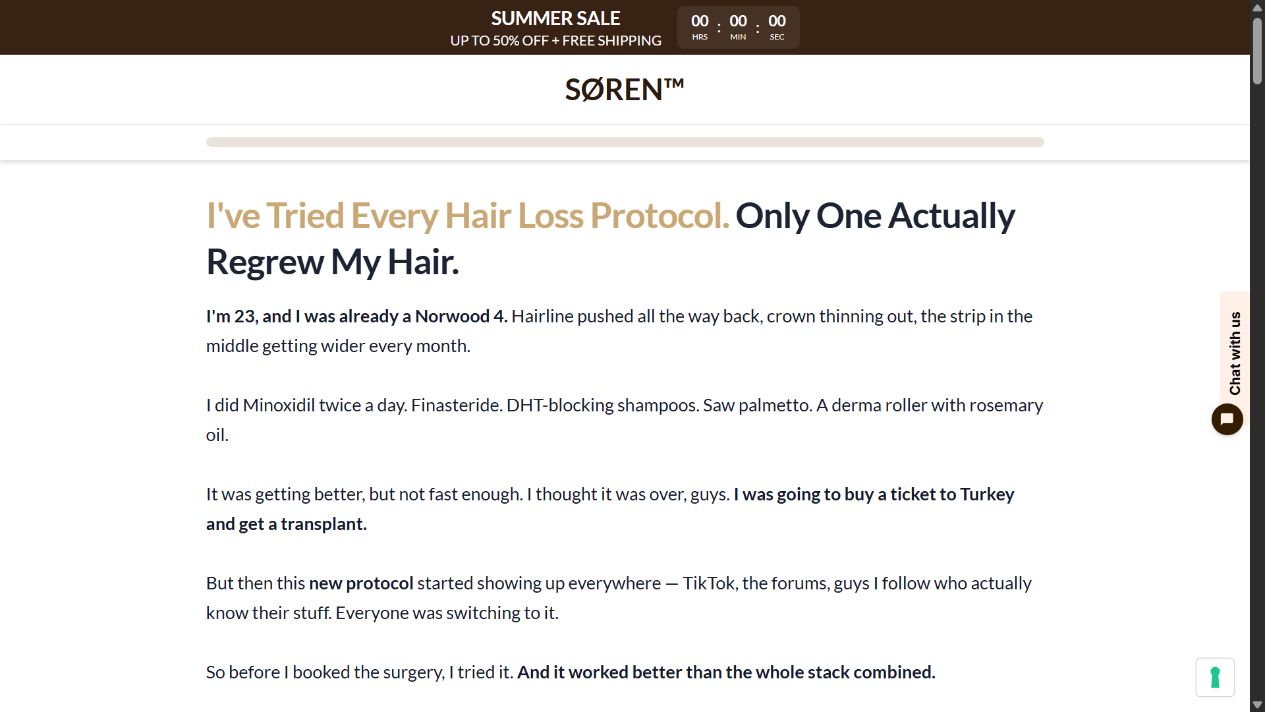
One SØREN page begins like a personal confession from a young man whose hairline and crown supposedly worsened despite several established treatments.
The narrator says he considered traveling to Turkey for a transplant, discovered a new protocol, dropped pills, and relied only on SØREN.
That story compresses fear, frustration, discovery, and rescue into a smooth path. Real hair-loss decisions are rarely that simple.
A testimonial can describe one person’s experience, but it cannot diagnose the reader or establish a dependable success rate.
The main product page also labels some customers as compensated. Payment does not automatically make a testimonial false.
Compensation does create an incentive and should reduce the weight a shopper gives the story compared with independent clinical evidence.
Before-and-after hair photographs are unusually sensitive to lighting, wetness, styling, haircut length, camera angle, and scalp exposure.
A reliable comparison needs matching conditions and a documented timeline. Even then, the image does not isolate which treatment produced the change.
Some testimonial language mentions other routines. If a participant used minoxidil, finasteride, supplements, styling fibers, or procedures, the photograph cannot credit SØREN alone.
The strongest evidence would be a preregistered trial of the exact kit, with objective hair counts, standardized images, adverse events, and independent analysis.
How the SØREN Hair Regrowth Offer Works
Step 1: An advertisement turns gradual thinning into an urgent deadline
The first message often tells men to act before follicles become impossible to recover.
That framing can be emotionally powerful because waiting feels dangerous, even before the user knows why hair is changing.
Urgency encourages a purchase before diagnosis, price comparison, or a discussion of less expensive evidence-based options.
Step 2: A personal story makes the system feel discovered rather than sold
The advertorial reads like advice from someone who struggled with the same fear.
Established products are described as inconvenient, slow, painful, or disappointing. SØREN then appears as the practical breakthrough that finally changed the outcome.
The transition feels conversational, but every path ultimately reaches the same order page.
Step 3: Technical language supplies medical-looking authority
Terms such as DHT, peptides, follicle, micro-infusion, and penetration make the routine sound precise.
Each concept has a scientific meaning. Placing them together does not prove this formula reaches a therapeutic depth or produces the stated biological effect.
Look for measured concentrations, device specifications, trial methods, and named publications rather than a collection of scientific words.
Step 4: Comparison tables make alternatives look inferior
The page contrasts SØREN with ordinary serums, supplements, and clinical treatments across convenience, time, support, and price.
Such tables are created by the seller. Their categories and checkmarks are marketing claims, not independent comparative testing.
A lower per-treatment figure can also hide how many kits arrive and how often the plan bills.
Step 5: The steepest discount selects the recurring plan
The subscription tab advertises savings up to 70%. Current options renew monthly, every two months, or every three months.
Shoppers may focus on the reduced kit price while overlooking the phrase “until canceled.”
Take a screenshot of the selected purchase type, renewal amount, next billing interval, cancellation method, and included quantities.
Step 6: The guarantee lowers resistance at checkout
A 90-day money-back statement makes experimentation feel reversible. Hair products often require months, so timing becomes critical.
Read whether the clock starts at purchase or delivery, whether empty containers must return, and whether shipping costs are excluded.
Request cancellation separately from a refund. Ending future renewals does not automatically return a past payment.
Safety Questions to Answer Before Using the Kit
Hair thinning has many possible causes, including heredity, hormones, medications, illness, nutrition, stress, inflammation, and damaging styling practices.
A serum advertisement cannot diagnose which cause applies. Rapid shedding, patchy loss, scalp pain, scarring, or inflammation deserves professional assessment.
Microneedling creates controlled skin injury. Hygiene, needle depth, application pressure, frequency, and the product placed on treated skin all influence risk.
Reusing a contaminated applicator can introduce bacteria. Sharing the device between people creates another avoidable exposure.
Ask for complete ingredient amounts, not only a list of fashionable extracts. Fragrance, preservatives, and botanical ingredients can irritate sensitive skin.
Stop using the system if swelling, persistent bleeding, worsening redness, discharge, severe pain, or another unexpected reaction appears.
People with bleeding disorders, immune problems, active scalp disease, or medicines affecting healing should seek medical advice before any needling routine.
Do not apply an unapproved topical formula simply because needles may improve absorption. Greater penetration can increase exposure alongside any intended effect.
Photograph the scalp under consistent lighting before treatment. Marketing photographs with different angles, hairstyles, or exposure can exaggerate apparent improvement.
Track irritation and shedding as carefully as growth. A routine that produces discomfort without measurable benefit should not continue indefinitely.
Do not treat the applicator as an ordinary comb. Any sharp component used repeatedly on scalp skin requires careful hygiene and handling.
Confirm whether every head is sterile, individually sealed, truly single-use, and labeled with a lot number or manufacturing trace.
Never share a needle head. Reuse or cross-use can transfer bacteria and create infection risk.
Ask for the exact needle material and length. People with metal allergies or sensitive skin need information before contact.
Review the full serum ingredient list for known allergies. “Natural” extracts can still irritate compromised skin.
Do not apply the product over active infection, inflamed dermatitis, open wounds, unexplained lesions, or a painful scalp without professional advice.
People with bleeding disorders, weakened immunity, uncontrolled diabetes, or blood-thinning medicine may face additional concerns with skin puncture.
A clinician can help decide whether the routine suits the person’s scalp, diagnosis, medicines, and risk factors.
Stop if substantial pain, spreading redness, drainage, fever, swelling, blistering, or persistent bleeding develops.
Photograph the reaction, record the lot information, and seek medical guidance. A customer-service script cannot evaluate infection or tissue injury.
Also avoid abandoning a prescribed treatment because an advertorial says someone else “dropped the pills.” Medication decisions belong with the prescriber.
Company, Address, and Fulfillment Checks
The footer identifies Apex Performance Group LLC
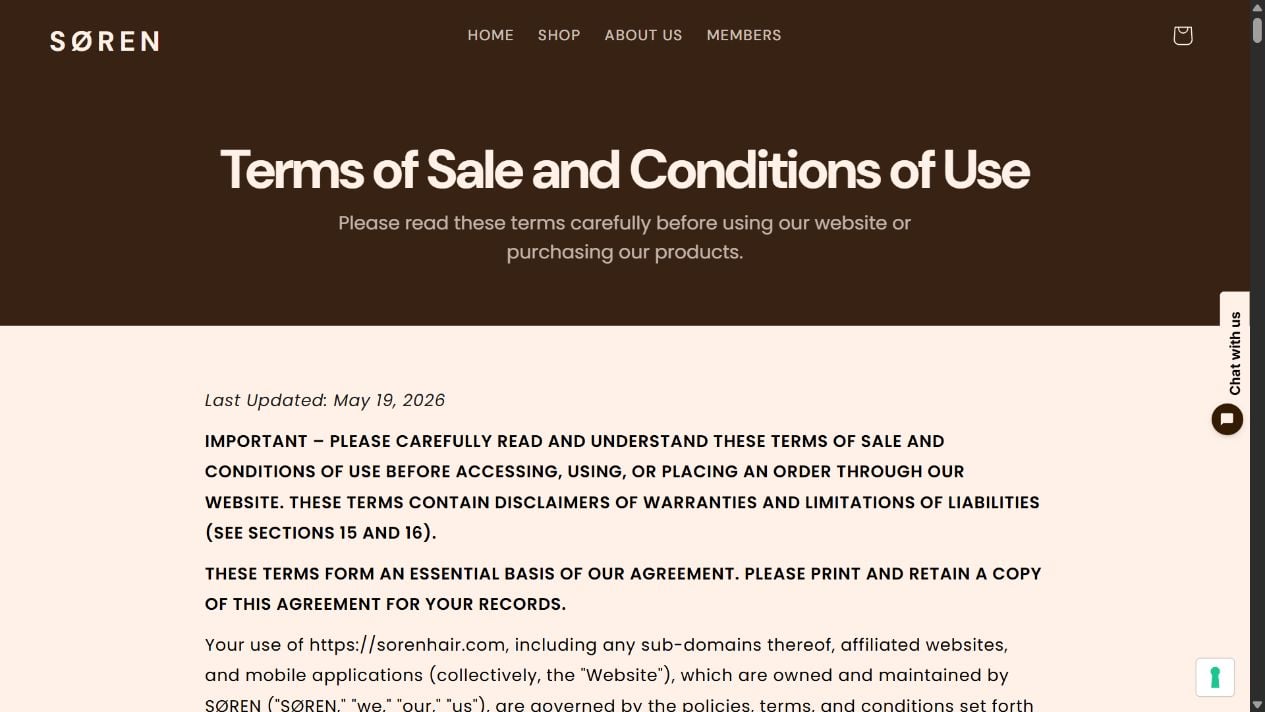
The current store footer names Apex Performance Group LLC. Its terms say the agreement is governed by Wyoming law.
A company name is a useful starting point, not a quality certificate. Match it against the receipt, card descriptor, policy pages, and state records.
If another entity appears at checkout, ask which one sells the kit, owns the brand, fulfills orders, and handles subscription cancellations.
The public contact trail should support health-related questions
A seller of a needle-based scalp system should answer specific questions about ingredients, needle specifications, sterility, lots, adverse reactions, and disposal.
Test support before buying. Save the response and confirm that the address uses the same domain as the storefront.
Generic replies about “visible results” do not replace technical product information.
Manufacturing accountability matters more than packaging
The reviewed presentation does not prominently identify the facility producing the serum and applicator on its main sales screen.
Ask where each component is made, what standards apply, and whether batch-specific testing covers microbes, contamination, stability, and material safety.
Do not claim a country of manufacture without evidence. An unclear origin is a transparency problem by itself.
Fulfillment and subscription operations may be separate
The warehouse mailing a kit may not control billing, while customer support may work for another contractor.
That division is common in online commerce, but it can complicate returns and recurring-payment disputes.
Keep the shipping label, packing slip, merchant descriptor, renewal notice, and cancellation confirmation together.
How to Evaluate the Guarantee and Subscription
Begin with the actual selected plan. A monthly kit and a three-month kit create different deadlines, charges, and quantities.
Calculate the cost across six months, including any shipping, tax, optional protection, replacement heads, or add-ons.
Read the cancellation policy before entering payment details. Confirm whether cancellation is available through a portal, email, telephone, or all three.
Check for notice deadlines before the next renewal. A request submitted after processing may stop later cycles but not a shipment already created.
Read the guarantee conditions separately. A refund promise and a subscription cancellation are different rights with different steps.
Save screenshots showing “no hassle” or “no hoops” if those words influence the purchase.
Ask whether used vials, opened kits, photographs, tracking, or a return authorization are required. Price the return before deciding the guarantee is risk-free.
Use a payment method that allows disputes. Do not send additional money to anyone promising faster cancellation or guaranteed recovery.
What to Do if You Have Fallen Victim to This Scam
- Stop using the kit after a serious reaction. Wash only as medically advised, preserve the packaging, and seek qualified care for infection or persistent injury signs.
- Cancel recurring billing in writing. Use the member portal and support channel, then save the timestamp, confirmation number, and complete message thread.
- Request the separate refund. State the order number, delivery date, guarantee language, reason, and exact amount you expect returned.
- Preserve product evidence. Keep unused vials, needle heads, ingredient panels, lot numbers, shipping labels, photographs, and advertising screenshots until the case closes.
- Challenge unauthorized renewals promptly. Tell the card issuer whether consent was absent, cancellation was ignored, or the merchant failed to honor written terms.
- Ask the issuer to block continuity charges. Replacing a card alone may not stop a merchant’s recurring authorization.
- Report a significant adverse event. Consumers can send device or product problems to FDA MedWatch and provide lot details when available.
- Scan the ordering device when warranted. Use Malwarebytes if the advertisement caused strange redirects, downloads, pop-ups, or browser changes.
- Limit aggressive ad exposure. AdGuard can reduce many promotional redirects, but it cannot cancel an existing SØREN plan.
- Discuss ongoing hair loss clinically. A dermatologist can investigate the cause and explain realistic treatment evidence, timelines, costs, and risks.
Is Your Device Infected? Run a Free Malware Scan
Slow performance, constant pop-ups, or strange behavior? These are classic signs of a malware infection. The fastest way to find out is to scan your device with Malwarebytes Free — one of the most trusted malware removal tools available.
The free version detects and removes the most common threats, including:
- Adware — the cause of those annoying pop-ups
- Browser hijackers — unwanted redirects and changed homepages
- Trojans and spyware — hidden programs stealing your data
- Potentially unwanted programs (PUPs) — software you never asked for
👉 Select your device below — Windows, Mac, or Android — then follow the simple steps to download Malwarebytes, scan your system, and remove any threats it finds. The scan usually takes 5 to 20 minutes.
Run a Malware Scan with Malwarebytes for Windows
Malwarebytes is one of the most popular and trusted anti-malware tools for Windows — and it’s completely free for removing infections. It catches threats that many antivirus programs miss, including adware, browser hijackers, and trojans. Follow the steps below to scan and clean your PC in just a few minutes.
Download Malwarebytes
Click the button below to download the latest version of Malwarebytes for Windows from the official source. The free version is all you need — it will scan your computer and remove adware, browser hijackers, and other malicious software at no cost.
Download MalwarebytesOfficial installer for Windows 11 and 10. Your download starts right away.Want real-time protection? See Malwarebytes Premium Malwarebytes Free for WindowsScans and removes malware at no cost
-
Install Malwarebytes
When the download finishes, open your Downloads folder and double-click the MBSetup file. If Windows shows a User Account Control pop-up, click “Yes” to allow the installation.

Follow the On-Screen Prompts to Install Malwarebytes
The setup wizard will walk you through a few quick screens:
-
Choose where you’re installing the program — “Personal Computer” or “Work Computer” — then click Next.

-
Malwarebytes will now install on your device. This usually takes under a minute.

-
When installation is complete, the “Welcome to Malwarebytes” screen will open automatically.

-
On the final screen, click Open Malwarebytes to launch the program.

-
Enable “Scan for Rootkits”
Before scanning, turn on rootkit detection so Malwarebytes can find even the most hidden threats. Click the Settings gear icon on the left side of the screen.

In the settings menu, find “Scan for rootkits” and click the toggle so it turns blue.

Done? Click “Dashboard” in the left pane to return to the main screen.
Start the Scan
Click the blue Scan button. Malwarebytes will automatically update its virus database and start checking your computer for malware.

-
Wait for the Scan to Finish
The scan checks your entire system for browser hijackers and other malicious programs, so it can take 5 to 20 minutes depending on your computer. Feel free to do something else — just check back occasionally to see the progress.

-
Quarantine the Detected Threats
When the scan is done, you’ll see a list of everything Malwarebytes found — malware, adware, and potentially unwanted programs. Click the “Quarantine” button to remove all of them at once.

Malwarebytes will now remove the malicious files and registry entries and move them safely into quarantine.

-
Restart Your Computer
Some threats can only be fully removed after a reboot. If Malwarebytes asks you to restart, click Yes. Once you’re logged back in, Malwarebytes has finished removing the threats it found.

That’s it — your Windows PC is now clean of trojans, adware, and other malware, and should be back to running smoothly.
If you are still having problems with your computer after completing these instructions, then please follow one of the steps:
- Run a computer scan with ESET Online Scanner
- Ask for help in our Windows Malware Removal Help & Support forum.
Run a Malware Scan with Malwarebytes for Mac
Malwarebytes for Mac is a free on-demand scanner that removes the malware other security software tends to miss — adware, browser hijackers, and unwanted programs included. Cleaning an infected Mac with Malwarebytes has always been completely free, and it’s our go-to recommendation. Follow the steps below to scan and clean your Mac in just a few minutes.
-
Download Malwarebytes for Mac
Click the button below to download the latest version of Malwarebytes for Mac.
Download MalwarebytesOfficial installer for macOS. Your download starts right away.Want real-time protection? See Malwarebytes PremiumMalwarebytes Free for MacScans and removes malware at no cost -
Open the Malwarebytes setup file
When the download finishes, open your Downloads folder and double-click the setup file to begin the installation.

-
Follow the On-Screen Prompts to Install Malwarebytes
The Malwarebytes for Mac Installer will guide you through a few quick screens. Click “Continue” and keep following the prompts until the installation completes.



When the installation is complete, Malwarebytes opens to the Welcome to Malwarebytes screen. Click “Get started“.
-
Select “Personal Computer” or “Work Computer”
Malwarebytes will ask what type of computer you’re installing it on. Click either Personal Computer or Work Computer, whichever applies.

-
Start the Scan
Click the “Scan” button. Malwarebytes will automatically update its detection database and begin checking your Mac for malware.

-
Wait for the Scan to Finish
Malwarebytes will scan your Mac for adware, browser hijackers, and other malicious programs. This can take a few minutes, so feel free to do something else — just check back occasionally to see the progress.

-
Quarantine the Detected Threats
When the scan is done, you’ll see a list of everything Malwarebytes found. Click the “Quarantine” button to remove all the threats at once.

-
Restart Your Mac
Malwarebytes will now remove all the malicious files it found. Some threats can only be fully removed after a reboot — if Malwarebytes asks you to restart, allow it. Once you’re logged back in, your Mac is clean.

That’s it — your Mac is now free of adware, rogue browser extensions, and other potentially harmful software.
If you are still experiencing problems while trying to remove a malicious program from your computer, please ask for help in our Mac Malware Removal Help & Support forum.
Run a Malware Scan with Malwarebytes for Android
Malwarebytes for Android automatically detects and removes dangerous threats like malware and ransomware so you don’t have to worry about your most-used device being compromised. Aggressive detection of adware and potentially unwanted programs keeps your Android phone or tablet running smooth.
-
Download Malwarebytes for Android.
You can download Malwarebytes for Android by clicking the link below.
Get Malwarebytes for AndroidOpens Google Play in a new tab.Want real-time protection? See Malwarebytes Premium for AndroidMalwarebytes for AndroidScans your phone and removes malware at no cost -
Install Malwarebytes for Android on your phone.
In the Google Play Store, tap “Install” to install Malwarebytes for Android on your device.

When the installation process has finished, tap “Open” to begin using Malwarebytes for Android. You can also open Malwarebytes by tapping on its icon in your phone menu or home screen.

-
Follow the on-screen prompts to complete the setup process
When Malwarebytes will open, you will see the Malwarebytes Setup Wizard which will guide you through a series of permissions and other setup options.
This is the first of two screens that explain the difference between the Premium and Free versions. Swipe this screen to continue.
Tap on “Got it” to proceed to the next step.
Malwarebytes for Android will now ask for a set of permissions that are required to scan your device and protect it from malware. Tap on “Give permission” to continue.
Tap on “Allow” to permit Malwarebytes to access the files on your phone.
-
Update database and run a scan with Malwarebytes for Android
You will now be prompted to update the Malwarebytes database and run a full system scan.

Click on “Update database” to update the Malwarebytes for Android definitions to the latest version, then click on “Run full scan” to perform a system scan.

-
Wait for the Malwarebytes scan to complete.
Malwarebytes will now start scanning your phone for adware and other malicious apps. This process can take a few minutes, so we suggest you do something else and periodically check on the status of the scan to see when it is finished.

-
Click on “Remove Selected”.
When the scan has been completed, you will be presented with a screen showing the malware infections that Malwarebytes for Android has detected. To remove the malicious apps that Malwarebytes has found, tap on the “Remove Selected” button.

-
Restart your phone.
Malwarebytes for Android will now remove all the malicious apps that it has found. To complete the malware removal process, Malwarebytes may ask you to restart your device.
That’s it — your Android phone is now clean — no more malicious apps, adware, or browser redirects.
If you are still having problems with your phone after completing these instructions, then please follow one of the steps:
- Restore your phone to factory settings by going to Settings > General management > Reset > Factory data reset.
- Ask for help in our Mobile Malware Removal Help & Support forum.
Stay Protected: Block Ads and Malicious Sites
Now that your device is clean, keep it that way. Most infections start with a malicious ad or a fake download button — so blocking them at the source is your best defense.
We recommend AdGuard, which blocks malicious ads, phishing pages, and dangerous redirects before they can reach you.
👉 Download AdGuard and browse safely
Frequently Asked Questions
Is SØREN Hair Regrowth a proven scam?
We found aggressive claims and meaningful subscription concerns, but not enough evidence to declare every sale fraudulent. The product’s promises require much stronger proof.
Does SØREN regrow hair in 90 days?
The reviewed page makes that claim, but it does not display a complete independent trial proving the exact kit reliably delivers that result.
Is the SØREN purchase a subscription?
It depends on the selected option. The discounted subscription plans renew every 30, 60, or 90 days until canceled.
Has the FDA cleared microneedling for hair loss?
The FDA says it has not cleared microneedling devices for hair-loss use and has not cleared them for delivering cosmetics into skin.
Are compensated testimonials automatically fake?
No. Compensation creates an incentive, so those stories should carry less weight than standardized independent trials and objective measurements.
Can I cancel and still request a refund?
Usually these are separate actions. Cancel future renewals, then submit a guarantee request using the seller’s exact documentation and deadline requirements.
The Bottom Line
SØREN packages a real cosmetic technique inside a polished regrowth story, but its strongest claims outrun the product-specific evidence displayed to shoppers.
Understand the recurring plan, read the guarantee, verify the applicator’s safety details, and seek a diagnosis before puncturing your scalp or abandoning established care.

Join the discussion
0 commentsShare your experience or ask a question about this article.
Discussion
Start the conversation
Have a question or something useful to share? Add the first comment.