

Imagine getting high-speed internet for a one-time fee of just $39.90 with no monthly charges. Sounds like a dream, right? Unfortunately, for many who stumbled upon Starlinkoficial.com, this dream quickly turned into a nightmare. What appears to be an irresistible deal on the surface is, in reality, one of the latest and most deceptive scams circulating the web. If you’re considering purchasing from Starlinkoficial.com, or already have, this article will give you the full picture.
Scam Overview
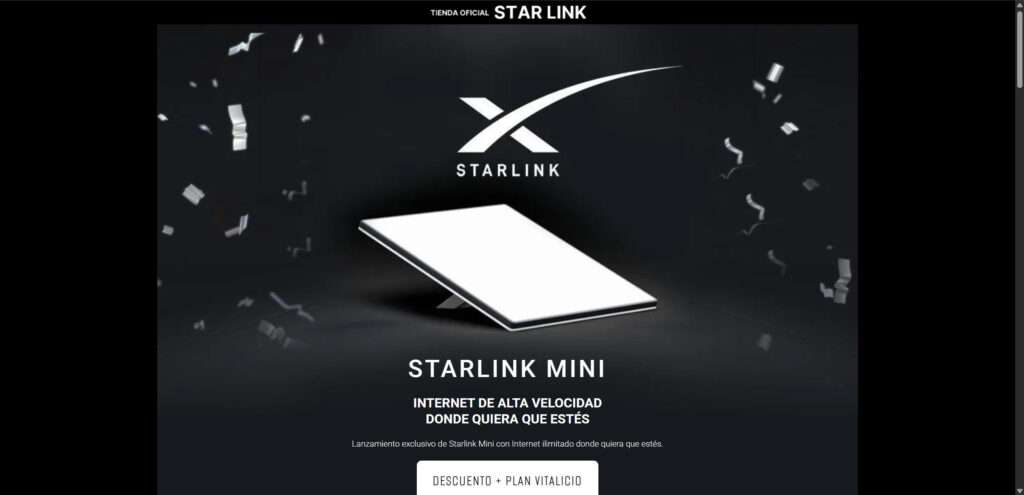
The Starlinkoficial.com scam is designed to prey on consumers eager for affordable, reliable internet solutions. Posing as a legitimate outlet for Starlink Mini, this fraudulent website mimics the branding and aesthetics of the actual Starlink, a satellite internet provider by SpaceX. Here’s what you need to know about how this scam operates and why it’s convincing so many people.
Imitating Legitimacy
The scam’s strength lies in its visual presentation. The website uses the official Starlink logo, sleek visuals, and product images that closely resemble the real hardware. For a casual observer or even a somewhat informed customer, it looks just like an official SpaceX affiliate site.
The domain name Starlinkoficial.com (notably misspelled “oficial” instead of “official”) is crafted to look legitimate. Most people overlook such small details, especially when lured by flashy banners and too-good-to-be-true discounts.
Promising a Lifetime Internet Plan
The scam claims to offer:
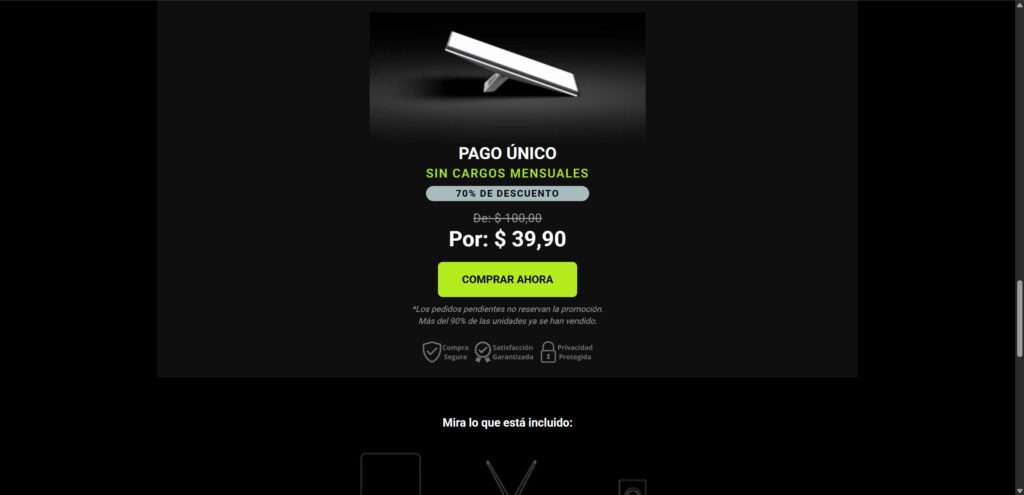
- A one-time payment of $39.90
- 70% discount from an alleged original price of $100
- No monthly fees
- Unlimited internet access via the Starlink Mini
- A “lifetime plan”
These features are presented as a promotional launch offer, urging users to act quickly as “90% of the units have been sold.”
Creating Urgency
Like many scams, this one relies heavily on psychological manipulation:
- Countdown timers suggesting limited-time offers
- Low stock alerts to create fear of missing out
- Fake reviews or testimonials designed to simulate customer satisfaction
These tactics create a sense of urgency that pushes users into making impulsive purchases without proper research.
False Claims of Security
The site displays icons like “Secure Purchase,” “Privacy Protected,” and “Satisfaction Guaranteed.” These badges mimic those from real e-commerce platforms, misleading customers into thinking their transactions are safe.
What You Really Get
Here’s the truth: they will either send you nothing at all or a cheap imitation device that does not connect to any satellite network, let alone offer functional internet service. In many reported cases, no package is delivered at all. When buyers attempt to contact support or request a refund, they find that the email addresses bounce back, phone numbers are fake, and customer service is non-existent.
The Real Risk
Beyond financial loss, entering your credit card information into such a site exposes you to identity theft and further fraud. Many victims have reported unauthorized transactions appearing on their bank statements days or weeks after making their purchase.
The scam is not just a monetary setback – it’s a serious breach of your personal data security.
How The Scam Works
Let’s break down exactly how this scam ensnares its victims. Understanding each stage can help you avoid falling for similar schemes in the future.
Step 1: You See an Ad
It often starts with an ad on social media platforms like Facebook, Instagram, or TikTok. These ads use phrases like:
- “Starlink Mini now available for just $39.90!”
- “No more monthly internet bills!”
- “Secure your lifetime plan today!”
The branding looks authentic, so users trust the message and click through.
Step 2: You Land on the Fake Website
You arrive at Starlinkoficial.com, where you see professional-grade images, logos, and a clean layout that mimics the real Starlink site. There is no obvious reason to doubt the site at first glance.
Key elements that build trust:
- Logos and brand colors that match the official Starlink website
- Images of satellite dishes that look identical to real Starlink equipment
- Language and terminology pulled directly from SpaceX communications
Step 3: You Are Hooked by the Offer
The site claims:
- A one-time payment gets you unlimited high-speed internet
- No hidden fees or future charges
- Delivery in 3–5 business days
- A “lifetime guarantee”
They also show a price slash from $100 down to $39.90 and use phrases like “Only today” or “Limited units available.”
Step 4: You Provide Payment Info
Once convinced, you proceed to checkout. You input your:
- Full name
- Shipping address
- Credit or debit card number
- Email address and phone number
After clicking “Buy Now,” you receive a generic email confirmation. There’s no invoice, no tracking number, and no further communication.
Step 5: The Wait Begins
You wait for a shipping confirmation email. It never arrives. Some receive fake tracking links that lead nowhere or to completely unrelated items. Most receive nothing at all.
Step 6: Attempting a Refund or Support
Victims try to contact the site for support. There is no working customer service. Emails are undeliverable, and the phone numbers listed do not work. The website may soon go offline or be replaced by a clone under a new name.
Step 7: Credit Card Fraud and Identity Theft
This is where the real damage begins:
- Unauthorized charges on your card
- Phishing attempts via email or text
- Your information sold on the dark web
Victims report credit card fraud, spam calls, and phishing messages shortly after purchasing from the site.
What To Do If You Have Fallen Victim to This Scam
If you’ve made a purchase from Starlinkoficial.com, act fast. Here are the steps you need to take:
1. Contact Your Bank Immediately
- Request a chargeback or dispute the transaction
- Inform them the site is fraudulent
- Cancel your current card and request a new one
2. Report the Scam to Authorities
- File a complaint with your country’s consumer protection agency
- In the U.S., report to the Federal Trade Commission (FTC) at reportfraud.ftc.gov
- Report the site to IC3 (Internet Crime Complaint Center)
- If you’re in another country, contact your equivalent fraud reporting agency
3. Monitor Your Credit and Bank Statements
- Watch for suspicious transactions
- Consider placing a fraud alert on your credit file
- Use a service like Credit Karma or Experian to monitor credit activity
4. Report the Website
- Report the domain to hosting providers and domain registrars (e.g., GoDaddy, Namecheap)
- Flag their ads on social media platforms
- Inform your email provider if you received phishing messages
5. Share the Warning
- Post your experience on forums like Reddit, TrustPilot, or Facebook
- Warn friends and family
- Help others avoid falling into the same trap
6. Avoid Similar Scams in the Future
- Always double-check the URL of a website
- Look for verified SSL certificates
- Research the company and product before buying
- Use a virtual credit card if available
- Be skeptical of extreme discounts and lifetime offers
The Bottom Line
Starlinkoficial.com is a scam. It exploits the trust associated with a real brand and offers fake promises to steal your money and personal data. Victims either receive nothing at all or a non-functioning imitation. Refunds are impossible, and the site is built solely to defraud.
If you’ve been affected, act quickly. Contact your bank, report the fraud, and spread awareness. And most importantly, always verify before you buy.
This isn’t just about losing $39.90 — it’s about protecting your digital identity and helping others avoid the same mistake.
Stay cautious, stay informed, and don’t let scammers win.

Reviews & discussion
0 commentsShare a firsthand experience, or ask a question.
Community reviews
starlinkoficial.com
Moderated reader experiences, not an editorial verdict.
Start the conversation
Have a question or something useful to share? Add the first comment.