

A new website called StimUSA.com is promising eligible individuals $1,400 in “free stimulus money” for 2025. Sounds great, right? Unfortunately, it isn’t. This offer is not only misleading, it may also be part of a larger scam operation designed to exploit unsuspecting users. If you stumbled across this site and wondered whether it’s real, you’re not alone. This detailed exposé breaks down why StimUSA.com is a scam, how it operates, and what to do if you’ve already interacted with it.
Scam Overview
What Is StimUSA.com Claiming?
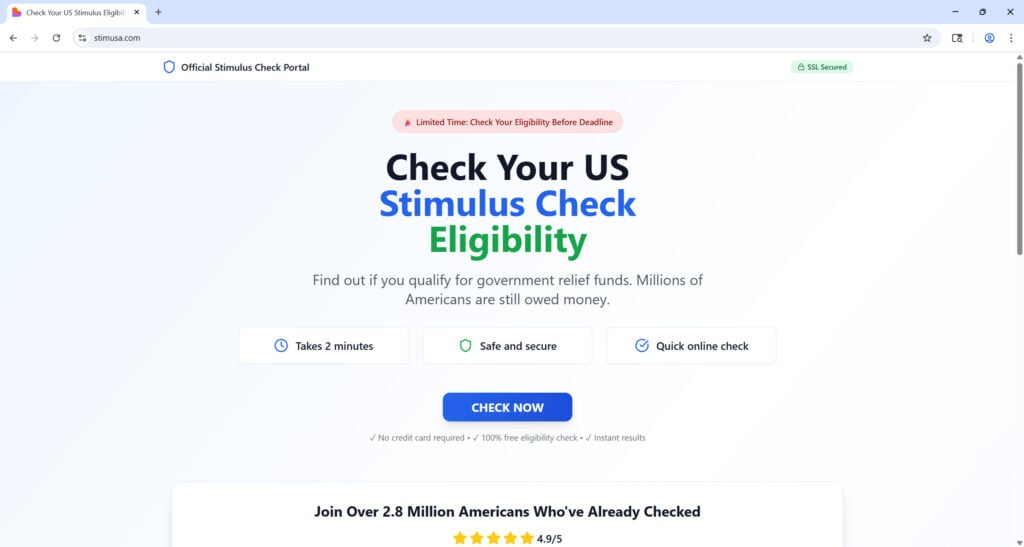
StimUSA.com is presenting itself as a legitimate economic relief initiative that allows individuals and families to claim a $1,400 stimulus check. The layout mimics the structure of official government websites, with buttons labeled “Check Your Eligibility” and “Claim Your Stimulus.”
But here’s where things start falling apart:
- The website claims to offer payments for 2023, yet the domain was only registered in 2025.
- It explicitly states in its fine print that it is not affiliated with any government agency.
- There is no legitimate economic stimulus check program being distributed in 2025.
Major Red Flags
- Suspicious Domain Timing
The domain was registered after the alleged stimulus year (2023), which makes it impossible for it to have played any official role in a legitimate government program. - No Government Affiliation
Real stimulus programs are managed through government domains such as IRS.gov or Benefits.gov. StimUSA.com clearly states it has no government affiliation. - No Contact Information
There is no address, no phone number, and no verifiable customer service listed. This lack of transparency is common with scam operations. - No Reviews or Digital Footprint
Legitimate services almost always have some form of user-generated feedback—on Trustpilot, Reddit, Google Reviews, or forums. StimUSA.com has zero mentions beyond its own promotional material. - Redirect Loops
Instead of giving you real information or application forms, the site redirects users to unrelated or vague offers. This often indicates a data-harvesting or affiliate revenue scheme. - Disguised Intentions
Everything about the site is designed to look legitimate, including professional design and official-sounding language. But dig a little deeper, and you’ll find there’s no solid foundation behind its claims.
Deceptive Content and Misleading Language
The language used on the site is purposefully vague, stating things like “financial assistance is available” without providing specifics. There’s also mention of “supporting local businesses” and “helping with essential needs,” which are common buzzwords used to generate trust.
None of the claims are backed by real documentation, links to federal programs, or any legal standing. This is content engineered to emotionally appeal to users who may be experiencing financial hardship.
Psychological Manipulation
The scammers behind this site are preying on vulnerable individuals who are already under stress. They use urgency (“first-come, first-served basis”), ease of access (“no strings attached”), and scarcity tactics to push users into clicking without thinking.
How the Scam Works
1. Initial Hook via Ads or Social Media
Users are often introduced to the StimUSA.com scam via ads on social media platforms, email blasts, or even text messages. These messages are designed to look urgent and official.
2. Landing on a Legitimate-Looking Website
The website design mimics that of real government pages. It includes headings like “Economic Relief Program” and “Stimulus Cheque Initiative,” paired with patriotic colors and a clean layout.
3. Call to Action: “Check Your Eligibility”
You are prompted to click a button to check if you qualify. This leads to a form that asks for your name, date of birth, Social Security number, address, and sometimes bank details.
4. Data Harvesting
The form isn’t verifying anything. Instead, it is harvesting your sensitive personal information, which can later be sold on the dark web or used in identity theft.
5. Redirects to Affiliate or Malware Sites
Once you’ve submitted your data, you’re redirected to unrelated sites—some of which may be filled with ads, require additional “sign-ups,” or even attempt to download malware to your device.
6. Follow-up Scams
After submitting your data, you may start receiving more scam emails, calls, or messages. Your information has now entered a scammer’s database, making you a target for future fraud.
7. No Payment Ever Arrives
Of course, there is no $1,400 payment. You receive no confirmation, no tracking, and no follow-up from any legitimate source. The site moves on to deceive the next victim.
Technical Aspects of the Scam
- Spoofed Pages: Often includes cloned sections of legitimate websites.
- HTTPS Protocol: Uses a secure connection to make the site look safe.
- Tracking Scripts: Likely employs cookies or scripts to track your clicks and gather further data.
The Real Cost
Falling for this scam can have dire consequences:
- Identity Theft: Stolen Social Security numbers can be used to open credit lines or file fake tax returns.
- Bank Fraud: If you’ve submitted banking details, scammers can attempt unauthorized transactions.
- Emotional Stress: Victims often experience anxiety and stress once they realize they’ve been scammed.
What to Do If You’ve Fallen Victim
If you’ve already interacted with StimUSA.com and submitted personal information, act quickly using the steps below:
1. Freeze Your Credit Immediately
Contact the three major credit bureaus (Experian, Equifax, TransUnion) and request a credit freeze to prevent any new accounts from being opened in your name.
2. Report the Scam
- FTC: Visit reportfraud.ftc.gov
- IRS: If you submitted tax-related info, notify the IRS through irs.gov/identity-theft-central
- IC3: File a report with the FBI’s Internet Crime Complaint Center at ic3.gov
3. Notify Your Bank
If you gave out your banking info, contact your bank immediately. Freeze or close your account and watch for unauthorized charges.
4. Enable Fraud Alerts
Place a fraud alert on your credit file to warn lenders that you may be a victim of identity theft.
5. Run a Full Security Scan
Use anti-virus software to run a comprehensive scan on your device. If malware was downloaded, remove it immediately.
6. Change Your Passwords
Change your login details on all major accounts, especially those using similar credentials.
7. Monitor Your Credit Reports
You are entitled to a free report from each bureau once a year through annualcreditreport.com. Check for suspicious activity.
8. Warn Others
Share your experience on forums, social media, or with friends and family to prevent others from falling into the same trap.
The Bottom Line
StimUSA.com is not a legitimate government aid site. It uses deceptive tactics, misleading information, and a highly polished interface to trick users into giving away sensitive personal data. If you see promises of $1,400 checks in 2025, know that no such stimulus exists.
Trust only government domains and verified sources when it comes to financial relief or tax credits. Bookmark IRS.gov and check with your accountant or tax professional before sharing any information online.
The internet is full of scams that prey on hope and urgency. Stay informed, stay skeptical, and protect your personal information like your future depends on it—because it very well might.
Frequently Asked Questions (FAQ) About the StimUSA.com Scam
Is StimUSA.com a real government website?
No. StimUSA.com is not affiliated with any government agency. Despite its professional appearance, it is a private site with no connection to the IRS, the U.S. Department of the Treasury, or any official stimulus program.
Are there any $1,400 stimulus checks being distributed in 2025?
No. As of now, there are no authorized $1,400 stimulus payments being issued by the U.S. government in 2025. All previous stimulus checks were part of federal relief efforts during the COVID-19 pandemic and have already ended.
How can I tell if a stimulus offer is a scam?
Here are a few red flags to look for:
- The website was recently registered and lacks history
- There’s no “.gov” domain or official government links
- You’re asked to provide sensitive data like your SSN or bank details
- There are no real contact details or customer support
- The site redirects you after submitting information
Always verify through IRS.gov or other official government sources.
What happens if I enter my personal information on a scam site?
Your information can be used for:
- Identity theft
- Credit fraud
- Fake tax returns
- Spam or phishing attacks
Scammers may sell or exploit your data for profit, leaving you exposed to serious financial harm.
Can I get my information removed from StimUSA.com?
Unfortunately, once your information is submitted to a fraudulent site, it may be stored or distributed without your knowledge. Your best defense is to act quickly:
- Freeze your credit
- Report the incident
- Change affected passwords
- Monitor your accounts closely
Why does the site look so professional if it’s a scam?
Scammers often design websites to mimic legitimate ones in order to build trust. They use real-sounding terms like “Relief Program” or “Cheque Initiative” to appear credible. Design alone is not proof of legitimacy.
How do I safely check if I’m eligible for any real stimulus or tax credit?
Visit IRS.gov or consult a trusted tax professional. Do not rely on social media ads or third-party websites making unsolicited offers.
Should I report StimUSA.com?
Yes. Reporting helps alert authorities and protect others. You can report the scam to:
- FTC: reportfraud.ftc.gov
- IRS: irs.gov/identity-theft-central
- FBI (IC3): ic3.gov
Can I get my money back if I was scammed?
If you entered financial details or lost money:
- Contact your bank or credit card provider immediately
- File a fraud report
- Request a chargeback or block further transactions
While recovery isn’t guaranteed, swift action improves your chances.








