

If you’ve stumbled upon a website claiming that you can earn up to $750 in Target gift cards just by filling out a quick form or completing a few deals, you’ve likely come across TarReward.com or a similar site. The promise sounds simple and exciting — a few clicks, a few surveys, and a free Target gift card worth hundreds of dollars. But as many users have learned, this is not a legitimate promotion from Target. It’s a scam designed to collect personal data and generate profit through affiliate fraud.
TarReward.com looks professional at first glance, featuring the Target logo, red color scheme, and persuasive calls to action. Yet behind this slick appearance lies a deceptive operation aimed at tricking people into giving away their information or signing up for unwanted services. In this in-depth guide, we’ll break down everything you need to know about the TarReward.com Target Gift Card Scam — how it works, what signs to look for, and what to do if you’ve already engaged with it.
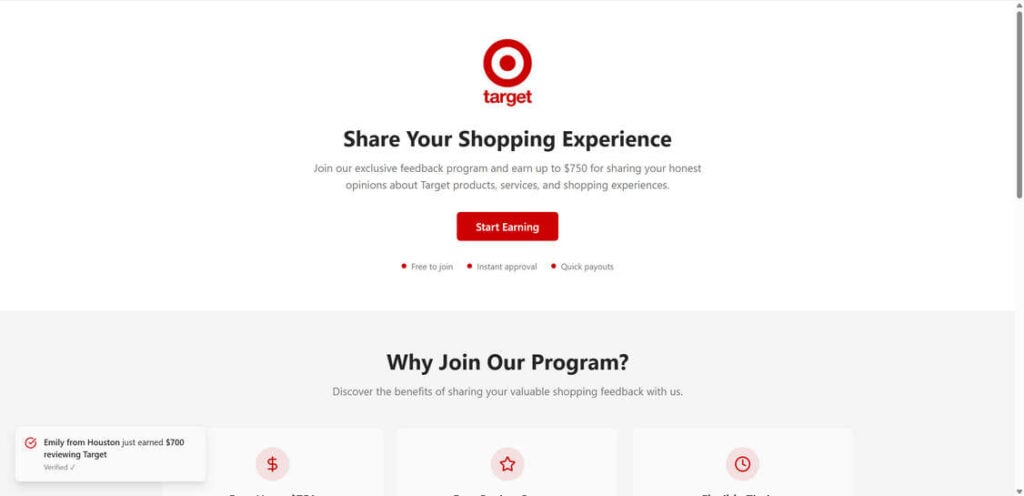
Scam Overview
The TarReward.com Target Gift Card Scam is part of a larger network of fraudulent “free gift card” offers circulating online. It mimics the branding of major retailers like Target, Walmart, and Amazon to lure unsuspecting users into completing tasks or offers under the false promise of a high-value reward.
What TarReward.com Looks Like
At first glance, TarReward.com appears clean and minimal. It displays the Target logo prominently at the top, followed by a headline that reads:
“Click Below to Claim Your Target Gift Card.”
Underneath, it includes a bright red Apply Today button and a short “instruction” list:
- Click “Apply Today” and answer a few basic questions.
- Enter your email and complete 3–5 deals.
- Finish tasks and earn credit between $100–$750.
This structure is deliberately designed to look legitimate and effortless. The typography, logo usage, and language mimic official Target branding, which lowers skepticism. However, the simplicity hides a network of affiliate redirections and data harvesting schemes.
The False Promise
The scam’s core promise — earning between $100 and $750 in Target gift cards — is completely fabricated. Target does not run any promotion through TarReward.com or similar websites. The supposed “deals” and “tasks” you’re asked to complete are not connected to Target in any way. They are affiliate marketing offers that generate small commissions for the scammers each time someone participates.
Once users complete several deals, they quickly discover there is no gift card, no confirmation email, and no way to contact support. The promised “reward” never materializes.
Exploiting Trust in the Target Brand
One of the reasons TarReward.com is so effective is that it leverages the trust and familiarity of the Target brand. Target is a household name with millions of loyal customers. By using the company’s logo and color scheme, scammers create instant credibility.
Most users assume that if Target’s name appears on the site, it must be legitimate. However, this is unauthorized use of Target’s intellectual property. Target’s official promotions are only hosted on their verified domain (Target.com) or their official marketing partners, not on unrelated sites like TarReward.com.
Red Flags That Expose the Scam
Several warning signs immediately reveal that TarReward.com is not a genuine Target promotion:
- Unverified domain: The website is not hosted on Target.com or any affiliated domain.
- No HTTPS security: Many scam sites either lack proper encryption or use temporary certificates.
- No contact information: There’s no phone number, address, or real company listed anywhere.
- Vague instructions: The steps are generic, with no details about how or when you’ll receive a gift card.
- Recently registered domain: TarReward.com was registered only recently — a common sign of short-term scams.
- Affiliate tracking links: Clicking the “Apply Today” button redirects through multiple affiliate URLs.
The Real Goal: Data and Commission
TarReward.com doesn’t want to give away gift cards — it wants your data and your participation. Every time you enter your email, name, or phone number, that information is stored, shared, or sold to advertisers.
Furthermore, every “deal” you complete — such as signing up for a free trial, downloading an app, or filling out a survey — earns the scammers a small payout. With enough users completing these steps, the fraudsters make significant money while you receive nothing.
Victims’ Reports
People who’ve interacted with TarReward.com often report:
- Floods of spam emails and text messages.
- Hidden subscription charges from “free trials.”
- No confirmation or delivery of any Target gift card.
- Difficulty unsubscribing or deleting their information.
Victims also find that their data is shared across multiple marketing databases, leading to persistent unwanted contact.
The TarReward.com Target Gift Card Scam is a deceptive affiliate marketing scheme that hides behind Target’s trusted image. It offers fake rewards, collects personal data, and profits through affiliate links. There are no real prizes, no legitimate deals, and no official connection to Target. The only beneficiaries are the scammers running the operation.
How the Scam Works
Understanding how this scam functions step by step is crucial to recognizing similar schemes in the future. Here’s how TarReward.com typically operates.
Step 1: The Hook — Social Media Ads and Pop-Ups
The scam begins with social media ads or online pop-ups promoting free Target gift cards. These ads appear on platforms like Facebook, Instagram, YouTube, and sometimes on low-quality websites. They often include messages such as:
- “You’ve been selected to receive a $750 Target gift card!”
- “Congratulations! Claim your Target reward today.”
- “Limited-time offer: Free Target card for loyal customers!”
The ads use vibrant Target colors, fake testimonials, and sometimes countdown timers to create urgency. The goal is to get users to click without thinking.
Step 2: The Redirect — From Ad to Landing Page
Clicking the ad takes you to TarReward.com, which looks clean and trustworthy. It contains the Target logo and straightforward instructions. The design is intentionally minimal to appear “official.” The big red Apply Today button stands out as the only clickable element, guiding users toward the next step.
Step 3: The Form — Data Collection Begins
After clicking “Apply Today,” users are asked to provide basic details — usually name, email address, and sometimes phone number or ZIP code. The site claims this information is required to “verify eligibility.” In reality, it’s the first layer of data harvesting.
Your email and phone number are stored and later sold to advertisers or spam marketing companies. This is why victims begin receiving promotional emails and texts soon after signing up.
Step 4: The “Deals” Trap
After submitting your information, you’re told to complete 3–5 deals to unlock your reward. These deals include:
- Signing up for free trials of products or services.
- Downloading specific apps.
- Completing surveys.
- Registering for additional promotional offers.
Each completed task triggers a commission payment for the scammers through affiliate tracking systems. For example, if you download an app, the scammers might earn a few dollars. Multiply that by thousands of users, and the profits become significant.
Step 5: Hidden Costs and Subscriptions
Some deals require credit card information for “verification” or “shipping purposes.” Victims who provide this data often find that the free trials automatically convert into paid subscriptions, billing them monthly.
Because these offers are hosted by third-party companies, canceling them can be complicated. Victims frequently discover unexpected charges on their statements weeks later.
Step 6: The “Almost There” Message
To keep users engaged, TarReward.com often displays progress bars or messages like “You’re almost done!” or “Just one more step to claim your $750 card.” This tactic exploits sunk-cost psychology — people who’ve already invested time feel compelled to continue.
Step 7: No Gift Card Ever Arrives
After completing all steps, users are typically met with vague confirmation messages like “Thank you for participating” or “Your submission is being processed.” No gift card is ever delivered. The email address provided may receive spam but never a reward.
Step 8: Data Monetization
Once collected, your personal data is added to marketing lists. This data can be used to:
- Send spam advertising messages.
- Target you with future scams.
- Sell your information to third parties.
In some cases, scammers may use phishing tactics to extract even more sensitive information.
Step 9: Domain Recycling
When TarReward.com starts attracting negative attention, the scammers often shut it down and launch a new website with a different name — such as ShopCardRewards.com, GiftClaimHub.net, or similar. The design and structure remain identical, allowing them to continue the cycle.
Step 10: Repeat and Expand
This scam format is replicated endlessly across different brands. You’ll find nearly identical pages offering fake gift cards from Walmart, Amazon, ALDI, and Costco. The underlying mechanics never change — only the logo and color scheme.
What to Do If You Have Fallen Victim to the TarReward.com Scam
If you’ve entered information or completed offers on TarReward.com, take these steps immediately to protect yourself.
1. Stop Using the Site
Exit TarReward.com immediately and do not click any more buttons or links. Avoid completing additional offers or entering further details.
2. Change Your Passwords
If you used the same password anywhere else, change it immediately. Use unique, strong passwords for each account and enable two-factor authentication wherever possible.
3. Monitor Your Email and Bank Accounts
Watch for suspicious activity, unauthorized charges, or unfamiliar subscriptions. If you notice new recurring payments, contact your bank to cancel them.
4. Unsubscribe and Filter Spam Emails
Mark spam emails as “junk” and use your email provider’s filters to block similar messages. Do not click unsubscribe links in suspicious emails, as they may confirm that your email address is active.
5. Cancel Any Free Trials or Subscriptions
If you entered credit card information for any deals, contact the companies directly to cancel. Notify your bank or credit card issuer about the potential fraud and request chargebacks if needed.
6. Run Security Scans
If you downloaded any apps or files from the scam’s “deals,” run antivirus or anti-malware scans on your device. Remove any unfamiliar programs immediately.
7. Report the Scam
Report TarReward.com and related scams to the following authorities:
- Federal Trade Commission (FTC): reportfraud.ftc.gov
- Internet Crime Complaint Center (IC3): ic3.gov
- Better Business Bureau (BBB): bbb.org/scamtracker
- Target’s customer service: to notify them of brand misuse.
8. Consider Identity Protection
If you provided sensitive information like your address, phone number, or credit card details, consider signing up for identity theft protection. These services can monitor suspicious activity linked to your name.
9. Educate Others
Warn your friends and family about TarReward.com. Scammers rely on mass participation. Sharing your experience can prevent others from becoming victims.
10. Stay Vigilant for Similar Scams
Keep an eye out for new websites offering too-good-to-be-true gift cards or rewards. Always verify promotions directly through the company’s official site.
Is Your Device Infected? Run a Free Malware Scan
Slow performance, constant pop-ups, or strange behavior? These are classic signs of a malware infection. The fastest way to find out is to scan your device with Malwarebytes Free — one of the most trusted malware removal tools available.
The free version detects and removes the most common threats, including:
- Adware — the cause of those annoying pop-ups
- Browser hijackers — unwanted redirects and changed homepages
- Trojans and spyware — hidden programs stealing your data
- Potentially unwanted programs (PUPs) — software you never asked for
👉 Select your device below — Windows, Mac, or Android — then follow the simple steps to download Malwarebytes, scan your system, and remove any threats it finds. The scan usually takes 5 to 20 minutes.
Run a Malware Scan with Malwarebytes for Windows
Malwarebytes is one of the most popular and trusted anti-malware tools for Windows — and it’s completely free for removing infections. It catches threats that many antivirus programs miss, including adware, browser hijackers, and trojans. Follow the steps below to scan and clean your PC in just a few minutes.
Download Malwarebytes
Click the button below to download the latest version of Malwarebytes for Windows from the official source. The free version is all you need — it will scan your computer and remove adware, browser hijackers, and other malicious software at no cost.
Download MalwarebytesOfficial installer for Windows 11 and 10. Your download starts right away.Want real-time protection? See Malwarebytes Premium Malwarebytes Free for WindowsScans and removes malware at no cost
-
Install Malwarebytes
When the download finishes, open your Downloads folder and double-click the MBSetup file. If Windows shows a User Account Control pop-up, click “Yes” to allow the installation.

Follow the On-Screen Prompts to Install Malwarebytes
The setup wizard will walk you through a few quick screens:
-
Choose where you’re installing the program — “Personal Computer” or “Work Computer” — then click Next.

-
Malwarebytes will now install on your device. This usually takes under a minute.

-
When installation is complete, the “Welcome to Malwarebytes” screen will open automatically.

-
On the final screen, click Open Malwarebytes to launch the program.

-
Enable “Scan for Rootkits”
Before scanning, turn on rootkit detection so Malwarebytes can find even the most hidden threats. Click the Settings gear icon on the left side of the screen.

In the settings menu, find “Scan for rootkits” and click the toggle so it turns blue.

Done? Click “Dashboard” in the left pane to return to the main screen.
Start the Scan
Click the blue Scan button. Malwarebytes will automatically update its virus database and start checking your computer for malware.

-
Wait for the Scan to Finish
The scan checks your entire system for browser hijackers and other malicious programs, so it can take 5 to 20 minutes depending on your computer. Feel free to do something else — just check back occasionally to see the progress.

-
Quarantine the Detected Threats
When the scan is done, you’ll see a list of everything Malwarebytes found — malware, adware, and potentially unwanted programs. Click the “Quarantine” button to remove all of them at once.

Malwarebytes will now remove the malicious files and registry entries and move them safely into quarantine.

-
Restart Your Computer
Some threats can only be fully removed after a reboot. If Malwarebytes asks you to restart, click Yes. Once you’re logged back in, Malwarebytes has finished removing the threats it found.

That’s it — your Windows PC is now clean of trojans, adware, and other malware, and should be back to running smoothly.
If you are still having problems with your computer after completing these instructions, then please follow one of the steps:
- Run a computer scan with ESET Online Scanner
- Ask for help in our Windows Malware Removal Help & Support forum.
Run a Malware Scan with Malwarebytes for Mac
Malwarebytes for Mac is a free on-demand scanner that removes the malware other security software tends to miss — adware, browser hijackers, and unwanted programs included. Cleaning an infected Mac with Malwarebytes has always been completely free, and it’s our go-to recommendation. Follow the steps below to scan and clean your Mac in just a few minutes.
-
Download Malwarebytes for Mac
Click the button below to download the latest version of Malwarebytes for Mac.
Download MalwarebytesOfficial installer for macOS. Your download starts right away.Want real-time protection? See Malwarebytes PremiumMalwarebytes Free for MacScans and removes malware at no cost -
Open the Malwarebytes setup file
When the download finishes, open your Downloads folder and double-click the setup file to begin the installation.

-
Follow the On-Screen Prompts to Install Malwarebytes
The Malwarebytes for Mac Installer will guide you through a few quick screens. Click “Continue” and keep following the prompts until the installation completes.



When the installation is complete, Malwarebytes opens to the Welcome to Malwarebytes screen. Click “Get started“.
-
Select “Personal Computer” or “Work Computer”
Malwarebytes will ask what type of computer you’re installing it on. Click either Personal Computer or Work Computer, whichever applies.

-
Start the Scan
Click the “Scan” button. Malwarebytes will automatically update its detection database and begin checking your Mac for malware.

-
Wait for the Scan to Finish
Malwarebytes will scan your Mac for adware, browser hijackers, and other malicious programs. This can take a few minutes, so feel free to do something else — just check back occasionally to see the progress.

-
Quarantine the Detected Threats
When the scan is done, you’ll see a list of everything Malwarebytes found. Click the “Quarantine” button to remove all the threats at once.

-
Restart Your Mac
Malwarebytes will now remove all the malicious files it found. Some threats can only be fully removed after a reboot — if Malwarebytes asks you to restart, allow it. Once you’re logged back in, your Mac is clean.

That’s it — your Mac is now free of adware, rogue browser extensions, and other potentially harmful software.
If you are still experiencing problems while trying to remove a malicious program from your computer, please ask for help in our Mac Malware Removal Help & Support forum.
Run a Malware Scan with Malwarebytes for Android
Malwarebytes for Android automatically detects and removes dangerous threats like malware and ransomware so you don’t have to worry about your most-used device being compromised. Aggressive detection of adware and potentially unwanted programs keeps your Android phone or tablet running smooth.
-
Download Malwarebytes for Android.
You can download Malwarebytes for Android by clicking the link below.
Get Malwarebytes for AndroidOpens Google Play in a new tab.Want real-time protection? See Malwarebytes Premium for AndroidMalwarebytes for AndroidScans your phone and removes malware at no cost -
Install Malwarebytes for Android on your phone.
In the Google Play Store, tap “Install” to install Malwarebytes for Android on your device.

When the installation process has finished, tap “Open” to begin using Malwarebytes for Android. You can also open Malwarebytes by tapping on its icon in your phone menu or home screen.

-
Follow the on-screen prompts to complete the setup process
When Malwarebytes will open, you will see the Malwarebytes Setup Wizard which will guide you through a series of permissions and other setup options.
This is the first of two screens that explain the difference between the Premium and Free versions. Swipe this screen to continue.
Tap on “Got it” to proceed to the next step.
Malwarebytes for Android will now ask for a set of permissions that are required to scan your device and protect it from malware. Tap on “Give permission” to continue.
Tap on “Allow” to permit Malwarebytes to access the files on your phone.
-
Update database and run a scan with Malwarebytes for Android
You will now be prompted to update the Malwarebytes database and run a full system scan.

Click on “Update database” to update the Malwarebytes for Android definitions to the latest version, then click on “Run full scan” to perform a system scan.

-
Wait for the Malwarebytes scan to complete.
Malwarebytes will now start scanning your phone for adware and other malicious apps. This process can take a few minutes, so we suggest you do something else and periodically check on the status of the scan to see when it is finished.

-
Click on “Remove Selected”.
When the scan has been completed, you will be presented with a screen showing the malware infections that Malwarebytes for Android has detected. To remove the malicious apps that Malwarebytes has found, tap on the “Remove Selected” button.

-
Restart your phone.
Malwarebytes for Android will now remove all the malicious apps that it has found. To complete the malware removal process, Malwarebytes may ask you to restart your device.
That’s it — your Android phone is now clean — no more malicious apps, adware, or browser redirects.
If you are still having problems with your phone after completing these instructions, then please follow one of the steps:
- Restore your phone to factory settings by going to Settings > General management > Reset > Factory data reset.
- Ask for help in our Mobile Malware Removal Help & Support forum.
Stay Protected: Block Ads and Malicious Sites
Now that your device is clean, keep it that way. Most infections start with a malicious ad or a fake download button — so blocking them at the source is your best defense.
We recommend AdGuard, which blocks malicious ads, phishing pages, and dangerous redirects before they can reach you.
👉 Download AdGuard and browse safely
The Bottom Line
The TarReward.com Target Gift Card Scam is another example of how scammers use trusted brands to deceive internet users. By promising large Target gift cards for minimal effort, these fraudsters trick people into sharing personal data and completing affiliate offers that generate profit for them — not you.
Target has no affiliation with TarReward.com, and there are no legitimate $750 gift card giveaways online. Real promotions are only hosted through Target’s verified channels.
If something seems too good to be true, it probably is. Always verify the source of any offer before entering personal information, and never trust websites that ask you to complete “deals” for rewards.
Stay alert, stay informed, and help others recognize the signs of online scams like TarReward.com. The more awareness we spread, the less power scammers have to exploit trust and curiosity.
Frequently Asked Questions
What is the TarReward.com Target Gift Card Scam?
The TarReward.com Target Gift Card Scam is a fake promotion that claims you can earn or win a Target gift card worth up to $750 by completing a few simple tasks. The site instructs users to “Apply Today,” provide personal information, and finish 3–5 “deals” or offers to receive their gift card. However, this promotion has no connection to Target. The entire setup is designed to collect user data and drive traffic to affiliate links, which earn scammers commission payments whenever someone completes an offer. Victims never receive a real Target gift card, and many end up with spam emails, unwanted subscriptions, or small unauthorized charges.
Is TarReward.com officially affiliated with Target?
No, TarReward.com has no affiliation with Target. The site uses Target’s logo, red color scheme, and branding to create a false sense of legitimacy, but Target has publicly confirmed it does not sponsor or endorse such offers. Genuine Target promotions only occur on Target’s official website or verified social media accounts. Any third-party website claiming to give away high-value gift cards in exchange for completing offers should be considered fraudulent.
How does the TarReward.com Target Gift Card Scam work?
The scam works through a combination of deceptive marketing, data harvesting, and affiliate manipulation. Here’s how the process typically unfolds:
- You see a social media ad or online pop-up claiming you can earn a $750 Target gift card.
- Clicking the ad directs you to TarReward.com, which looks like an official Target page.
- The site asks for your email address and personal details to “verify eligibility.”
- You’re told to complete several “deals” — such as signing up for trials, downloading apps, or answering surveys.
- Each deal generates small affiliate commissions for the scammers.
- After finishing all the steps, you never receive any reward. Instead, your data is sold or used to target you with spam and other scams.
Why is TarReward.com a scam?
TarReward.com is a scam because it uses false claims and the unauthorized Target logo to deceive people. The site promises rewards that do not exist, manipulates users into providing personal data, and directs them to affiliate offers for the scammers’ financial gain. There’s no genuine verification process, no gift card distribution, and no connection to Target. Instead, victims end up losing time, privacy, and sometimes money through hidden subscriptions linked to the “deals” they completed.
What are the signs that TarReward.com is fake?
There are several clear red flags that expose TarReward.com as a fraudulent website:
- The domain name is not owned or operated by Target.
- The site has no HTTPS security certificate or privacy policy.
- There’s no contact information or customer support.
- The language is vague and generic, lacking legal disclaimers.
- The process requires completing unrelated “deals” to claim the prize.
- The domain is newly registered, which is common for short-lived scam sites.
- No one online has ever reported successfully receiving a gift card.
If a website exhibits these warning signs, it’s almost certainly a scam.
What happens if I complete the deals on TarReward.com?
Completing deals on TarReward.com will not earn you a Target gift card. Each task you complete earns the scammers money through affiliate networks. These deals may include signing up for free trials or services that later begin billing you automatically. Many victims report unauthorized charges, continuous spam emails, and unwanted app downloads after finishing the tasks. Ultimately, you provide value to the scammers while gaining nothing in return.
Why do scammers use Target’s logo and colors?
Scammers behind TarReward.com use Target’s familiar red color scheme and bullseye logo to build trust instantly. They know that people are more likely to believe an offer if it appears associated with a recognizable brand. This technique, called brand impersonation, is a common tactic in online fraud. It lowers skepticism and increases click rates. However, Target’s official marketing and giveaways never occur on third-party websites like TarReward.com.
What should I do if I entered my information on TarReward.com?
If you’ve already entered your information, follow these steps immediately:
- Stop interacting with the website and close the page.
- Change your passwords, especially if you reused them elsewhere.
- Monitor your email inbox for spam or phishing attempts.
- Run antivirus and anti-malware scans on your device.
- Cancel any free trials or subscriptions you may have signed up for.
- Contact your bank or credit card company if you entered payment details.
- Report the scam to the FTC and other authorities to help stop it.
Will I ever receive the $750 Target gift card from TarReward.com?
No, you will never receive a real gift card from TarReward.com. The entire promotion is fabricated. Once you’ve provided your information or completed the so-called deals, there is no follow-up or reward distribution. Victims often receive vague messages like “Your submission is being processed,” but the gift card never arrives.
How can I report the TarReward.com Target Gift Card Scam?
You can report this scam to multiple authorities and organizations to help prevent others from being victimized:
- Federal Trade Commission (FTC): Report at reportfraud.ftc.gov.
- Internet Crime Complaint Center (IC3): File a complaint at ic3.gov.
- Better Business Bureau (BBB): Submit scam details at bbb.org/scamtracker.
- Target Customer Service: Contact Target directly to notify them of brand misuse.
Providing screenshots, URLs, and detailed descriptions will help investigators track and shut down similar scams.
What should I do if I provided my credit card information?
If you entered your credit card details on TarReward.com or while completing offers:
- Contact your bank or credit card issuer immediately.
- Cancel the card and request a replacement to prevent future unauthorized charges.
- Dispute any suspicious or recurring transactions.
- Monitor your statements closely for additional charges.
- Avoid entering card details on any unfamiliar website in the future.
Why do people fall for scams like TarReward.com?
People often fall for scams like TarReward.com because they combine elements of trust, urgency, and reward. The use of the Target brand builds credibility, while messages like “Apply Now” and “Limited Time Offer” create pressure to act quickly. Many people don’t pause to verify legitimacy when the promise of an easy reward feels real. Scammers know this and exploit emotional decision-making.








