

Over 700,000 people have fallen for a fake viral post on Facebook and Instagram claiming you can stop Meta from accessing your data. Celebrities like Julianne Moore, Sarah Paulson, and James McAvoy shared this misleading post online. But the truth is, simply sharing a post won’t prevent Meta from collecting your information.
This article will uncover the truth behind the Goodbye Meta AI trend and detail exactly how you can control how Meta uses your data.
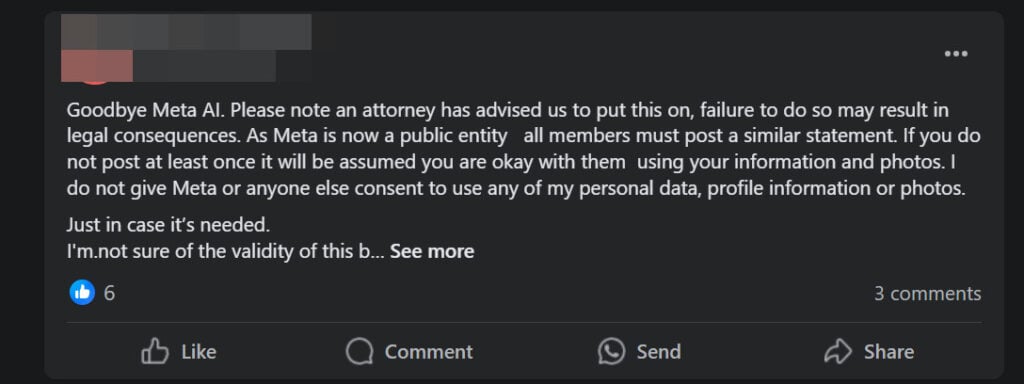
Overview of the Viral Goodbye Meta AI Scam
A post claiming you can stop Meta from accessing your data by sharing a message has gone viral on Facebook and Instagram.
The post states that because Meta is now a public company, you must share the message or risk legal action. It claims that not sharing the post counts as permission for Meta to use your photos and information.
Over 700,000 people, including celebrities, shared this misleading message. However, privacy experts confirm sharing a post will not prevent Meta from collecting your data.
So what’s really going on here? Let’s break down the facts behind this viral scam.
The Post’s Claims Are False
The viral Goodbye Meta AI post claims sharing the message will:
- Stop Meta from using your personal data and photos
- Prevent legal trouble
However, this is misinformation. Sharing a post does not override Meta’s terms of service or stop data collection.
Here is what the message says:
Goodbye Meta AI. A lawyer has told us to share this, and if you don’t, there might be legal trouble. Since Meta is now a public company, everyone needs to post something like this.
If you don’t share this at least once, it will be taken as you agreeing to let them use your info and photos. I do not give Meta or anyone else permission to use my personal data, profile information, or photos.
Meta’s Privacy Policy Allows Data Collection
Here are the facts about Meta’s privacy policy:
- In June 2022, Meta updated its privacy policy to expand how it uses customer data.
- The updates allow Meta to use your posts, photos, and information to train AI systems like chatbots.
- You agree to this simply by having a Facebook or Instagram account.
- Sharing a post does not revoke these permissions.
The Viral Post Exploits Confusion Around Meta’s Policy
The Goodbye Meta AI trend capitalizes on confusion around Meta’s privacy policy changes. By sharing the post, people hope to control how their data is used.
But the reality is, posting a message does nothing to stop Meta from collecting your information. The only way to limit data collection is by adjusting your account settings.
Scammers Use Viral Posts to Gain Likes and Followers
Scammers and shady accounts often create viral scam posts. Their goal is to quickly gain likes, comments, and followers – not protect your privacy.
Once they gain an audience, scammers edit posts to share spam, malware and phishing links. The Goodbye Meta AI post lets them amass followers rapidly.
In summary, the claims made by the viral post are completely false. Sharing the message will not prevent Meta from accessing your data. Now let’s look at exactly how this scam works.
How the Viral Goodbye Meta AI Scam Works
The Goodbye Meta AI scam is highly effective because it preys on people’s privacy concerns around Meta’s policy update. Here’s how it works to gain traction:
1. Scammers Create a Post Warning of Legal Action
Scammers write an alarming post, claiming you must share the message or face legal consequences. This creates a sense of urgency to share the post right away.
2. Celebrities and Influencers Share the Post
Well-known accounts share the fake message, misleading their followers into thinking the post protects their privacy. Their shares give the scam credibility.
3. Post Goes Viral Through Sharing
Ordinary users see celebrities sharing the post and believe it’s real. They share the message with their own networks, fueling the viral effect.
4. Scammers Gain Followers and Interactions
As the post spreads, scammers rapidly gain new followers. All the comments and shares boost their account’s credibility and reach.
5. Scammers Edit Post to Share Spam Links
Once they build an audience, scammers edit the viral post. They replace it with phishing links, shady offers, and malware downloads.
6. Scam Targets Followers Gained From Viral Post
Everyone who followed the account from the original post now sees the edited spam or phishing content in their feed.
This is an effective social engineering strategy that exploits people’s privacy concerns around Meta’s policy changes. Rather than protect your data, the viral post feeds scammers’ follower counts.
What to Do If You Fell For the Goodbye Meta AI Scam
If you shared the Goodbye Meta AI post, don’t panic. Here are some steps you can take to secure your accounts and data:
1. Delete the Viral Post From Your Profile
If you shared the scam message, delete it from your profile immediately. This prevents you from spreading misinformation to more people.
2. Review Your Profile’s Privacy Settings
Check your privacy settings on Facebook, Instagram and other linked social accounts. Tighten settings around who can see your content.
3. Enable Two-Factor Authentication
Turn on two-factor authentication for an extra layer of security on logins. This prevents scammers from accessing your account if they get your password.
4. Change Your Passwords
To be safe, change your passwords on all social media accounts. Make them strong and unique for each profile.
5. Watch For Suspicious Activity
Keep monitoring your accounts closely over the next weeks for unusual posts or messages – signs of hacking.
6. Report Fake Accounts
If you see the scam post or suspicious accounts, report them immediately to Meta. This helps curb the spread of misinformation.
7. Limit Ad Targeting in Settings
Adjust your ad preferences and data settings. Opt out of behavioral profiling to limit how your data is used.
Stay vigilant for new viral scams that may emerge around Meta’s privacy policy. And be thoughtful about what posts you interact with to avoid falling for misinformation campaigns.
How to Really Stop Meta From Accessing Your Personal Data
While the viral post is useless, you do have options to limit how Meta uses your information. Here are a few key steps to take control of your privacy settings:
Adjust Data Usage in Privacy Center
Inside the Privacy Center, you can view and manage how your data is used for ad targeting and AI training. Turn these options off.
Opt Out of Data Collection Where Possible
On Instagram and Facebook, opt out of options like data partnerships, facial recognition, and location sharing.
Restrict Old Posts and Profile Information
Change past posts to “Friends Only” and limit who can see your bio info and contacts.
Delete Old Posts and Accounts
Removing outdated content prevents Meta from accessing it. You can also delete accounts entirely.
Use Privacy Checkup Tool
This walks you through key privacy settings like app permissions, profile visibility, and data controls.
While no single step prevents all data collection, adjusting these settings significantly limits how much of your information Meta can access.
Being aware of viral scams claiming to protect your privacy is also key.Frequently Asked Questions About the Goodbye Meta AI Scam
1. What is the Goodbye Meta AI trend?
The Goodbye Meta AI trend is a viral scam spreading on Facebook and Instagram. A fake post claims that sharing the message will prevent Meta from accessing your personal data and photos. Over 700,000 accounts, including celebrities, have shared this misinformation.
2. Does sharing the Goodbye Meta AI post actually stop data collection?
No, simply sharing a post does not stop Meta from collecting your data. The post exploits confusion around Meta’s privacy policy changes, but has no legal bearing. You must adjust your account settings to limit data access.
3. Why did so many people share this post?
The post spreads rapidly because it causes alarm. It claims legal action if you don’t share the message. When celebrities shared it, many users assumed the information was accurate.
4. Who is behind the Goodbye Meta AI trend?
Security experts say scammers and shady accounts create these fake viral privacy posts. Their goal is to gain followers rapidly by exploiting people’s concerns around data privacy.
5. What do scammers do after the post goes viral?
Once their follower count grows, scammers edit the viral post. They replace it with phishing links, malware downloads, and other spam content.
6. How can I tell if a viral privacy post is a scam?
Be wary of posts that claim legal action if you don’t share them or say you must share them. Viral posts promising an easy fix to a complex issue like data privacy are often scams.
7. What should I do if I shared the Goodbye Meta AI post?
If you shared the post, delete it immediately to avoid spreading misinformation. Also review your privacy settings and enable two-factor authentication as a precaution.
8. How do I really stop Meta from collecting my data?
Use the Privacy Center to limit data use for advertising and AI training. Adjust privacy settings like app permissions and facial recognition. Opt out of data sharing options.
9. Are there any other steps I can take to improve my privacy?
You can delete old posts, restrict past posts to friends only, use privacy checkup tools, and delete accounts entirely. Limiting ad targeting also minimizes data collection.
10. What should I do going forward to avoid scams?
Carefully scrutinize privacy posts for misleading claims or calls to action. Report fake accounts to social platforms. Stay up to date on policy changes from reputable news sites.
The Bottom Line
The viral Goodbye Meta AI post preys on people’s concerns around privacy at the expense of spreading misinformation. While sharing a post does nothing, you do have real options to manage how Meta accesses and uses your personal data.
Use Meta’s privacy tools, limit tracking settings, and opt out where possible. Be wary of scams exploiting the privacy policy confusion – no post alone can override what you agreed to in Meta’s terms.
This article is for educational purposes only and does not constitute professional, financial or legal advice. The content is intended for general information and should not be construed as definitive guidance. Information contained herein is subject to change without notice.  For concerns, please contact us via the provided form.
If you are the owner of the website or product in question and wish to offer clarifications regarding your business or website, please reach out to us through the provided Contact Form.

Join the discussion
0 commentsShare your experience or ask a question about this article.
Discussion
Start the conversation
Have a question or something useful to share? Add the first comment.