


An upbeat video says one hidden phone setting can produce more than $100 each day. The promise arrives just when bills feel especially heavy.
The presentation looks simple enough to try, yet the important details sit outside the dramatic headline. Those details deserve careful examination before anyone pays.
Overview
A secret setting promises effortless daily income
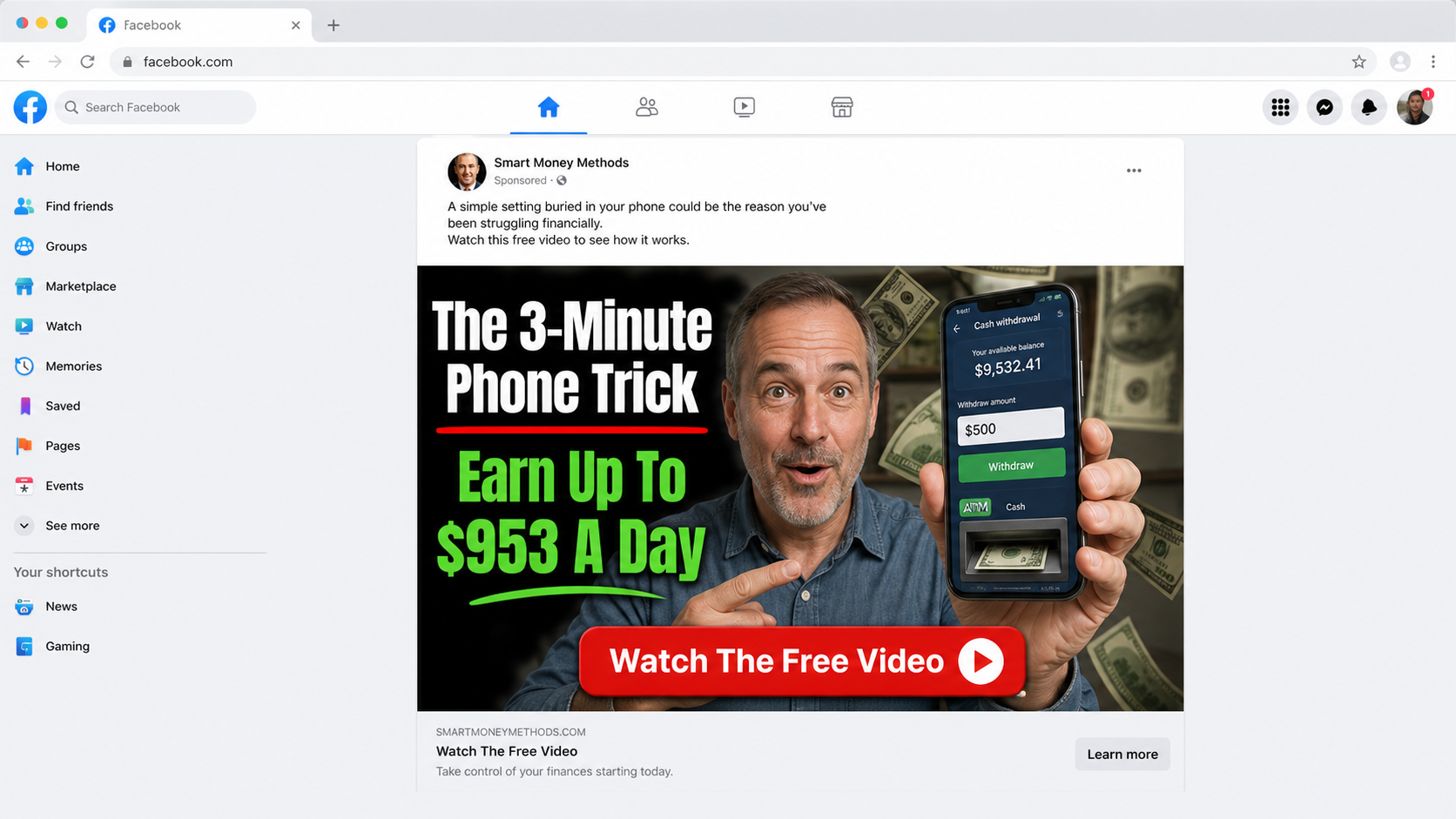
The 3-minute phone trick money scam suggests an ordinary smartphone contains a neglected feature that converts attention into daily payouts.
Some versions claim users can earn $953 every day. Others use different totals, but the promise remains unusually large, quick, and nearly automatic.
The pitch avoids explaining what customers sell, who pays them, why buyers exist, or how income is calculated. Mystery is presented as exclusivity.
That missing business model is the first major problem. A legitimate opportunity can describe its work before collecting a fee.
A hardship story lowers the viewer’s defenses
The sales video may introduce a parent facing medical bills, job loss, foreclosure, or another crisis. The character discovers the method after conventional options fail.
This story is not included merely for entertainment. It mirrors the anxiety of viewers searching for urgent income and makes skepticism feel unnecessarily cynical.
The narrator often emphasizes that no technical skills, audience, inventory, or experience are required. Each removed obstacle makes the offer sound accessible.
Yet earning substantial money normally requires a valuable product, service, asset, investment risk, or sustained work. The video does not make those realities disappear.
The free explanation ends at a paid doorway
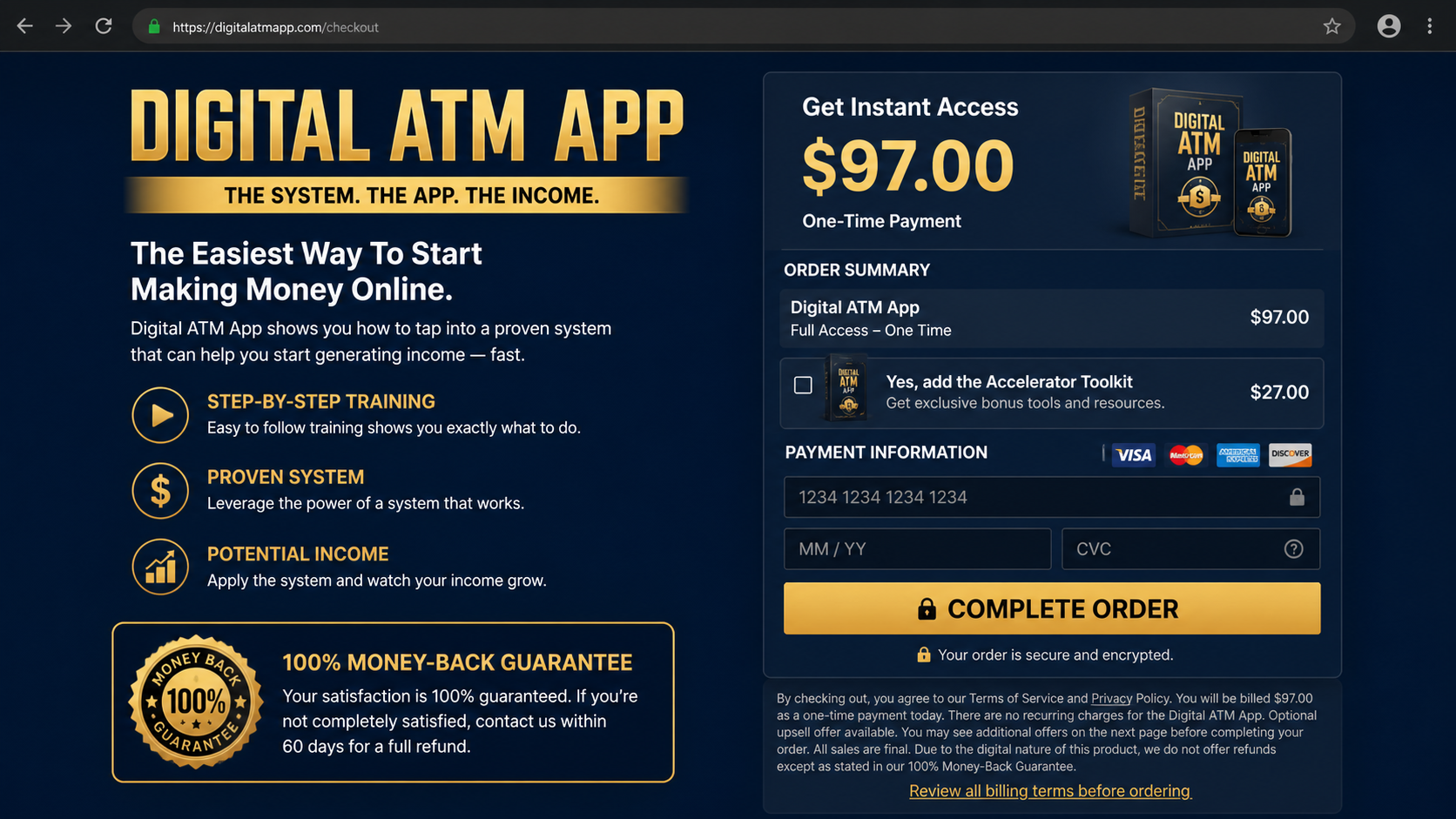
After repeated teasers, viewers reach an offer for a digital system. One observed version sold access under the name Digital ATM App for $97.
The name suggests a machine that dispenses money on demand. It does not describe a verified bank product or a hidden function inside the customer’s phone.
The $97 price is the front door, not proof of total cost. Digital funnels can place upgrades, coaching packages, tools, or recurring services afterward.
Buyers must judge the actual terms on their screen. Not every checkout uses the same add-ons, and operators can alter prices without changing the video.
- A social advertisement promises extraordinary smartphone income.
- A crisis narrative makes the opportunity feel emotionally relevant.
- A fake editorial page resembles familiar television news.
- A long presentation withholds the supposed method.
- A $97 product appears after the free promise.
- Additional offers may follow the first payment.
- Clear evidence supporting the earnings claim is missing.
The FTC warns that guaranteed income, large returns, and “proven systems” are common signs of deceptive business offers. Success cannot be guaranteed by a video.
A seller making specific earnings claims should provide meaningful substantiation. Screenshots, anonymous comments, and animated counters do not show typical customer results.
The right question is practical: what exact work creates revenue, who purchases it, what expenses apply, and how many buyers achieved the advertised outcome?
How The Scam Works
Step 1: The ad finds people who need financial relief
Social platforms can target interests, age groups, locations, and behavior. A money-making promotion therefore reaches viewers already engaging with work-from-home material.
The opening frame uses a precise daily figure because specificity feels researched. “Up to $953” sounds more credible than a vague promise of extra cash.
“Up to” also protects the pitch rhetorically. The impressive number dominates the thumbnail, while the qualifier does little to explain typical performance.
A smartphone appears as the tool because almost everyone owns one. The viewer is encouraged to believe the necessary equipment is already in hand.
The ad asks for only a few minutes, not $97. That small first commitment makes the later payment request easier to reach.
Step 2: The landing page dresses advertising as journalism
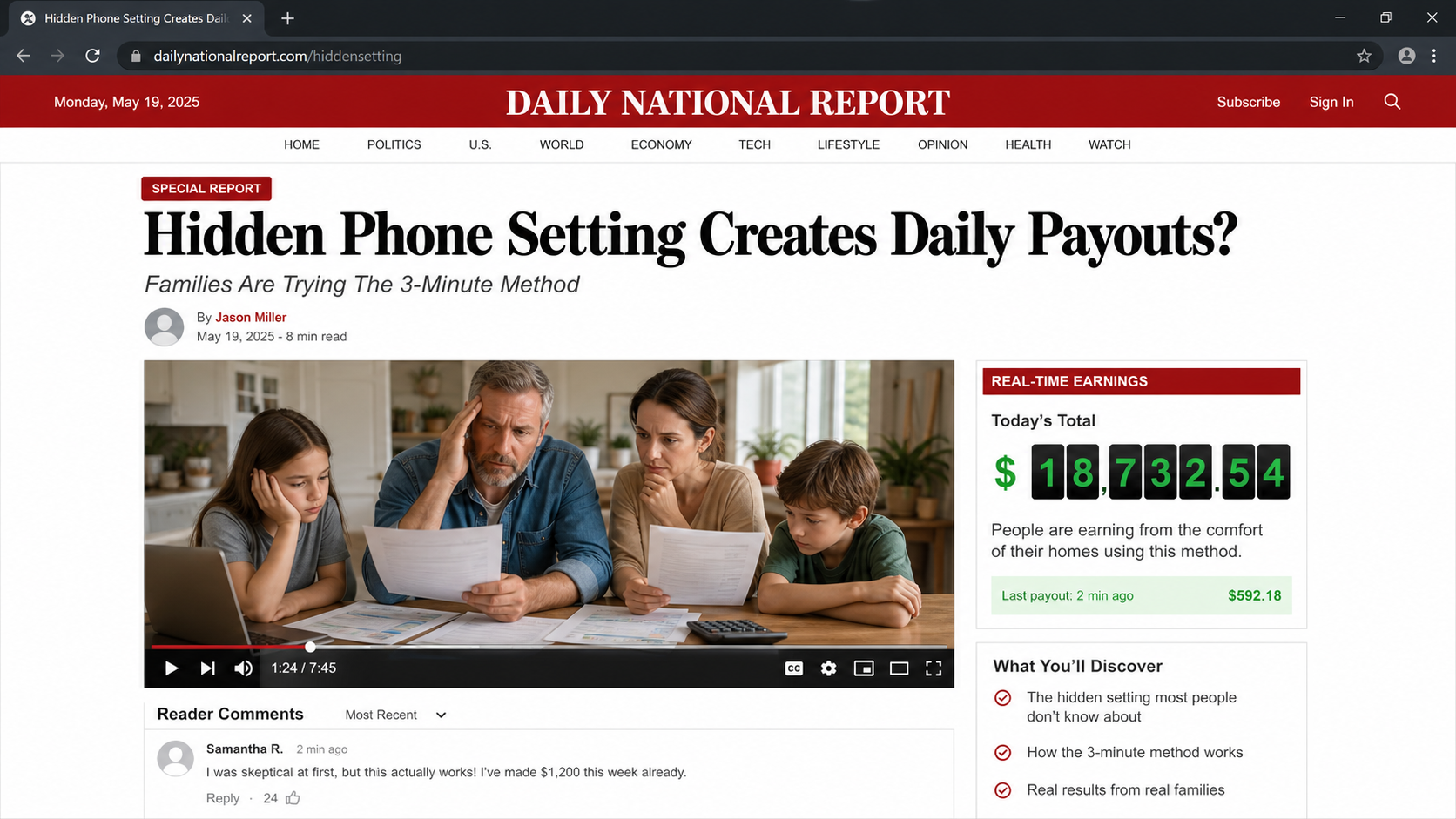
After the click, a news-style page may display a red masthead, reporter byline, market ticker, video controls, and reader comments.
The format implies an independent newsroom investigated the method. In reality, the page’s buttons and stories may exist solely to move visitors toward checkout.
Look at the web address before reading the headline. A domain unrelated to the apparent publication exposes the borrowed costume.
Try opening the navigation in a separate tab. A copied advertorial often sends every menu item to the same presentation or leaves links nonfunctional.
News design is not evidence. Anyone controlling a website can reproduce familiar colors, typography, stock portraits, and breaking-news labels.
Step 3: The presenter sells possibility instead of a process
The video begins with outcomes: bills paid, debts cleared, time recovered, and family stress reduced. The income mechanism remains deliberately blurry.
A dramatic personal story gives the offer a hero and villain. “Big Tech,” banks, employers, or unnamed insiders may be blamed for hiding the opportunity.
That framing discourages ordinary questions. Doubt becomes evidence that the listener has been conditioned by the same system supposedly withholding the secret.
The speaker may show payment notifications or dashboard totals. Such images can be edited, staged, borrowed, or generated without demonstrating withdrawable profit.
Reliable earnings evidence needs context, dates, expenses, participant counts, and typical results. A rapid montage provides none of those safeguards.
Step 4: Time and scarcity push the viewer toward $97
The presentation repeatedly says access may close, the price may rise, or only a limited group can join. Digital inventory rarely justifies that urgency.
A countdown may reset after refresh. A “live” enrollment number may stay unchanged, revealing that the pressure is a page element.
By now, the viewer has invested significant attention. Paying $97 can feel like finishing a process rather than making a new financial decision.
The offer often compares the fee with a much larger supposed value. Inflated bonuses make the purchase seem discounted without establishing real market demand.
A refund badge appears nearby, reducing perceived risk. Obtaining that refund can still require contacting an unfamiliar vendor under specific conditions.
Step 5: The checkout collects payment before clarity
The order form asks for billing details while the product description remains broad. Buyers may receive videos, templates, links, or general training instead of automation.
A preselected toolkit or post-purchase upgrade can increase the charge. Another page may offer mentoring, traffic, licensing, or higher membership tiers.
Continuity billing is not present in every version. Customers should inspect checkboxes, linked terms, and confirmation emails for any renewable service.
The safest approach is to photograph each screen before paying. The record shows what was represented when the transaction occurred.
Never treat a one-time label as final until the receipt confirms it. Merchant systems can separate the initial product from later optional purchases.
Step 6: The buyer receives information, not an income machine
Access may lead to a members area containing generic online marketing lessons. The material might discuss affiliate links, traffic, content, or lead generation.
Those activities are not hidden smartphone settings. They require audiences, testing, compliance, expenses, and uncertain performance.
If the system depends on buying advertising, the $97 price understates the capital needed. If it depends on organic traffic, results can take months.
Some purchasers encounter more sales calls offering premium assistance. Pressure to “invest in yourself” can turn a small purchase into a costly sequence.
The original income promise becomes harder to evaluate because failures are blamed on effort, mindset, implementation, or failure to buy the advanced tier.
Step 7: Refund friction protects the funnel
A customer seeking cancellation may discover the public brand differs from the company on the receipt. Support addresses can route through outsourced help desks.
Representatives may offer extensions, replacement products, partial refunds, or additional coaching before accepting cancellation. Every detour delays a clear resolution.
Guarantees often exclude consumed digital content, advertising expenses, upgrades, or requests outside a narrow window. Buyers should read those restrictions immediately.
If support stops responding, payment disputes require documentation. A vague complaint is weaker than dated screenshots showing the claim, amount, and requested refund.
The funnel succeeds when embarrassment keeps customers silent. Reporting the transaction quickly is practical consumer protection, not an admission of carelessness.
What the Advertisement Never Explains
An online income method needs an economic engine. Money must come from customers, advertisers, investors, employers, or asset appreciation.
If the pitch cannot identify that source plainly, it has not explained a business. It has described a desired outcome.
Ask what is sold, the average price, the acquisition cost, refund rate, platform fees, taxes, and hours required. Profit appears only after those deductions.
Also ask how many purchasers earned nothing. Testimonials select unusual stories and do not reveal the experience of the whole customer group.
A dashboard total is not audited income. It may represent gross revenue, simulated credits, pending commissions, or numbers created for the presentation.
Seller, Earnings, Price, and Billing Checks
Find the company behind the checkout
Record the legal seller, support provider, merchant descriptor, business address, and governing law. A product nickname is not enough for accountability.
Search the address using maps and business records. A virtual mailbox or shared suite does not automatically prove fraud, but it limits transparency.
Call the listed number before ordering. Ask what the system teaches, whether upgrades follow, and who processes refunds.
Demand useful earnings evidence
Specific profit claims require more than isolated success stories. Ask for the period measured, participant population, typical result, costs, and written substantiation.
Check whether the seller distinguishes revenue from profit. A person can collect $1,000 while spending more than $1,000 to generate it.
Walk away when representatives guarantee success or say results depend entirely on attitude. A real business acknowledges uncertainty and operational risk.
Calculate the complete entry cost
Add the initial $97, optional tools, advertising budget, domain fees, software subscriptions, coaching, and payment processing. The advertised fee may be smallest.
Do not finance a package based on projected earnings. Debt remains payable even when the opportunity produces no income.
Compare the same educational topics with established courses, libraries, and free platform documentation before buying under pressure.
Inspect renewals, upgrades, and refund restrictions
Read every checkbox and linked policy before submitting the order. Search terms for subscription, recurring, monthly, annual, trial, continuity, and automatic renewal.
Capture the final cart and receipt. If an upgrade appears after payment, decline it until the first product proves useful.
Test support during the refund period rather than waiting. A silent help desk becomes far more expensive after the deadline.
What to Do if You Have Fallen Victim to This Scam
- Stop purchasing additional upgrades. Do not send more money to unlock earnings, accelerate traffic, qualify for a refund, or rescue the first payment.
- Download your evidence. Preserve the ad, advertorial, presentation, checkout, terms, member dashboard, emails, invoices, support conversations, and bank statement.
- Request a refund immediately. Quote the order number, purchase date, misleading earnings claim, requested amount, and deadline in one concise written message.
- Cancel every attached service. Identify trials, tool subscriptions, coaching plans, and renewals individually instead of asking only to cancel Digital ATM App.
- Notify the payment provider. Explain any unauthorized amount, recurring charge, undelivered feature, or material difference between the sales claim and product.
- Protect exposed credentials. Change reused passwords, enable multifactor authentication, and review email rules if the funnel requested account access.
- Check the computer. Run Malwarebytes when downloads, remote-support tools, unknown extensions, or aggressive redirects appeared during the process.
- Limit future malicious promotions. Configure AdGuard to reduce deceptive ad exposure, pop-ups, and tracking across commonly targeted browsing sessions.
- Report the campaign. Send documentation to the FTC, the advertising platform, your state consumer office, and any impersonated publication.
- Reject recovery offers. Anyone promising to retrieve the loss for an upfront fee may be targeting victims through a second scam.
Is Your Device Infected? Run a Free Malware Scan
Slow performance, constant pop-ups, or strange behavior? These are classic signs of a malware infection. A quick way to check is to scan your device with Malwarebytes Free, one of the most trusted malware removal tools available. If you only visited a scam page and didn’t download or install anything, this scan is optional.
The free version detects and removes the most common threats, including:
- Adware — the cause of those annoying pop-ups
- Browser hijackers — unwanted redirects and changed homepages
- Trojans and spyware — hidden programs stealing your data
- Potentially unwanted programs (PUPs) — software you never asked for
👉 Select your device below — Windows, Mac, or Android — then follow the simple steps to download Malwarebytes, scan your system, and remove any threats it finds. The scan usually takes 5 to 20 minutes.
Run a Malware Scan with Malwarebytes for Windows
Malwarebytes is one of the most popular and trusted anti-malware tools for Windows — and it’s completely free for removing infections. It catches threats that many antivirus programs miss, including adware, browser hijackers, and trojans. Follow the steps below to scan your PC and remove what Malwarebytes finds.
Download Malwarebytes
Click the button below to download the latest version of Malwarebytes for Windows from the official source. The free version is all you need — it will scan your computer and remove adware, browser hijackers, and other malicious software at no cost.
Download MalwarebytesOfficial installer for Windows 11 and 10. Your download starts right away.Want real-time protection? See Malwarebytes Premium Malwarebytes Free for WindowsScans and removes malware at no cost
-
Install Malwarebytes
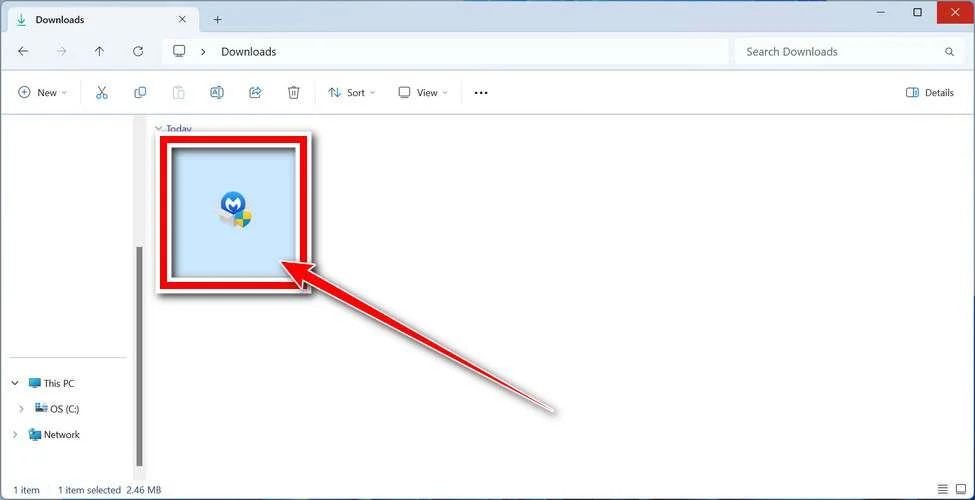
When the download finishes, open your Downloads folder and double-click the MBSetup file. If Windows shows a User Account Control pop-up, click “Yes” to allow the installation.
Follow the On-Screen Prompts to Install Malwarebytes
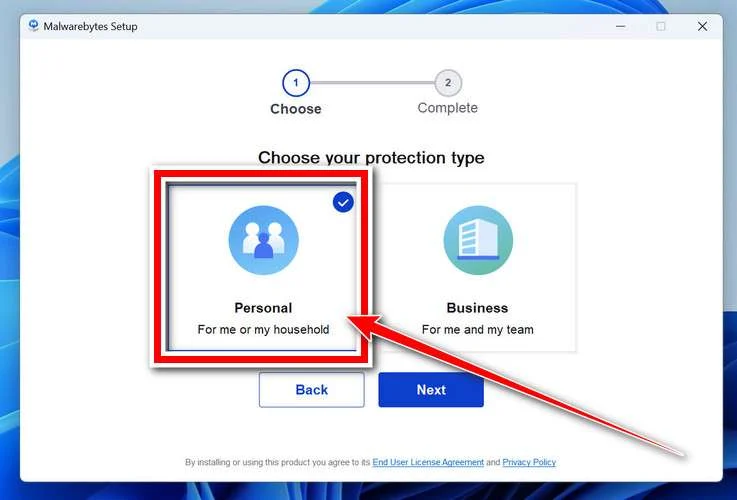
The setup wizard will walk you through a few quick screens:
-
Choose where you’re installing the program — “Personal Computer” or “Work Computer” — then click Next.
-
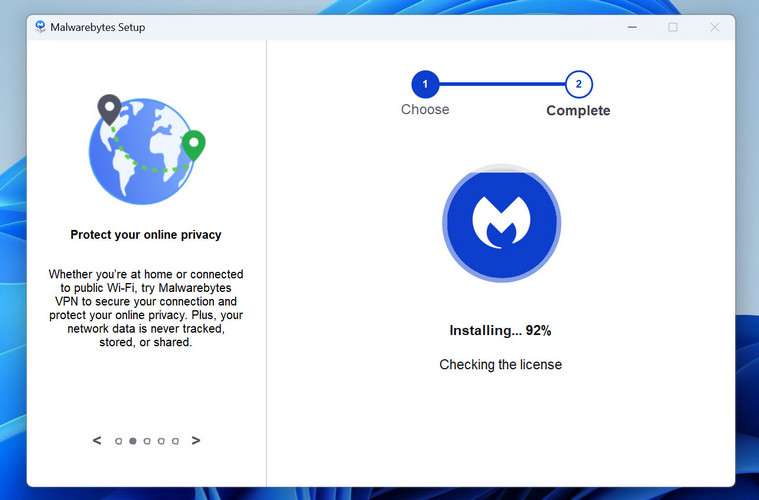
Malwarebytes will now install on your device. This usually takes under a minute.
-
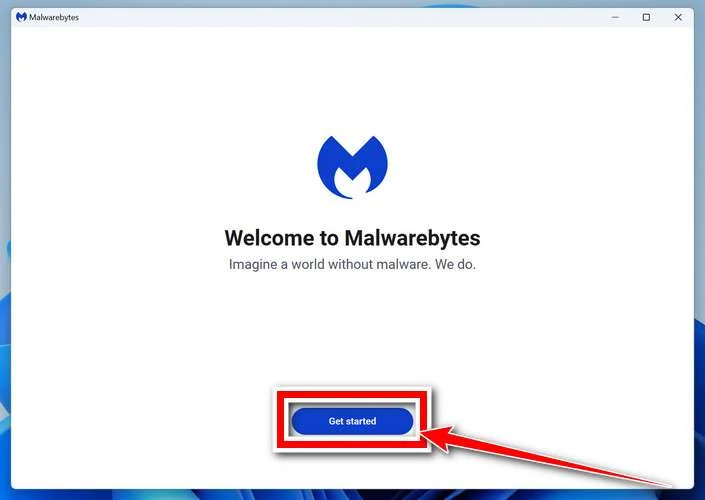
When installation is complete, the “Welcome to Malwarebytes” screen will open automatically.
-
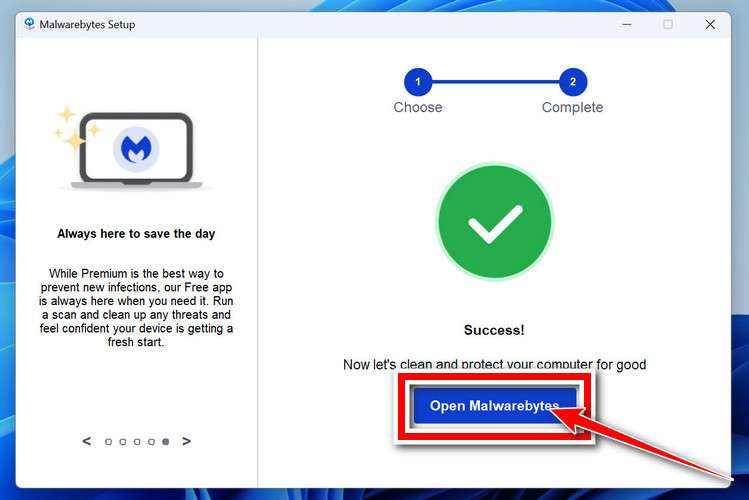
On the final screen, click Open Malwarebytes to launch the program.
-
Optional: Check for rootkits with a Custom Scan
You don’t need to change any settings for a normal scan. The standard Threat Scan in the next step is enough for most problems, so you can go straight to it.
If you also want to check for rootkits, use a Custom Scan. In current versions of Malwarebytes, rootkit scanning is only available there:
- On the Scanner tile, click the three-dot menu and select Advanced Scan.
- Choose Custom Scan. In its options, check Scan for rootkits.
- Select your system drive (usually C:\) as the location to scan, then start the scan. It takes longer than a Threat Scan.
- When it finishes, review and quarantine the results as described in the steps below.
Rootkit scanning isn’t available on Windows devices with ARM processors.
Start the Scan
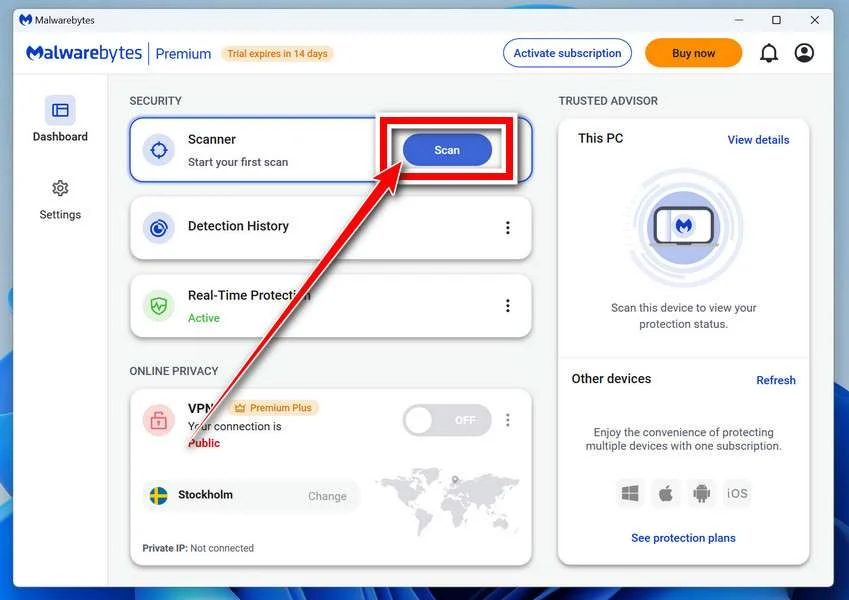
Click the blue Scan button. Malwarebytes will automatically update its virus database and start checking your computer for malware.
-
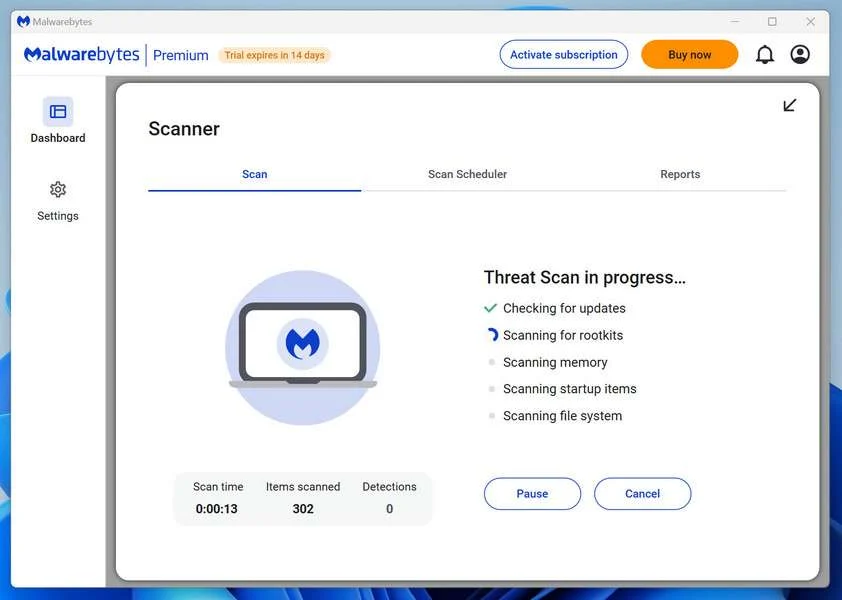
Wait for the Scan to Finish
The scan checks your entire system for browser hijackers and other malicious programs, so it can take 5 to 20 minutes depending on your computer. Feel free to do something else — just check back occasionally to see the progress.
-
Quarantine the Detected Threats
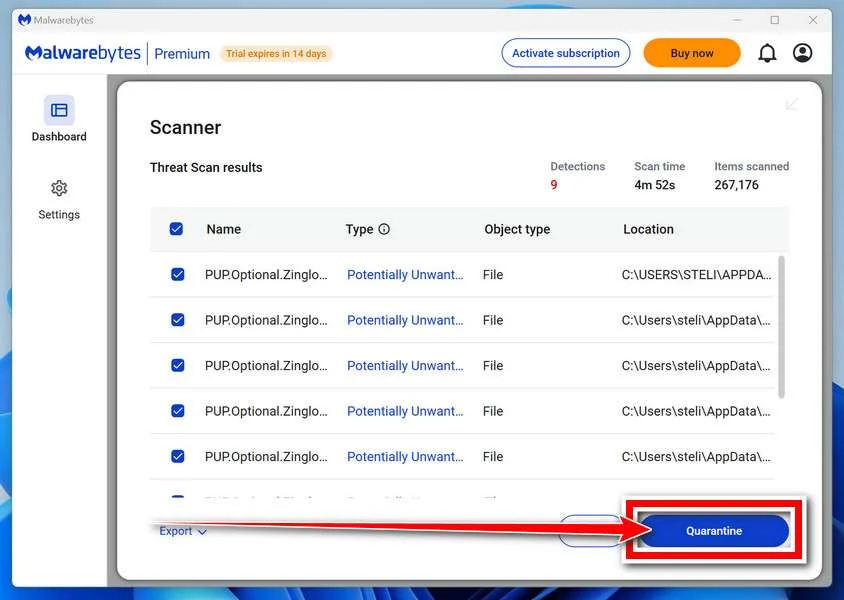
When the scan is done, you’ll see a list of everything Malwarebytes found — malware, adware, and potentially unwanted programs. Click the “Quarantine” button to remove all of them at once.
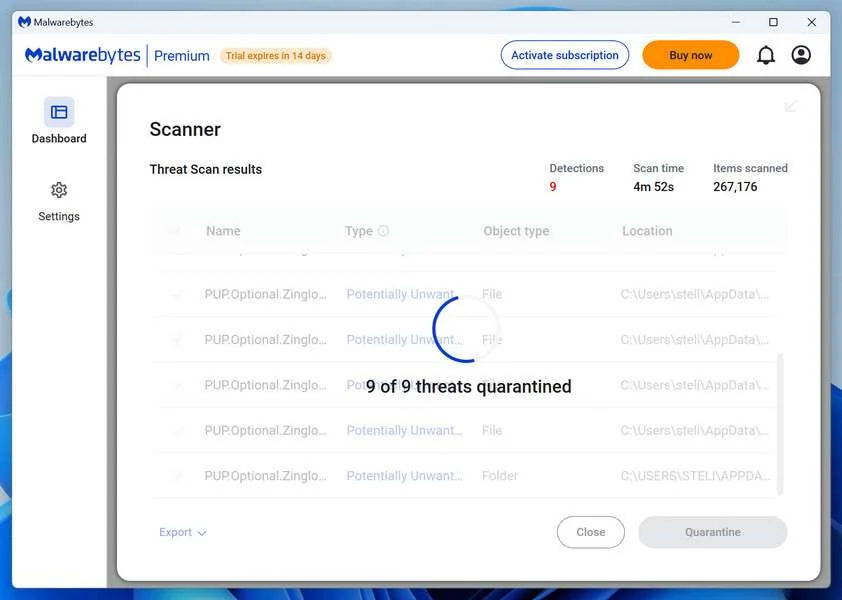
Malwarebytes will now remove the malicious files and registry entries and move them safely into quarantine.
-
Restart Your Computer
Some threats can only be fully removed after a reboot. If Malwarebytes asks you to restart, click Yes. Once you’re logged back in, Malwarebytes has finished removing the threats it found.
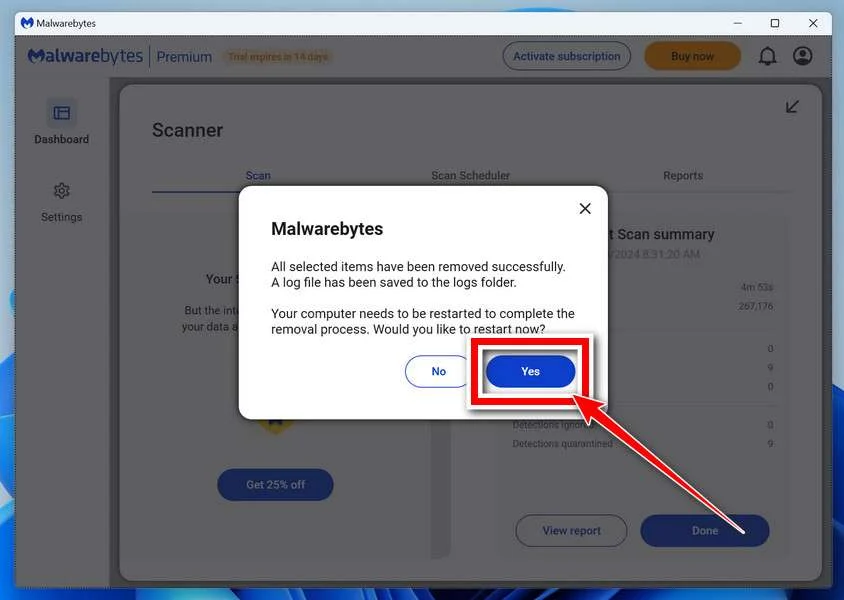
When the scan is done, check whether the problems you noticed have stopped. If they continue, see the options below.
If you are still having problems with your computer after completing these instructions, then please follow one of the steps:
- Run a computer scan with ESET Online Scanner
- Ask for help in our Windows Malware Removal Help & Support forum.
Run a Malware Scan with Malwarebytes for Mac
Malwarebytes for Mac is a free on-demand scanner that removes the malware other security software tends to miss — adware, browser hijackers, and unwanted programs included. Cleaning an infected Mac with Malwarebytes has always been completely free, and it’s our go-to recommendation. Follow the steps below to scan your Mac and remove what Malwarebytes finds.
-
Download Malwarebytes for Mac
Click the button below to download the latest version of Malwarebytes for Mac.
Download MalwarebytesOfficial installer for macOS. Your download starts right away.Want real-time protection? See Malwarebytes PremiumMalwarebytes Free for MacScans and removes malware at no cost -
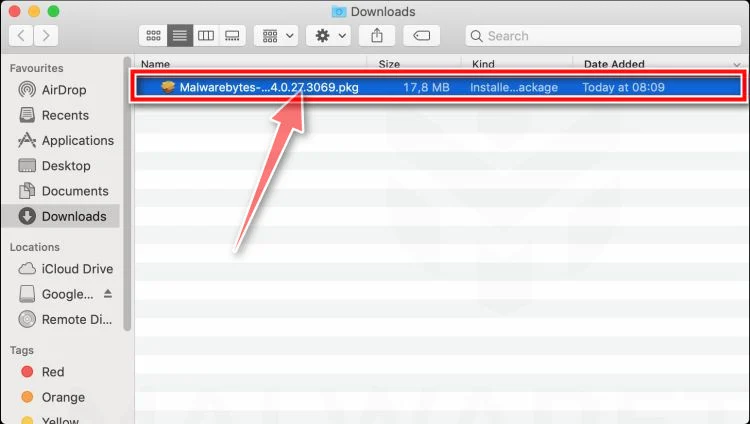
Open the Malwarebytes setup file
When the download finishes, open your Downloads folder and double-click the setup file to begin the installation.
-
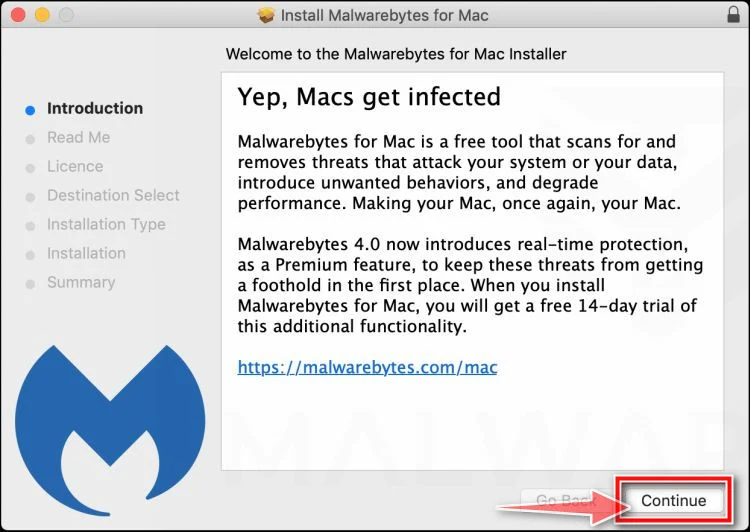
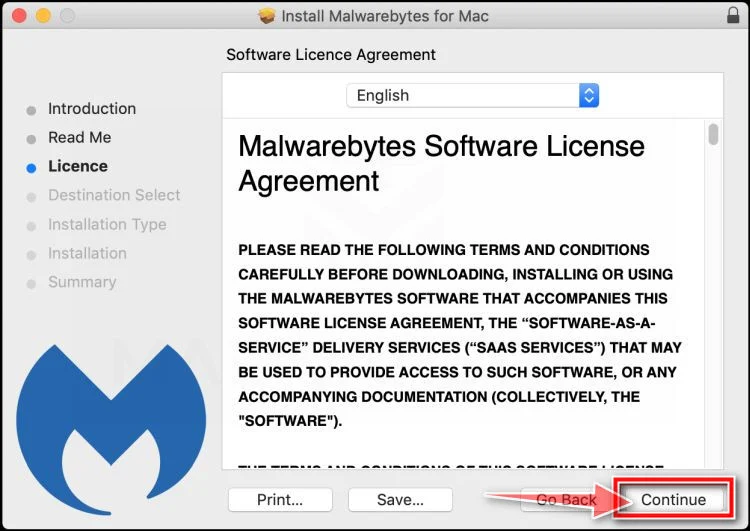
Follow the On-Screen Prompts to Install Malwarebytes
The Malwarebytes for Mac Installer will guide you through a few quick screens. Click “Continue” and keep following the prompts until the installation completes.
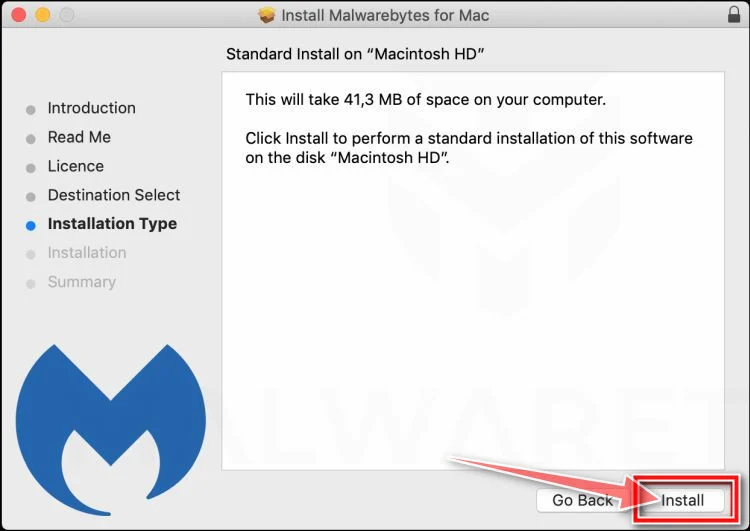
When the installation is complete, Malwarebytes opens to the Welcome to Malwarebytes screen. Click “Get started“.
Malwarebytes needs Full Disk Access to check your whole Mac. When it asks, open System Settings > Privacy & Security > Full Disk Access, turn on Malwarebytes (it may be listed as Malwarebytes Protection), and confirm with your password or Touch ID. Then return to Malwarebytes. On macOS Monterey and earlier, this setting is in System Preferences > Security & Privacy > Privacy.
-
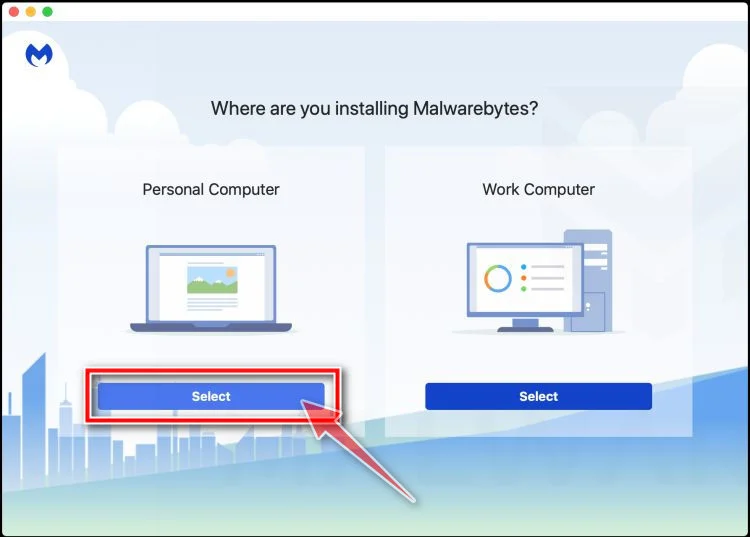
Select “Personal Computer” or “Work Computer”
Malwarebytes will ask what type of computer you’re installing it on. Click either Personal Computer or Work Computer, whichever applies.
-
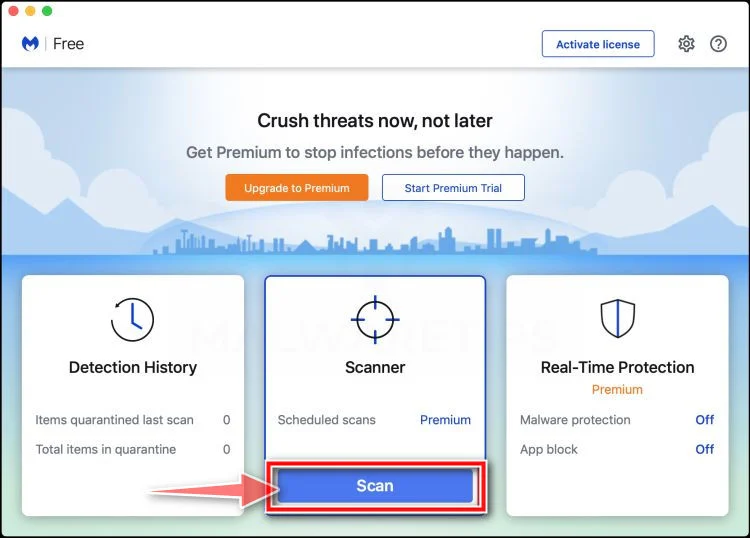
Start the Scan
Click the “Scan” button. Malwarebytes will automatically update its detection database and begin checking your Mac for malware.
-
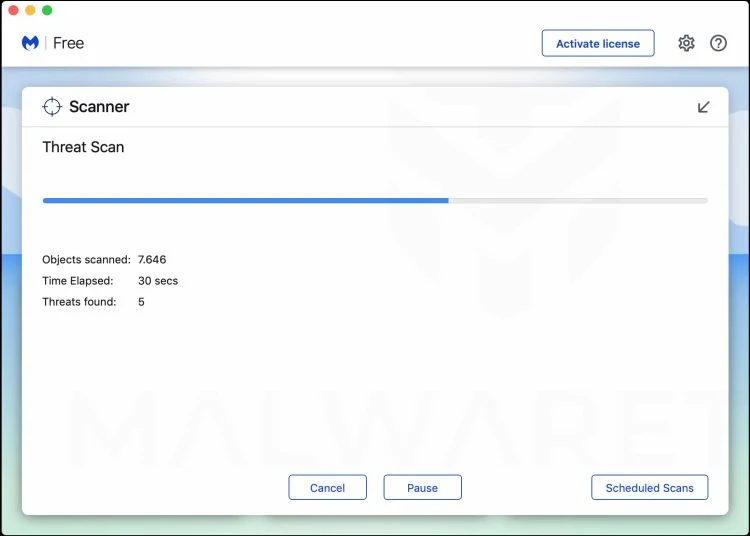
Wait for the Scan to Finish
Malwarebytes will scan your Mac for adware, browser hijackers, and other malicious programs. This can take a few minutes, so feel free to do something else — just check back occasionally to see the progress.
-
Quarantine the Detected Threats
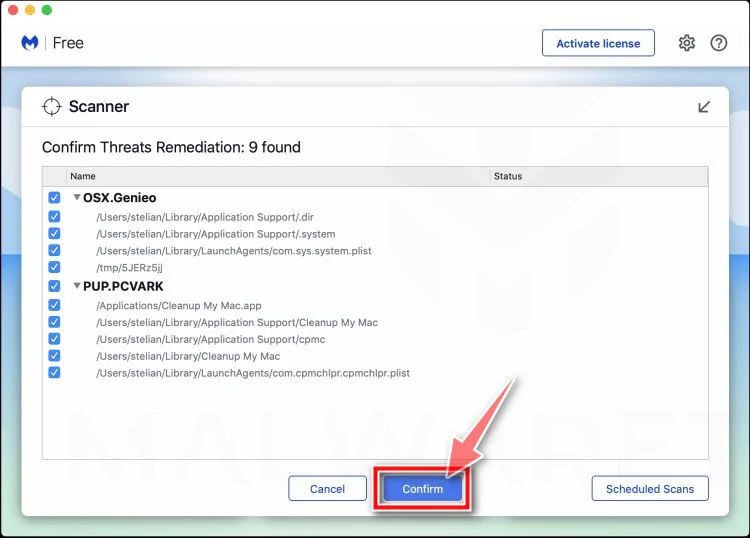
When the scan is done, you’ll see a list of everything Malwarebytes found. Click the “Quarantine” button to remove all the threats at once.
-
Restart Your Mac
Malwarebytes will now remove all the malicious files it found. Some threats can only be fully removed after a reboot — if Malwarebytes asks you to restart, allow it. Once you’re logged back in, check whether the problems you noticed have stopped. If they come back, save the scan report and ask for help in our forum.
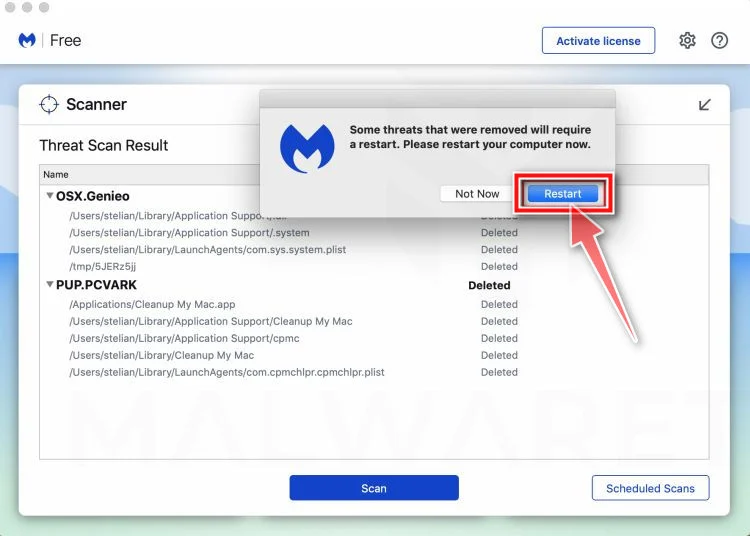
If the problems you noticed continue after the scan, see the options below.
If you are still experiencing problems while trying to remove a malicious program from your computer, please ask for help in our Mac Malware Removal Help & Support forum.
Run a Malware Scan with Malwarebytes for Android
Malwarebytes for Android scans your phone or tablet for malware, adware, and potentially unwanted apps. The free version scans only when you start a scan. Real-time protection, which checks apps automatically, is part of the paid Premium version.
-
Download Malwarebytes for Android.
You can download Malwarebytes for Android by clicking the link below.
Get Malwarebytes for AndroidOpens Google Play in a new tab.Want real-time protection? See Malwarebytes Premium for AndroidMalwarebytes for AndroidScans your phone and removes malware at no cost -
Install Malwarebytes for Android on your phone.
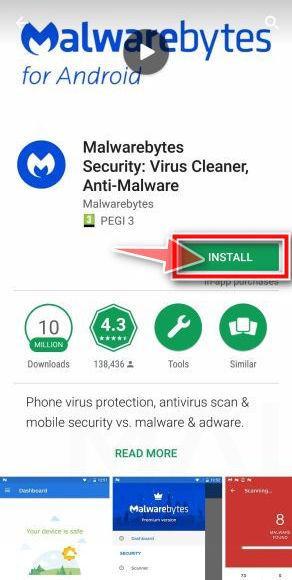
In the Google Play Store, tap “Install” to install Malwarebytes for Android on your device.
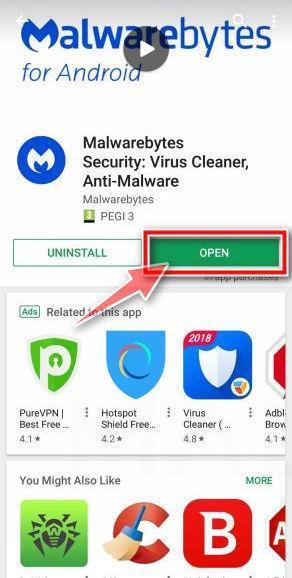
When the installation process has finished, tap “Open” to begin using Malwarebytes for Android. You can also open Malwarebytes by tapping on its icon in your phone menu or home screen.
-
Follow the on-screen prompts to complete the setup process
When Malwarebytes opens, it walks you through a short setup. Tap Get started and follow the prompts. If you see an offer for a trial or a paid plan, read it before you accept. You can skip it and keep using the free scanner.
Malwarebytes will ask for permission to access the files on your phone so it can scan them. Tap Allow, or turn on the permission in the Android screen that opens, then return to Malwarebytes.
-
Run a scan with Malwarebytes for Android
On the main screen, tap Scan now. In some versions, you open the menu, tap Scanner, and then tap Run a scan.
-
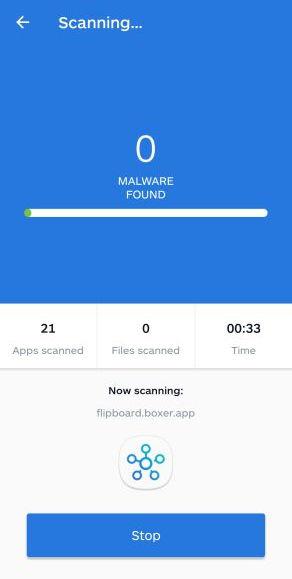
Wait for the Malwarebytes scan to complete.
Malwarebytes will now start scanning your phone for adware and other malicious apps. This process can take a few minutes, so we suggest you do something else and periodically check on the status of the scan to see when it is finished.
-
Remove the detected apps.
When the scan has been completed, you will see a list of the threats that Malwarebytes for Android has detected. Next to each detected item, tap the menu icon (three dots), then choose to uninstall the app or delete the file. Android then asks you to confirm. Tap OK or Uninstall to remove the app.
-
Restart your phone.
When the detected apps are removed, restart your phone if Malwarebytes asks you to. Then check whether the problems you noticed have stopped.
If the problems you noticed continue after the scan, see the options below.
If you are still having problems with your phone after completing these instructions, then please follow one of the steps:
- Ask for help in our Mobile Malware Removal Help & Support forum.
- Only as a last resort, reset your phone to factory settings. Read the warning below first.
- Back up your photos, videos, files, and messages, for example to your Google account or a computer.
- Make sure you know your Google account email and password. The phone asks for them after the reset. If you changed the password recently, Google recommends waiting 24 hours before you reset.
- On a Samsung phone, also make sure you know your Samsung account password.
- If you use an authenticator app for two-step verification, move your accounts to another device or save your backup codes first.
Stay Protected: Block Ads and Malicious Sites
No scan can prove a device is completely clean, so it helps to block threats before they reach you. Most infections start with a malicious ad or a fake download button — so blocking them at the source is your best defense.
We recommend AdGuard, which blocks malicious ads, phishing pages, and dangerous redirects before they can reach you.
👉 Download AdGuard and browse safely
Frequently Asked Questions
Is there really a three-minute phone setting that pays users?
No credible evidence shows that an ordinary hidden setting automatically generates the advertised daily income.
Smartphones can support legitimate work, but revenue requires an actual business activity, employer, buyer, or investment carrying genuine effort and risk.
What is Digital ATM App?
Digital ATM App is a name used for the paid offer at the end of this funnel. It should not be confused with banking software.
Buyers should evaluate the exact current product because content, price, operator, and follow-up offers can change.
Does the $97 payment guarantee access to everything?
Do not assume that. The initial price may cover only the entry product, while optional tools or higher tiers appear separately.
The order summary and receipt should state what the payment includes and whether any service renews.
Are the earnings screenshots reliable?
Not by themselves. Images can omit expenses, display gross sales, show unusual results, or be edited for advertising.
Meaningful proof describes typical outcomes across a defined customer group and includes the costs required to achieve them.
Can I dispute the charge if the material was delivered?
Dispute rights depend on the transaction, representations, payment method, and local rules. Contact the issuer promptly and describe facts accurately.
Receiving digital files does not automatically resolve a complaint about unauthorized billing or materially misleading promises.
How can I avoid similar offers?
Ignore guaranteed income, secret settings, countdowns, and unexplained daily totals. Search the seller and business model before opening the checkout.
Never pay merely because a video says hesitation is the only barrier separating ordinary people from easy wealth.
The Bottom Line
The 3-minute phone trick money scam presents an income fantasy before explaining any business. Its fake-news styling and hardship narrative are persuasion tools.
A $97 course cannot turn an unexplained phone setting into dependable profit. Clear economics and verifiable typical results should come before payment.
Close the funnel, preserve evidence if you paid, and choose opportunities that describe the work, costs, operator, and risks without theatrical secrecy.

Join the discussion
0 commentsShare your experience or ask a question about this article.
Discussion
Start the conversation
Have a question or something useful to share? Add the first comment.