


A long TikTok streak disappears, and someone claims they can bring it back. The first “restoration code” costs only $10, which can feel like a small price for saving months of daily messages.
The code fails. Then a second code is needed, followed by a final upgrade, a release fee, or a refund charge.
Overview
A lost streak becomes a chain of payments
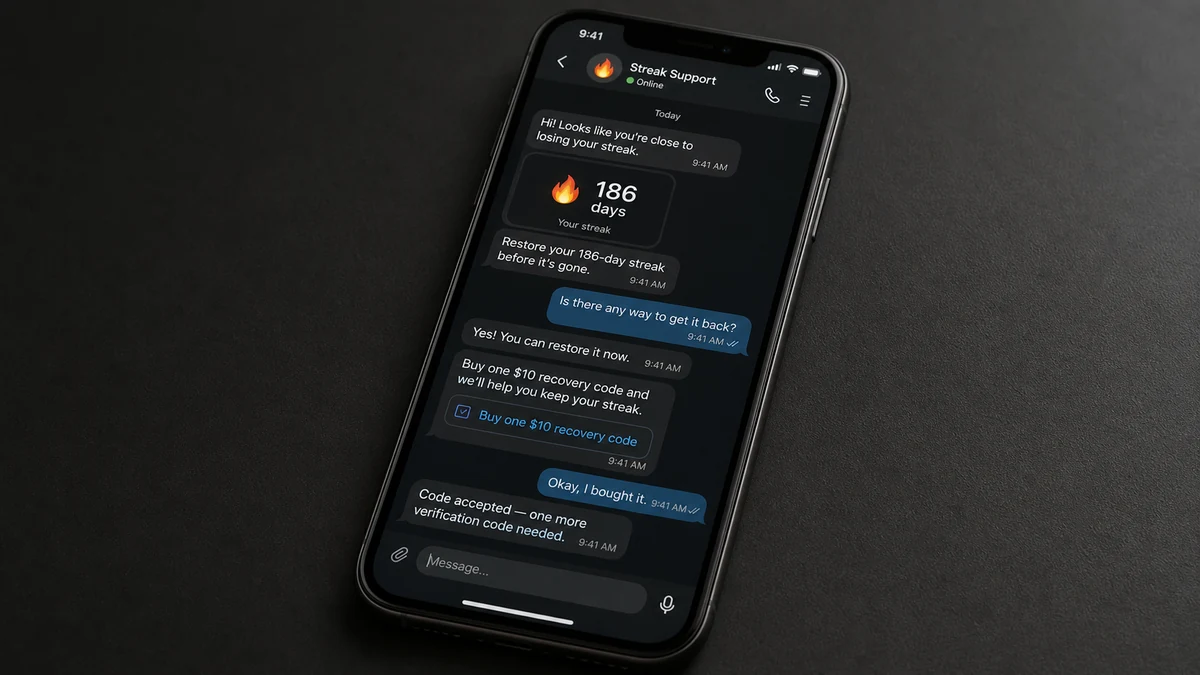
The TikTok streak restoration scam targets people who are disappointed after a streak ends and either cannot see TikTok’s restore option or have already used it. A seller offers a workaround through direct messages, often claiming to have special codes or access to a support panel.
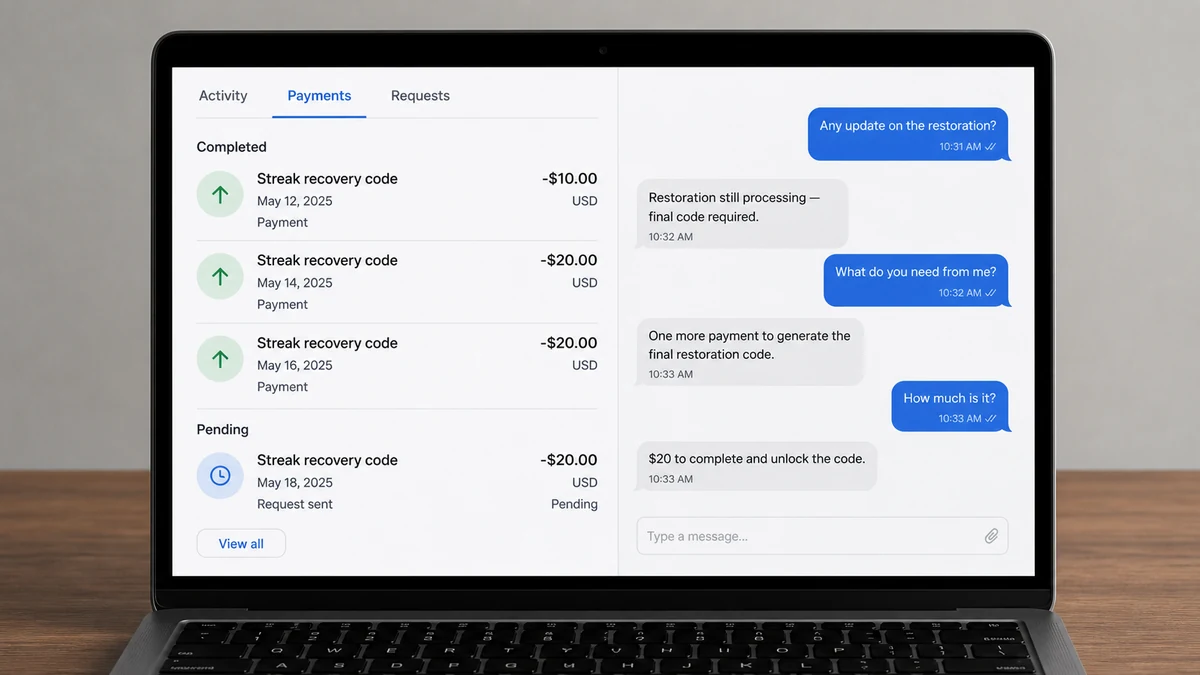
In one reported payment chain, the victim started with a $10 code. When it did not restore anything, the seller blamed the account, code level, or length of the streak and requested more money. The combined loss reached about $70 while the streak remained gone.
The amounts rise gradually. Each payment is framed as the last missing piece, which makes walking away feel harder after money has already been spent.
TikTok’s real restore feature does not require a seller
TikTok does have a legitimate streak restoration feature. According to TikTok’s official guidance, an eligible user sees a Restore option inside the affected chat and must use it within a limited period after the streak ends.
The process takes place in the app. TikTok does not direct users to buy codes from a stranger, send money to an individual, or provide a username so an outside technician can edit the account.
The seller is charging for something they cannot demonstrate
A paid restoration code has no visible connection to TikTok’s documented system. The seller cannot show an official code redemption page, published price, receipt from TikTok, or support case that the user can verify independently.
Typical warning signs include:
- The offer arrives through a direct message, comment, or unofficial help account.
- The seller asks how long the streak was and uses the answer to set the price.
- Payment goes to a personal account, wallet, gift card, or cryptocurrency address.
- There is no code field inside TikTok where the buyer can redeem the purchase.
- Every failed attempt produces a new fee instead of a working result.
- A refund supposedly requires another payment first.
- The seller warns that contacting TikTok will permanently erase the streak.
The changing explanation is part of the scam. It keeps the victim focused on solving the latest problem instead of asking whether the product ever existed.
How the TikTok Streak Restoration Scam Works
Step 1: The seller finds someone who wants a streak back
Victims may post publicly that a streak disappeared, ask for help in a comment, or search for restoration advice. Scam accounts also advertise in videos with phrases such as “streak recovery,” “instant restore,” or “works after the deadline.”
The pitch is well timed. A long streak can represent months of contact with a friend or partner, so losing it feels more personal than losing an ordinary app counter.
Step 2: A cheap starter code lowers resistance
The first price is usually modest. A $10 charge sounds less risky than a full account-recovery service, and the seller may promise a refund if the code fails.
The buyer is not given a verifiable TikTok checkout. Instead, the payment goes through a peer-to-peer app, bank transfer, gift card, or another route with weak buyer protection.
Step 3: Simple questions make the service feel technical
The seller asks for the username, streak length, date it ended, device type, or screenshots of the chat. Those details make the process feel customized, but they do not prove access to TikTok’s systems.
More dangerous versions ask for a password or one-time verification code. That turns a small payment scam into an account takeover attempt.
Step 4: The first attempt fails for a reason invented afterward
The seller may claim that the streak is too old, the account is on the wrong server, the code covers fewer days, or a premium authorization is needed. The explanation appears only after the payment, when admitting the loss feels difficult.
A genuine product should state its requirements before purchase. A service that discovers a new paid requirement after every failure is not troubleshooting; it is extending the payment chain.
Step 5: The next code costs more
The victim is told not to waste the first payment. Another $20 or $40 will supposedly activate it, combine two codes, or unlock a higher streak tier.
This is the sunk-cost trap. The seller uses the money already lost as a reason to risk more. No additional payment can make an unofficial code part of TikTok’s real recovery system.
Step 6: The promised refund becomes a second trap
When the victim asks for money back, the seller may require a processing charge, account verification payment, tax, or refundable deposit. Legitimate refunds are deducted from the original transaction or returned to the original payment method. They do not require the customer to send more money first.
The FTC describes this broader pattern as a refund and recovery scam: someone promises to recover a loss, then charges another upfront fee.
Step 7: The victim’s details are reused
A person who paid once may be contacted from a different account by a fake TikTok employee, payment investigator, or recovery specialist. The new caller may know the exact amount lost because the same group kept the conversation.
The name changes, but the rule does not: no legitimate recovery agent needs a gift card, cryptocurrency transfer, or advance payment to return money already sent.
Why a Paid Restoration Code Does Not Make Sense
TikTok controls streak status on its own servers. An outsider cannot change that record merely by sending a string of letters and numbers through a direct message. For a code to be real, TikTok would need to create, sell, document, and redeem it somewhere in the app or on an official TikTok domain.
The scam offers none of those pieces. There is no official product page, no TikTok receipt, no redemption interface, and no support history visible to the user. The only evidence is supplied by the same person collecting the payment.
Screenshots of “successful restorations” are easy to stage. A seller can use an unrelated account, edit a chat image, or show TikTok’s genuine in-app restore result and falsely credit a paid code. A testimonial does not demonstrate what caused the streak to return.
Even a streak that reappears after payment would not prove the seller helped. TikTok may restore an eligible streak through its normal feature, or the display may update after an app issue. The service must be independently verifiable before money changes hands, not explained afterward.
The safest test is simple: open the affected chat in TikTok and look for the Restore button. If it is not available, use support tools reached from the app. Do not search social media comments for someone claiming private access.
How to Handle a Lost TikTok Streak Safely
Open the chat where the streak ended. If TikTok considers it eligible, the Restore option should appear there. Follow the in-app prompts and note that availability can be limited by time and by how many restorations the account has left.
If the option is missing or does not work, go to TikTok’s settings and use Report a problem. This creates a support route attached to the actual account. Do not follow a link sent by someone who contacted you first.
Take a screenshot of the chat and the date the streak ended before changing settings or reinstalling the app. That record may help when describing the issue to official support.
Never provide a password, login link, QR code, backup code, or one-time verification code. TikTok support does not need you to transfer ownership of the account to inspect an in-app feature.
If the restore window has passed, the streak may not be recoverable. That is disappointing, but it is safer than handing money and account access to a stranger who cannot show a legitimate recovery route.
When a Code Scam Becomes an Account Takeover
Some sellers stop at repeated payments. Others ask for the victim’s password, a login link, or a six-digit verification code, claiming they must enter the account to activate the restoration.
A one-time code can approve a new login or password reset. If it is shared, the scammer may change the recovery details, message the victim’s contacts, or use the account to advertise the same fake service.
QR codes create the same risk. Scanning or sending a login QR image can authorize another device without revealing the password. Never share one with a supposed support agent.
If the seller asks for any login credential, stop immediately. Change the TikTok password from the official app, remove unfamiliar devices, and secure the email address connected to the account.
Company, Address, and Fulfillment Checks
The account is not TikTok support
A TikTok logo, support-style username, or copied help-center language does not establish affiliation. Real support activity should be visible through the app or an official TikTok domain, not only in a private conversation controlled by the seller.
The payment account exposes the real transaction
Save the recipient’s exact name, payment tag, bank details, wallet address, and transaction reference. The seller may call the payment a “code purchase,” but the provider will see a transfer to a person or account with no verified TikTok connection.
The product has no traceable delivery
A message containing a code is not proof of value. Ask where TikTok documents the code, where it is redeemed, and how its status can be checked without the seller. If those answers do not exist, delivery is just another message.
Support changes its story whenever money stops
Real technical support investigates a failure against published rules. Scam support creates a new paid condition. The moment a refund, correction, or unlock requires another transfer, stop the conversation.
What to Do if You Have Fallen Victim to This Scam
- Stop sending money. Do not buy another code or pay a refund fee, even if the seller says your earlier payments will otherwise be lost.
- Contact the payment provider now. Report fraud, provide the recipient details, and ask about a reversal or dispute. Speed matters, especially for bank and peer-to-peer transfers.
- Save the evidence. Capture the seller’s profile, messages, promised service, every code, receipts, transaction IDs, and any threats. Keep the original conversation if possible.
- Secure your TikTok account. Change the password from the official app if you shared credentials, remove unknown devices, enable two-step verification, and check whether the email or phone number changed.
- Protect your email too. If the same password was reused, change it everywhere. Review active sessions and recovery details, because email access can be used to retake the TikTok account.
- Scan devices if you installed anything. A streak restoration should not require software. Use Malwarebytes to check a device that ran a file or unofficial app supplied by the seller.
- Block known malicious routes. AdGuard can help stop many scam and advertising domains, but it cannot make a private seller legitimate or restore a streak.
- Report the seller inside TikTok. Choose the closest fraud, impersonation, or deceptive-behavior category and include the payment demand.
- Report the loss to the appropriate fraud authority. In the United States, use ReportFraud.ftc.gov and IC3.gov. Your bank may also request a police report for its investigation.
- Block follow-up recovery accounts. A new person who already knows what happened is not necessarily an investigator. Do not pay anyone upfront to recover the first loss.
Frequently Asked Questions
Does TikTok sell streak restoration codes?
TikTok’s published process uses a Restore option inside an eligible chat. Its guidance does not direct users to purchase codes from private sellers.
Can someone restore a streak with only my username?
An outsider knowing your username does not prove access to TikTok’s streak system. Treat that claim as unverified and use only the restore feature or support reached from your own app.
Why do the code prices keep increasing?
The first small payment tests whether the victim will pay. Each invented failure creates a reason for a larger transfer while the victim is focused on recovering both the streak and the money already spent.
Is my account at risk if I shared screenshots?
Possibly. Review screenshots for email addresses, phone numbers, QR codes, login alerts, or other private details. Change credentials immediately if you shared a password or verification code.
Can a bank reverse the payments?
Sometimes, depending on the payment method, destination, and reporting speed. Contact the bank or payment provider immediately and report the transaction as fraud.
What if TikTok’s real restore window has passed?
Use official support to confirm your options. If the streak is no longer eligible, a private seller cannot create a legitimate exception by charging for a code.
The Bottom Line
The scam turns a small emotional loss into a growing financial one. It starts with an affordable code, then keeps inventing reasons why the previous payment was almost enough.
TikTok streak restoration happens inside TikTok. If someone wants money through a private payment account, cannot show an official redemption page, and charges again when nothing works, there is no restoration service to finish. Stop paying and secure the account.

Join the discussion
0 commentsShare your experience or ask a question about this article.
Discussion
Start the conversation
Have a question or something useful to share? Add the first comment.