

Social media ads are promoting TikUnlocked.com as a secret tool capable of giving ordinary TikTok accounts features that other users supposedly cannot access. The promise is tempting: remove ads, download videos without restrictions or watermarks, and discover who has viewed your reposts.
The website is polished enough to look convincing on a phone, but its screens tell a very different story. TikUnlocked does not demonstrate any genuine connection to TikTok and cannot unlock the advertised features. Instead, it leads visitors through a staged activation sequence before trapping them behind affiliate offers that generate revenue for the people promoting the site.
What Is TikUnlocked.com?
TikUnlocked.com presents itself as an unofficial TikTok enhancement service. Visitors are asked to enter a TikTok username, choose one or more premium-style features, and allow the site to “connect” to their account. The interface borrows TikTok’s colors, logo, and visual style, creating the impression that the process is supported by the platform or built on top of a legitimate TikTok service.
That impression is misleading. TikUnlocked is not an official TikTok website, and entering a username does not authorize a third-party website to alter an account. A TikTok username is generally public information. It can be used to identify or display a profile, but it is not an access key that allows an outside site to change how TikTok works.
The captured funnel begins with a page asking visitors to “Enter your TikTok username.” A reassurance underneath claims that the user’s data is never stored or shared, yet the page provides no meaningful explanation of who operates the service, what data is processed, or how the alleged connection works.
After a username is submitted, the site offers three features:
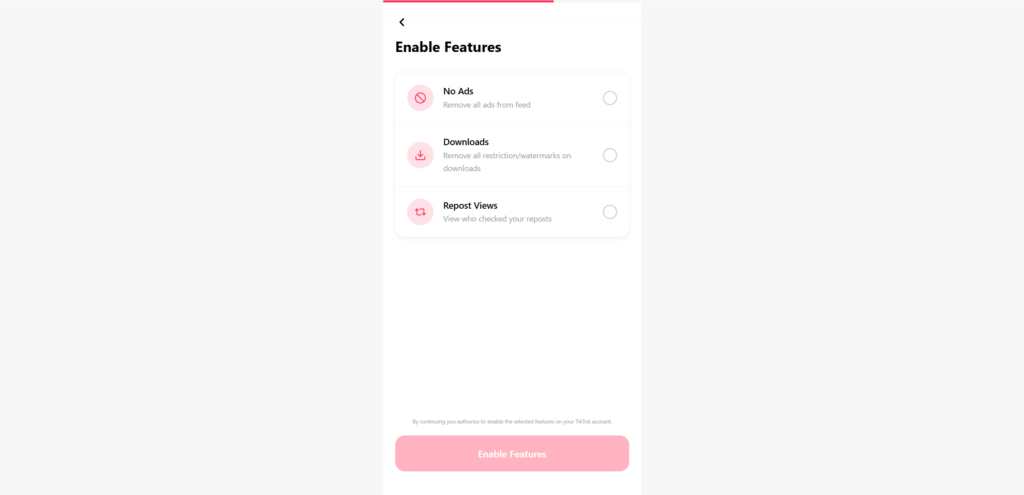
- No Ads, described as removing all advertising from the TikTok feed;
- Downloads, supposedly removing restrictions and watermarks from downloaded videos; and
- Repost Views, advertised as a way to see who checked the user’s reposts.
These claims are not supported by a real authorization screen, a verified TikTok integration, or any evidence that the site has the ability to modify an account. The options are bait. Their purpose is to make the visitor feel that something valuable has been selected before the site introduces the real objective of the funnel.
TikUnlocked.com Scam: The Verdict
TikUnlocked.com should not be trusted. The website cannot unlock the promised TikTok features, and its visible process ends at an affiliate content locker rather than inside TikTok. Visitors are told to install software, register with personal information, complete surveys, or activate offers to finish a supposed security check.
The key deception is the claim that these tasks are necessary to verify that the visitor is human. They are not part of TikTok’s security system. They are third-party promotional offers, and the TikUnlocked funnel appears designed to earn commissions when visitors interact with them.
Even if an offer is completed successfully, there is no credible mechanism connecting that conversion to the TikTok account. The site cannot turn on an account-level feature merely because an advertising network records an app installation or survey registration.
How the TikUnlocked Scam Works
1. Social Media Ads Sell a “Secret” TikTok Upgrade
The funnel begins away from TikUnlocked.com, usually with an advertisement or promotional post on social media. These ads may describe the website as a newly discovered trick, a limited beta tool, a TikTok loophole, or a method that the platform does not want users to know about.
This framing is deliberate. Calling the tool “secret” gives the promoters an excuse for why the feature is not available inside the official app. It also discourages careful thinking: visitors are pushed to act quickly before the supposed loophole disappears.
The claims are tailored to familiar frustrations. Many people would like fewer ads, easier downloads, and more information about who interacts with their content. TikUnlocked packages those wishes into one simple promise, even though the selected features involve entirely different parts of TikTok’s infrastructure and could not realistically be enabled by entering a username on an unrelated website.
2. The Username Field Creates an Illusion of Personalization
Once visitors reach the site, they are asked for their TikTok username. This makes the experience feel personalized, but the field proves almost nothing. A page can repeat any text a visitor enters and place it beside a generic profile icon without authenticating the account or communicating with TikTok.
This is an important distinction. Identifying a public profile is not the same as gaining permission to modify it. If an outside application genuinely connects to TikTok, TikTok explains that the user is asked to grant permission and that connected services can later be reviewed under Security & permissions and Apps and services permissions. That is the type of transparent consent flow described in TikTok’s official guidance for connecting third-party apps.
TikUnlocked’s screenshots show no comparable authorization. There is no official TikTok login page, no named developer requesting defined permissions, and no consent screen explaining what account information the service wants to access.
3. The Visitor Selects Features the Site Cannot Deliver
The next screen invites the visitor to choose from the three advertised upgrades. This step is psychologically useful to the operators because it turns curiosity into a sense of progress. The visitor is no longer merely looking at a claim; they have configured a personalized result and may feel invested in completing the remaining steps.
However, selecting a button on TikUnlocked only changes what the TikUnlocked page displays. It does not change settings inside the TikTok app. Removing advertisements from a user’s feed would require control over TikTok’s own delivery system or an authorized feature supplied by TikTok. A third-party page cannot grant that control through a public username.
The download claim is equally deceptive. Some legitimate utilities can process a public video link, subject to platform rules and the rights of the creator, but that is very different from removing all download restrictions or permanently enabling watermark-free downloads on an account. TikUnlocked does not even ask for a video link at this stage; it pretends to modify the account itself.
The “Repost Views” promise is another attention-grabber. The site supplies no evidence that it can access a private list of people who checked a repost, and no legitimate permission screen is shown that would provide such data.
4. A Fake Connection Animation Simulates Technical Work
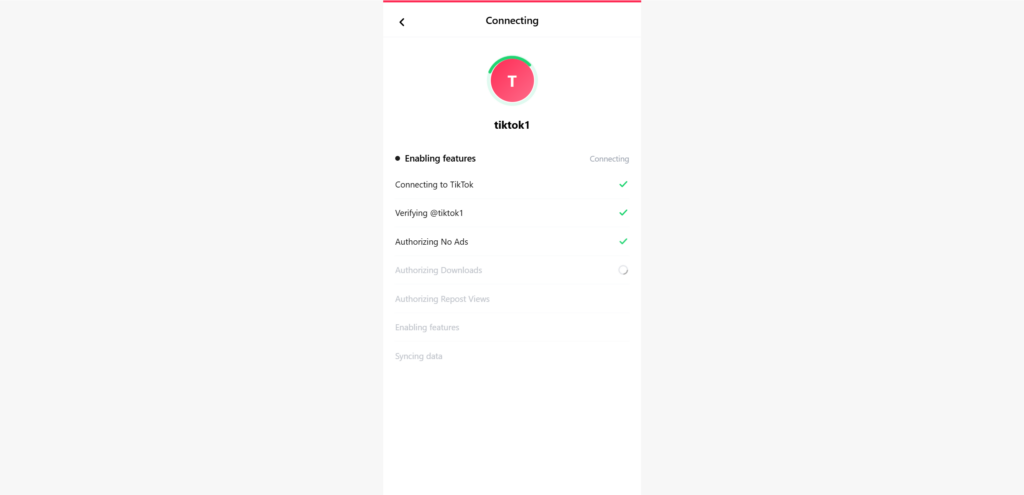
After the visitor presses “Enable Features,” the site displays a connecting screen with status messages such as “Connecting to TikTok,” “Verifying” the username, “Authorizing No Ads,” “Authorizing Downloads,” “Authorizing Repost Views,” “Enabling features,” and “Syncing data.” Green check marks appear as the sequence progresses.
This is theater, not proof. Progress bars, spinning circles, and technical-sounding labels are easy to create in a web page. They do not establish that a request has reached TikTok, that TikTok has recognized the visitor, or that any account setting has changed.
The sequence is especially revealing because the site claims to be “authorizing” features without authenticating the account owner. A username alone cannot prove ownership. If this process were real, anyone could enter someone else’s username and change that person’s TikTok experience, which would be an obvious security failure.
5. The “Human Verification” Becomes an Offer Wall
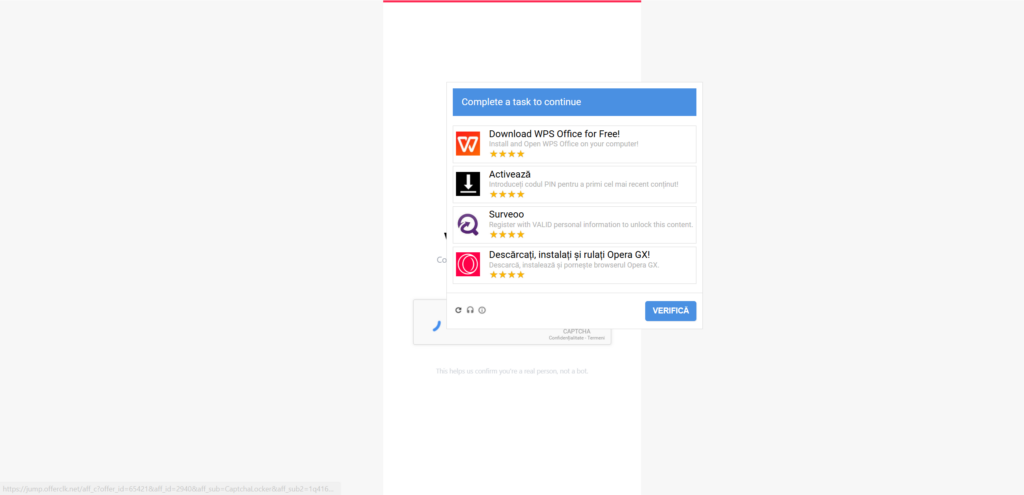
Just as the visitor appears close to receiving the promised result, TikUnlocked introduces one final obstacle: “Verify you’re human.” The page describes it as a security check, making it look like an ordinary CAPTCHA.
The timing is calculated. By this point, the visitor has entered a username, selected features, watched several steps complete, and been told the site is already connecting to TikTok. Abandoning the process now can feel like wasting everything already done, even though those earlier steps had no value.
When the verification box is activated, the supposed CAPTCHA reveals the true business model. A window appears with the instruction “Complete a task to continue.” The available tasks can include downloading and opening software, entering a PIN to activate content, registering for a survey with valid personal information, or installing and running a browser.
That is not identity verification. It is a content locker filled with performance-based advertising offers. The captured browser status bar even shows a redirect containing affiliate-style parameters such as offer_id, aff_id, and a reference to CaptchaLocker, directly exposing the tracking structure behind the page.
6. Affiliate Commissions Replace the Promised Reward
Affiliate marketing itself is not automatically fraudulent. Businesses legitimately pay publishers for sales, registrations, or app installations every day. The problem here is the deceptive reason visitors are given for completing the offers.
TikUnlocked does not openly say, “We will earn a commission if you install this application or submit your details.” Instead, it presents the offers as a mandatory security step needed to activate TikTok features. The valuable reward keeps the visitor moving, while the affiliate conversion appears to be the only result the funnel is actually equipped to produce.
Different offers may generate revenue in different ways. The operator may be credited when a visitor installs and opens an application, creates an account, completes a survey, submits contact details, signs up for a trial, or activates a mobile service. The selection can change according to the visitor’s country, device, browser, and available advertising campaigns.
Some displayed products may belong to real companies. Their presence does not make TikUnlocked legitimate, nor does it necessarily mean those companies created or approved the misleading promotion. Offers can pass through several advertising and affiliate intermediaries before appearing inside a content locker.
7. The Features Never Arrive
Visitors may finish one task only to find that it does not register, that another task appears, or that the page continues asking for verification. Some offers have eligibility rules, tracking requirements, geographic restrictions, or additional steps that are not obvious at the beginning.
Even if the offer network records the conversion, the core problem remains unchanged: an affiliate completion cannot grant TikUnlocked control over TikTok. The two systems are technically disconnected. One records an advertising action; the other would need legitimate authority to modify a social media account.
The “unlock” therefore remains permanently out of reach. The visitor contributes time, personal data, an installation, or perhaps money, while the promoter gets the chance to earn a commission.
Why TikUnlocked Cannot Unlock TikTok Features
TikUnlocked’s promises collapse under basic scrutiny. The site does not verify ownership of the account, does not show an official TikTok authorization page, and does not identify any legitimate permission capable of enabling the advertised functions.
A genuine connected application can only use the access TikTok makes available and the user specifically approves. It cannot invent new platform permissions simply by describing them on its own interface. TikTok also allows users to review and remove connected apps, another level of transparency absent from this funnel.
The domain name is another warning. TikUnlocked.com is not a TikTok-controlled domain, even though the page prominently uses TikTok branding. TikTok’s own scam-safety guidance advises users to verify claims through an original, official source and to avoid unknown or suspicious links. The company also warns that scams may use fraudulent websites to imitate legitimate businesses and collect personal or login information.
Most importantly, the site’s destination reveals its purpose. A real feature activation would conclude with confirmation inside TikTok or a clearly documented connected-app permission. TikUnlocked concludes with affiliate tasks.
TikUnlocked Appears to Be Part of a Wider Scam Network
The TikUnlocked funnel has the characteristics of a reusable network template rather than a genuine standalone software product. Its pages are generic, the “connection” sequence can be reworded for almost any platform, and the final content locker can rotate offers without changing the initial promise.
Networks using this model commonly build multiple versions around whatever is currently popular: social media upgrades, premium app features, game currency, gift cards, account viewers, generators, and download tools. The branding at the top changes, but the journey remains remarkably similar. A visitor chooses a reward, watches a fake progress animation, encounters a last-minute verification requirement, and is sent into affiliate offers that never produce the advertised result.
This structure makes the operation easy to reproduce and difficult to eliminate permanently. When one domain attracts warnings or loses advertising access, another lookalike page can take its place. Social media accounts and ads can also be replaced, allowing the same funnel to return under a new name.
That is why avoiding only TikUnlocked.com is not enough. Users should recognize the model. Any unrelated website claiming it can unlock private social media features after a “human verification” task deserves the same skepticism, especially when the verification involves downloads, surveys, trials, PIN codes, or personal information.
The Risks of Using TikUnlocked.com
The most immediate loss may be time, but the offer wall introduces more serious risks. A visitor who enters a phone number or PIN may activate a paid mobile service or recurring subscription, depending on the offer and local billing rules. Charges may appear on a phone bill rather than on a bank statement, making them easier to miss.
Survey and registration offers can collect names, email addresses, phone numbers, demographic details, and other information useful for aggressive marketing. That data may lead to spam, sales calls, or further scam attempts. The FTC warns that deceptive surveys and quizzes can be used to collect personal information, and its phishing guidance notes that promises of free benefits are commonly used to lure people into clicking links or surrendering data.
Software downloads create another layer of risk. A recognizable program displayed in an offer wall is not automatically malicious, but users may be redirected through tracking pages, encouraged to install software they never wanted, or told to download from a source they have not verified. Browser extensions and applications can change settings, collect usage data, display additional advertising, or bundle unwanted components.
There is also a potential account-security risk if the visitor later encounters a page asking for a TikTok password, email password, one-time code, or recovery information. Entering only a public username normally does not hand over control of the account. Entering credentials or approving an unknown connected app is far more serious and should trigger immediate security action.
What To Do If You Used TikUnlocked.com
- Stop completing offers and close the page. Do not continue simply because the site says only one more task is required. The promised TikTok features are not waiting behind the offer wall.
- If you entered only your public username, do not panic. A username alone is usually public and is not sufficient to log in to your account. Be alert for targeted messages or phishing attempts, but a password change is not automatically necessary unless you disclosed other information or notice suspicious activity.
- Change your TikTok password if you entered it anywhere in the funnel. Make the change through the official TikTok app or by typing the official address yourself. Do not follow another link supplied by TikUnlocked or an offer page. If the same password was used for email or other accounts, change it there as well.
- Enable two-step verification and review account activity. TikTok’s account-safety instructions explain how to use Security Checkup, review trusted devices, and enable two-step verification. Remove devices you do not recognize.
- Review connected applications. In TikTok, open Profile, tap the menu, choose Settings and privacy, then Security & permissions and Apps and services permissions. Remove any service you do not recognize or no longer use.
- Uninstall anything downloaded solely for the verification. Check recently installed applications, programs, and browser extensions. Remove unfamiliar items, restore any browser settings that changed, and run a reputable security scan. If an offer instructed you to paste commands, disable security tools, or grant remote access, disconnect the device from the internet and seek professional help.
- Check your phone bill and mobile subscriptions. If you entered a phone number, received a PIN, or approved an “Activate” offer, contact your mobile carrier. Ask whether a premium service, carrier-billed subscription, or recurring content charge was added and request its cancellation. Consider asking the carrier to block premium billing.
- Protect financial information. If you supplied card or bank details, contact the financial institution using the number printed on the card or listed in the official app. Explain what happened, review recent transactions, and follow its advice about blocking the card or disputing unauthorized charges.
- Prepare for follow-up spam. If you completed registrations or surveys, treat unexpected calls, texts, and emails with extra caution. Do not trust anyone who claims they can finish the unlock, recover money, or fix the account for a fee.
- Report the advertisement and website. Report the original social media ad as fraud or misleading content. If the promotion appeared on TikTok, use the in-app reporting tools. Users in the United States can also submit a report through ReportFraud.ftc.gov; users elsewhere can report the incident to their local consumer-protection or cybercrime authority.
How to Recognize Similar “Unlocker” Scams
The name of the next site may be different, but the warning signs are usually familiar. Be suspicious when an unofficial domain promises paid, private, or nonexistent app features through a simple username field. Legitimate account connections should clearly identify the developer, redirect through the platform’s official authorization system, and explain the precise permissions being requested.
A long animated sequence is not evidence of a connection. Neither are generic messages such as “injecting,” “syncing,” “authorizing,” or “connecting to servers.” These labels are often used to make an ordinary landing page look like advanced software.
The clearest red flag is a last-minute “human verification” that asks for downloads, surveys, trials, subscriptions, personal details, or payments. A real CAPTCHA tests whether the visitor is human. It does not require the visitor to become an affiliate conversion.
Frequently Asked Questions
Is TikUnlocked.com legitimate?
No. The captured process provides no evidence of a legitimate TikTok connection and ends with an affiliate offer wall. The website cannot deliver the account upgrades it advertises.
Is TikUnlocked affiliated with TikTok?
There is no indication that TikUnlocked.com is owned, approved, or operated by TikTok. Using TikTok’s name, logo, and colors does not create an official relationship.
Can TikUnlocked remove all TikTok ads?
No credible mechanism is shown that would allow TikUnlocked to remove advertising from a user’s feed. Entering a username on an unrelated site cannot modify TikTok’s ad delivery.
Can TikUnlocked enable watermark-free downloads?
The website does not demonstrate that ability. Tools that process individual public video links are different from a site claiming it can unlock an account-wide download feature. TikUnlocked uses the promise to lead visitors to affiliate tasks.
Can it reveal who viewed my reposts?
The site presents “Repost Views” as a selectable option but supplies no legitimate authorization or evidence that it can access such information. The progress animation should not be mistaken for proof.
Is entering a TikTok username dangerous?
A public username alone normally does not provide account access. However, there is no benefit to entering it on TikUnlocked, and continuing through the funnel can expose the visitor to tracking, unwanted downloads, surveys, subscription offers, and phishing attempts. Never enter a password or one-time security code.
Why does TikUnlocked ask users to complete offers?
The offers appear to be the monetization mechanism. The site operator or promoter may receive an affiliate commission when visitors install software, register, submit information, or activate eligible offers.
Will completing every task unlock the features?
No. Completing advertising offers cannot give TikUnlocked permission to change TikTok. Some visitors may also find that tasks fail to register or are replaced with additional requirements.
Are the applications shown in the offer wall malicious?
Not necessarily. A legitimate application can appear inside a misleading affiliate funnel without being responsible for the original promise. The problem is that TikUnlocked uses these offers as fake verification and implies that completing them will unlock TikTok features.
Can the scam return under another name?
Yes. The funnel is easy to clone and rebrand. Users should focus on the pattern—impossible feature claims, fake progress screens, and an offer-based verification wall—rather than trusting a site simply because its domain is new.
The Bottom Line
TikUnlocked.com is not a hidden TikTok upgrade tool. It is a deceptive affiliate funnel dressed in TikTok branding. The username form and animated authorization screens create the illusion that valuable features are being attached to an account, but the process ultimately delivers visitors to downloads, surveys, registrations, and PIN-based offers.
Nothing shown in the funnel proves that TikUnlocked can communicate with TikTok in a way that would enable “No Ads,” unrestricted downloads, or repost-viewer information. The site’s real, observable function is to turn curiosity into affiliate conversions.
Avoid TikUnlocked.com, do not complete its verification tasks, and report any social media advertisement promoting it. If the same scheme reappears under a different name, remember the giveaway: real security checks verify people; they do not demand that people install apps, surrender personal information, or activate promotional offers to unlock impossible features.

Reviews & discussion
0 commentsShare a firsthand experience, or ask a question.
Community reviews
tikunlocked.com
Moderated reader experiences, not an editorial verdict.
Start the conversation
Have a question or something useful to share? Add the first comment.