

A text message says ParkingEye has recorded an unpaid parking charge and the amount will increase unless you pay today. The link opens a polished page that asks for a vehicle registration, name, address and card details.
The message is a phishing scam. ParkingEye is a legitimate private parking operator, but criminals use its name and the fear of escalating charges to direct drivers to fake payment sites.
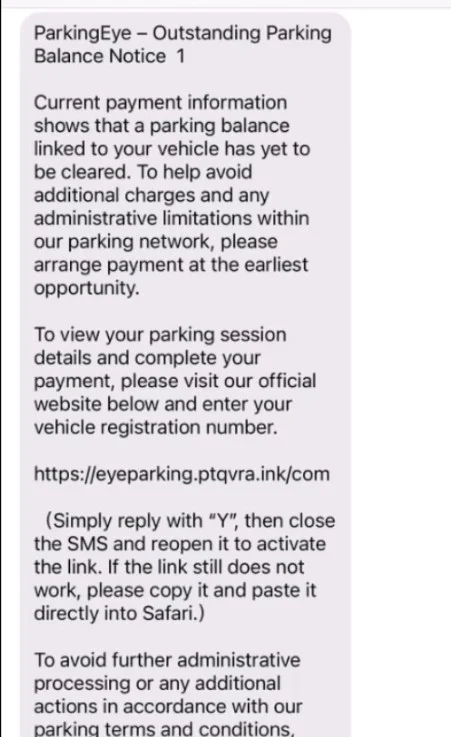
ParkingEye Scam Text Overview
The message creates a parking problem without evidence
The scam text claims that a Parking Charge Notice is unpaid, close to its deadline or already subject to additional fees. It may threaten debt collection, court action, vehicle seizure, driving restrictions or damage to your credit if the balance is not settled immediately.
Most messages provide no genuine notice reference, car park location, date, entry and exit times or vehicle information. They are sent in bulk to random phone numbers. Receiving one does not mean the sender knows you drive, used a ParkingEye car park or received a real notice.
The payment page is designed to look routine
The link may use ParkingEye branding, official colors and a form that first asks for a vehicle registration. That sequence makes the page feel connected to a database. In reality, the victim supplies the information the scammer did not have.
The final form collects card data, billing address and contact details. A small parking payment may be attempted immediately, followed by larger unauthorized transactions or calls from someone pretending to be the bank’s fraud team.
- The trigger: an urgent text about an unpaid private parking charge.
- The missing evidence: no verified reference, car park, date or vehicle details.
- The fake solution: a link to a lookalike payment page outside parkingeye.co.uk.
- The real objective: card details, identity information and a responsive phone number.
Do not assume the text is genuine because you recently parked somewhere. Scammers send broad messages precisely because many recipients have used a paid car park. A real charge can be checked through formal paperwork and the official operator website without using the text link. That independent check takes only minutes and prevents the message from defining the facts. It also preserves your right to understand or challenge a genuine charge instead of paying an unknown website out of fear.
Warning Signs of a Fake ParkingEye Message
Urgency replaces the details a real notice should contain
A genuine parking charge gives the recipient enough information to identify the event and understand payment or appeal options. The scam keeps the claim vague and makes speed seem more important than verification.
Some messages ask you to reply Y or copy a link into the browser. That is not a safety measure. It can confirm that your number is active and bypass protections that prevent a link from opening directly.
Red Flags at a Glance
- No Parking Charge reference appears. The message cannot be matched to official paperwork.
- No location or date is provided. The claim could apply to any driver.
- The deadline is immediate. The amount supposedly increases within hours rather than following written terms.
- The domain is wrong. The payment page is not on parkingeye.co.uk or another route you independently verified.
- Threats are exaggerated. Vehicle seizure, licence suspension or instant credit damage is used to create panic.
- The form gathers the case details. It asks you to supply the registration and identity information the sender claims to know.
Parking Charge Notice, Penalty Charge Notice and Scam Text
The similar initials can confuse drivers
ParkingEye generally issues private Parking Charge Notices connected to the terms of a car park. Councils and transport authorities may issue Penalty Charge Notices under different legal rules. Scammers use PCN because many drivers recognize the initials without knowing who should contact them.
The distinction does not need to be solved inside a text message. Start with the physical notice, car park operator or council you can verify. A legitimate case should identify the issuer and provide a reference that works on the correct official system.
- Private charge: check the named operator, location, reference and appeal instructions.
- Council penalty: use the council website and details printed on the official notice.
- Scam text: usually lacks specific evidence and directs payment through an unrelated domain.
- Safe verification: type the known official address yourself instead of following the message.
A fake message does not cancel a genuine notice
Deleting a scam text is correct, but it does not resolve any separate paper notice you actually received. If genuine correspondence exists, follow its verified payment or appeal deadline.
Do not pay the fake site and then assume the real charge is settled. Money sent to criminals never reaches the parking operator.
The payment amount is chosen to feel easier than checking
A modest charge can make the text seem less dangerous than a bank scam. The criminal wants the amount to be believable enough that the victim enters a full card number without calling anyone. The visible debit may be small, but the form can also collect the security code, billing address, phone number and one-time banking approval.
Treat a failed payment exactly like a successful one. A fake page can record every field before showing an error and then prompt the victim to try another card. Do not enter a second card. Contact the first issuer, explain that the complete details reached a phishing site and ask what protection is required.
Threats about credit and enforcement skip important steps
A private parking dispute does not jump from an anonymous text to instant vehicle seizure, licence suspension or immediate credit damage. Those claims are designed to borrow the fear associated with government penalties while avoiding the formal notices and legal steps that a real dispute would require.
You do not need to debate those threats with the sender. Stop replying, preserve the message and verify any genuine issue from paperwork or the operator’s official contact route. Replying may confirm that the number reaches a worried driver and lead to more targeted messages.
How the ParkingEye Text Scam Works
Step 1: Bulk texts create a plausible problem
Thousands of mobile numbers receive the same unpaid parking message. Because many people drive and use private car parks, the claim feels personally relevant by chance.
The text does not need access to vehicle records to create anxiety.
Step 2: A short deadline suppresses verification
The message says the charge will rise today or enforcement will begin. The victim is pushed to pay before locating paperwork or checking the operator.
Threats involving court, credit or vehicle action make a small payment seem like the easiest escape.
Step 3: The link opens a copied payment page
Logos, fonts and payment language are copied from legitimate parking websites. The domain may contain parking, PCN or ParkingEye among extra words.
HTTPS and a padlock only encrypt the connection to the scammer’s site; they do not make it official.
Step 4: The victim supplies the missing details
The page asks for the vehicle registration, name, postcode and phone number. Entering them creates the illusion that the system found a matching charge.
Those details also build a useful identity profile for later fraud.
Step 5: Card information is collected
A plausible amount is presented, and the victim enters full card and billing details. A small payment may succeed or the page may display an error.
An error does not mean the card was safe; the information may already have been transmitted.
Step 6: A fake bank call follows
The criminals may call using the supplied number and claim the parking payment triggered fraud protection. They request a one-time code or instruct the victim to move money.
Knowledge of the parking payment makes the impersonation sound credible.
Step 7: The same victim receives more traffic scams
An active number may receive DVLA, toll-road, delivery or council fine messages. Each campaign tests a different urgent story.
Recovery services may also promise to reverse the card theft for an upfront fee.
How To Check Whether a Parking Charge Is Real
Begin with information the text did not provide
Look for a physical Parking Charge Notice or earlier correspondence containing the reference, vehicle registration, location, date and payment or appeal instructions. Do not create a case by entering details into the suspicious link.
A Safer Verification Sequence
- Do not use the message link. Close it and type parkingeye.co.uk yourself if ParkingEye is named.
- Find the notice reference. A real case should connect to formal correspondence you can inspect.
- Check the location and times. Confirm whether the vehicle was actually present.
- Contact the operator independently. Use contact details from the official website or verified notice.
- Use the correct appeal route. Do not pay merely because a phishing text created urgency.
- Keep the scam separate. Report the text even if an unrelated genuine parking issue also exists.
What To Do If You Paid the Fake Parking Charge
Act as though the full card number is exposed
Contact the card issuer immediately using the number on the card or inside the banking app. Explain that the details were entered on a parking-operator impersonation site, even if only a small payment appears.
Save screenshots of the text, sender, URL, payment page and bank transaction before deleting anything. Note every piece of information entered and whether a one-time code was shared.
Do not trust an incoming fraud call that mentions the transaction. Criminals may use the information from the form to impersonate your bank and complete a larger theft.
Recovery Checklist
- Lock the card while speaking with the issuer and ask whether replacement is necessary.
- Dispute unauthorized charges and ask the bank to block recurring or merchant-initiated attempts.
- Change any password entered on the fake page and every account that reused it.
- Review statements for small test charges and unfamiliar merchant names.
- Forward the scam text to 7726 and report the phishing URL through the UK reporting service.
- Report financial loss to Action Fraud, or Police Scotland when appropriate.
- Keep checking for fake bank, DVLA, toll and recovery messages that use the stolen details.
- Verify any real parking notice separately so its legitimate deadline is not missed.
A one-time code can mean a second transaction
If you shared a bank security code, tell the issuer exactly what the code message said. It may have approved a card registration, online purchase or new digital wallet rather than the small parking payment.
Ask the bank to review new payees, devices, wallet tokens and contact-detail changes, not only the visible transaction.
Frequently Asked Questions
Is ParkingEye a legitimate company?
Yes. ParkingEye is a legitimate private parking operator. The scam consists of texts and payment pages that impersonate the company.
Does a real ParkingEye charge include a reference?
A genuine notice should provide a Parking Charge reference and specific event details that can be checked through the official route.
Should I reply Y to reveal the link?
No. Replying confirms an active number and does not validate the sender. Forward the message to 7726 instead.
What if I really parked in a ParkingEye car park?
That coincidence does not authenticate the text. Verify any charge through official correspondence and parkingeye.co.uk.
The Bottom Line
The ParkingEye text scam creates a vague unpaid charge, adds a frightening deadline and leads to a copied payment page that collects card details.
Do not pay from the message. Verify formal parking correspondence through the operator’s official website, and contact the bank immediately if the fake page received your card information.

Join the discussion
0 commentsShare your experience or ask a question about this article.
Discussion
Start the conversation
Have a question or something useful to share? Add the first comment.