

It sounds like a dream come true—an email lands in your inbox claiming you’re entitled to $900,000 in compensation from the United Nations for being a victim of fraud. The email even includes the names of prominent global officials and offers details to make the claim seem legitimate. But here’s the hard truth: it’s a scam.
In this comprehensive article, we’ll unpack the infamous “United Nations Scam Victim Compensation” email scam. You’ll learn exactly how it works, the red flags to look for, and what steps to take if you’ve already been caught in the net.
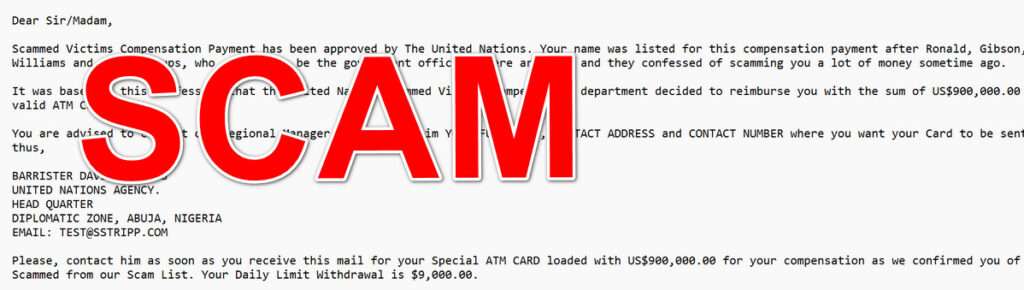
The Anatomy of the “Scam Victim Compensation” Email
This scam exploits two powerful human emotions: hope and urgency. The promise of nearly a million dollars from a reputable organization like the United Nations can easily lower one’s defenses, especially if they’ve truly been scammed before. Here’s a deep dive into how this particular scam is structured and why it’s so convincing.
The Setup: Reputable Branding
The email begins with an official-sounding subject line: “RE: THE UNITED NATIONS AIDS AND AWARENESS SCHEME.” Right away, it references a global humanitarian cause, setting a tone of credibility and importance.
Next, it claims that a Scammed Victims Compensation Payment has been approved by The United Nations. By invoking the name of a globally trusted institution, the scammers aim to instill immediate trust.
The Backstory: A Fabricated Investigation
The email tells you that you were scammed previously by a group of criminals (named as Ronald, Gibson, Williams, etc.) who have since been caught and confessed to their crimes. This false backstory serves two purposes:
- Personalization: It makes the victim feel uniquely chosen, as if their personal misfortune has finally been acknowledged.
- Legitimacy: The mention of an investigation and arrest lends an air of official procedure.
The Hook: Big Money, No Strings Attached
The email states that you’re entitled to US$900,000.00, which will be sent to you via an ATM card. There’s no need for you to do anything but provide your personal contact information. It’s designed to sound simple, secure, and hassle-free.
The Action Point: Urgent Contact
The email then instructs you to contact a supposed UN Regional Manager—Barrister David Charles—along with his email address and physical location in Abuja, Nigeria. This is a significant red flag. While scammers have diversified globally, Nigeria has been a hotbed for this type of email scam for decades.
Fake Official Signatures
To complete the illusion, the email is signed off by none other than Antonio Guterres, the current Secretary-General of the United Nations, and Ana Maria Menéndez, a senior adviser on policy. Including these names adds a final layer of credibility and intimidation.
Language and Tone
The message is written in a formal, albeit slightly awkward tone, which is common in scam emails. Phrases like “We confirmed you of being Scammed from our Scam List” and “Please, contact him as soon as you receive this mail” are subtle hints that the sender is not a native English speaker, and the message lacks professional editing.
Psychological Triggers
- Greed: The large sum of money promised.
- Fear of missing out (FOMO): The urgency in contacting the agent.
- Authority: The use of UN officials’ names and diplomatic terminology.
In summary, this scam succeeds by mimicking the format and tone of official communication, providing a compelling backstory, and creating a sense of urgency.
How the Scam Works
Understanding the mechanics of the scam can help you avoid falling into its trap. Here’s a detailed, step-by-step breakdown of how the United Nations “Scam Victim Compensation” email scam typically unfolds.
Step 1: The Initial Contact
The scam starts with an unsolicited email that appears to come from a legitimate source like the United Nations. The subject line references humanitarian causes and victim compensation, drawing in recipients who may have previously been victims of online fraud.
Here is how the email scam looks:
Subject: RE: THE UNITED NATIONS AIDS AND AWARENESS SCHEME
RE: THE UNITED NATIONS AIDS AND AWARENESS SCHEME. SCAMMED VICTIMS PAYMENT COMPENSATION OF US$900,000.00 (REF: CODE: 06654.)
Dear Sir/Madam,
Scammed Victims Compensation Payment has been approved by The United Nations. Your name was listed for this compensation payment after Ronald, Gibson, Williams and their groups, who claimed to be the government officials were arrested and they confessed of scamming you a lot of money sometime ago.
It was based on this confession that the United Nation Scammed Victims Compensation department decided to reimburse you with the sum of US$900,000.00 in a valid ATM Card.
You are advised to contact our Regional Manager and do send him YOUR FULL NAME, CONTACT ADDRESS and CONTACT NUMBER where you want your Card to be sent to thus,
BARRISTER DAVID CHARLES
UNITED NATIONS AGENCY.
HEAD QUARTER
DIPLOMATIC ZONE, ABUJA, NIGERIA
EMAIL:Please, contact him as soon as you receive this mail for your Special ATM CARD loaded with US$900,000.00 for your compensation as we confirmed you of being Scammed from our Scam List. Your Daily Limit Withdrawal is $9,000.00.
Thank you and have a Nice Day.
Yours Sincerely,
Antonio Guterress
[UN Secretary General]
cc: Ana Maria Menéndez [Senior Adviser On Policy]
Step 2: Emotional Manipulation
The body of the email builds a story around global justice. Supposed scammers have been caught, confessions have been made, and now you’re eligible for compensation. This plays directly into the emotions of hope, relief, and vindication.
Step 3: Request for Personal Information
The email asks you to send over your full name, contact address, and phone number. While this may seem harmless, these details can be used to:
- Steal your identity
- Tailor follow-up scams
- Gain your trust
Step 4: Follow-Up Communication
Once you respond, the scammer (posing as Barrister David Charles) will reply with further instructions. These might include:
- Filling out forms
- Confirming more personal details
- Paying small “processing fees” to receive your ATM card
Step 5: The Fees Begin
After the initial contact, you’ll be asked to pay various fees:
- ATM card activation fee
- Courier service fee
- Customs clearance fee
- Diplomatic tax or government charges
Each fee will seem minor compared to the $900,000 promised. But these fees are the scammer’s real goal—they continue requesting money until the victim stops paying or catches on.
Step 6: Stringing You Along
As long as you keep paying, the scam continues. The scammer may:
- Send fake tracking numbers
- Forge official documents
- Create fake websites to show ATM card shipment status
They are experts at maintaining the illusion and encouraging continued payments.
Step 7: The Vanishing Act
Eventually, the scammer stops responding or creates an excuse as to why the compensation can no longer be delivered—perhaps citing a “failed transaction” or “government policy change.”
By then, the victim may have lost hundreds or even thousands of dollars.
What To Do If You’ve Fallen Victim to This Scam
If you’ve already responded to a scam email or lost money, don’t panic. There are concrete steps you can take to protect yourself and possibly recover your losses.
1. Stop All Communication Immediately
Do not respond to any more emails or phone calls. The scammers may try to re-engage you if they think you’re still a viable target.
2. Report the Scam
File a report with the following:
- FTC Complaint Assistant
- Internet Crime Complaint Center (IC3)
- Your country’s cybercrime unit or national fraud reporting center
3. Contact Your Bank or Credit Card Company
If you’ve sent money, notify your financial institution immediately. They might be able to stop a wire transfer or reverse a transaction.
4. Place Fraud Alerts and Credit Freezes
Notify credit bureaus (Equifax, TransUnion, Experian) to place a fraud alert on your profile. Consider a credit freeze to prevent new accounts from being opened in your name.
5. Change Your Passwords
If you shared any sensitive data, change your email, banking, and other relevant passwords. Use two-factor authentication (2FA) whenever possible.
6. File a Police Report
While local police may not be able to track down international scammers, having a police report can be helpful for identity theft protection and reimbursement claims.
7. Educate Others
Scammers thrive in silence. Share your experience with friends, family, and on social media to prevent others from falling for the same trap.
FAQ: United Nations Scam Victim Compensation Email
What is the United Nations Scam Victim Compensation email?
This is a phishing scam email that falsely claims the United Nations is offering financial compensation—usually $900,000—to victims of past scams. The goal is to trick recipients into sharing personal information or sending money for fake processing fees.
Is the United Nations actually offering compensation to scam victims?
No. The United Nations does not offer direct monetary compensation through unsolicited emails. Any email claiming otherwise is fraudulent. Official UN communications never request personal information or payments via email.
Why do scammers use the name of the United Nations?
Scammers use the name and logos of trusted global organizations like the UN to gain credibility and make their claims seem legitimate. By associating with a respected name, they lower the recipient’s guard.
How can I tell if an email like this is a scam?
Look for common red flags:
- Unsolicited messages offering large sums of money
- Requests for personal information
- Grammatical errors and awkward language
- Urgency or pressure to respond quickly
- Unofficial email addresses (e.g., not ending in “@un.org”)
What kind of information do scammers ask for?
Scammers typically ask for:
- Full name
- Mailing address
- Phone number
- Banking details
- Scanned IDs or personal documents Providing this information can lead to identity theft or more targeted scams.
What happens if I reply to the email?
If you respond, scammers will continue to communicate with you, asking for more information and eventually for money to cover various made-up fees such as ATM card activation, courier charges, or tax clearances. They may continue until you stop replying or realize it’s a scam.
I sent money already. Can I get it back?
In most cases, it’s difficult to recover money sent to scammers, especially if it was wired internationally. However, you should report the incident to your bank immediately. There may be a small window where a transaction can be reversed or flagged.
Who should I report this scam to?
You can report the scam to:
- The FTC (Federal Trade Commission): reportfraud.ftc.gov
- Internet Crime Complaint Center (IC3): www.ic3.gov
- Your local police or national fraud reporting service
- Email provider or spam filter service
Will reporting the scam help?
Yes. While not every scammer is caught, reporting helps authorities track scam patterns, shut down fraudulent accounts, and warn others. Your report may prevent someone else from becoming a victim.
Can I be targeted again if I ignore the email?
Yes. Once scammers identify someone as a potential target, they may try again using different angles or impersonating different organizations. Mark the email as spam and block the sender to reduce future attempts.
What should I do to protect myself from similar scams?
- Never trust unsolicited offers or compensation claims
- Verify suspicious messages by contacting organizations through official websites
- Avoid clicking on links or downloading attachments from unknown sources
- Use strong, unique passwords and enable two-factor authentication
- Regularly monitor your bank and credit accounts for unusual activity
Is there any real UN aid or victim support program?
The United Nations does operate humanitarian and development programs, but they do not involve sending money to individuals without prior legitimate engagement. Real assistance is always channeled through recognized agencies and partners, not direct emails.
The Bottom Line
The United Nations “Scam Victim Compensation” email is a cunning fraud that plays on real fears and hopes. By promising huge sums of money for past injustices, it tricks victims into giving away personal information and paying fees that will never be recovered.
If you receive such an email, do not respond. Instead, report it, protect your information, and spread the word to keep others safe. And remember, legitimate global organizations will never ask for personal data or money via unsolicited emails.
Stay informed, stay alert, and help create a safer digital world.

Join the discussion
0 commentsShare your experience or ask a question about this article.
Discussion
Start the conversation
Have a question or something useful to share? Add the first comment.