

The text arrives at a normal time, in the middle of a normal day.
“Final Notice,” it says. “Unpaid Toll Violation.” A deadline follows, bold and confident, like someone in an office already pressed the next button in a process you cannot stop.
Then it lists consequences that feel uncomfortably real. Registration suspension. License suspension. Collections. A fee of up to 35%. Credit reporting.
And right when your brain starts racing, the message offers one clean, simple escape …a link.
Scam Overview
A growing number of drivers across the U.S. are receiving “Unpaid Toll Violation” texts that demand immediate payment, usually for a small amount like $9.96 or $11.94. The numbers vary. The cities vary. The agency name changes depending on where the scammer thinks you live.
But the playbook is the same.
These are smishing scams, which means phishing delivered by text message. The purpose is not to settle a real toll bill. The purpose is to get you to click a fraudulent link and enter your payment details, along with personal information the scammers can reuse or sell. The Federal Trade Commission has repeatedly warned that texts claiming you owe unpaid tolls are often scams designed to steal your money and information.
If you have seen one of these messages, you have probably noticed how “official” they try to sound. That is deliberate. Scammers have learned that the more the text resembles a formal notice, the more likely people are to treat it like a real administrative process.
What these scam texts usually look like
While the exact wording varies, most unpaid toll scam texts include the same ingredients:
- A subject line like “Final Notice: Unpaid Toll Violation”
- A short deadline, sometimes within 24 hours, sometimes a specific date
- A paragraph referencing laws or statutes to sound credible
- A numbered list of consequences
- A “Pay Now” link that claims to be an official portal
- Language that pressures you to act “without delay”
In the screenshot you shared, the scam message leans heavily into formality and authority. It references Arizona Revised Statutes, Title 28, threatens enforcement actions, and then provides a link that looks like an official government address.
The link format is one of the most important clues.
Scammers often build links that include real-looking words like “az.gov” or “dot” or “dmv” inside the URL, while the actual domain is something else entirely. In your example, the link is:
https://az.gov-uio.cc/dot?var=fmx0cHiplD
The eye catches “az.gov” first. That is the trick. The actual domain ending is “.cc,” not “.gov.”
This technique is common across toll scams nationwide. Agencies and consumer protection groups have warned that scam texts often use convincing lookalike links and urge people to click quickly.
Why this scam is spreading so quickly right now
This particular scam wave has become so widespread because it checks three boxes that make fraud campaigns scale fast:
- It targets a universal fear
Most people understand what tolls are, even if they do not use toll roads every day. They also know that driving-related problems can escalate quickly. Scammers lean into that fear. - It uses small dollar amounts to lower suspicion
A demand for $9.96 feels plausible. It feels like a leftover toll, an administrative fee, or a late charge. It is small enough that many people would rather pay than investigate.
That “small amount” detail is not kindness. It is strategy.
- It can be adapted instantly to different locations
Scammers can swap out agency names and state references in minutes. Today it is Arizona. Tomorrow it is New York. Next week it is your city. That flexibility is why the FTC describes these as scams “from coast to coast.”
Transportation agencies have also been issuing public warnings as the scam spreads. For example, Arizona’s Department of Transportation has publicly warned about fake toll texts and emphasized that they are not texting people to collect toll payments.
E-ZPass agencies have issued similar alerts. E-ZPass Virginia, for example, has an “Active Smishing Scam” warning explaining that recipients may include non-customers, and it provides steps for reporting the texts.
The FCC has also published guidance on how to spot and avoid toll road payment scam texts, emphasizing that these messages claim you owe a toll balance and pressure immediate payment.
Why the messages feel believable even when they are wrong
One of the most unsettling parts of this scam is that it can feel real even if the details are nonsense.
Some victims get toll texts in states with very few toll roads, or none at all. Arizona is a perfect example. Arizona transportation officials have repeatedly pointed out that Arizona has no toll roads, and that toll-related collection texts claiming to be from ADOT are scams.
And yet, people still click.
Why?
Because the scam is not built on accuracy. It is built on emotion.
The message triggers the feeling of being “in trouble,” then gives you a way to make the trouble disappear. That is enough to override skepticism, especially if you are busy, distracted, or already stressed.
The “professional” tone is part of the trap
Notice how the scam uses formal phrasing:
- “This communication constitutes a final notice…”
- “Pursuant to the provisions of…”
- “Initiation of enforcement measures…”
That is not random writing. It is meant to sound like a government letter.
It also gives the scammer plausible deniability in your mind. It feels like a process. It feels like something that already exists.
Scammers often add a list of consequences that mirrors common administrative fears:
- Reporting to a transportation agency
- Registration suspension
- License suspension for 30 days
- Collections referral with fees up to 35%
- Credit reporting and legal proceedings
That “fees up to 35%” line shows up constantly in this scam family, and consumer protection agencies have flagged it as a hallmark of these messages.
What scammers do with your information
These scams are not only about the $9.96.
The real prize is your data.
Once you enter payment information into a fake portal, scammers can:
- Use your card details immediately for unauthorized purchases
- Run small “test” charges first, then larger ones later
- Sell your card information to other criminals
- Combine your card details with personal information to make future fraud attempts easier
And those fake portals often ask for more than just card details. They may request:
- Full name
- Phone number
- Home address
- Email address
- Vehicle plate number (sometimes)
- Date of birth (sometimes)
That information is valuable on its own. It can be sold on black markets, bundled into identity theft kits, or used for future scams that feel far more personal.
Why “it’s only $10” is a dangerous thought
A small amount feels low-risk.
But the moment you type your card number, you are no longer dealing with a small transaction. You are dealing with card compromise.
Many victims only realize it later, after seeing unfamiliar charges, or after a second scam message arrives offering a “refund” and requesting more information.
That is why agencies and consumer protection groups consistently say the same thing: do not click the links, and do not pay through texts. Verify through official channels you find yourself.
The hidden clue: the domain is the truth
If you remember one practical detail from this article, make it this:
A real government portal in the U.S. will not use random domain endings like .cc, .vip, or similar.
A scammer can put “az.gov” or “toll” or “dot” anywhere in a URL. Those words are easy to fake.
The domain ending is harder to hide, but most people do not know where to look.
That is why scammers keep using it.
How The Scam Works
This scam is more than a scary message. It is a step-by-step funnel designed to move you from surprise to payment, with as few pauses as possible.
Below is how the unpaid toll violation “payment required” scam typically unfolds, from the first text to the moment victims realize their card information is gone.
Step 1: Mass texting, not targeted enforcement
Scammers send these texts in bulk. They do not need to know whether you drove on a toll road. They only need a percentage of recipients to click.
They may get phone numbers through:
- Data leaks and breached databases
- Purchased marketing lists
- Automated number generation
- Resold “lead lists” shared between scam groups
This is why the scam hits people who have never used toll roads, and even people who do not own a car.
The goal is volume.
Step 2: The message creates urgency before you can verify
The text is designed to hijack your attention.
It uses a “Final Notice” label because that implies you already missed earlier warnings. It mentions a deadline that feels imminent, like “Payment required by January 7, 2026,” or “Pay within 24 hours.”
That urgency is not just for drama. It blocks a basic safety step: verification.
If you are calm, you might:
- Log into your real toll account
- Search the official agency website
- Call the agency using a number you find independently
- Check your mail for a real notice
If you are rushed, you click.
The FTC’s toll scam alerts emphasize that these texts pressure you to pay quickly through a link, and that you should avoid clicking and verify through legitimate sources.
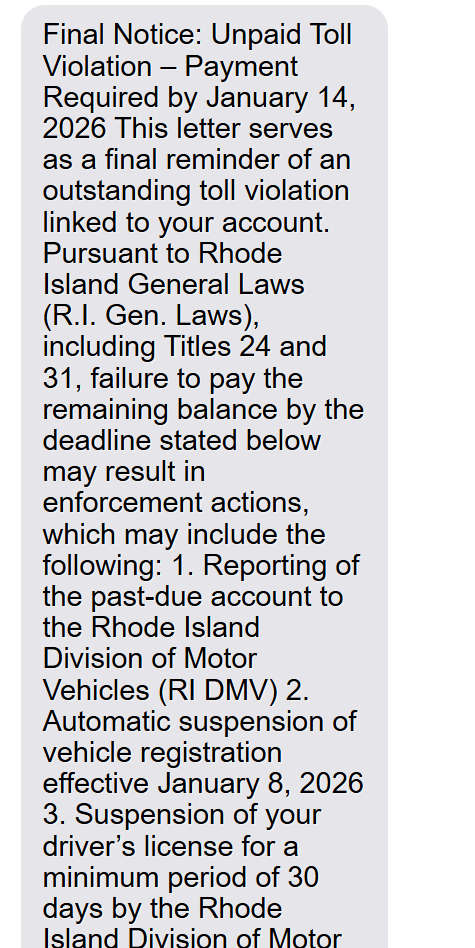
Here is what a scam message will say:
Final Notice: Unpaid Toll Violation – Payment Required by January 14, 2026 This letter serves as a final reminder of an outstanding toll violation linked to your account. Pursuant to Rhode Island General Laws (R.I. Gen. Laws), including Titles 24 and 31, failure to pay the remaining balance by the deadline stated below may result in enforcement actions, which may include the following: 1. Reporting of the past-due account to the Rhode Island Division of Motor Vehicles (RI DMV) 2. Automatic suspension of vehicle registration effective January 20, 2026 3. Suspension of your driver’s license for a minimum period of 30 days by the Rhode Island Division of Motor Vehicles (RI DMV) 4. Referral of the unpaid balance to a collections agency, with additional fees of up to 35% added to the original amount due 5. Potential legal action and adverse reporting to credit bureaus, which may negatively impact your credit rating To avoid these penalties, please submit payment promptly through the official Rhode Island Division of Motor Vehicles online portal using the link provided below: [link]
Step 3: Legal language and statute references are used as “credibility armor”
Many toll scam texts include references to laws, statutes, or administrative codes.
In your screenshot, the text references Arizona Revised Statutes, Title 28. Other versions cite state administrative codes, transportation codes, or agency regulations.
This is not legal enforcement. It is persuasion.
The scammer wants the message to sound like something that would come from a legal department. The average person is not going to fact-check statutes in the moment, especially when a deadline is looming.
So the legal reference acts like a stamp.
It makes the message feel official long enough for the scammer to get what they need.
Step 4: Threats are stacked to make inaction feel risky
The text rarely threatens just one consequence.
It usually lists several, such as:
- Reporting the delinquent account
- Automatic suspension of vehicle registration
- Suspension of driver’s license for at least 30 days
- Collections referral with fees up to 35%
- Legal proceedings and credit reporting
This is fear stacking. It is meant to overwhelm your decision-making.
Even if one threat seems exaggerated, the list creates a “what if” moment.
“What if one of these is true?”
That moment is where many victims click.
Step 5: The link is designed to fool fast readers
The link is usually the most carefully engineered part.
Scammers commonly use:
- Lookalike domains
- Extra words in front of the real domain
- Hyphens and subdomains that mimic official naming patterns
- Domain endings that do not match real agencies
A link like az.gov-uio.cc is a perfect example.
It places “az.gov” up front, then hides the real domain ending in plain sight. If you skim, you see “az.gov.” If you read carefully, you realize it is not a .gov domain.
This technique is widespread enough that the FCC has published consumer guidance specifically about toll road payment scam texts and warns users to avoid clicking these links.
Step 6: The fake portal “looks right” at a glance
When you click, you are taken to a phishing site that mimics a real toll agency or transportation department payment page.
These sites often include:
- An official-looking header or logo
- Familiar words like “toll,” “invoice,” “violation,” or “DOT”
- A clean form layout
- A “Pay Now” button
- Sometimes a “case number” or “notice number” field
Some are low-quality. Others are surprisingly polished.
Either way, they are built for speed. The goal is to get you to complete the form before you stop and question it.
Toll agencies have warned that these phishing texts are being sent nationwide and that legitimate toll agencies do not request payment through unsolicited texts.
Step 7: The scam asks for a small amount to reduce resistance
The fake portal often displays a small balance due, like $9.96 or $11.94.
That number is chosen for a reason.
It feels like:
- A single toll
- A small administrative penalty
- A processing fee
- A minor late charge
It is low enough that victims think, “I can just pay and move on.”
But the moment you enter your card information, the scam has succeeded.
Because the payment itself is not the end goal.
The payment is the entry point.
Step 8: The site collects personal data alongside card data
Many victims expect to enter card details only.
But these sites often ask for more:
- Full name
- Billing address
- Phone number
- Email address
Why?
Because combining personal data with payment data increases the scammer’s ability to:
- Pass billing verification checks
- Resell a more “complete” identity profile
- Target you later with a more convincing follow-up scam
It also creates a sense of legitimacy. If a portal asks for your address, it can feel more “real.”
Step 9: The scam confirms the “payment” to buy time
After you submit, the site may show a confirmation message.
It might say:
- Payment complete
- Transaction processed
- Receipt generated
This is a delay tactic.
If you believe the payment worked, you may not immediately call your bank. That gives scammers time to use your card.
Step 10: Card theft happens quickly, sometimes within hours
Once scammers have your card details, they can:
- Run test charges to confirm the card works
- Make larger charges later
- Use the card for online purchases
- Sell the card details to other fraudsters
Victims often notice the scam only after seeing unfamiliar charges.
Or after receiving a second text.
Step 11: Follow-up scams target victims again
If you clicked or paid, you may get targeted again.
Common follow-ups include:
- “Payment failed, please try again”
- “Refund issued, verify your details”
- “Collections notice, pay immediately”
The purpose is to extract more information or more payments.
This is why reporting and monitoring matter, even if you only paid a small amount.
How to Spot Unpaid Toll Scam Texts and Scam Websites
Quick rule first
If a text message claims you owe a toll and pushes you to pay through a link, treat it as suspicious until you prove it’s real using an official source you look up yourself.
That one habit stops most toll payment scams cold.
How to Spot the Scam Text Message
1) The message creates urgency you can feel
Scam texts rarely say “please review when convenient.”
They say things like:
- “Final Notice”
- “Payment required by today”
- “Pay within 24 hours”
- “Enforcement begins tomorrow”
Real toll agencies may send reminders, but scammers use urgency to rush you before you verify.
2) It threatens big consequences for a small balance
This scam loves the contrast of a tiny amount and huge threats.
Typical threats include:
- License suspension
- Registration suspension
- Collections and a fee up to 35%
- Credit score damage
- Legal action
If a text claims you owe $9.96 but warns of immediate suspension, that mismatch is a classic scam signal.
3) The sender looks “off”
Common red flags:
- International numbers (like +63, +44, etc.)
- Random long numbers with no recognizable ID
- Email-looking senders or strange short codes
- Slightly misspelled agency names
A legitimate toll agency is usually consistent about how it contacts customers.
4) It uses official sounding legal language to look legitimate
Scam texts often include:
- “Pursuant to…”
- “Administrative Code…”
- “Revised Statutes Title…”
- “This constitutes final notice…”
That formal tone is meant to make you comply, not inform you.
5) It tells you to reply “Y” or “STOP” in a specific way
Many scam campaigns include instructions like:
- “Reply Y and reopen this message to activate the link”
- “Reply Y to confirm”
- “Reply STOP to cancel”
That’s often used to increase engagement and confirm your number is active.
6) The link is the biggest giveaway
If the text includes a link, inspect it closely.
Common scam link patterns:
- Weird domain endings: .cc, .vip, .xyz, .win, .top, .icu
- Extra words to mimic government sites: “az.gov-something.cc”
- Long random strings after the domain
- Slight misspellings of real agencies
A real agency link should be easy to recognize and should match what you find on the official website when you type it in yourself.
How to Spot the Scam Website
Even if the site looks “clean,” look for these telltale signs.
1) The domain is not an official agency domain
This is the fastest check.
What scammers do:
- Put official words inside the URL to trick you
- Hide the real domain in the middle
Example of a trick format:
az.gov-uio.cc/...
It looks like “az.gov” but the real domain is “uio.cc.”
What you want to see instead:
- A legitimate agency domain you can confirm by searching the agency name yourself
- Official state or toll authority domains, often ending in .gov (though some toll operators use .com)
If the site uses an odd domain ending or a domain you’ve never heard of, do not enter any information.
2) The page asks for too much information too fast
Common scam site behaviors:
- Immediately asks for full name, address, phone number, email
- Requests credit card details before showing any real invoice
- Asks for driver’s license number or date of birth without a clear reason
A real toll portal typically lets you log in or look up a bill using limited info, and it does not demand a full identity profile upfront.
3) The “amount due” looks oddly specific and small
Scam sites often use amounts like:
- $9.96
- $11.94
- $12.17
Those amounts feel realistic, which lowers your defenses.
But the site usually cannot show you real proof of the toll event:
- no matching toll location
- no timestamp you can verify
- no plate image or official notice number tied to a real system
4) The site design looks official, but the details don’t
Watch for:
- Generic seals or copied logos that look slightly blurry
- Awkward wording that doesn’t match government writing
- Pages that feel “template-based,” like they were quickly assembled
A big clue is language that overdoes it with formality and threats.
5) “Security” claims that don’t prove anything
Scam sites may display:
- “Secure payment” badges
- Random trust icons
- “Verified” labels
These graphics are easy to paste onto any website.
What actually matters:
- The domain name
- Whether you reached the site through an official source you trust
- Whether the agency itself lists that payment portal on its official website
6) Checkout behavior that feels wrong
Scam payment flows often:
- Push you to pay without letting you review details
- Skip normal account login steps
- Show a fake “Payment Successful” screen instantly
- Throw an error and ask you to try another card
If a site acts like it’s trying to get your card number more than it’s trying to help you understand a bill, exit immediately.
The safest verification method (works every time)
If you get one of these texts, do this instead of clicking:
- Open your browser
- Search the official toll agency name or transportation department
- Navigate to the site yourself
- Log in through the official portal or call the official number listed there
Do not use phone numbers or links provided in the text.
Mini checklist you can paste into your article
Scam text red flags:
- “Final Notice” + short deadline
- Threats of suspension, collections, credit damage
- Small amount due like $9.96
- Reply “Y” instructions
- Strange sender number
- Link with odd domain endings
Scam site red flags:
- Domain ends in .cc, .vip, .xyz, .win, etc.
- Asks for full identity info + card details immediately
- No verifiable toll details
- Fake trust badges and rushed checkout
- Instant “payment success” confirmation
What To Do If You Have Fallen Victim to This Scam
If you clicked the link, entered your information, or paid the small amount, take a breath.
You are not the only one this happened to. These scams are built to feel urgent and official, and they catch people in a normal moment of distraction.
Here is a calm, practical action plan you can follow right now.
- Stop interacting with the message
Do not click again. Do not reply. Do not try to “fix” anything through the link. Close the page and delete the text. - If you entered card details, contact your bank or card issuer immediately
Tell them your card information was entered into a phishing website. Ask them to:
- Cancel the compromised card
- Issue a replacement card number
- Review recent and pending transactions
- Dispute any unauthorized charges
- Check your recent transactions for small “test” charges
Scammers often start with a small charge to confirm the card works. Look for:
- Small amounts you do not recognize
- Charges from unfamiliar merchants
- Pending transactions that have not posted yet
- Set up transaction alerts
If your bank offers alerts, turn them on. You want to know the moment any new charge appears. - If you entered personal information, protect your identity
If you provided name, address, phone number, or email, consider:
- Placing a fraud alert with the major credit bureaus
- Freezing your credit if you want stronger protection
- Monitoring your credit report for new accounts you did not open
- Change passwords if you reused any credentials
Some phishing pages try to collect logins. Even if this one did not, it is smart to:
- Change your email password
- Change banking passwords
- Enable 2-factor authentication where available
- Report the scam text to your carrier
Many carriers support reporting by forwarding the message to 7726 (SPAM). E-ZPass Virginia, for example, specifically recommends reporting smishing texts this way. - Report the scam to the FTC
The FTC tracks these campaigns and provides guidance for victims. You can report the scam through the FTC’s reporting channels. The FTC has published multiple alerts about unpaid toll texts and how to avoid them. - Verify any real toll balance through official sources you locate yourself
If you are worried you might actually owe something:
- Do not use the link in the text
- Navigate directly to the official toll agency website by typing it yourself
- Use official contact numbers from trusted sources
Many toll agencies state clearly that they do not request payment via unsolicited text messages.
- Save screenshots before deleting, especially if money was stolen
Keep:
- The full text message
- The sender number
- The link shown
- Any confirmation screen from the site
This can help with disputes and reports.
- Watch for follow-up scams for the next 30 to 60 days
Once scammers know your number is active, they may try again. Be cautious of:
- Refund texts
- Collections threats
- Messages claiming you are “still unpaid”
- Calls pretending to be your bank
If you get a call that feels urgent, hang up and call your bank using the number on the back of your card.
The Bottom Line
Unpaid toll violation “payment required” scam texts are spreading across U.S. cities because they are simple, believable, and fast.
They use small dollar amounts like $9.96 to lower your defenses. They use legal language to sound official. They use fear and deadlines to rush you into clicking. And the moment you enter your card details, the scam stops being about a toll and starts being about theft.
Consumer protection agencies and toll operators have been clear: treat these texts as suspicious, do not click links, and verify through official channels you find independently.
If you remember only one rule, make it this.
A real toll agency does not need to scare you into paying through a random text link….scammers do.
FAQ – Unpaid Toll Violation “Payment Required” Scam Texts
What is the “Unpaid Toll Violation Payment Required” text scam?
This is a phishing scam where criminals send text messages claiming you have an unpaid toll violation and must pay immediately. The text usually includes a deadline, threats (collections, registration suspension, license suspension), and a link to a fake payment portal. The goal is to steal your credit card details and collect personal data that can be sold or reused for identity fraud.
Why am I getting a toll violation text if I don’t use toll roads?
Scammers send these messages in bulk to thousands or millions of random numbers. They are not checking whether you used a toll road. They rely on volume and fear, knowing some people will click just in case.
What are the most common signs the toll violation text is a scam?
Look for these red flags:
- “Final Notice” language and a very short deadline (24 hours or “pay by tomorrow”)
- Threats of license suspension, registration suspension, or credit score damage
- A “Pay Now” link instead of directing you to an official website you can look up yourself
- Odd claims like “administrative fees up to 35%” or “reported to transportation department databases”
- Links using strange domains like .cc, .vip, .win, .xyz, or similar
- The message feels overly formal, legal, or intimidating for a normal toll notice
Why do these texts mention a 35% fee?
Because it sounds official and scary. Many versions of this scam use “up to 35%” to imply penalties are already adding up. It is a pressure tactic designed to rush you into paying without verifying.
The link looks like a government site. How can it still be fake?
Scammers build links to fool people who skim. For example, a link might contain “az.gov” or “dot” inside it, but the real domain is the ending part, like .cc or .vip. The words at the front can be fake decoration. The domain ending tells the real story.
Are toll agencies or DOTs allowed to text me for payment?
Some toll services do send legitimate notifications in certain situations, but a random “Final Notice” text with threats and a payment link should be treated as suspicious. The safest approach is always the same: do not use the link in the text. Instead, go directly to the toll agency’s official website by typing it into your browser or using an official app you already trust.
What happens if I click the link but don’t enter any information?
Clicking alone can still expose you to risk, especially if the site tries to:
- Track your device and location
- Push you to enter personal details
- Redirect you to other scam pages
If you clicked but did not enter anything, close the page, do not return, and watch for follow-up scam messages.
What happens if I entered my credit card information on the payment page?
If you entered card details, scammers can:
- Run small test charges to confirm the card works
- Make larger unauthorized purchases later
- Sell your card information to other criminals
You should contact your bank immediately, cancel the card, and dispute any unauthorized charges.
Why do scammers usually ask for a small amount like $9.96 or $11.94?
Small amounts feel believable and low-risk. Many people think, “It’s only $10, I’ll just pay it.” But once you enter your credit card information, the scammers can use it for much more than the small payment.
What personal information do these scam sites try to collect?
Many fake toll portals collect:
- Full name
- Phone number
- Home address
- Email address
- Vehicle plate number (sometimes)
- Credit card number, expiration date, and security code
This data can be used for identity theft or sold on black markets.
Can scammers really suspend my registration or driver’s license over a toll?
No. Scammers cannot suspend anything. They use official-sounding threats to pressure you into paying. Real enforcement actions follow formal processes and are not triggered through a surprise text link.
What should I do immediately if I already paid?
Follow these steps right away:
- Call your bank or card issuer and report your card was used on a phishing site.
- Cancel the card and request a new one.
- Review transactions and dispute any charges you do not recognize.
- Turn on transaction alerts so you are notified instantly if your card is used again.
- Monitor your credit and consider a fraud alert or credit freeze if you entered personal details.
How do I report unpaid toll scam texts?
You can report them in a few ways:
- Forward the message to 7726 (SPAM) to report it to your mobile carrier (if supported)
- Report it to the FTC (Federal Trade Commission) through their official fraud reporting site
- Report it to the toll agency or transportation department being impersonated (using contact info from their official website)
- If money was stolen, file a police report for documentation
How do I check if I actually owe a toll balance?
Do not use the link in the text. Instead:
- Go to the official toll agency website by typing the address manually
- Use an official app you already installed previously
- Call the toll agency using a phone number from a verified official site
If the text does not match anything you see in your real account, it is almost certainly a scam.
What if the text claims it’s from a state that doesn’t even have toll roads?
That is a strong sign it is fraud. Scammers reuse templates and swap in state names or transportation agencies without caring whether the claim makes sense. They rely on panic, not accuracy.
Why do I keep receiving these scam texts?
Once scammers confirm a number is active, your number may be targeted again or sold to other scam groups. Blocking, reporting, and not engaging helps reduce future targeting over time.
What is the safest rule to follow with toll payment texts?
Never pay through a link in an unexpected text message. If you are concerned, verify by going directly to the official toll agency site or contacting them through trusted information you find independently.








