


A payment confirmation is the kind of message that usually lets you cross something off a list. This one has a second task waiting inside.
It says there’s a vendor agreement ready for you. The reference looks specific enough to be worth checking, especially if you handle contracts for work.
Overview
The subject and the body tell different stories
The vendor agreement email scam opens like a payment update but changes direction when you read the message. It says a vendor addendum has been prepared for your attention.
The reported subject begins “Important::: PYMT Processed for.” The body instead asks you to log in and complete an agreement.
A payment confirmation, a legal amendment, and a request to access a portal are three different things that should be checked against their own records.
The reported link led to a phishing page intended to collect login details. An unrelated web login doesn’t establish that a contract exists, let alone that you approved it.
The paperwork details that give it a professional look
A reference number and a legal department label make the email seem connected to a case you can verify. Here’s what appeared in the sample.
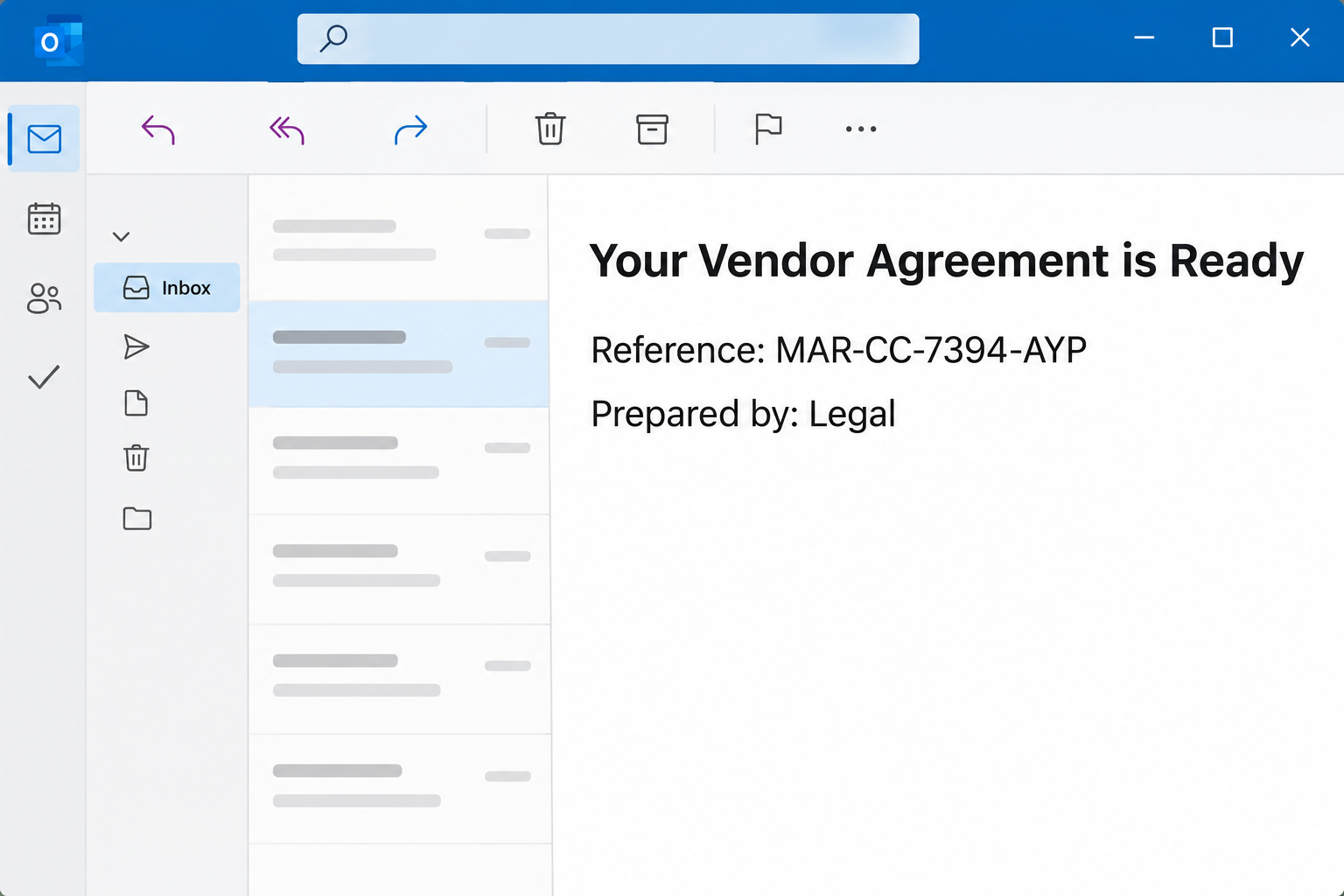
- The heading reads “Your Vendor Agreement is Ready.”
- The reference shown under Agreement Details is MAR-CC-7394-AYP.
- The notice identifies the preparer only as Legal.
- The due date is shown as “Fri 13, 2026,” without a month.
- The signoff mentions Maison Santos, but doesn’t establish who sent the notice.
These details help find a copy of the message. Don’t treat them as proof that the named party prepared an agreement or is connected to the phishing page.
A contract review doesn’t start with a mailbox password
The email asks you to complete the document through its own sign-in route. The designated legal and procurement contacts should be able to verify an actual amendment separately.
The account most at risk is the one a recipient uses on the fake page. It might be a work account, a shared inbox, or a personal login.
This particular report established a credential phishing destination, not a completed payment or a signed addendum. Neither the subject nor the reference changes that finding.
If someone forwards you the notice in good faith, their identity doesn’t authenticate the original request. Check who actually manages the vendor relationship before taking any action.
The case doesn’t show a file attachment that needed to be opened to identify the request. The notice itself points to the separate login step.
How the Vendor Agreement Email Scam Works
Step 1: The payment subject gets the message into a finance workflow
A finance inbox may receive genuine updates about money already sent or received. A subject about a processed payment can look like another item to reconcile.
Readers accustomed to working from a queue may open it before asking which party paid or what invoice the email concerns. Then they find an unexpected contract task.
If you think the notice applies to an actual payment, pull up the transaction yourself. Keep the confirmation question separate from any document the sender wants you to sign.
A colleague in accounts payable may not be responsible for legal review. Send them the known internal case reference, if you have one, rather than forwarding the phishing link.
Step 2: An incomplete addendum request borrows authority from Legal
Addenda are normal after an agreement already exists. People may change delivery details, payment schedules, or responsibilities without writing an entirely new contract.
But this email doesn’t establish what existing agreement the addendum would change. The department label and reference make the request look more specific than it is.
A real agreement owner can identify the original contract, the proposed changes, and who needs to approve them. Find that person through your usual records.
If the date is important, use the actual case to confirm it. “Fri 13, 2026” does not tell you which month is meant or who set the deadline.
Step 3: The review step changes into a credential request
The message asks you to log in to finish the agreement. The reported destination was not a verified portal for viewing the addendum.
A contract platform may legitimately use your organization’s identity provider. That doesn’t mean a sign-in you reached from an unexpected email should be trusted.
Open your firm’s standard signing or procurement system separately. If the contract isn’t there, ask the person who normally sends documents for this relationship.
If you signed similar agreements recently, check the document history or your copies for the earlier reference. A genuine amendment should connect to something you can locate.
If any part of the email seems to contain confidential terms, don’t upload it to an outside checking service. Report it through the organization’s approved security channel.
When a supplier genuinely changes platforms, confirm the change with an existing contact before using it. Treat the change itself as something to verify, not proof the email is fine.
Step 4: A stolen work login can affect more than one agreement
An intruder with access to a vendor-facing inbox may find pricing, approval discussions, shipment records, and information about upcoming payments. None of those consequences is established for every recipient.
The account may also allow access to other services, depending on what permissions it has. Ask your organization to check connected apps and shared access after any exposure.
A convincing follow-up can arrive inside a real-looking conversation. If someone requests a new bank account or an unusual approval, call a known counterparty independently.
Do not approve terms simply because a later message uses the same reference number. Work from the approved draft and the person responsible for it.
How to Verify a Vendor Addendum Without the Email
Locate the existing agreement or purchase order in your own system. Ask the agreement owner whether there is an amendment, and which provisions it is meant to change.
If there is a genuine review, find the version in your approved document system. Compare the vendor, effective date, and proposed changes against the record you opened yourself.
For outside counsel or a supplier, reach a person whose details were already recorded before the message arrived. Ask for a copy through the established channel.
Avoid sharing a full original contract simply to ask whether a message is genuine. Use a verified reference number or set up an internal comparison first.
If payment terms appear to change, use your usual approval and callback controls before accepting new instructions. The email’s payment subject is not confirmation that anyone moved funds.
You can often resolve this in one conversation with procurement or Legal. The suspicious link is not necessary for checking either the payment claim or the document.
Check the authority to approve, not just the file name
Find out which team requested the change before you look for a signature. A real document can still be assigned to the wrong person or sent before approvals finish.
If the addendum affects a live purchase order, check whether the order owner has recorded the proposed change. Don’t let an inbox message become your new approval record.
In a small business without a formal contract system, compare the request with the most recent signed agreement. Call the contact on that record rather than replying immediately.
Ask which clauses need to change and when the revised terms take effect. An unverified notice with a deadline but no clear scope doesn’t answer either question.
Keep payment verification on a separate track
If the subject mentions a processed payment, reconcile that through your normal finance tools even if someone confirms a genuine contract discussion is underway.
Look for a transaction amount and account record you can verify. A genuine vendor may know the agreement reference without being the person who can confirm settlement.
If you’ve already forwarded the message, send a correction through your established internal channel. Say which link to avoid and who can verify the real document.
For a shared inbox, determine whether anybody else entered details before making broad changes. Security can prioritize accounts that interacted and preserve evidence from others.
When a real contract is confirmed, continue with its approved copy rather than salvaging information from the suspicious portal. Keep a separate record of the phishing report.
If a recipient unintentionally approved something in a real system while checking the email, report that action too. The agreement owner needs to know which system changed and when.
What to Do if You Have Fallen Victim to This Scam
-
If you haven’t used the link, report the request internally.
Mention the payment subject, vendor agreement heading, and reference so the security team can find other copies. Don’t ask a teammate to open the page as a test.
If you need to review a real addendum, approach the agreement owner independently. Let them confirm the document through the normal workflow.
-
If you opened the page, stop before doing anything else.
Close it and make a brief note of what appeared. Tell IT if the browser filled in a password, downloaded something, or triggered an unfamiliar prompt.
Don’t try to reopen the page to collect better screenshots. Give your organization the original email through its approved reporting route if asked.
-
If you entered credentials, protect the account you actually used.
Report the exposure to your security team through a known channel. Change the password through the real identity provider and discuss how to sign out affected sessions.
Share whether you supplied a code or approved a prompt. An administrator may need to check authentication changes as well as reset the password.
-
Check for changes that could affect the vendor relationship.
Have your team review mail activity, rules, shared mailboxes, and connected apps as applicable. Keep evidence of unusual messages or changes for the security review.
Ask procurement to confirm any recently altered instructions with known contacts. Put questionable changes on hold until they have been verified.
-
Tell finance if anyone acted on an apparent payment or new bank detail.
Give them the actual transaction confirmation and when it occurred, if available. Contact the financial institution promptly through a verified route if money was sent.
Don’t accept a new account number from the same conversation to reverse a payment. The bank and finance team should handle that question independently.
-
Keep future approval requests on the established route.
Let affected coworkers know which message not to use and where to find any real record. Leave the suspicious sender out of the discussion.
For a Microsoft 365 work account, the administrator can consult Microsoft’s compromised mailbox procedure for session checks and unusual changes.
If you only read the email, you don’t need to restart the whole vendor approval process. The practical job is to report the notice and verify any real work separately.
Frequently Asked Questions
What is vendor agreement reference MAR-CC-7394-AYP?
It is the reference printed in the suspicious message. It doesn’t establish who created the email or whether an agreement with that number exists in your company.
Your agreement owner can check the reference through the usual records. Don’t enter it into the sender’s portal to find out where it came from.
Does the processed payment subject mean a transfer took place?
No, that’s what the subject suggests, not what the case establishes. Look for an actual transaction in your bank or finance system if a payment was expected.
If the payment matches, it still doesn’t authenticate the addendum. Verify that document separately through the parties and workflow you already know.
Is Maison Santos responsible for this email?
The name appears in the signoff of the documented specimen, but the signoff is not proof of who sent it. This article does not identify the operator.
If you have a genuine relationship with a business by that name, reach your known contact. Don’t rely on whatever details the unsolicited email includes.
Does reading the notice mean I signed the addendum?
Reading this email does not mean you completed a genuine signing process. If you provided a password or approved access, that is an account incident to report.
If a document shows changes or a new signature in the real system, contact your agreement owner. Use that record rather than the email to investigate.
What if a coworker sent me the same notice?
An internal forward doesn’t make the original destination trustworthy. Ask your coworker where the request came from and have the agreement owner check it separately.
If someone received it directly from a familiar address, the account behind that address could still be misused. Use an established channel to verify the request.
Should I reply to ask for a safer copy?
Don’t reply through the suspicious message. A real vendor should be reachable from a contract, contact record, or previous verified channel that you already have.
If there is an actual document to review, ask your known contact to put it in the regular signing or shared document system.
The Bottom Line
Don’t use the vendor agreement email to review a payment or sign an addendum. Confirm both claims through your known finance, procurement, or legal channels.
If you submitted a password or approved access, report that first. Then tell the agreement owner so they can check any pending signatures or payments that might be affected.

Join the discussion
0 commentsShare your experience or ask a question about this article.
Community experiences
Did this happen to you?
Your experience could help someone recognize the same scam. Submit a private report for our team to review.
I experienced this tooReports are reviewed before publication. Sharing publicly is always your choice.
Discussion
Start the conversation
Have a question or something useful to share? Add the first comment.