


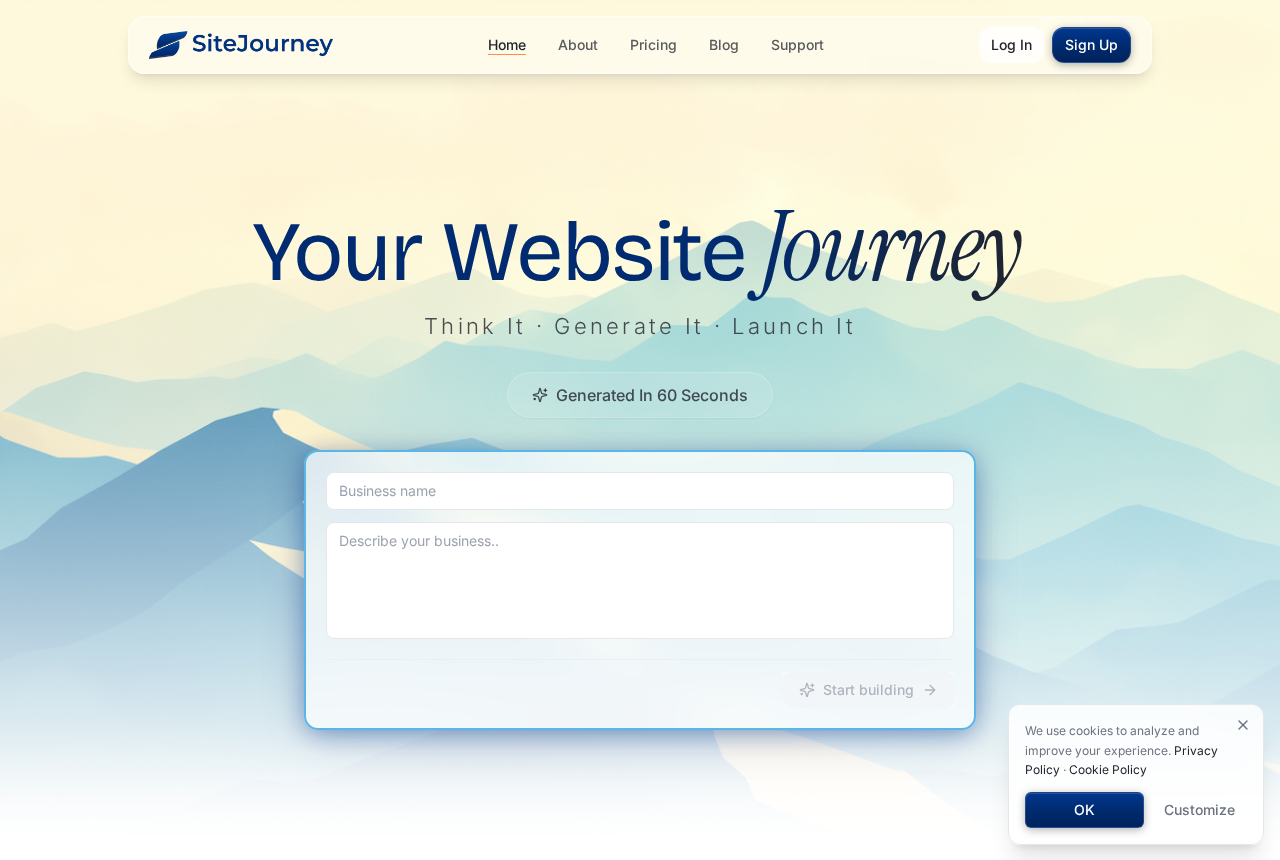
You type your business name, describe what you do, and wait for the first draft. In the SiteJourney demo, that is the easy part.
The harder question comes later, when the address on that screen is the one you want to put on your invoices and business cards.
Overview
What you can build before paying
SiteJourney is an AI website builder. You describe the pages and features you want, and it generates a design you can preview and edit by chatting.
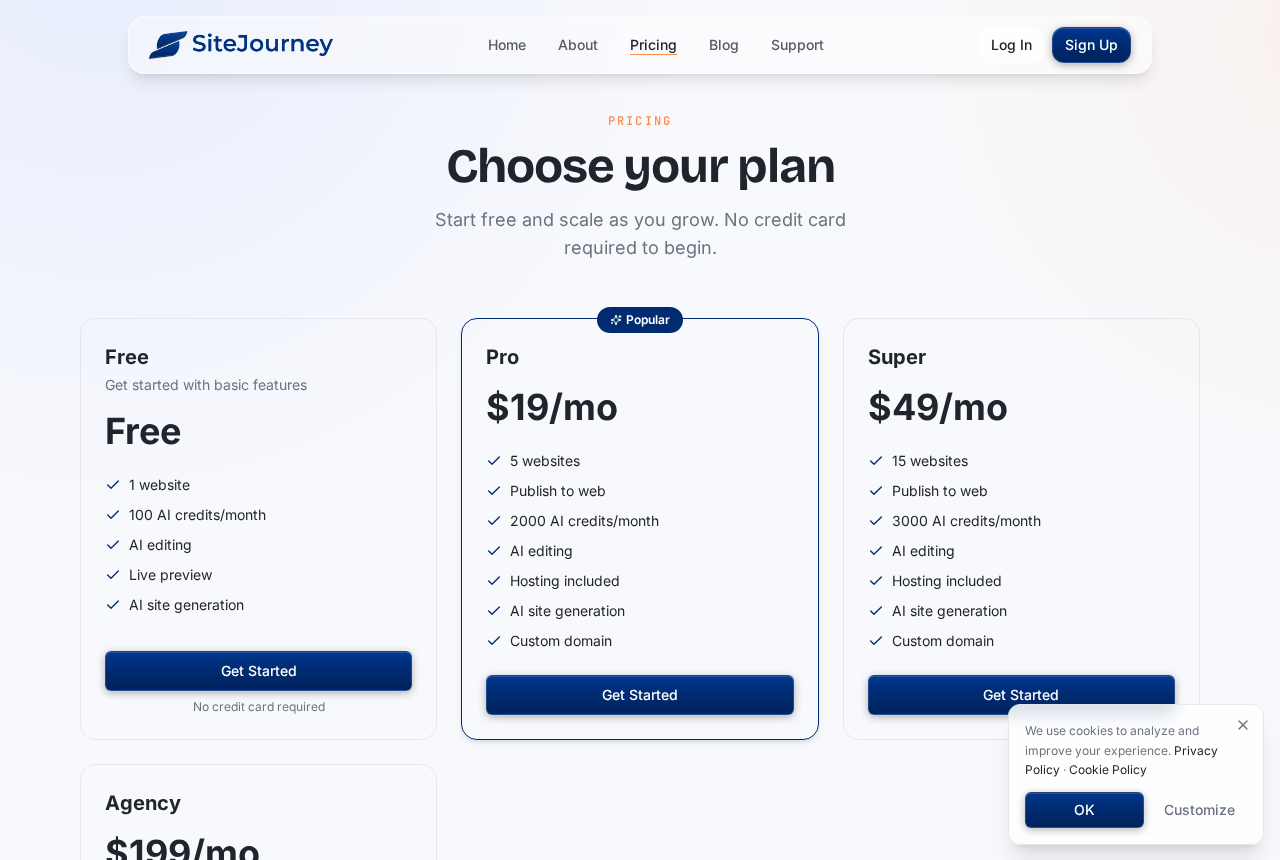
The public pricing page lists one website, a live preview, AI editing and 100 monthly AI credits on its Free plan. It says no credit card is required.
Publishing to the web appears on the paid plans. That distinction matters if you came to the site expecting to test an actual public launch for free.
A published walkthrough started with a review-site prompt. It produced a layout, article previews, transitions and a visible request form. Some image slots came back as placeholders.
When the reviewer requested a counter for incoming requests, the builder said custom backend features were not available in that session. An attempted carousel also returned an error.
That earlier session shows what one prompt achieved, not everything the current platform can do. It was a useful design exercise without a completed business workflow.
The domain offer has two different clocks
The homepage offers a custom domain free for the first year with a paid plan. It also says that the domain renews at standard rates afterward.
The website plan runs on its own billing cycle. The domain has a separate renewal date, and the terms say domain renewal is automatic unless switched off.
Look at both dates before deciding whether the offer is cheap. A monthly price tells you little about the cost of keeping your address in year two.
- Free preview: build and edit a sample before committing to public hosting.
- Paid plan: budget for a recurring subscription, applicable taxes and any separate domain renewal.
- Promotional domain: check how to keep or transfer it before making it your primary address.
Why the fine print matters more than the demo
The terms do not offer self-service unlocking or a transfer code for promotional domains. A move can require staff review or reimbursement of registration costs.
They also say the company can delay or refuse a transfer in some cases, subject to rules set by the registrar or the domain industry’s governing body.
That is a restriction in the written offer, not a report that someone lost a domain. You can avoid it by bringing a name you already control.
The landing page mentions domains among the features included on every site. The dedicated domain section and pricing page narrow the offer to paid plans.
How SiteJourney Goes From Free Preview to Paid Hosting
Step 1: Write a prompt around one job your site must do
A logo, a color palette and a row of photos can make the first preview feel finished. Start with the tasks your customers will actually perform.
For a roofer, that might be sending a quote request. For a tutor, it could mean booking only while a particular appointment remains open.
Ask the generator to build that path in your sample. A button that looks right is useful as a design, but the work continues after someone clicks.
Before posting generated copy, check what it says about your prices, hours, qualifications and services. The terms put responsibility for checking generated material on the person publishing it.
Step 2: Compare the preview with the plan that publishes it
The paid tiers advertise separate limits for projects and AI credits. Pro lists five sites and 2,000 monthly credits; Super lists fifteen sites and 3,000 credits.
The prices shown were $19 and $49 a month, respectively. That is $228 or $588 for twelve months at those monthly rates, before taxes and domain renewals.
That arithmetic is a budgeting comparison, not a description of an annual checkout offer. The actual invoice can depend on the plan and billing interval you select.
If a feature only works on a published site, do not guess from the preview. Ask whether you can demonstrate it without enrolling in a longer paid term.
Use a spare address to test published pages before sending potential customers there. A working test site is more informative than a promise in a pricing table.
Step 3: Decide who should register the website address
Connecting a domain you already manage is different from claiming a promotional one. In the first case, you keep the account where the registration is managed.
SiteJourney says a third-party registrar handles names acquired through its service. The terms say you are the registrant and must keep your registration details accurate.
For a name you register through the promotion, get the registrar’s name and confirm your access before printing the address on anything expensive to replace.
Pointing an address toward different hosting and transferring it to a different registrar are separate operations. Ask who can change DNS settings, and who can authorize a transfer.
Step 4: Plan the exit before relying on the site
Ask what you can export while the account is active. Your page copy and photos may be easy to save, while forms and other features can behave differently.
SiteJourney’s terms say it may offer a limited window, generally up to thirty days, to export user content after termination. Do not treat that as guaranteed time.
Set a reminder before the paid plan renews and another before the domain expires. Canceling your hosting plan is not the same instruction as disabling domain renewal.
If you need the site running without interruption, set up the replacement first. Verify inbound mail and form delivery after the change, not just the home page.
Who Bills You, Who Holds the Domain, and How Support Works
The published operator is SiteJourney, Inc.
The terms and privacy policy both identify SiteJourney, Inc. as the operator. When you pay, keep the invoice so you can match the subscription and its billing period.
A legal company name helps you identify whom to contact. It does not tell you whether the specific feature or migration path you need is included.
A registrar account matters more than a map
SiteJourney’s support page presents a map, but a location cannot tell you who administers the domain. Ask for the sponsoring registrar and your authorized point of contact.
Look up the actual domain you register, not SiteJourney’s own website address. The registrar for the company’s homepage need not be the registrar for your promotional name.
Keep a copy of the original registration confirmation. It helps distinguish a genuine notice about your domain from an unsolicited email demanding a separate renewal payment.
Send migration questions through the proper channel
The site publishes a support form and advertises a typical response within one business day. That is the company’s stated service target, not an independently timed result.
Use the account settings for subscription cancellation. If your issue concerns a promotional domain, ask support separately for the transfer procedure, expected timing and any fee.
Billing, hosting and domain registration are separate services
Paid subscriptions renew until canceled, and cancellation takes effect at the end of the billing period. The terms generally exclude refunds except where the law requires them.
Domain fees have their own conditions. The terms say they are nonrefundable once a registration, renewal or transfer is submitted, so ask for the renewal price beforehand.
SiteJourney can facilitate registration without being the registrar of record. For eligible domains, ICANN’s transfer policy provides a separate framework that accredited registrars must follow.
What a Business Should Test Before Paying
Start with a form submission from an address you control, using fictional details. Check that the confirmation appears and the message arrives where you expect it.
Test a booking the same way. Submit two requests for the same slot and find out whether the site blocks the second one or merely forwards both.
Look for stock photographs or made-up praise in the generated copy. Remove material you cannot verify or do not have permission to use before anything goes live.
Keep customer lists and private contract details out of trial prompts. The service terms describe sharing content with providers used to operate the platform, including AI services.
For a simple portfolio, content and an email link may be enough. Anything that must save or route customer records deserves a separate demonstration with test data.
If you have several clients, decide whose accounts hold their registration and email. A client should not lose access to the address because your own subscription ended.
Make a small backup now rather than relying on a future export. Keep original images, page text, important links and a list of the settings that connect services.
For an existing website, write down the pages that bring in traffic. Have redirects ready if the generated site uses different URLs for those same pages.
Three Things to Separate Before Your First Launch
Your name, the website files, and the mailbox
A domain is the address people type. Your website is the content they find there, and your mailbox may be handled by a different company altogether.
A hosting plan with an SSL certificate can protect the connection to your site. It does not tell you whether the plan includes an inbox for that address.
If you already receive mail at your domain, document the mail settings before switching hosts. A site can load correctly even while messages to your business stop arriving.
A new design is not a migration
Suppose the generator produces a five-page preview of an existing plumbing business. The design may look complete even though the old booking link and service-area pages are missing.
Compare the two versions page by page before connecting the real domain. Check pictures, consent notices, phone links, forms and anything customers use to reach or pay you.
If your new site relies on a specialty integration, keep a copy of its settings and test it separately. An attractive preview cannot tell you what another provider will export.
Give the customer the keys to their own address
If you build for a client, ask them to open the registrar account. Set up your access in a way they can revoke without losing the registration.
Tell them which service bills for hosting and which service holds the name. Give them both renewal dates, plus a copy of any work they would need to rebuild.
That arrangement makes it easier to change designers later. It also means a missed payment on your account cannot automatically take ownership of the client’s address with it.
What to Do If You Already Paid for SiteJourney
-
Find your invoice and confirm whether the charge was for the plan, the domain or both. Note the renewal date for each service before changing settings.
-
Back up the pages, graphics and settings you need. Export any records you are allowed to keep while you can still access the account and its controls.
-
If you claimed a promotional domain, get its transfer instructions and any cost in writing before canceling. Verify the registrar and check the domain’s expiration date.
-
Cancel the subscription in account settings if you no longer need it. Save the confirmation, and review the domain’s auto-renewal separately so the wrong service isn’t left active.
-
For an unexpected charge, send support the invoice, cancellation confirmation and date of the charge. If it remains unresolved, ask your card issuer about your dispute options.
-
When moving a business site, confirm the replacement serves your real domain and receives email before retiring the previous hosting. Keep both running temporarily if necessary.
Frequently Asked Questions
Is SiteJourney a scam or a real AI builder?
It is a real website builder that can generate a preview. The issue worth checking is how much control you keep when a free domain is bundled with hosting.
Can I publish a SiteJourney website for free?
The Free plan lists a live preview, while paid plans list public publishing. Check the current plan rather than assuming a sharable preview is a hosted business site.
Does the free domain stay free after a year?
The homepage limits the promotion to the first year. It says the domain renews at standard rates afterward, so check the actual price for your chosen extension.
Can I move a promotional domain to another registrar?
Do not count on a self-service transfer. The terms make the process conditional, and the applicable registrar or ICANN rules may affect what can be required.
Does canceling SiteJourney mean I get a refund?
Canceling generally stops the next subscription renewal, not the current bill. Ask for the invoice details if the problem is an unexpected renewal, duplicate charge or domain fee.
Should I use SiteJourney for customer bookings?
Test the booking process with dummy data first. Confirm that confirmations arrive, slots are managed correctly and you can recover the information if you move to another host.
The Bottom Line
Use SiteJourney’s free preview if you want to try the builder. Do not register your primary business domain through the promotion if you need an uncomplicated exit.
Keep your domain at a registrar you control, and pay for hosting only after the functions you depend on have passed a real test.
If you already claimed the name, back up your work and get the transfer and renewal terms in writing before you turn off the plan.

Join the discussion
0 commentsShare your experience or ask a question about this article.
Community experiences
Did this happen to you?
Your experience could help someone recognize the same scam. Submit a private report for our team to review.
I experienced this tooReports are reviewed before publication. Sharing publicly is always your choice.
Discussion
Start the conversation
Have a question or something useful to share? Add the first comment.