


The caller says your neighbourhood is getting better internet. Before the work can go ahead, he wants to check the connection on your computer.
In the Toronto telecom scam, that request moved from internet speed to online banking. The resident was still on a video call when police arrived.
Overview
What happened in Toronto
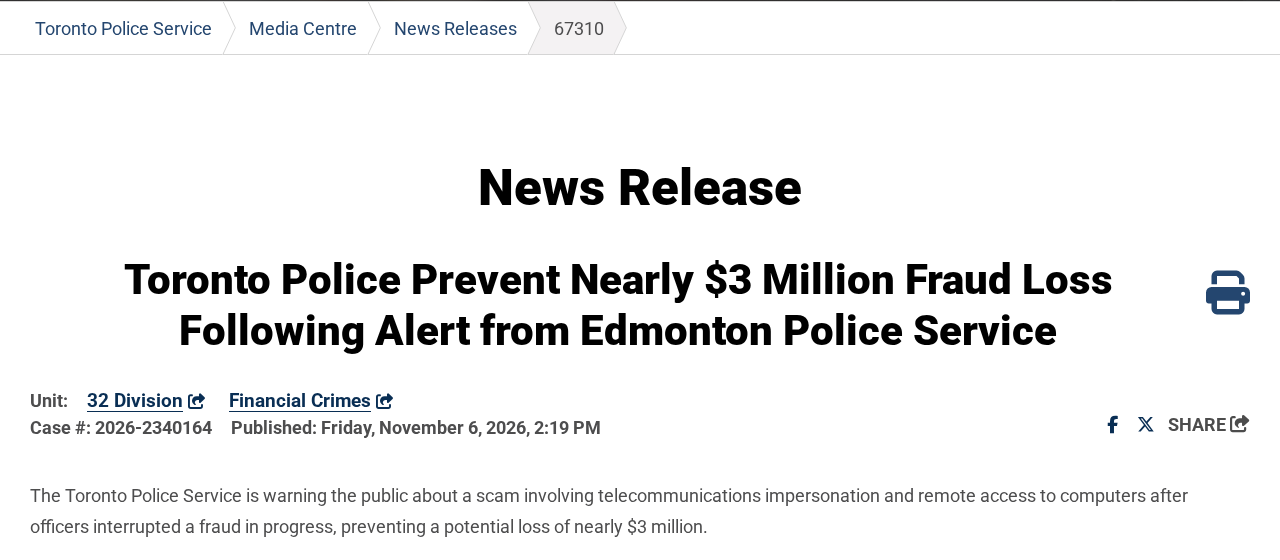
On November 5, 2026, Edmonton police alerted Toronto’s Financial Crimes Unit about a fraud involving approximately CA$2.9 million. Toronto officers intervened at the resident’s home.
The Toronto Police Service report says the officers arrived while the resident was trying to access online banking. They stopped the fraud before a transaction took place.
- The caller presented himself as a representative of a large telecom company.
- He turned a supposed internet speed check into a request for remote access.
- The conversation eventually moved from alleged computer problems to the resident’s bank account.
What the software name does and does not tell you
Police name UltraViewer as the remote support app used in this case. The presence of an app with a legitimate use does not identify the person controlling it.
The danger is an unexpected caller gaining control of the computer and asking you to open sensitive accounts while that access may still be active.
The action that stops the escalation
End the call when an unsolicited internet speed check turns into a request for access. If you already granted access, disconnect the computer from the internet.
Use another device to call the bank if you opened banking or shared financial information. Call the telecom provider separately using a number you already trust.
How the Toronto Telecom Scam Shifted to Remote Access
Step 1: Make a cold call sound like scheduled work
The caller did not begin by asking for a transfer. He told the resident that the provider was improving service in the area and needed to assess internet speed.
The story is specific enough to sound like routine maintenance. You do not have to prove it is false to end the call and ask the provider separately.
Toronto police did not name the telecom company. This is not a finding against any carrier or a reason to distrust a technician you independently booked.
If someone really needs to visit your address, the provider can confirm whether a visit is scheduled. The number on your bill is a better starting point.
Step 2: Turn a speed test into computer control
Police say the resident installed UltraViewer at the caller’s direction. The app gave another person the ability to see or control what happened on the computer.
A speed test and giving someone control over your desktop are not interchangeable. If the only task is checking connection speed, ask for the provider’s documented process.
Even a software download from the genuine software maker does not verify the caller. The risk starts when you allow a stranger to use the tool.
Do not accept the proposed session while you call to verify the story. End the original call and verify the offer before granting any access.
Step 3: Use alleged viruses to keep the session going
After getting access, the caller claimed the computer had problems and viruses he could remove. The public report does not establish that the computer had an infection.
If somebody you did not invite tells you they found viruses, that claim is not a diagnosis. Ask a trusted professional to examine the device after ending contact.
A resident does not owe a caller time to finish looking around the computer. Unplug the network cable or disable Wi-Fi if a stranger already has access.
Closing the unfamiliar window is a weaker assurance than disconnecting the network. The window you closed may not be the tool providing access.
Step 4: Move from remote support to the bank
The caller said the resident should check online banking to see whether money had been withdrawn. That would open a financial account during the remote session.
Police say the video call ended when officers tried to speak with the suspects. They still saw computer activity consistent with somebody accessing the device remotely.
This is why ending video is not the same as disconnecting remote access. Stop both before you change passwords, send messages or look at account balances.
The case did not end with a CA$2.9 million loss. Toronto police say they arrived before money moved and stopped the transaction from taking place.
How to Verify a Telecom Call Without Keeping It Open
Tell the caller you will contact the company and hang up. You do not need a callback number, a link or a technician code from that caller.
Use a recent bill, a bookmarked login or the official app. If a person arrives at the door, you can leave the door closed while you verify.
Ask whether the company has a scheduled network upgrade for your account. Then ask whether your specific service appointment or support ticket is recorded there.
Ask the company what it normally needs you to do. If it directs you to a speed test, use the address from its actual support materials.
Do not trust a familiar telephone number simply because it appears on screen. Someone can display a number without answering at that number when you call it independently.
Knowing your address or the name on an account does not prove employment. Don’t supply further personal details to test how much the caller already knows.
Some legitimate support services use remote assistance with permission. That is different from an unsolicited caller pressuring you to start a session before you can verify their identity.
A telecom appointment is not a reason to sign into a bank. If a caller crosses that line, end the session even if earlier answers sounded convincing.
When you actually called the provider first
If you requested help, check that the case number in the provider’s own app matches your appointment. Follow the published instructions from the provider rather than a forwarded link.
Find out whether support can work without seeing your whole desktop. On a legitimate call, ask what the technician needs to see before you grant permission.
Close unrelated documents and sign out of financial accounts before any verified support session. When authorized work is finished, stop sharing and confirm the session ended.
If the provider cannot confirm the appointment, do not continue the first call. You can open a fresh legitimate support case for the internet problem separately.
When a family member is the one on the call
Give them one concrete instruction first: end the call. Do not ask them to read out a code, open a bank account or forward the caller’s link.
If they enabled remote access and you are with them, help disconnect the affected computer. Use a different phone or computer to work through bank and carrier checks.
Ask four questions before deciding what to do next. Did they run anything, grant control, open their bank or approve a payment?
What to Do If a Caller Got Into Your Computer
-
Disconnect the affected computer from the internet. Turn off its connection or unplug its network cable rather than spending time arguing with the caller.
-
Use another device to reach the bank through a trusted channel. Explain that a stranger had remote control and say whether you opened any financial account.
-
Ask the bank to look for transfers, approvals, new payees or unusual account access. Follow its instructions to stop or dispute anything that already happened.
-
Write down what the caller had you install or open. Save the time, app name and any message or payment record you can access safely.
-
Have a reputable technician examine the device before using it again for banking. Explain that it was controlled remotely and say whether another program was installed.
-
Report the incident to local police and the impersonated company. If you are in Canada, use the genuine national fraud reporting service as well.
Separate a phone call from an active session
If you only spoke to the caller and did not share sensitive information or run anything, you do not need to assume the computer was accessed.
If you downloaded a file without opening it, do not run it to see what it does. Record where it came from and keep it unopened.
If the caller could actually control the computer, the risk is broader than an app you recognize. Tell the technician which screens and accounts were open.
If the device is managed by an employer, report the incident to IT using a separate device. Follow their instructions for preserving records and reconnecting safely.
Secure accounts from a different device
Do not sign into your bank on the affected computer just to check whether money left. Give the bank the approximate time and let it review the records.
Start with accounts the caller saw you open. Follow each provider’s steps to change exposed passwords, review active sessions and check whether recovery details were changed.
If you opened your email during the session, secure it too. A compromised mailbox can let another person intercept account messages and password resets.
Tell the bank whether you read out a code or approved a request. That detail helps it check whether a transaction was authenticated or is still pending.
Tell support what you saw, not what the caller said
Tell the bank whether you entered banking credentials while the session was live. A statement that nothing was withdrawn yet does not answer who saw your information.
If you started a transfer but did not confirm it, say that explicitly. The bank can check its status without asking you to operate the affected machine again.
Tell your technician whether the pointer moved without you or windows opened unexpectedly. Those observations are more useful than repeating the caller’s unsupported claim about a virus.
Do not reconnect the machine merely to collect screenshots for a report. Write down what you remember and ask the person handling the device how to preserve evidence.
Record the time you received the call and the time you disconnected. Those points give the bank and technician a range for activity that may need examination.
If a password change was already made while the caller could see your screen, repeat it from a trusted device. Choose a unique password and review recovery options.
Why It Matters That No Money Moved
Police describe a potential loss, not a completed theft. Their intervention stopped the transfer, but it also showed why a resident should treat the access itself seriously.
Someone may still have seen information even when the balance looks unchanged. A separate check with the bank and a review of the affected device answer different questions.
A public alert does not identify every call using the same story. The name of the app might vary, but an unsolicited request for control is still actionable.
Warn family or neighbours with a simple instruction. If the internet provider calls and asks to get into the computer, hang up and call the company independently.
If someone later claims they can get stolen funds back for a fee, do not send a payment. Go through the bank or the police case you opened.
The Toronto report gives an unusually clear separation between contact and loss. Officers were able to interrupt the call before a transfer, even though the deception had progressed.
You can make that separation yourself sooner. A remote support story does not obligate you to finish a session, and an unexpected call does not require a payment.
Frequently Asked Questions
Did the Toronto resident lose CA$2.9 million?
No transfer is reported in this case. Toronto police say approximately CA$2.9 million was at risk and that officers intervened before a transaction occurred.
Which internet provider did the caller impersonate?
The bulletin does not name the company. Verify the specific call through the provider shown on your bill, regardless of which brand the caller claimed to represent.
Is UltraViewer itself the scam?
Police identify it as the remote support app used in this incident. The fraud was the caller’s deception and use of access to get the resident toward banking.
Does hanging up a video call remove remote access?
Ending video does not necessarily stop remote access. Disconnect the computer from the internet if a stranger had control.
Should I reset the computer immediately?
Disconnect it first and handle any immediate risk to your bank account. Have the affected device examined and discuss what to preserve before considering a reset.
What if I opened my bank account but did not send a transfer?
Contact the bank anyway from another device. Explain that banking was open while a stranger had remote access and ask the bank to review unusual activity.
The Bottom Line
The Toronto telecom scam started with a fake speed check. A neighbourhood upgrade is no reason to give a cold caller control or open your bank account.
End the call and verify through your bill or official app. If remote access was already active, disconnect the computer and contact the bank from another device.

Join the discussion
0 commentsShare your experience or ask a question about this article.
Community experiences
Did this happen to you?
Your experience could help someone recognize the same scam. Submit a private report for our team to review.
I experienced this tooReports are reviewed before publication. Sharing publicly is always your choice.
Discussion
Start the conversation
Have a question or something useful to share? Add the first comment.