


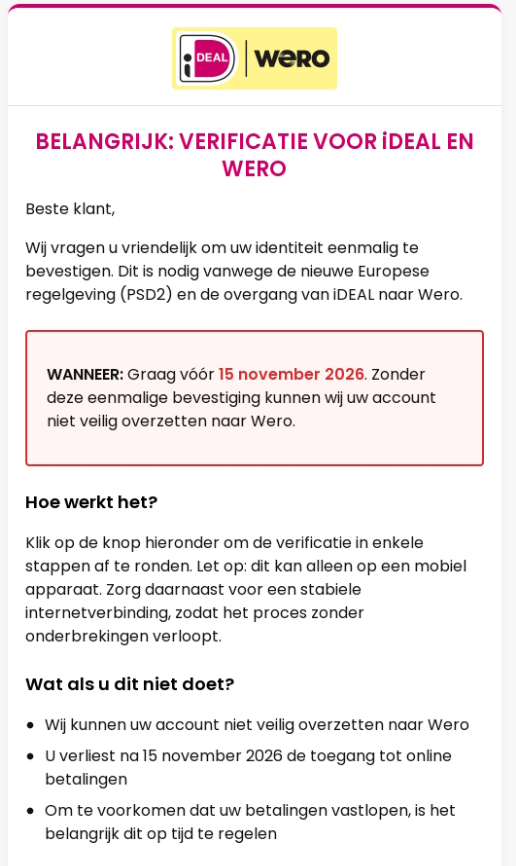
An email says your iDEAL payments will stop unless you verify your identity by November 15. It tells you to complete the check on a mobile device.
You may already have seen the iDEAL and Wero names together at checkout. That real change is what makes the message sound plausible.
Overview
The date in the email is not a banking deadline
The Dutch fraud helpdesk recorded an email claiming that iDEAL users would lose the ability to pay online after November 15, 2026, without a one-time identity check.
The switch from iDEAL to Wero is real, but the threat is not. The email tells recipients to start verification through a link supplied by the sender.
- The message invokes European payment rules and claims that they require action by a fixed date.
- The recipient is told that the supposed check works only on a mobile device.
- The genuine Dutch rollout continues gradually, with participating banks handling the consumer transition.
The official rollout works through your bank
iDEAL says it does not email customers to verify their identities, activate Wero or open an iDEAL account page. Those requests conflict with its published instructions.
Wero’s consumer guidance says you do not need a separate sign-up for the Dutch rollout. Your own bank will tell you when changes affect your services.
What the evidence confirms
The example shows the pitch and the verification button. It does not show everything that the destination page collected or whether any payment went through.
iDEAL has separately warned that lookalike messages aim to obtain bank information. Handle any information you supplied according to what it could let someone access or authorize.
How the iDEAL Wero Verification Scam Works
Step 1: Borrow a real change in the checkout
People in the Netherlands are already seeing iDEAL and Wero branding together. The email borrows that combination instead of inventing an unfamiliar payment system.
The European Payments Initiative announced that online Wero payments began rolling out through participating Dutch banks from October 26, 2026. That date concerns availability, not email verification.
Merchants and payment providers adopt the system over time. Two stores can show different options without your account being broken, overdue or blocked.
That ordinary variation makes the email easier to believe. It still does not give an outside sender control over whether you can pay from your bank account.
Step 2: Give a made-up deadline an official explanation
The email says a one-time identity check is needed because of European payment rules and the migration to Wero. It presents both as reasons to act.
Regulatory language makes a request sound routine, especially when the email promises to protect transaction history. Neither phrase tells you who will receive the information.
In the example, the sender says the check must happen before November 15 and that it cannot be processed afterward. The deadline comes from the suspicious email itself.
The public rollout announcement gives a very different timetable. It sets an objective to complete the migration by the end of 2027, not an individual November cutoff.
Step 3: Push the reader onto a phone
The purported verification must be completed on a mobile device, according to the message. That looks reasonable because many Dutch shoppers already approve transactions in banking apps.
But using your phone does not make the link a bank channel. A webpage can claim to check your identity while asking for something unrelated to migration.
Stop and read any request for approval. A payment, device registration or login approval does not become a migration check because an email says so.
The sample does not establish what followed the button. The decision does not depend on exploring that unknown destination, because the brand rejects this kind of emailed verification.
What the Real iDEAL to Wero Transition Means for You
The migration is about how online payments reach merchants from participating banks. It is not a request for consumers to rescue their own payment history through a web form.
The rollout announcement distinguishes the October launch from the later completion goal. Participating providers can introduce the option to merchants gradually rather than all at once.
For customers, the important instruction is in Wero’s Dutch consumer guidance: keep using your bank’s own channels and keep its app up to date.
Look for guidance in the app you already use or go directly to your bank’s known website. If you update an app, use its official app store listing.
You do not need to register again because one web store displays the combined logo. Seeing iDEAL at a different store does not establish that you missed anything.
A retailer may truthfully announce a change to its own payment options. That would not make it the right place to submit documents for a national payment migration.
Why both logos are not a security check
A genuine logo can appear in checkout instructions, bank information and adoption notices. The same artwork can also appear in a message with no connection to those organizations.
Look at how you arrived at the request, not just its design. A purchase you started at a known shop is different from an unexpected instruction to prove identity.
If you open your banking app yourself to check a message, read the purpose of any notification before accepting it. Confirm new activity with your bank if nothing matches.
Three different dates, three different meanings
The message sample was dated November 8. The fraud helpdesk documented it on November 10, which means the claimed deadline was still a few days away.
The design repeats November 15 in the warning and near the button. That is part of the pitch, not separate confirmation from a bank or regulator.
October 26 is the date in the genuine announcement. Participating banks began making the new payment option available for a gradual merchant rollout rather than switching every checkout immediately.
The end of 2027 is the project’s completion objective. It does not mean every merchant waits until then or that every bank introduces other features at once.
The difference helps when an email claims it can restore payments after a deadline. A rollout milestone explains why a new logo appeared; it does not authenticate that email.
Distinguish paying a merchant from enrolling in a new service
The Wero launch announcement is specifically about online shopping. It does not say that every service offered elsewhere under the Wero name is part of one Dutch enrollment.
The consumer guidance also separates online purchases from sending money between individuals across borders. Those person-to-person features are not all available on the first day of the change.
If a relative elsewhere in Europe uses Wero differently, that is not a reason to follow a Dutch verification email. Ask your own bank about features on your account.
A purchase can still start on a merchant’s website and finish in your bank app. What matters is that you recognized the merchant and initiated the transaction yourself.
How to Check an iDEAL Verification Email Safely
Compare the request with iDEAL’s official warning, which says not to confirm, unlock or verify payments from a link in a text or email.
You do not have to find out whether a sender name is spoofed before deciding not to use the link. The request itself conflicts with the official process.
If your bank has a real notice, start from the bank’s independently reached app or support channel. Do not ask the email sender to confirm its own authenticity.
Preserve the message date and subject if you want to report it. The threatening date belongs to the email, not a countdown that requires you to respond.
Other versions can change the date or button. Check whether the request takes you away from your bank’s verified channels to perform a banking action.
If you have a failed payment after seeing the message, check the transaction through your bank and merchant separately. A payment error is not evidence that phishing instructions were genuine.
Separate a real purchase from a surprise approval
When you actually buy something, use the merchant and amount you chose to check the confirmation request. The prompt needs to match what you intended to do.
A request you did not initiate should remain unapproved while you check it. Do not select a confirmation option to find out what will happen next.
If you are unsure whether an approval went through, call your bank through the official number. The timestamp and information shown on the screen can help identify the action.
What to Do If You Opened the Email or Started Verification
-
If you only received or read the email, do not touch its button. Open your bank independently if you want to check an account notice.
-
If you opened the link but did not enter anything or approve a request, close it. Record the time and check for unexpected prompts or downloads.
-
If you submitted bank details, a password or a security code, contact the bank’s fraud team immediately. Explain what you shared without repeating the code to anyone unofficial.
-
If you confirmed a payment, login or new device, tell the bank exactly which action you remember. Ask it to check for pending activity and unfamiliar devices.
-
Keep the original message, bank notifications and the transaction reference if money moved. Do not reopen the email link to take a more complete screenshot.
-
Report the email through the impersonated service or the Dutch fraud helpdesk. Never forward a live link casually to a relative who may click it.
Ask the bank what can be stopped if you see a transaction you didn’t intend. A report to a fraud helpdesk does not notify your bank.
Describe the action rather than guessing at the fraud label. Telling the bank you confirmed a prompt after opening an email is more useful than saying your phone was hacked.
If you downloaded an app from the link, tell the bank and use another device to contact it. A download or installation is a different exposure from a page visit.
Keep legitimate bank correspondence distinct from messages that arrived afterward. An unsolicited offer to restore access may be another attempt to make you approve something.
Write down what the phone actually asked you to do
If a bank notification appeared, record its exact purpose as well as you remember it. Registering a device and approving a payment present different problems to investigate.
Include the merchant or recipient shown and the amount if there was one. Keep bank details out of public screenshots and share them only through an official reporting route.
If a payment did fail, check whether it was an unrelated purchase you had already started. Keep that purchase’s receipt separate from the unexpected verification message.
Let the bank know if the email took you outside the app before returning to it. That detail helps distinguish the page you visited from the environment you trusted.
Check for additional messages promising to reopen the same verification after the deadline. There is no legitimate need to take up an extension from the sender of the false notice.
If another household member shares the account, warn them using the subject and deadline in plain text. They do not need the original button to recognize the request.
For a merchant order that really is waiting for payment, sign into the merchant independently and check the order. Do not let the phishing email supply a replacement payment route.
If you have already reported the incident, reference that case when you speak to your bank again. Keep separate notes for steps you completed and steps you only considered.
Frequently Asked Questions
Was November 15, 2026 a real deadline for iDEAL users?
The date appeared in a fake email, not in the official Dutch migration timetable. Do not use that message to verify an account or restore payments.
Is iDEAL really becoming Wero?
The transition is real and gradual. The European Payments Initiative announced the Dutch online payment rollout in October 2026 and aims for completion by the end of 2027.
Does the switch require me to activate Wero by email?
iDEAL says it does not ask people to activate Wero by email. Follow instructions you can reach independently inside your own bank’s official app or website.
What if the button opens a page that looks like my bank?
Leave that page and open your bank from its known address or app. The appearance of a familiar login does not prove who supplied the page.
Did clicking the button authorize a payment?
A click alone does not show that a payment was made. Contact the bank promptly if you entered details, confirmed a request or see a transaction you don’t recognize.
Should I reply if the email claims to know my bank?
Do not reply or give it more details. Check any real change with the bank using a contact route that did not come from the email.
The Bottom Line
Do not use an iDEAL Wero verification email to keep your payments working. The migration is real, but the November 15 threat and emailed identity check are false.
If you entered details or approved a request, get in touch with your bank now through its own app or number. Keep the email and describe what you did.

Join the discussion
0 commentsShare your experience or ask a question about this article.
Community experiences
Did this happen to you?
Your experience could help someone recognize the same scam. Submit a private report for our team to review.
I experienced this tooReports are reviewed before publication. Sharing publicly is always your choice.
Discussion
Start the conversation
Have a question or something useful to share? Add the first comment.