


A stranger says they reported your account by mistake. They sound apologetic and send a screenshot that appears to show the report has already become an investigation.
The screenshot gives you 12 hours to clear things up. It directs you to another app to speak with someone you’ve never met.
Overview
The apology started an account warning
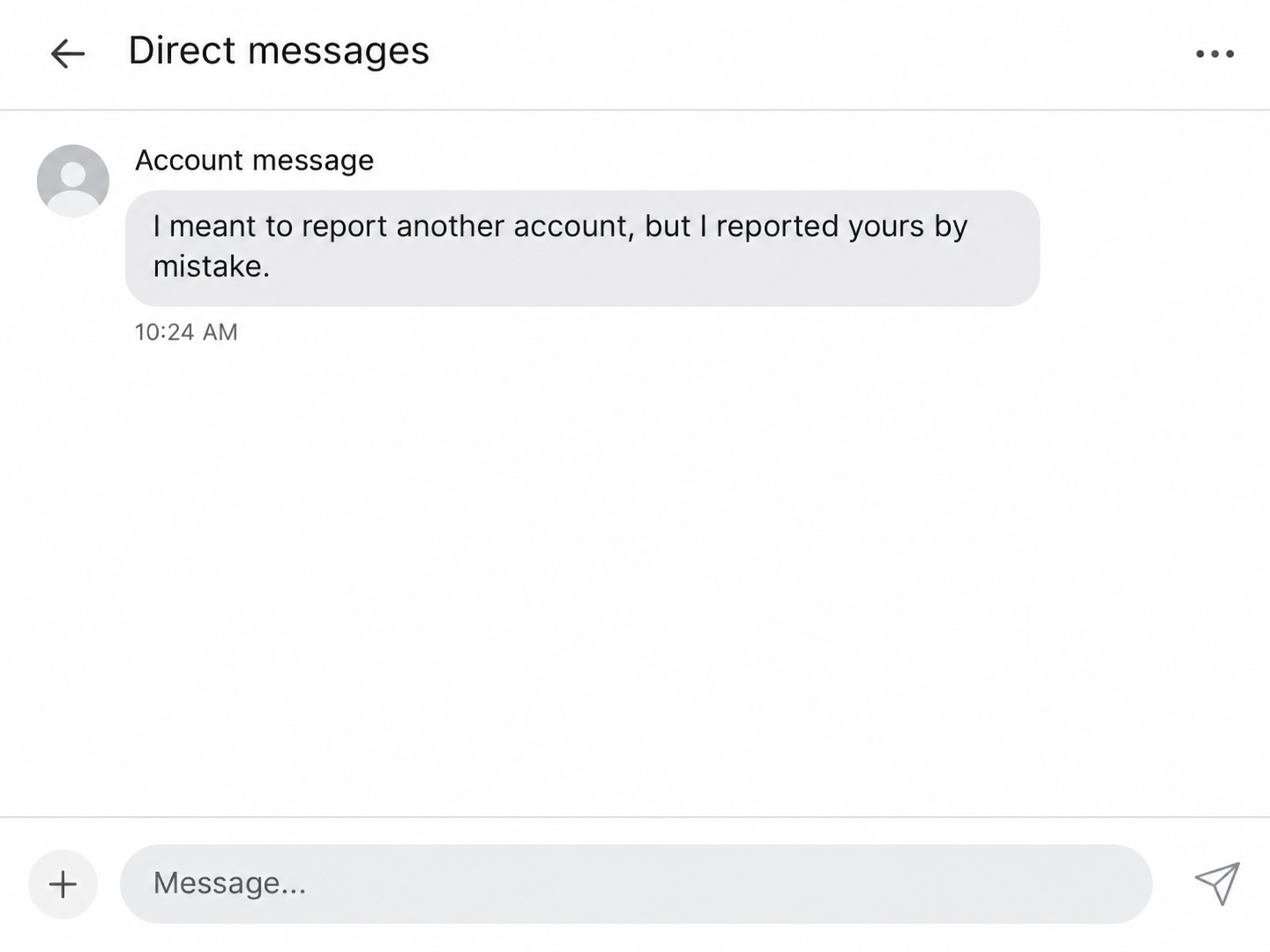
A Reddit user reported getting an unsolicited direct message from someone who said they had reported the wrong account. The stranger supplied a screenshot made to resemble an official email.
The image claimed that the recipient was under investigation for suspicious activity. It told them to contact someone on Discord within 12 hours to resolve the supposed report.
The recipient stopped before making contact on Discord. The opening image reconstructs the first message without identifying the stranger or recreating the fake email as evidence.
The move to Discord gives the lie away
Reddit’s guide to official account messages tells users to ignore and report messages about their account status received elsewhere. An account case does not require a Discord conversation.
A separate documented account of this same lure shows what the second contact can ask for.
A person posing as an administrator tried to get the target to change their account email.
That would hand the address connected to password recovery to someone else. The first recipient never reached that stage, so the later demand comes from the separate account.
You can check an actual restriction yourself
If someone says you have been reported, check for direct notices inside your own account. A screenshot the stranger sends tells you what they want you to see.
- Open the account directly and look for an actual enforcement notice.
- Leave any Discord account that claims it can remove the supposed report.
- Keep your own email address, password and backup codes under your control.
- Save the messages and report the impersonation through the platform where it happened.
A stranger can submit a real report or claim to have submitted one. Either way, the official account notice is where you learn whether any action was actually taken.
Why Changing the Account Email Matters
The email address on your account can help you prove ownership and recover an account you cannot access.
A request to replace it is a request about who can recover it later.
Reddit’s explanation of email verification describes why attaching and verifying an address is useful for recovery. Keep that address under your own control.
In the separate case, the purported administrator supplied a specific email address for the target to add. The address looked related to validation but did not belong to the target.
Changing to an address somebody else controls may let them receive messages about the account or initiate password recovery.
The exact outcome can depend on the account’s security settings and verification status.
The initial screenshot makes that later request feel like part of an official case. Look for the direct account notice before acting on any proposal to change your email.
A public profile, a Discord display name and an image of a certificate are all easy to show another person.
The account’s actual recovery information matters far more than those appearances.
How the Accidental Report Scam Works
Step 1: Someone makes you responsible for clearing up a mistake
The stranger opens with an apology. They frame you as an innocent person who could still lose access unless you act to undo what they did.
One version makes the mistake sound plausible by referring to another username that resembles yours.
That prepares you to accept a story about a report being filed against the wrong person.
Step 2: The sender shows an email you did not receive
The stranger sends an image that looks like a platform notice. In the reported case, it mentioned suspicious activity and told the recipient they were under formal investigation.
A screenshot can copy logos and formatting without providing an account event you can actually see. Open the platform yourself and look for a notice addressed to your account.
The notice’s deadline also changes the rhythm of the exchange. Twelve hours feels short enough to encourage a quick response and long enough to sound like a normal administrative rule.
Step 3: The problem moves to Discord
The screenshot tells the reader to add a Discord contact. Once the conversation moves, the stranger can make another account sound like a separate administrator who confirms their story.
The first recipient stopped at this point. That decision kept the fake investigation from turning into a second conversation about account access.
Step 4: A supposed administrator asks to change an account detail
A separate incident shows how an alleged administrator on Discord presented a fake certificate and asked the target to change the email tied to the account.
The request can be framed as a validation step. The practical change is that a stranger would control the inbox associated with a service you want to keep.
A later request for a code or password would expose access in a different way. Keep those details private and make changes only when you initiated the process yourself.
Step 5: The account can become a convincing sender for more messages
If another person gains control, they may be able to send messages that carry your username and posting history.
Friends or community members can recognize an account while missing who operates it.
That risk is especially relevant to people who help moderate communities or who have regular transactions through established discussion groups.
Tell others if your account begins sending requests you did not write.
What an Actual Account Notice Gives You
Check the notice in your own account
Reddit’s guidance describes where official account messages appear and how administrator accounts are displayed. Your own inbox is more useful than an image forwarded by another user.
An actual notice should be accessible when you open the platform independently. Read what it says happened and use any directions inside that notice if you need to respond.
Reddit’s enforcement and appeals guide explains that account-level action comes with a direct notice about the reason and appeal instructions.
If someone shows you a message they allegedly received, you still need to check your own account.
Their screenshot cannot stand in for an appeal route that you can open yourself.
Keep control of the email that receives recovery mail
When you review account settings, check whether the listed email address is one you can access. Leave it in your control even if someone says a temporary swap is required.
If you recently changed email providers, make the update through your account settings after signing in directly. Confirm that you can reach the new inbox before abandoning the old one.
Keep any real notices sent to the old address after an unexpected change. They may help you identify when control shifted and give the support team useful information.
Treat the two platform accounts as separate
The fake report starts in one platform and moves to another. Preserve the original message and any separate handle, then use each platform’s own reporting tools for its part.
Discord’s reporting instructions explain how to report a message or profile through the app. That is the useful route if someone impersonates support there.
An unsolicited Discord friend request does not give the sender access to your Reddit account. Focus on whether you changed security settings, shared a credential or opened an unfamiliar attachment.
If Your Account Still Opens After You Changed the Email
A session may still be open on the device you used before the change. Check account settings from that session while you still have access to it.
Look for an actual email change notice in the old inbox as well. Read the delivery time and use the platform’s help instructions if you cannot undo the change yourself.
If the stranger also touched another service, check that account on its own.
What you shared on Discord may have been meant for your Reddit account or for your email provider.
A fake support account might say that verification takes time and tell you to leave the settings alone. Keep your recovery details under your own control while you investigate.
If someone asks you to send proof you followed their instructions, do not supply a screenshot. A picture of settings could expose an address or other details they can reuse.
Community moderators can ask a colleague to check changes they did not authorize. It helps to tell them the time range and which private requests might have been sent.
If a member says they got another report warning from you, ask them to preserve that message and report it. Give them a trusted way to confirm who is speaking.
Document which account name was used in each app. This makes it easier to file separate reports, especially if the two profiles copy names that do not match exactly.
If the fake administrator tries to involve your community
A person may claim that the alleged report came from a moderator or that a moderator can vouch for the Discord contact. Check through the community’s established communication channel.
Community moderators can see your public username, but they have no reason to ask for your password or recovery email.
If you moderate several communities, tell the people with whom you usually work where suspicious messages appeared. They can review the relevant community activity without hearing private account details.
A screenshot showing a similar username can be confusing, especially when two profiles have the same photo. Open the account independently and check the full username on the original page.
If you were asked to recover someone else’s account, let that person use official support. Handling a password or recovery address on their behalf makes it harder to establish ownership.
For account recovery, distinguish what you saw from what you changed. Those details let support know whether there is a real loss of control or only an impersonation report.
What to Do if You Have Fallen Victim to This Scam
-
Save the initial message, its timestamp and the other account’s display information, then stop responding and block or report the impersonator.
-
Use a trusted session to check the email address in settings and restore an address you control if the account still lets you.
-
If you shared a password or code, change the password and review active sessions and two-factor settings through the real service.
-
If locked out, follow the official account recovery instructions and include the affected username, the changes you noticed and when they happened.
-
Report the Discord profile or messages using Discord’s own controls and leave any new private chat that offers to solve the problem.
-
Warn affected contacts or fellow moderators and ask them to check requests or account changes made while somebody else had access.
Reddit’s compromised-account instructions explain where to request help and what information the safety team needs. Include a contact address you can access yourself.
If you used the same password on other services, change it there too. Start with the email account that can reset your other passwords and check its recent security activity.
If the impostor offered to sell access back to you, preserve the message and use the official recovery route.
Paying a second stranger can add a financial loss to the problem.
Someone who only read the first message has a simpler response. Check for an actual account notice, report the impersonation and leave your recovery details as they were.
Frequently Asked Questions
Can another person’s accidental report immediately close my account?
A stranger’s claim about a report is not an enforcement notice. If the platform takes action, check for its direct notice and follow its own appeal instructions.
Will a real administrator clear my case over Discord?
Reddit’s official guidance tells users to ignore and report off-platform messages about account status. A Discord contact sent in a private screenshot is not the route to account support.
Why would the impersonator want me to change my email?
An address can receive messages used to verify or recover your account. Keep an address you control on the account, especially if a stranger suggests a temporary replacement.
What if I accepted a Discord friend request without sharing anything?
Accepting a friend request is different from sharing an account credential. End the conversation, report the relevant messages and check whether you changed any settings while speaking with the person.
What if I already changed my account to their address?
Try to restore an address you control from a trusted session, then change your password. If you cannot get in, use the official compromised-account form promptly.
How can I check whether an account notice is genuine?
Open the service directly and look for a notice in the account it concerns. Use its published help instructions if the message asks you to take action.
The Bottom Line
Keep your account email under your own control. If a stranger says they reported you by accident, check for a real notice and leave the Discord conversation.
If you already changed the address or disclosed a code, secure your account from a trusted session if you can. Use official recovery if the account is now inaccessible.

Join the discussion
0 commentsShare your experience or ask a question about this article.
Community experiences
Did this happen to you?
Your experience could help someone recognize the same scam. Submit a private report for our team to review.
I experienced this tooReports are reviewed before publication. Sharing publicly is always your choice.
Discussion
Start the conversation
Have a question or something useful to share? Add the first comment.