


A message in Telegram tells you that your account has been marked as a “virtual account.” The profile looks familiar, and the warning gives you 24 hours to act.
The wording is strange enough to make you hesitate. A deadline tied to losing your chats can make it tempting to answer the person who sent it.
Overview
The warning came from a regular chat
A Telegram user in Taiwan reported receiving a private message that claimed their account had failed a required security check. The sender threatened to delete or disable it.
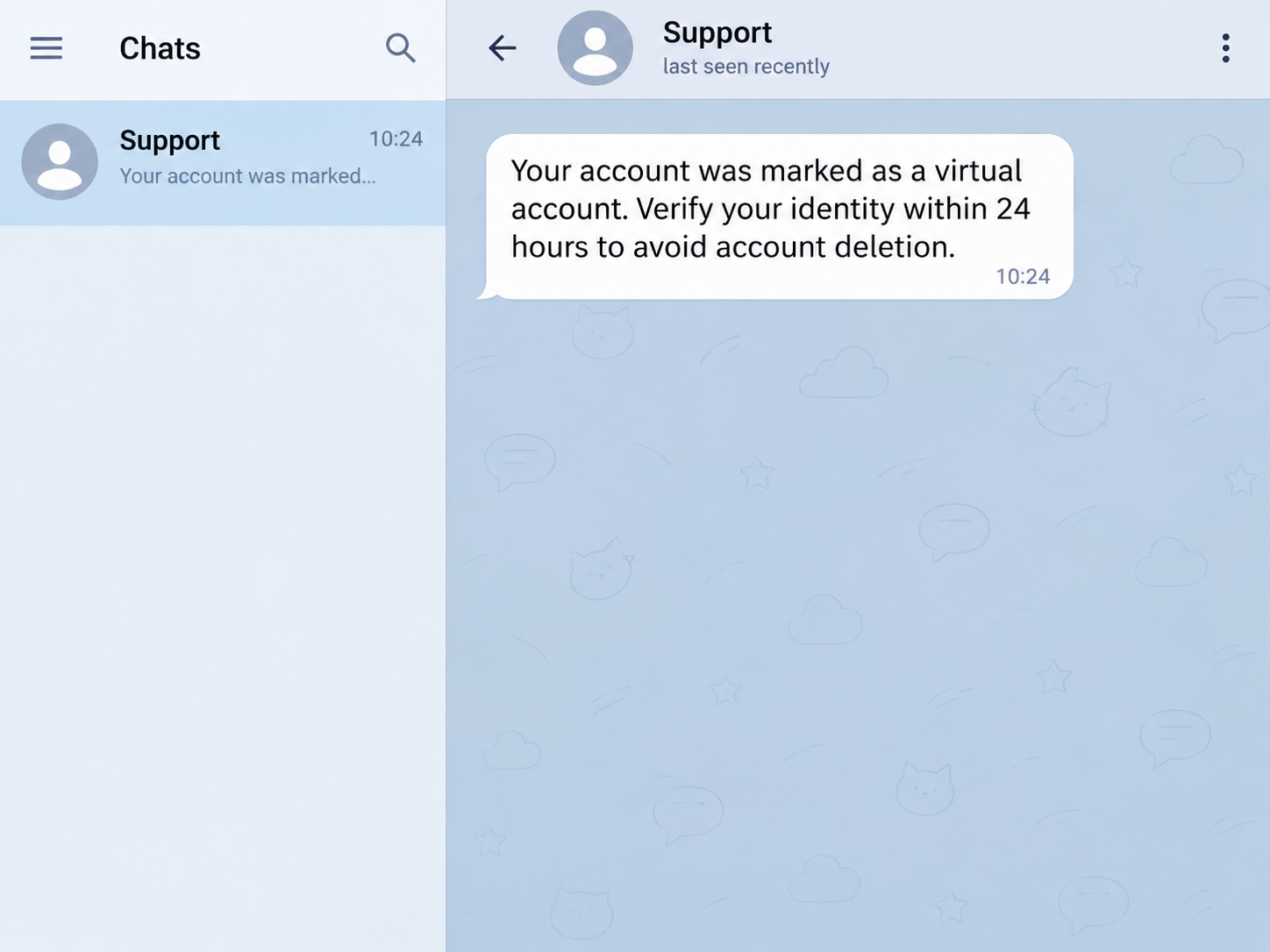
The reported message called it a “virtual account” and demanded identity verification within 24 hours. It came from a profile displaying Telegram’s name and logo.
The user could see a phone number associated with the profile. A country code tells you how a number is formatted, and it cannot identify who is operating it.
The image above reconstructs the warning in a generic chat. The user asked how to recognize the sender, and the public report describes no disclosure or subsequent account loss.
The name and logo were doing the work
A profile can copy an app’s name and artwork. Telegram’s documentation points readers to a verified service notifications chat named Telegram for codes that sign in to Telegram itself.
The platform also supports verification codes for other services. Those arrive in a different verified chat called Verification Codes, so a code there can belong to an outside app.
That distinction matters when a person points you at a code you just received. The notification can be genuine while the person asking you to forward it is an impersonator.
Keep the chat separate from your account settings
Treat the incoming message as something to report. If you want to see whether someone has accessed your account, use the settings on a device where you already use Telegram.
- Open the Devices screen yourself to see where your account is signed in.
- Keep new login codes and verification passwords inside the official sign-in you started.
- Preserve a screenshot before reporting if you need a record of the warning.
- Leave any conversation that makes access to your account depend on sharing a code.
The important question is whether Telegram recognizes a new device. The profile picture and the 24-hour deadline cannot answer that question for you.
What a Telegram Verification Code Actually Does
Telegram uses a phone number as part of signing in. An account code is a short-lived credential that helps authorize a new session, including on another phone or computer.
A request for a code can make the message sound official. Someone who obtains the code may be able to use it for a login attempt already underway.
Telegram says in its official FAQ that codes for your Telegram account should never be shared with anyone. That instruction applies even when the request appears inside Telegram itself.
There is also a separate password called Two-Step Verification. When enabled, it provides another check at sign-in, so handing over a code can lead to another request for the password.
If you shared your phone number, watch for a sign-in code you did not request. If you gave someone the code, check your active sessions immediately.
If a code appears in the verified third-party chat, read which service sent it. The attempt might concern a store, another messaging service or a different account entirely.
The deletion threat is another clue you can check against Telegram’s own documentation. Account self-destruction is an inactivity setting, with at least 18 months described as the default.
Telegram also describes a process a user can initiate to delete an account. An unsolicited deadline in a private chat is a different kind of event entirely.
How the Fake Telegram Security Verification Scam Works
Step 1: A profile makes the first contact
The warning turns up in the same app it claims to represent. You see a familiar logo where you normally see a friend’s photo, with a name you recognize.
The impersonator can take advantage of how quickly people scan a new chat.
Seeing that the message arrived inside Telegram tells you where it arrived, while the sender still needs checking.
Step 2: The message invents a problem with the account
The message suggests that your account has been misclassified and needs a security review. The label sounds like something the company uses internally and a customer would never have seen.
The risk of losing chat history adds weight to the urgency.
If you use Telegram for family, work or an important group, that consequence makes even a strange instruction feel actionable.
Step 3: The sender makes verification the condition for keeping access
The warning directs you to complete identity verification by the stated deadline. The public account ends at this demand, so the exact next screen and any additional instructions are unknown.
A follow-up may ask you to send a code in the chat or type it into a linked page. Leave that chat and start any checks from Telegram settings.
Showing a legitimate notification during that exchange would create an impression that the stranger controls the platform’s security process. A send time close to the chat can reinforce that impression.
Step 4: A new session can carry the deception into other chats
If someone signs in to your account, the session may appear in your connected devices. Look for an entry you cannot account for.
An unauthorized session could let someone send messages that appear to come from your account. That puts your contacts and groups at risk of trusting them as well.
Weeks of old notifications are less useful than knowing who has an active session right now. Reading the Devices screen gives you more direct evidence than studying the threat.
What to Check on Your Own Phone
Open the device list on a session you trust
Use the Telegram app you already installed. From Settings, open Devices, or find Active Sessions under Privacy and Security in versions that list it that way.
Compare the entries with the phones, browsers and computers you actually use.
Think about an old desktop installation or spare phone before you assume every unfamiliar label belongs to an attacker.
A device description can be generic and a location can be approximate. Recent activity and a device you can recognize usually give you more context than one city name.
If a device clearly belongs to someone else, terminate that session from a trusted device. You can also close old sessions you no longer use to simplify future checks.
Keep at least one working session while you get the account under control. Logging out everywhere can complicate recovery when you no longer receive texts at your current number.
Check where a code arrived before reacting
Telegram describes two verified chats that serve different purposes. Check the alert’s placement inside the app rather than relying on a copied paper-plane image beside a person’s name.
If the message says a code was generated for a different service, open that service independently to check for changes.
Report an unsolicited third-party code in Telegram when that option appears.
A notice about a sign-in you never initiated is a reason to review devices.
It does not create a reason to answer a private account that arrived around the same time.
If Telegram already shows an unfamiliar login alert, act on the connected session in settings. Save the date and device details privately so you can explain the incident to support.
Keep other people out of the conversation
If the stranger asks you to invite another person, move the discussion to a different chat or put a group administrator in touch, leave the conversation.
Someone claiming to protect an account can cause you to expose the group’s members too.
A screenshot sent through a trusted channel gives an administrator useful context without bringing the stranger in.
For a group that accepts payments or posts public announcements, alert another established administrator if your account may have sent messages without you.
They can check recent posts and warn members.
When the Warning Arrives During Real Account Trouble
A fake message can arrive while you are already dealing with a new phone, a replaced SIM or a login you began earlier. Check the sequence before trusting the sender.
Start by identifying the last sign-in you actually initiated.
If you’re setting up a new device, keep the official app open and finish its prompts without switching to the stranger’s chat.
If you recover your phone number after a SIM issue, review which sessions stayed active. Family members who message your usual account may not know you lost the device.
People with a public username can receive unsolicited messages from accounts they have never saved. You can review who sees your number in Privacy and Security after checking active sessions.
If the warning appears in a group, capture the account that posted it and alert a moderator you already know.
There is no reason to appoint the poster as an administrator.
Someone can also send a report screenshot that includes personal information from unrelated chats. Crop those details from anything you share with a group, and keep the full record privately.
If your phone number stops working at the same time
Try calling your number from another phone if service suddenly stops. A carrier problem can happen independently, so contact the carrier through its established app or support line.
Tell the carrier when service stopped and whether you recently requested a replacement, so it can check what happened to your SIM.
Use a Telegram session already open on a laptop to check Devices. Keep it open while you restore access to your number.
A two-step password needs its own recovery route. Check the email account you use for Telegram recovery so someone cannot reach it through a password you shared elsewhere.
If one caller claims to be fixing both your SIM and your Telegram account, contact the carrier and Telegram separately through their official channels.
What to Do if You Have Fallen Victim to This Scam
-
Preserve the warning and the sender’s profile if you can do so safely, then report the private chat and block the sender.
-
On a trusted device, open Telegram settings and use Devices to terminate the sessions you cannot account for.
-
Set or update your Telegram Two-Step Verification password and confirm that its recovery email is an account you still control.
-
If the linked page collected an email password, change it through your email provider and check for other devices signed in there.
-
Tell contacts through a trusted channel to disregard any messages, links or payment requests sent while your account was out of your control.
-
If you lose access, keep your original device and phone number available when you describe the problem to Telegram Support.
If your number stopped receiving calls and texts around the same time, contact your carrier. Restoring access to the number may matter as much as recovering the Telegram session.
Preserve receipts and transaction references if a message sent from your account persuaded someone to pay. That person should contact the provider that processed the payment without waiting for Telegram.
You may also see later messages from strangers who claim they can restore your account for a fee. Use the official support route and keep your new codes private.
If you only read the original warning, the exposure is much smaller. Reporting it and checking Devices can resolve the immediate concern without resetting the rest of your digital life.
Frequently Asked Questions
Does a private warning mean Telegram has flagged my account?
A message from an ordinary profile cannot establish that. Check the real app and its official help page before taking action on any claim that your account will close.
Why did the sender call it a virtual account?
The phrase gives the threat a technical sound without explaining a specific problem you can confirm. The reported sender used it to demand identity verification within 24 hours.
Can someone sign in if I only gave them my phone number?
They can try to start a login, which is why an unexpected code is worth noticing. Check active sessions and keep the code and Two-Step Verification password to yourself.
Does a real Telegram code mean a stranger is legitimate?
A genuine login code shows that a login process generated a credential. Telegram’s instructions say to keep codes for your Telegram account private, including from other services or apps.
How can I tell whether I actually lost control of the account?
Check Devices for an unrecognized session, then look for messages you did not send or profile changes you never made.
Can my friends receive messages from someone using my account?
An active unauthorized session can send messages under your profile. Warn people through a different trusted channel if you find a suspicious session or someone receives an unexpected request.
The Bottom Line
Leave the private chat and keep your Telegram account codes to yourself. A profile repeating Telegram’s branding has no authority to make you meet its 24-hour deadline.
If you already followed the instructions, check Devices on a session you trust and remove unfamiliar logins. Then secure Two-Step Verification and warn contacts if your account sent anything unexpected.

Join the discussion
0 commentsShare your experience or ask a question about this article.
Community experiences
Did this happen to you?
Your experience could help someone recognize the same scam. Submit a private report for our team to review.
I experienced this tooReports are reviewed before publication. Sharing publicly is always your choice.
Discussion
Start the conversation
Have a question or something useful to share? Add the first comment.