


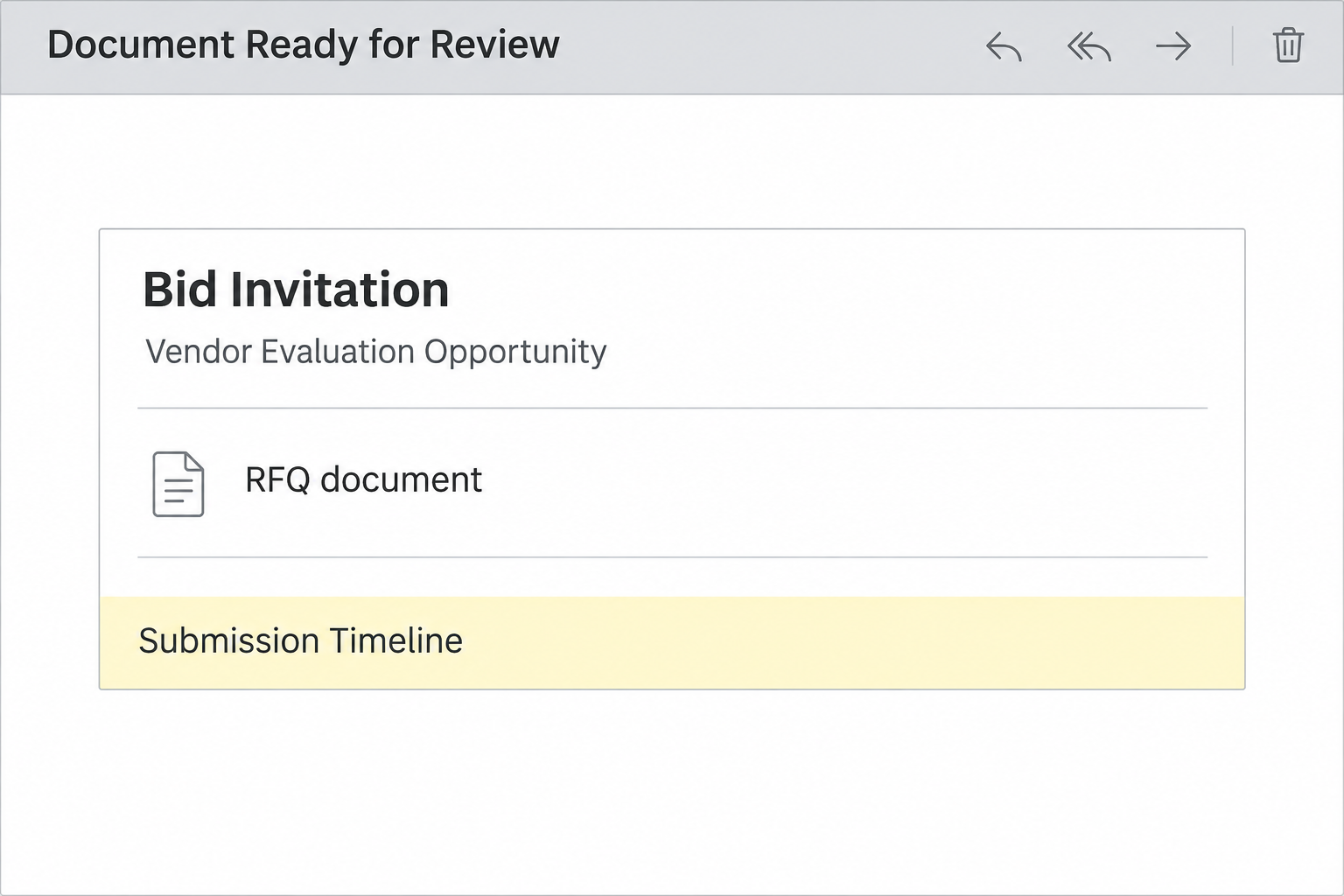
The first clue might be the subject, “Document Ready for Review.” If you spend your day opening bids and pricing jobs, that probably sounds like ordinary work.
The email gets the little details right. It is worth taking a closer look at the one detail that could change what you do next.
Overview
A bid invitation that belongs in the wrong inbox
The Vendor Evaluation email scam presents itself as a new business opportunity. The message describes an infrastructure initiative and says the recipient’s team has been invited to submit a quote.
The sample used the heading “Bid Invitation,” with “Vendor Evaluation Opportunity” beneath it. The project was supposedly scheduled for early Q2 2026, and the sender wanted preliminary information from suppliers.
It looked more organized than a cold sales email. There was a compact submission timeline, a named document, and a place to direct questions.
An RFQ, or request for quotation, is a familiar part of real procurement. A legitimate buyer may send one to several suppliers to compare pricing, specifications, schedules, or other terms.
That routine explains the choice of story. A sales coordinator can open a quote request without knowing the buyer personally, especially when the message seems relevant to the company.
The PDF name is not proof of a file
The apparent attachment in the documented message was labeled “Bid_Invitation_RFQ_2026_Q2.pdf.” It wore the trappings of a normal attachment, including a file size and an expiration notice.
But the document card was part of the email itself. The apparent attachment and a separate review control sent the reader toward the same external destination.
That distinction matters more than the document name. A label ending in .pdf can describe a file, but it can also be text the sender placed over a link.
The external page was unavailable when analysts tried to examine it. The evidence shows the email and its linked attachment imitation, not a working sign-in screen captured on that destination.
Credential theft is the likely goal. An incomplete view of the landing page does not justify claiming a particular sign-in provider, a stolen password, or a malware infection was observed.
The practical checks a bid desk can make
Procurement messages have details your company can verify independently. A legitimate buyer should have a way to identify the organization, the solicitation, and the channel it uses for submissions.
Ask a colleague whether the account is already known before opening anything. An experienced salesperson may recognize the customer name, but recognition alone does not authenticate the message.
Use these three checks to decide whether the email merits any further attention:
- Find the buyer through your customer records or its independently located website.
- Ask whether an RFQ exists and confirm its reference number or identifying details.
- Request the file through the buyer’s established procurement channel or a known contact.
Do not reply to the original email for confirmation. Even a polite reply that repeats the same bid details comes from the same unverified source.
How the Vendor Evaluation Email Scam Works
Step 1: The email arrives as ordinary sales work
The lure does not begin with an overdue bill or an urgent account warning. It offers something a supplier actually wants: a chance to quote for new work.
The wording implies someone has considered the recipient’s background. That flattery is restrained, which fits the way an unfamiliar purchasing team might approach a suitable vendor.
The subject avoids naming a project or identifying a buyer. “Document Ready for Review” works in a crowded inbox because the card inside supplies the stronger story.
A recipient who forwards it to an estimator can unwittingly lend it credibility. The estimator sees a coworker passing along an assignment, not necessarily a stranger making first contact.
That is why a quick message to the colleague should be specific. Ask whether they verified the buyer or simply forwarded the email because it looked like an appropriate lead.
Step 2: The RFQ card looks like something you can preview
The sample did more than mention a file in a paragraph. It gave the purported PDF its own space, near a section with dates and submission information.
People who use webmail all day are accustomed to clicking compact file tiles. This one borrows that habit even though the actual tile is embedded in the message.
Some real services share files by link. A preview opening in a browser is therefore not automatically suspicious, and it does not identify who controls the page.
What makes this specimen problematic is the combination: an unexpected bidder invitation, an unauthenticated contact, and two apparent ways to review the document that resolve to the same outside page.
Rather than opening both, ask IT to inspect the message. Seeing the same file name twice does not establish that a document exists.
Step 3: A deadline gives the reader a reason to stop asking questions
There are two different clocks in the message. One refers to the bid submission timeline, while another suggests the linked document will no longer be accessible after a short period.
That difference can be legitimate in a real bidding system. In this email, the clocks work together to make immediate review feel like the responsible thing to do.
The pressure is easy to miss because the language is polite. It does not have to threaten your account if it can make you worry about missing a worthwhile job.
A small sales team may see a quote deadline and clear time immediately. The better first use of that time is to confirm that the solicitation exists.
The quarter and deadlines belong to this sample. If you receive something similar with new dates, judge it by the contact and destination, not the calendar.
Step 4: The outside page can turn curiosity into a sign-in
A recipient expecting specifications may interpret a sign-in prompt as just another step in accessing a restricted document. The workflow feels familiar even when the sign-in is not.
The link destination was unavailable for inspection, so no login form was confirmed. A Microsoft or Google sign-in screen would be a guess, not an observation.
The risk is what would happen if a copy led to a page that requested your work password or a verification code. Those details could enable access to your account.
If a page claims you are signed out, leave it. Open your organization’s normal mail or document portal from a bookmark and look for the share there.
A real external share may not appear in your own portal. In that case, contact the verified sender or your IT team instead of entering credentials on an unexpected screen.
Step 5: An exposed sales mailbox can make later fraud look routine
An attacker who gains access to a work mailbox can read the questions customers ask, find pending bids, and see which invoices are due. Those details make follow-up fraud convincing.
A real purchase-order thread can suddenly contain a request to send a deposit to a new account. The context is genuine even when the instruction is not.
The FBI’s guidance on business email compromise recommends confirming changes to payment details using a known phone number. This protects both sides of a business relationship.
None of those later events was established in the captured Vendor Evaluation case. They explain why a submitted password needs a different response from an unopened email.
What to Do if You Have Fallen Victim to This Scam
-
If you only received the message, report it as phishing. Use your organization’s reporting control or forward it as an attachment if your security team requests that format.
If a colleague sent it to you internally, tell them you are flagging the outside email. Ask them not to send the fake RFQ to any more staff.
Keep the original for the security team until they tell you what to do with it. A screenshot is useful but cannot replace the original headers and link information.
-
If you clicked but entered nothing, close the page. Write down the approximate time and which control you used, then let IT check your report against its records.
A click alone is not proof that your password was stolen. Be clear about whether you typed, approved, downloaded, or opened anything after reaching the page.
If something really downloaded, do not open it to find out what it is. Follow your company’s file-handling process and leave the file where support can examine it.
-
If you typed a work password, tell IT immediately. Contact the help desk using an internal number or channel you already trust, then follow its official password reset process.
Say whether you also approved a prompt or entered a verification code. Tell IT about anything you typed even if you never finished or got an error.
Do not assume the password change will end every active session. Ask support whether it has revoked sessions and checked recovery details, sign-in methods, and connected applications.
-
Have the mailbox examined for unexpected changes. Forwarding rules, delegates, sent messages, and changed security information can reveal problems that a new password would leave in place.
Microsoft publishes guidance for administrators responding to compromised mailboxes. Send the affected user and timeline to your own support team rather than attempting administrator actions without authorization.
Review any vendor threads that show an unexpected request for bank details, a deposit, or copies of internal documents. Verify those conversations with the other party using a known number.
-
Act quickly if a payment left the company. Have your finance team contact the bank through its usual fraud channel and ask what can still be stopped or recalled.
Gather the amount, transfer reference, beneficiary details, and communication timeline for the bank. Whether recovery is possible depends on the payment and how quickly it can be traced.
Let management decide when to contact customers or vendors. Reach them through independently verified details so a notice does not end up back with the person under investigation.
-
Protect any other accounts that shared the password. Reset those passwords through the real services, using distinct credentials, and enable their strongest available sign-in protections.
The FTC’s phishing guidance explains how to handle suspicious messages and when to report them. Use your company’s incident process for work accounts.
If you installed a program or ran a downloaded file, mention that separately. An executed file is an additional exposure, not something established by this fake attachment card.
A Better Way to Accept Unsolicited RFQs
An outright ban on new procurement emails would throw away legitimate work. A simple verification habit preserves the lead without requiring your staff to follow a link from a stranger.
Have the first recipient collect three things: the buyer’s legal name, the project or solicitation reference, and the normal place where that buyer posts or shares opportunities.
For a private bid with no public listing, call the buyer’s offices through an independently verified number. Ask to be transferred to purchasing rather than repeating the email’s contact details.
Pay special attention to forwarded requests. Teach your team to say whether a bid is verified when sharing it, so the next person knows if there’s more checking to do.
Consider where a real RFQ belongs after verification. Keeping the official copy in your team’s normal shared workspace gives estimators a reliable reference and avoids a trail of copied links.
Frequently Asked Questions
Is “Document Ready for Review” always a phishing subject?
The phrase appears in legitimate messages too. It is relevant here because it appeared alongside the specific Vendor Evaluation bid story and imitation attachment.
Is Bid_Invitation_RFQ_2026_Q2.pdf a malicious PDF?
The email displayed that name on a link. A real PDF with the same name somewhere else is a separate file and has to be assessed on its own.
A file name alone cannot tell you what you downloaded. Ask your help desk to handle unknown files, especially if you cannot confirm their provenance through the buyer.
Why would an RFQ tell me to sign in?
Some buyers protect their documents behind an authenticated procurement portal. A sign-in request is not proof of fraud, but it should only be honored on a service you independently recognize.
If the buyer can confirm the solicitation and identify its official portal, go there directly. Do not use the email’s destination to prove the email is genuine.
Could the email have infected my device just by arriving?
There is no sign of that in the documented lure. Treat it as a suspicious email to report, not as evidence that your computer needs to be wiped or reset.
A downloaded file that you opened is a separate question. Give IT the sequence of events instead of assuming that all links, files, and prompts have the same effect.
Why did the link lead to an error page?
Links in phishing messages can stop working. Hosting changes, blocked destinations, or unrelated technical problems can all produce an error, so the error is not a reliable safety signal.
You do not need to revisit it to complete a report. Tell support what the message said and what happened the first time you followed it.
Can a buyer safely resend the real RFQ?
Yes, if the buyer and opportunity check out independently. Ask an established contact to share it through the organization’s recognized purchasing portal or an approved file exchange.
If the only way to obtain the document is still the link in the original email, pause. Your organization can decide whether a lead without independent verification is worth pursuing.
The Bottom Line
The Vendor Evaluation message made a business opportunity look ready to download. The apparent PDF was a link, not the document the sender led the reader to expect.
You do not have to choose between ignoring every new buyer and trusting every bid invite. Verify the buyer elsewhere, then ask for the RFQ through a channel you know.

Join the discussion
0 commentsShare your experience or ask a question about this article.
Community experiences
Did this happen to you?
Your experience could help someone recognize the same scam. Submit a private report for our team to review.
I experienced this tooReports are reviewed before publication. Sharing publicly is always your choice.
Discussion
Start the conversation
Have a question or something useful to share? Add the first comment.