

A global project invitation can look like the break a growing supplier has been waiting for, especially when a famous energy company appears in the signature.
The Vendor Registration and Partnership Process email builds patiently on that hope, starting with questions that sound normal in corporate procurement.
Overview
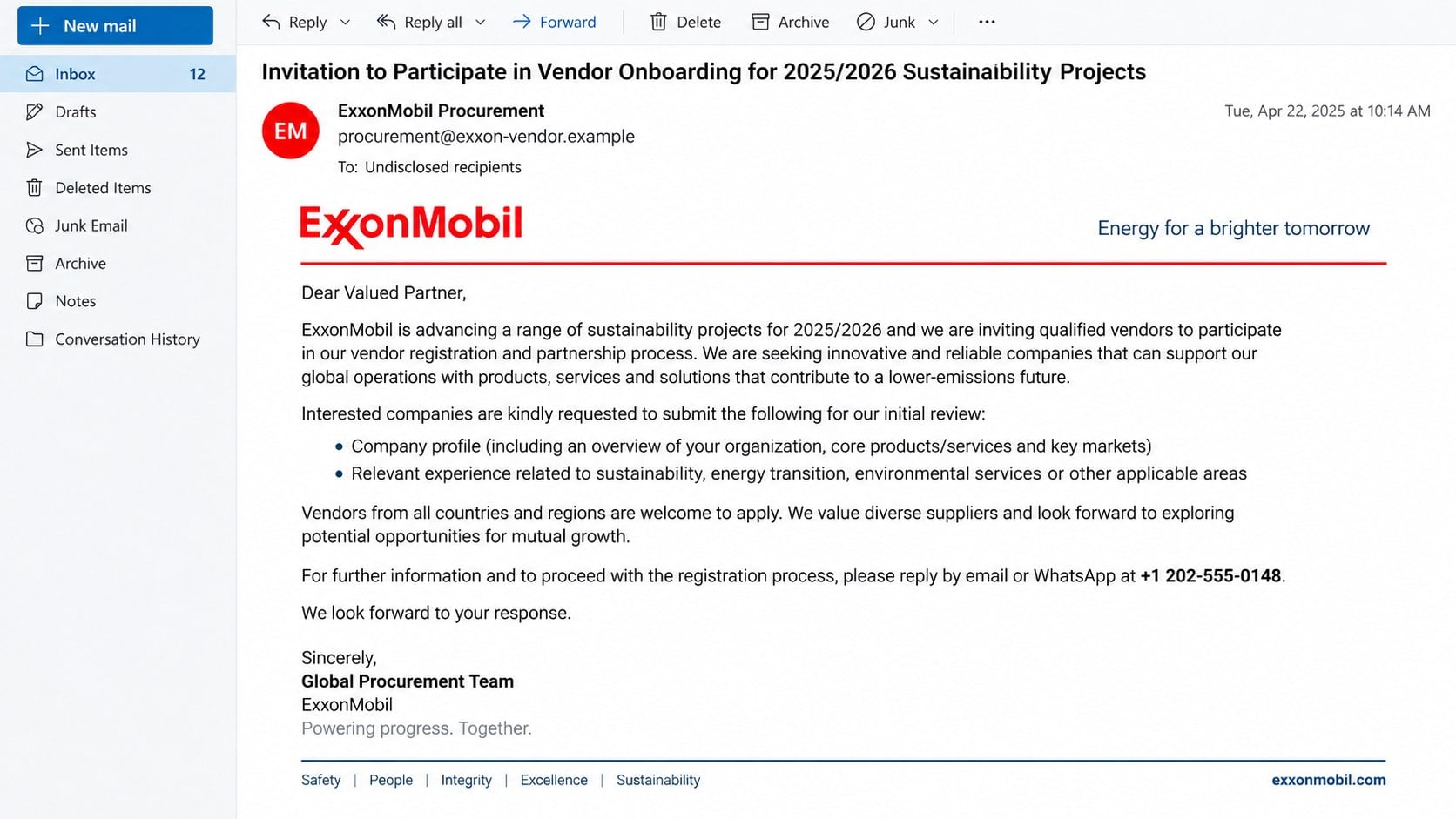
The message impersonates a real company and procurement role
The scam presents itself as an invitation to join ExxonMobil’s vendor registration process for 2025/2026 sustainability projects.
It targets companies and professionals who may supply equipment, consulting, logistics, construction, environmental services, or related work.
The email uses ExxonMobil’s name and real-world corporate address, but the legitimate company has no connection with the operation.
The sender and reply channel do not belong to the organization being impersonated.
The first request appears modest and professional
Recipients are asked for a company profile, relevant experience, track records, and an outline of products or services.
Those documents are common during genuine pre-qualification, so the opening exchange may not contain an obvious payment demand.
The message says vendors worldwide can apply and mentions future invitations to tender or requests for quotation.
Broad eligibility allows the criminal to continue with almost any business that responds.
The promised contract leads toward fees and sensitive records
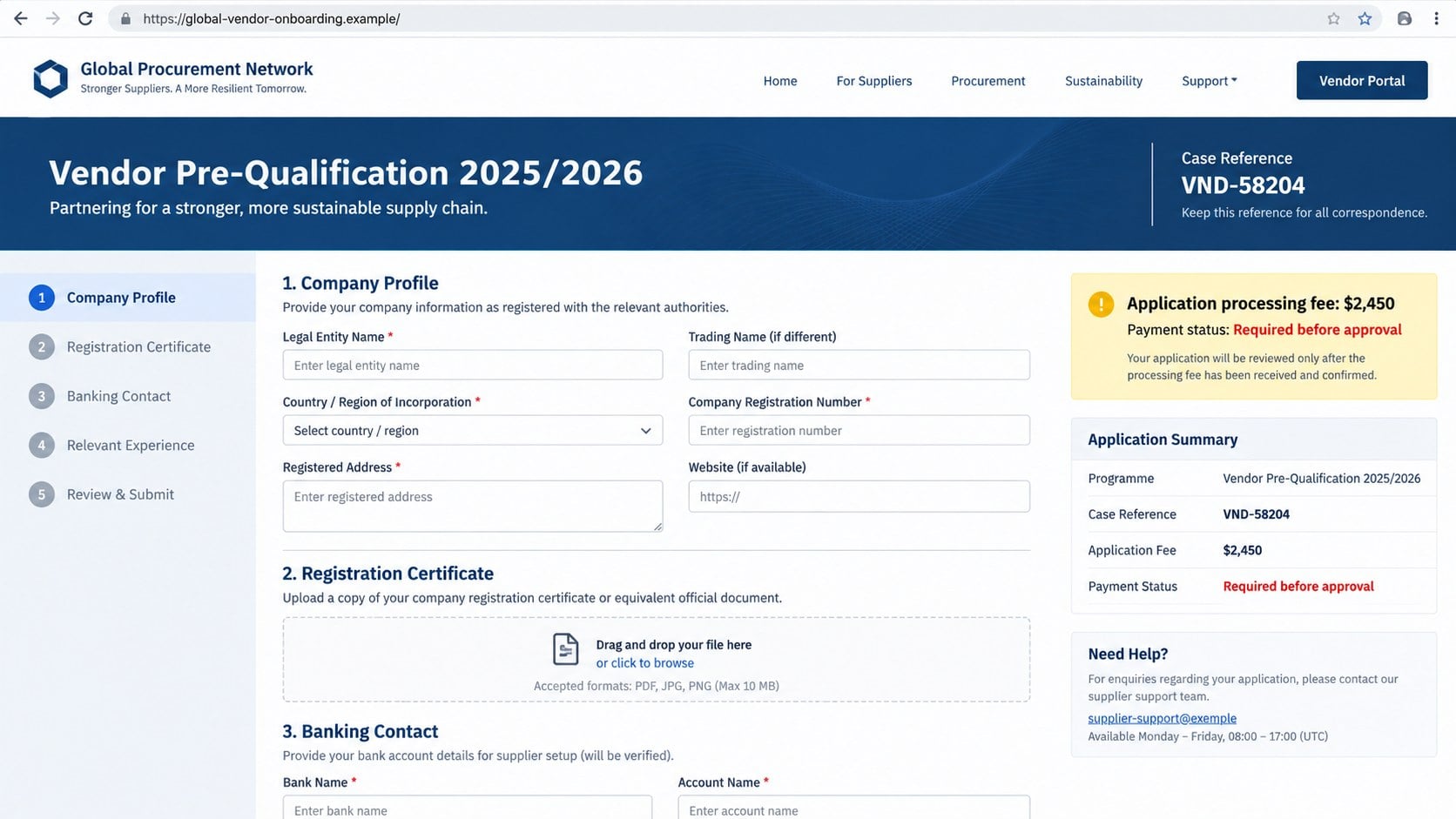
After contact begins, the fake coordinator can request compliance forms, registration certificates, director identification, banking details, and processing payments.
Each requirement is framed as the next stage before approval, tender access, or contract release.
The project does not exist for the recipient, and paying one charge usually creates another supposed obstacle.
Important warning signs include:
- The invitation arrives without prior supplier outreach.
- The sender domain is unrelated to the named corporation.
- The reply route includes a personal mailbox or WhatsApp.
- The message welcomes every type of worldwide supplier.
- A real address is copied into an unverifiable signature.
- No tender appears in the company’s official supplier system.
- Fees become necessary before selection or payment.
- Sensitive records are requested outside an authenticated portal.
Why the Vendor Invitation Feels Like a Real Opportunity
Procurement language is naturally formal. Terms such as pre-qualification, financial stability, technical capacity, ITT, and RFQ are used in legitimate sourcing.
The scam borrows that vocabulary to make an unsolicited approach sound like a standard corporate process.
Sustainability projects provide an especially broad story because they can involve engineering, technology, transport, safety, training, materials, and professional services.
A small supplier may believe its niche experience attracted the invitation, even when the message was delivered in bulk.
The use of a recognized corporation changes how the request is perceived. Recipients may focus on the potential contract instead of the sender’s infrastructure.
A genuine headquarters address strengthens the signature while proving nothing about the person who wrote the email.
Criminals can copy public names, job titles, addresses, slogans, project themes, and corporate descriptions within minutes.
The conversation advances in believable stages
Unlike a one-page credential phish, this scheme can involve several replies over days or weeks.
The supposed coordinator may praise the company profile, send forms, answer questions, and introduce additional fake departments.
Every step increases the victim’s investment of time and attention.
Walking away becomes emotionally harder after staff have prepared documents and discussed the opportunity internally.
The fee is dressed as administration, not payment for a contract
The first charge may be described as registration, compliance, certification, due diligence, legal review, insurance, tender access, or document processing.
A modest fee seems small beside the value of the promised project.
Once paid, another requirement can appear because no real procurement system sets the rules.
The operation continues until the target refuses further payment or discovers the impersonation.
How the Vendor Partnership Email Scam Works
Step 1: Criminals identify businesses likely to respond
Company websites, trade directories, professional networks, event lists, supplier databases, and leaked contact records provide names and addresses.
Procurement, sales, business development, estimating, and executive contacts are valuable because opportunity emails fall within their work.
The attacker may mention the recipient’s industry while leaving project requirements broad.
That limited personalization can make a mass invitation feel deliberately selected.
Step 2: A famous corporation anchors the story
The sender adopts ExxonMobil’s name, address, procurement language, and sustainability themes.
Real public information is mixed with invented contact details and an unauthorized employee identity.
The email may claim to represent a group procurement, contracts, vendor, or shared-services office.
A recognizable brand lowers the recipient’s guard before any demand appears.
Step 3: The victim is invited to send harmless-looking material
A company profile and experience summary often contain information already used in marketing.
Requesting those first makes the conversation appear low risk and allows the criminal to learn the business.
The response confirms that the address is monitored and that someone wants the opportunity.
Later messages can reuse names, projects, and capabilities from the submitted profile.
Step 4: Fake pre-qualification becomes more demanding
The supposed procurement team sends registration forms, non-disclosure agreements, questionnaires, or portal invitations.
Requests expand to incorporation certificates, licenses, tax records, director details, references, bank letters, and financial statements.
Each document is justified as evidence of capacity or compliance.
Collected records can support identity fraud, convincing supplier impersonation, and attacks on the victim’s customers.
Step 5: A processing obstacle introduces money
The target learns that approval requires a registration, certification, legal, insurance, customs, or processing payment.
Instructions may direct a wire, cryptocurrency transfer, money service, or payment to a supposed accredited consultant.
The recipient is assured that the fee is refundable or will be included in the contract.
There is no legitimate tender behind that promise, so repayment depends entirely on the criminal.
Step 6: More officials and deadlines reinforce the illusion
One operator may introduce a fake lawyer, compliance agent, project director, bank officer, or certification provider.
Separate email identities create the impression that several departments have reviewed the application.
Urgent deadlines appear near payment requests, discouraging the victim from contacting the real corporation.
Documents can contain signatures, stamps, reference numbers, and professional letterheads copied from public examples.
Step 7: The demands escalate or the scammers disappear
After one payment, new taxes, permits, courier charges, guarantees, or activation fees can follow.
If the victim questions the process, the coordinator may threaten cancellation or claim the money already invested will be lost.
When payments stop, communication may end abruptly and the promised tender never arrives.
Stolen documents and contact lists can still be reused in later fraud.
Company, Address, Contact, and Tender Verification Checks
A real company name does not validate the sender
ExxonMobil is a legitimate corporation, but that fact offers no support for an email from an unrelated domain.
Compare the complete sender and reply-to addresses with official procurement contacts reached independently.
Do not treat a copied logo, slogan, executive name, or headquarters address as authentication.
The address may be accurate and still be misused
The campaign copies a genuine Spring, Texas corporate address to strengthen the signature.
Scammers frequently borrow addresses belonging to real companies, government buildings, virtual offices, warehouses, or unrelated businesses.
Mailing coordinates identify a place. They do not prove that the person emailing from elsewhere works there.
Phone and WhatsApp routes require independent confirmation
A direct mobile or WhatsApp number bypasses a corporation’s established supplier and switchboard channels.
Caller ID, profile photos, and business names inside messaging apps can be fabricated.
Contact the company using a telephone number from its official site, then ask for supplier-registration verification without using the suspicious conversation.
The tender should exist outside the email thread
Search the official supplier portal, procurement announcements, tender reference, project package, eligibility rules, and submission deadline.
A genuine process should identify the legal buyer and explain how suppliers submit records securely.
Never pay a newly introduced intermediary until the real corporation confirms the requirement through an established channel.
Documents and Data the Operation May Request
Early requests may seem harmless, but a company profile gives the criminal a map of services, locations, customers, and decision-makers.
Registration certificates provide legal names, numbers, addresses, incorporation dates, and authorized officers.
Director identification can support account opening, SIM fraud, fake contracts, or impersonation during support calls.
Bank letters reveal financial institutions, account ownership, routing details, signatures, and contact information.
Tax forms may contain sensitive identifiers that should never be sent to an unverified procurement address.
Supplier lists and references expose new companies that can receive convincing messages from an impersonated victim.
Signed forms may be edited into other documents, creating the appearance of consent.
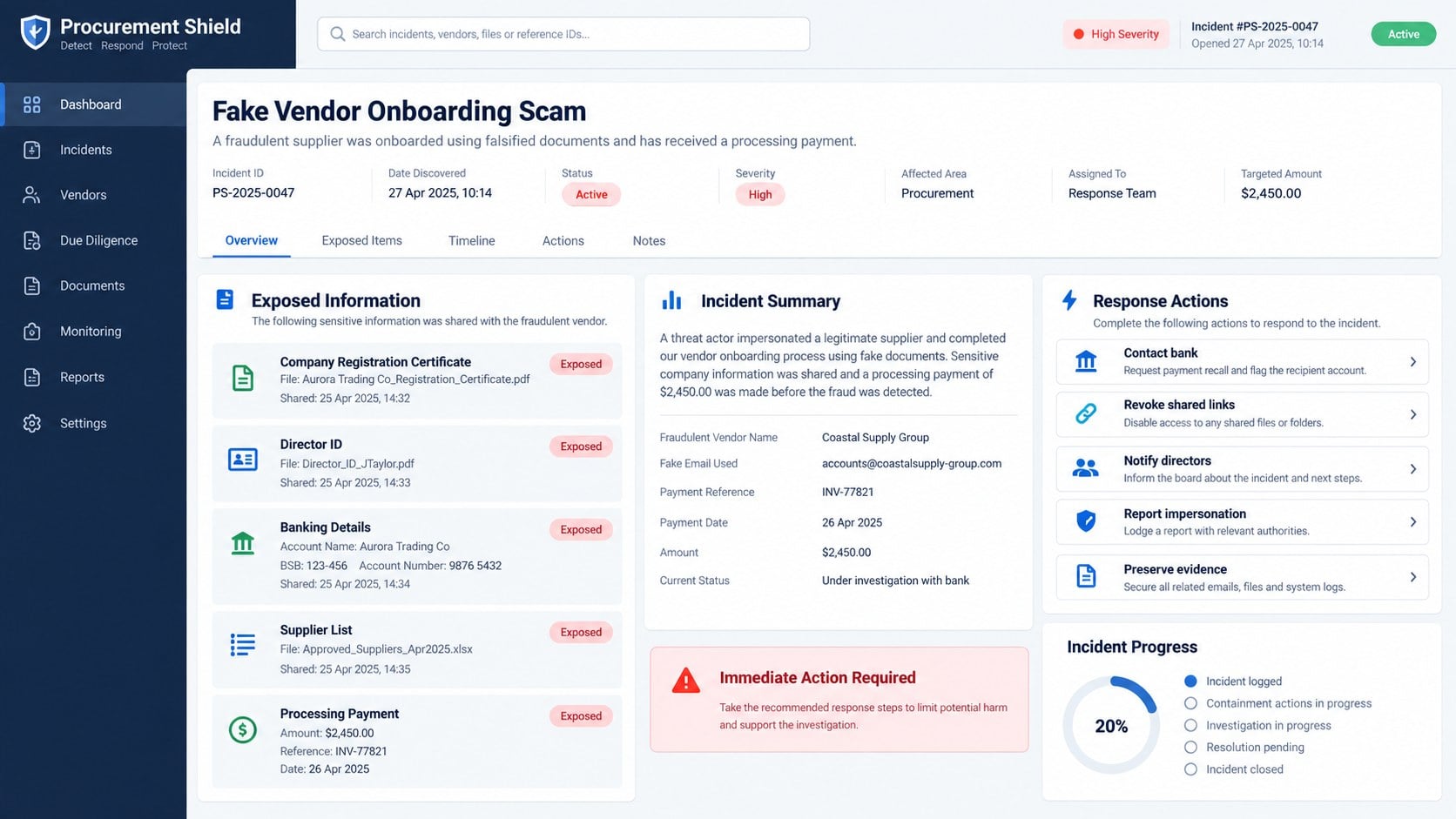
Track every file, link, and detail shared so the response covers the real exposure.
Why the Processing Fee Is Not the Only Loss
The direct payment may be only the first measurable damage.
Employees can spend days preparing questionnaires, financial records, proposals, and compliance material for a nonexistent buyer.
Identity documents and banking details can create future fraud that surfaces long after the conversation ends.
Malicious follow-up attachments may introduce an information stealer or remote-access tool into the business network.
A compromised mailbox can expose genuine bids, customer contracts, and payment discussions.
The criminal may impersonate the victim company when targeting suppliers discovered in the submitted documents.
Public embarrassment can discourage reporting, but silence makes it harder to warn connected organizations.
Incident handling should therefore include financial, legal, technical, identity, and relationship risks.
Signs the Conversation Has Moved Into Advance-Fee Fraud
Genuine procurement can involve fees in limited contexts, but unexpected personal payment channels and secrecy are strong warnings.
Look at the full pattern rather than accepting each request separately.
- The opportunity was never advertised through official channels.
- No verifiable buyer joins the conversation.
- Documents arrive from several unrelated domains.
- WhatsApp becomes the preferred procurement route.
- An upfront payment unlocks the next stage.
- The beneficiary is a person or unrelated consultant.
- Fees must be paid before contract review.
- A refund is promised only after award.
- Deadlines shrink when independent verification is requested.
- The coordinator discourages calls to corporate headquarters.
Any one irregularity deserves a pause. Several connected inconsistencies are enough to end the process and report the impersonation.
What to Do if You Have Fallen Victim to This Scam
- Stop the conversation. Do not send another document, signature, fee, password, one-time code, or banking detail.
- Contact the real corporation independently. Report the impersonation through its verified corporate or supplier channel and ask whether the tender exists.
- Call the bank immediately. Request a recall or hold for wires and other payments, then flag the recipient account as fraudulent.
- Inventory every disclosure. List company records, director IDs, signatures, bank documents, tax information, credentials, contacts, and files supplied.
- Revoke exposed access. Disable shared links, change compromised passwords, terminate sessions, replace API keys, and secure document repositories.
- Run Malwarebytes on involved devices. Scan systems that opened attachments or downloads, quarantine findings, restart, update, and scan again.
- Warn staff and business partners. Explain that criminals may reuse the submitted profile, identities, and supplier names in follow-up fraud.
- Preserve evidence. Save original messages, headers, forms, WhatsApp chats, payment instructions, receipts, file hashes, and account logs.
- Report the fraud. Notify law enforcement, national fraud services, insurers, identity authorities, and regulators according to the exposed data.
- Use AdGuard as additional protection. It can block many known malicious pages and ads, but it cannot verify a contract or recover a transfer.
Is Your Device Infected? Run a Free Malware Scan
Slow performance, constant pop-ups, or strange behavior? These are classic signs of a malware infection. The fastest way to find out is to scan your device with Malwarebytes Free — one of the most trusted malware removal tools available.
The free version detects and removes the most common threats, including:
- Adware — the cause of those annoying pop-ups
- Browser hijackers — unwanted redirects and changed homepages
- Trojans and spyware — hidden programs stealing your data
- Potentially unwanted programs (PUPs) — software you never asked for
👉 Select your device below — Windows, Mac, or Android — then follow the simple steps to download Malwarebytes, scan your system, and remove any threats it finds. The scan usually takes 5 to 20 minutes.
Run a Malware Scan with Malwarebytes for Windows
Malwarebytes is one of the most popular and trusted anti-malware tools for Windows — and it’s completely free for removing infections. It catches threats that many antivirus programs miss, including adware, browser hijackers, and trojans. Follow the steps below to scan and clean your PC in just a few minutes.
Download Malwarebytes
Click the button below to download the latest version of Malwarebytes for Windows from the official source. The free version is all you need — it will scan your computer and remove adware, browser hijackers, and other malicious software at no cost.
Download MalwarebytesOfficial installer for Windows 11 and 10. Your download starts right away.Want real-time protection? See Malwarebytes Premium Malwarebytes Free for WindowsScans and removes malware at no cost
-
Install Malwarebytes
When the download finishes, open your Downloads folder and double-click the MBSetup file. If Windows shows a User Account Control pop-up, click “Yes” to allow the installation.

Follow the On-Screen Prompts to Install Malwarebytes
The setup wizard will walk you through a few quick screens:
-
Choose where you’re installing the program — “Personal Computer” or “Work Computer” — then click Next.

-
Malwarebytes will now install on your device. This usually takes under a minute.

-
When installation is complete, the “Welcome to Malwarebytes” screen will open automatically.

-
On the final screen, click Open Malwarebytes to launch the program.

-
Enable “Scan for Rootkits”
Before scanning, turn on rootkit detection so Malwarebytes can find even the most hidden threats. Click the Settings gear icon on the left side of the screen.

In the settings menu, find “Scan for rootkits” and click the toggle so it turns blue.

Done? Click “Dashboard” in the left pane to return to the main screen.
Start the Scan
Click the blue Scan button. Malwarebytes will automatically update its virus database and start checking your computer for malware.

-
Wait for the Scan to Finish
The scan checks your entire system for browser hijackers and other malicious programs, so it can take 5 to 20 minutes depending on your computer. Feel free to do something else — just check back occasionally to see the progress.

-
Quarantine the Detected Threats
When the scan is done, you’ll see a list of everything Malwarebytes found — malware, adware, and potentially unwanted programs. Click the “Quarantine” button to remove all of them at once.

Malwarebytes will now remove the malicious files and registry entries and move them safely into quarantine.

-
Restart Your Computer
Some threats can only be fully removed after a reboot. If Malwarebytes asks you to restart, click Yes. Once you’re logged back in, Malwarebytes has finished removing the threats it found.

That’s it — your Windows PC is now clean of trojans, adware, and other malware, and should be back to running smoothly.
If you are still having problems with your computer after completing these instructions, then please follow one of the steps:
- Run a computer scan with ESET Online Scanner
- Ask for help in our Windows Malware Removal Help & Support forum.
Run a Malware Scan with Malwarebytes for Mac
Malwarebytes for Mac is a free on-demand scanner that removes the malware other security software tends to miss — adware, browser hijackers, and unwanted programs included. Cleaning an infected Mac with Malwarebytes has always been completely free, and it’s our go-to recommendation. Follow the steps below to scan and clean your Mac in just a few minutes.
-
Download Malwarebytes for Mac
Click the button below to download the latest version of Malwarebytes for Mac.
Download MalwarebytesOfficial installer for macOS. Your download starts right away.Want real-time protection? See Malwarebytes PremiumMalwarebytes Free for MacScans and removes malware at no cost -
Open the Malwarebytes setup file
When the download finishes, open your Downloads folder and double-click the setup file to begin the installation.

-
Follow the On-Screen Prompts to Install Malwarebytes
The Malwarebytes for Mac Installer will guide you through a few quick screens. Click “Continue” and keep following the prompts until the installation completes.



When the installation is complete, Malwarebytes opens to the Welcome to Malwarebytes screen. Click “Get started“.
-
Select “Personal Computer” or “Work Computer”
Malwarebytes will ask what type of computer you’re installing it on. Click either Personal Computer or Work Computer, whichever applies.

-
Start the Scan
Click the “Scan” button. Malwarebytes will automatically update its detection database and begin checking your Mac for malware.

-
Wait for the Scan to Finish
Malwarebytes will scan your Mac for adware, browser hijackers, and other malicious programs. This can take a few minutes, so feel free to do something else — just check back occasionally to see the progress.

-
Quarantine the Detected Threats
When the scan is done, you’ll see a list of everything Malwarebytes found. Click the “Quarantine” button to remove all the threats at once.

-
Restart Your Mac
Malwarebytes will now remove all the malicious files it found. Some threats can only be fully removed after a reboot — if Malwarebytes asks you to restart, allow it. Once you’re logged back in, your Mac is clean.

That’s it — your Mac is now free of adware, rogue browser extensions, and other potentially harmful software.
If you are still experiencing problems while trying to remove a malicious program from your computer, please ask for help in our Mac Malware Removal Help & Support forum.
Run a Malware Scan with Malwarebytes for Android
Malwarebytes for Android automatically detects and removes dangerous threats like malware and ransomware so you don’t have to worry about your most-used device being compromised. Aggressive detection of adware and potentially unwanted programs keeps your Android phone or tablet running smooth.
-
Download Malwarebytes for Android.
You can download Malwarebytes for Android by clicking the link below.
Get Malwarebytes for AndroidOpens Google Play in a new tab.Want real-time protection? See Malwarebytes Premium for AndroidMalwarebytes for AndroidScans your phone and removes malware at no cost -
Install Malwarebytes for Android on your phone.
In the Google Play Store, tap “Install” to install Malwarebytes for Android on your device.

When the installation process has finished, tap “Open” to begin using Malwarebytes for Android. You can also open Malwarebytes by tapping on its icon in your phone menu or home screen.

-
Follow the on-screen prompts to complete the setup process
When Malwarebytes will open, you will see the Malwarebytes Setup Wizard which will guide you through a series of permissions and other setup options.
This is the first of two screens that explain the difference between the Premium and Free versions. Swipe this screen to continue.
Tap on “Got it” to proceed to the next step.
Malwarebytes for Android will now ask for a set of permissions that are required to scan your device and protect it from malware. Tap on “Give permission” to continue.
Tap on “Allow” to permit Malwarebytes to access the files on your phone.
-
Update database and run a scan with Malwarebytes for Android
You will now be prompted to update the Malwarebytes database and run a full system scan.

Click on “Update database” to update the Malwarebytes for Android definitions to the latest version, then click on “Run full scan” to perform a system scan.

-
Wait for the Malwarebytes scan to complete.
Malwarebytes will now start scanning your phone for adware and other malicious apps. This process can take a few minutes, so we suggest you do something else and periodically check on the status of the scan to see when it is finished.

-
Click on “Remove Selected”.
When the scan has been completed, you will be presented with a screen showing the malware infections that Malwarebytes for Android has detected. To remove the malicious apps that Malwarebytes has found, tap on the “Remove Selected” button.

-
Restart your phone.
Malwarebytes for Android will now remove all the malicious apps that it has found. To complete the malware removal process, Malwarebytes may ask you to restart your device.
That’s it — your Android phone is now clean — no more malicious apps, adware, or browser redirects.
If you are still having problems with your phone after completing these instructions, then please follow one of the steps:
- Restore your phone to factory settings by going to Settings > General management > Reset > Factory data reset.
- Ask for help in our Mobile Malware Removal Help & Support forum.
Stay Protected: Block Ads and Malicious Sites
Now that your device is clean, keep it that way. Most infections start with a malicious ad or a fake download button — so blocking them at the source is your best defense.
We recommend AdGuard, which blocks malicious ads, phishing pages, and dangerous redirects before they can reach you.
👉 Download AdGuard and browse safely
How Businesses Can Screen Unsolicited Vendor Invitations
Assign one procurement owner to verify inbound opportunities before sales or finance staff send records.
Require an official tender number, buyer identity, supplier-portal listing, legal entity, scope, submission rules, and independently verified contact.
Call through a number already published by the buyer. Ask the switchboard to connect the named procurement employee.
Do not upload sensitive documents until the portal’s ownership and data-handling terms are confirmed.
Separate business development from payment approval. No employee excited by an opportunity should authorize the related fee alone.
Watermark sensitive submissions with the recipient, purpose, and date so reuse becomes harder and easier to trace.
Train staff that a real address and brand can be copied, while domain ownership and independent confirmation require stronger evidence.
Frequently Asked Questions
Is the ExxonMobil vendor onboarding invitation genuine?
The analyzed email is an impersonation scam. ExxonMobil is not connected with the sender or the promised 2025/2026 procurement opportunity.
Verify any real supplier invitation through the corporation’s independently reached procurement channels.
Why does the email ask only for a company profile?
A low-risk opening encourages a reply and gives the criminal information for more convincing follow-up messages.
Requests can expand later to identification, financial records, banking details, and processing fees.
Does the real corporate address make the message legitimate?
No. Headquarters addresses are public and easy to copy into a signature.
The sender domain, verified employee identity, official portal, and confirmed tender matter more.
Are vendor registration fees always fraudulent?
Not universally, but an unexpected fee through an unverified coordinator is dangerous.
Confirm the requirement, beneficiary, amount, and refund terms directly with the legal buyer before paying.
What can scammers do with company documents?
They can build credible impersonation, target suppliers, open fraudulent relationships, falsify applications, and support identity theft.
Report sensitive document exposure even when no money was sent.
Could the follow-up files contain malware?
Yes. Extended correspondence creates opportunities to deliver malicious archives, documents, installers, or credential links.
Scan opened files with Malwarebytes and involve organizational security when a business device was used.
The Bottom Line
The Vendor Partnership email sells access to a major contract before introducing fees and sensitive paperwork. Public corporate details make the disguise stronger, not authentic.
Confirm the buyer and tender outside the conversation. After engagement, protect money, identities, documents, devices, and partners as parts of one incident.

Join the discussion
0 commentsShare your experience or ask a question about this article.
Discussion
Start the conversation
Have a question or something useful to share? Add the first comment.