

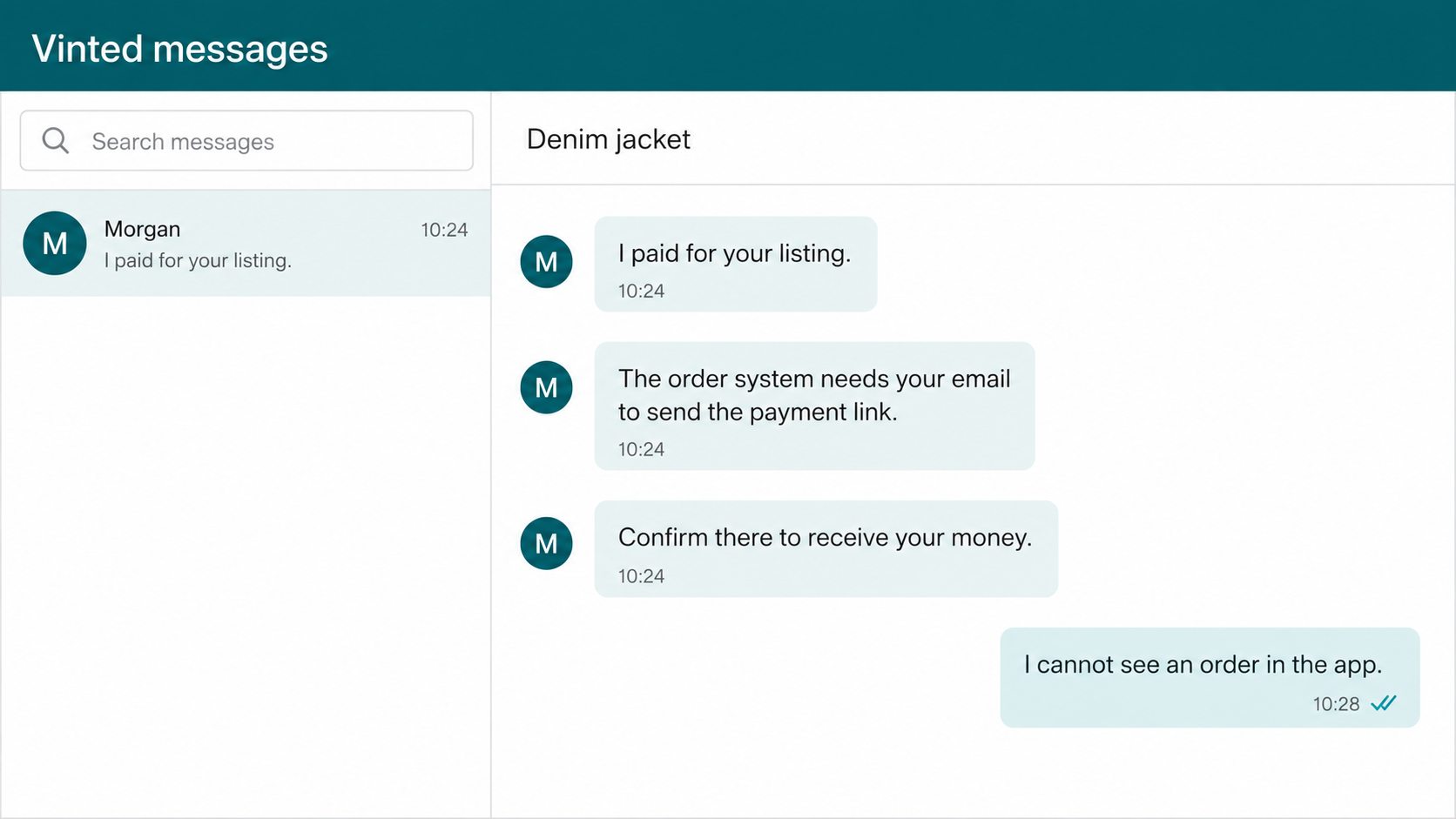
A new seller lists an item, and a buyer appears almost immediately. There is no haggling, no hesitation, and no complicated question. The buyer says the payment is complete and only needs the seller’s email address to release it.
That quick sale can feel like the marketplace working perfectly. In the Vinted seller payment scam, however, there is no order behind the message. The “buyer” is building a route from the chat to a fake payment page.
Overview
What the fake Vinted buyer claims
The supposed buyer says they purchased the item but need the seller’s email address, phone number, or a confirmation step. They may claim Vinted cannot send the payment until the seller follows an external link.
Other versions begin with a QR code, a fake order screenshot, or an email saying “your item has sold.” The seller is told to verify a bank card, accept the payment, or pay a refundable amount before shipping.
What is really happening
The buyer has not completed a Vinted order. The message is a phishing attempt designed to move the seller outside the marketplace and collect card details, online banking credentials, passwords, or one-time security codes.
Some criminals use the stolen card information directly. Others try to authorize a bank transfer or add the victim’s card to a digital wallet while the fake page displays reassuring messages about receiving money.
Why new sellers are common targets
A first-time seller may not know exactly how a Vinted sale appears, when a shipping label becomes available, or what information a buyer can see. The scammer fills that knowledge gap with confident instructions.
Vinted’s safety information says payments are made through the platform and held securely during the transaction. A genuine order should be visible inside the account. A buyer does not need your card details so you can receive the proceeds.
- The buyer asks for an email address or phone number to “complete” the order.
- A sale confirmation appears in email but not in the Vinted app.
- The seller is sent to a website outside Vinted.
- A payment-receipt page requests card number, expiration date, or security code.
- The buyer sends a QR code or screenshot instead of using the normal order flow.
- You are rushed to act before the payment or order supposedly expires.
How the Vinted Seller Payment Scam Works
Step 1: The scammer finds a fresh listing
Criminals monitor new listings because inexperienced sellers are more likely to be uncertain about marketplace procedures. An account may contact several sellers at once using the same short message.
The buyer can appear friendly and uncomplicated. They agree with the price immediately, avoid detailed questions about the item, and focus on completing the transaction as fast as possible.
A profile photo, name, and positive-looking bio do not make the account safe. Accounts can be newly created, compromised, or filled with copied details.
Step 2: The buyer invents a problem with payment
The scammer says the payment is pending because Vinted needs the seller’s email, the seller has not activated receiving, or the order system cannot verify the account. None of those statements should override what appears in the real app.
Sometimes the buyer claims they were charged already and asks the seller to act quickly. This adds guilt to the pressure: the seller may fear that an innocent buyer’s money is stuck.
The buyer can also say they need an email address for a courier label. Vinted’s help guidance says a prepaid shipping label for an eligible sale is made available through the normal transaction flow, including the seller’s inbox and email. It does not require following a buyer-created payment link.
Step 3: The conversation moves away from Vinted
After obtaining an email address or phone number, the scammer sends a fake transaction notice. Moving outside the app gives them more control over the layout and removes platform warnings.
The message may copy Vinted colors, mention the real listing title, and display the correct sale price. The buyer already saw those details publicly, so their presence does not prove that Vinted generated the notice.
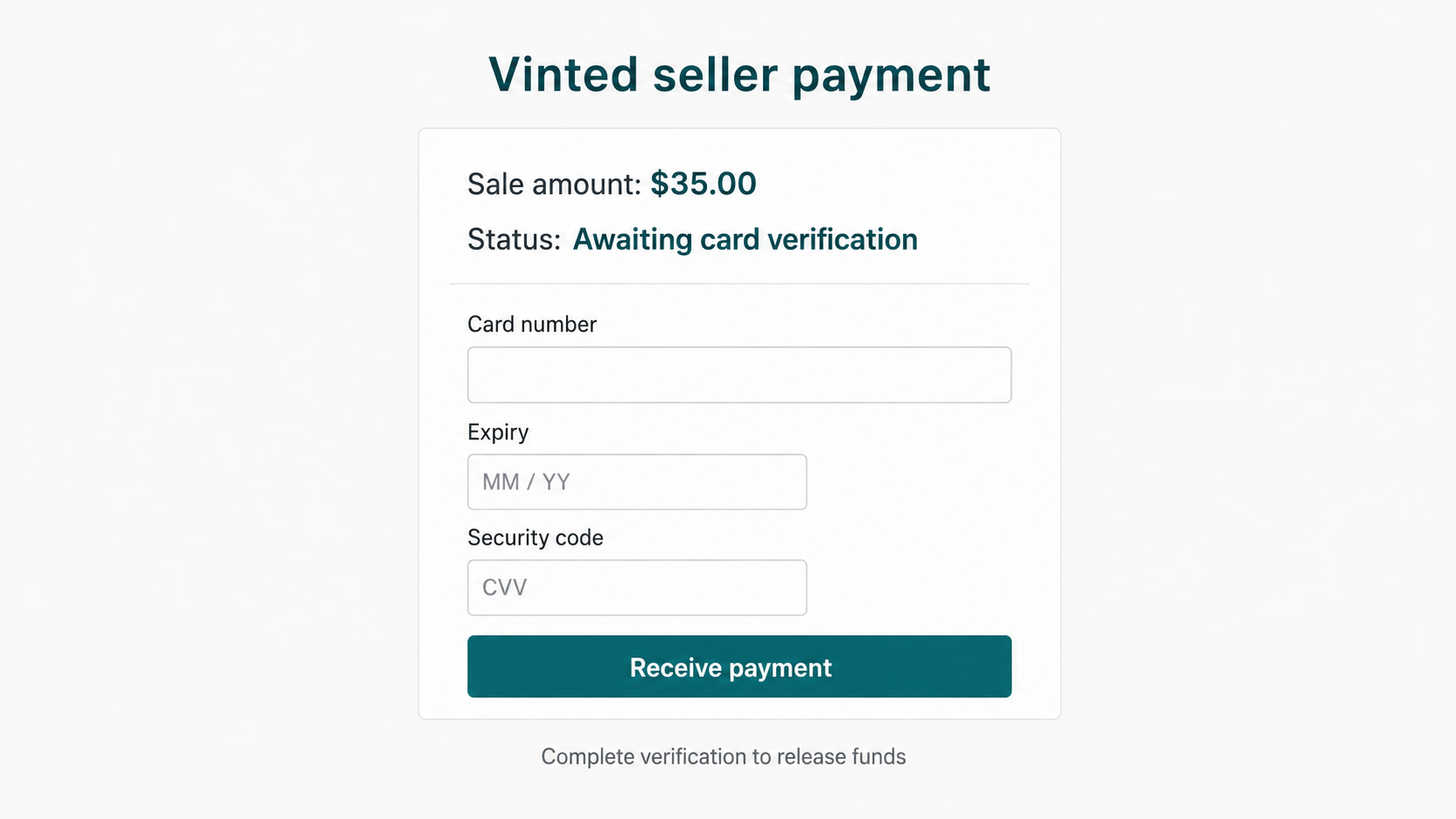
A large button says “Receive payment,” “Confirm order,” or “Get shipping label.” The link leads to a lookalike site whose domain may contain vinted, secure, payment, order, or delivery.
Step 4: The fake page asks for card details
The page says the seller must connect or verify a card before receiving the sale amount. It requests the card number, expiration date, security code, name, and sometimes the current balance.
This reverses the normal direction of payment. A buyer purchasing an item does not need the seller’s security code. Card details authorize money to leave an account; they are not required to let a stranger send proceeds through Vinted.
The site may show a small refundable verification charge. A low amount makes the step feel harmless, but the information can support much larger unauthorized transactions.
Step 5: A bank code is requested in real time
After the card form, a second screen asks for a one-time code or approval in the banking app. The text may falsely describe it as confirmation that the seller owns the account.
In reality, the code can authorize a purchase, transfer, card enrollment, or digital-wallet setup initiated by the criminal. Read the bank’s genuine alert carefully. If it says you are authorizing money to leave, do not approve it.
The scammer may message at the same time, telling the seller that delays will cancel the order. This synchronized pressure is intended to prevent careful reading.
Step 6: A fake support agent takes over
If the payment fails, a chat window or phone call may appear. The agent says the seller account is limited, the card lacks sufficient verification funds, or another card must be used.
Victims can be told to move money between accounts, share the screen, install remote-access software, or provide multiple codes. Every additional step gives the criminal another chance to complete a transaction.
Real marketplace support does not need control of your device or access to online banking. Contact Vinted only through the official app or help center you open independently.
Step 7: The item may be lost as well as the money
A fake email may include a shipping address and threaten a penalty if the package is not sent. A seller who relies on that message can ship an item even though no order or protected payment exists.
Once the package is delivered, the scammer may disappear. The seller then faces two losses: the goods and any money taken through the phishing page.
Never ship based on a screenshot, email, or buyer assurance. Confirm the order status and label inside the Vinted account.
Tracking alone does not fix the problem. It can show that a package reached the address chosen by the scammer, but it cannot create a Vinted payment that was never made. The transaction must be genuine before the parcel leaves your control.
Company, Address, and Fulfillment Checks
A buyer account is not the same as a completed order
Review the buyer’s profile, but do not treat account age or photos as decisive. The key evidence is a transaction recorded in your Vinted account, not the confidence of the person messaging you.
If someone says they paid and the order is missing, pause. Do not supply more contact details or accept a link as a substitute for the absent transaction.
The order must appear inside Vinted
Open the app yourself and check the relevant conversation, order status, sale details, and notifications. Avoid signing in through a button sent by the buyer.
A genuine sale creates platform records both parties can see. A graphic or email generated outside that system cannot create a protected order.
Receiving payment does not require card security data
Never give a buyer your card number, expiration date, security code, bank password, or one-time code. Those details are not needed to receive proceeds from a marketplace sale.
If a page says a specific account balance is required for verification, close it. That question can help the criminal choose a charge amount and has no legitimate role in accepting a sale.
Shipping instructions should come from the transaction
Use only the label and instructions available through the confirmed order flow. Compare any email with what appears inside the app and do not use a label created by an unverified buyer.
The FTC’s marketplace guidance recommends keeping transactions within the marketplace’s payment system. Off-platform arrangements can remove protections and make a dispute harder to resolve.
Other Vinted Scams Sellers May Encounter
- Fake overpayment: The buyer sends a forged notice showing too much money and asks for the difference back.
- Courier fee request: The seller must pay insurance or a refundable delivery charge to release the order.
- QR code phishing: A code supposedly opens the shipping label but leads to a credential or card form.
- False support chat: An agent inside the fake site requests bank codes or remote access.
- Off-platform payment: The buyer offers a bank transfer or payment app to avoid marketplace fees.
- Item-switch dispute: A dishonest buyer may claim the received item was different and return something else.
Not every dispute is a phishing attempt, and marketplaces have genuine customer-service processes. Keep photographs, listing details, packaging evidence, and shipping records so a real dispute can be handled through the platform.
When selling a higher-value item, photograph identifying marks and the packing process without exposing private information. Use tracked delivery required by the order. Good records help with legitimate disputes, while keeping the transaction inside Vinted preserves the platform trail.
Be cautious when a buyer says the rules are different because they live in another country. Cross-border shipping may change available carriers, but it does not turn an external card-verification form into a legitimate way to receive marketplace funds.
What to Do if You Have Fallen Victim to This Scam
- Stop contact and do not ship. If the order does not appear in Vinted, do not send the item. Save the buyer profile, messages, email headers, URL, and screenshots before reporting or blocking the account.
- Call the bank or card issuer immediately. Explain that card details or a security code were entered on a phishing page. Ask whether the card should be frozen or replaced and whether pending payments can be stopped.
- Cancel any approved transaction. If you authorized a transfer or digital-wallet enrollment, tell the bank exactly what happened. Speed can affect the available recovery options.
- Change compromised passwords. Start with Vinted and email, using unique passwords for each. Sign out unfamiliar sessions and enable multifactor authentication.
- Review account settings and activity. Check payment methods, profile information, messages, listings, and completed or pending orders for changes you did not make.
- Report the buyer and fake page. Use Vinted’s official reporting and support tools. Report financial fraud to the relevant authority, such as the FTC in the US or the current national fraud service in your country.
- Scan the device if anything was installed. Use a trusted security product such as Malwarebytes after downloading a file, installing an app, or granting remote access. Remove suspicious browser extensions.
- Block known malicious redirects. A service such as AdGuard can reduce exposure to many dangerous pages, but it does not replace bank contact or password changes.
- Warn contacts about account misuse. If the attacker accessed your marketplace or email account, tell people to ignore unusual payment links sent from it.
Frequently Asked Questions
Does a Vinted buyer need my email address to pay?
A buyer should complete the purchase through Vinted. Do not provide an email address for the purpose of receiving an external payment link. Confirm the order inside your account.
Do I need to enter card details to receive Vinted money?
No buyer-supplied page should need your card security information. A request for the card number, expiration date, security code, or bank code is a strong phishing warning.
How do I know whether my Vinted item really sold?
Open Vinted independently and inspect the order status and shipping instructions. Do not rely on a screenshot, buyer message, or email that has no matching transaction in the app.
What if the fake page charged only a small amount?
A small card test can be followed by larger charges. Contact the card issuer, explain that the full card details were exposed, and ask whether replacement is appropriate.
Can a one-time bank code release a marketplace payment?
A code normally authorizes a specific banking action. Read the bank’s message carefully. Do not approve a purchase, transfer, or card enrollment just because a marketplace contact calls it payment verification.
Should I ship if the buyer sends proof of payment?
No. Ship only when the order and label are confirmed through the platform’s normal flow. A payment screenshot or external email can be fabricated.
The Bottom Line
The Vinted seller payment scam succeeds by making a nonexistent sale feel urgent and nearly complete. The fake buyer needs only one gap in the seller’s understanding to move the transaction from Vinted into a phishing page.
Keep the conversation, order, payment, and shipping process inside the platform. If a buyer says money is waiting but the sale is missing from your account, believe the account. Do not trade card details or a bank code for the promise of receiving payment.

Join the discussion
0 commentsShare your experience or ask a question about this article.
Discussion
Start the conversation
Have a question or something useful to share? Add the first comment.