

The Walmart Fraud Prevention scam call is designed to sound like a real security alert.
Victims receive a call or voicemail claiming there was a suspicious Walmart purchase, often with a specific amount like $2,499.00, and are told to press 1 or call back right away. The goal is to create panic and push the victim into speaking with scammers.
From there, the scam can quickly escalate into a fake tech support scheme, where callers ask for personal information, request remote access to a device, and try to steal money through bank transfers or gift cards.

Scam Overview
The Walmart Fraud Prevention scam call is an imposter scam that uses the Walmart name to create instant trust and panic.
Scammers know that millions of people shop at Walmart, order online, and have saved payment methods on retail accounts. That makes Walmart a perfect brand to impersonate. A fake “fraud prevention” call does not sound strange. It sounds like something that could happen to anyone.
The script usually starts with a familiar trigger:
- “We detected a suspicious purchase”
- “A Walmart order was placed on your account”
- “A charge for $2,499.00 is pending”
- “Press 1 if you did not authorize this transaction”
- “Call us back immediately to prevent account compromise”
The key detail is urgency.
The caller wants you to act before you think. They want you worried about losing money, not calmly checking your real Walmart account or bank app.
This scam also works because it mimics real fraud prevention behavior. Banks and retailers do sometimes send security alerts. Consumers are trained to respond quickly to unauthorized transactions. Scammers exploit that habit.
Why this scam feels so convincing
There are a few reasons this scam is unusually effective.
First, the caller often uses a specific dollar amount, like $2,499.00. A precise number makes the story sound real. It feels like a real transaction, not a generic scam script.
Second, the call may come in two stages, just like the one you received:
- A live caller asking account questions
- A follow-up recorded call from a “fraud department” voice
That two-step approach makes the scam feel more organized and more legitimate.
Third, scammers rely on caller ID spoofing. The number on your phone can look local, or it can look like a business line. The FTC specifically warns that caller ID can be faked, and that even a number that looks nearby or familiar cannot be trusted on its own. The FTC also warns that pressing buttons on robocalls usually leads to more scam calls, not fewer.
It is part of a much larger impersonation scam problem
This Walmart version is not an isolated tactic. It fits into a broader pattern of business impersonation scams.
The FTC has warned that business impersonation scams led to nearly $3 billion in reported losses in 2024, and the scam scripts are often built around fear and urgency, such as false claims about account problems or fraud. The FTC also advises not to give money or personal information to someone who contacts you unexpectedly, and to verify the business using contact information you look up yourself.
That advice is exactly what applies here.
A real Walmart issue should be verified through the official Walmart app, the official website, or the number on your card or order account. Not through the number that called you.
What scammers are really trying to do
Many victims assume the scam ends with identity questions.
It often does not.
The call flow turns into a fake tech support scam. That is a major escalation, and it is a known pattern. Once the scammer has you engaged, they pivot from “fraud prevention” to “device security,” “account protection,” or “refund processing.”
They may say things like:
- “Your account was hacked”
- “Your device is infected”
- “We need to secure your phone/computer”
- “We need to process a refund for the fraudulent charge”
- “We need remote access to fix this”
This is where the scam gets dangerous.
The FTC and FBI both describe this exact pattern in tech support scams. Scammers impersonate support staff, create urgency, request remote access, and then steal personal or financial information. They also frequently demand payment through gift cards, wire transfers, or other hard-to-reverse methods.
The remote access trap
A lot of victims do not realize how serious this step is.
Scammers often ask you to install software like AnyDesk (or similar remote access tools). They claim it is needed to:
- remove malware
- secure your account
- stop the pending charge
- issue a refund
- verify your identity
But once they are connected, they can watch what you do, guide what you click, and try to manipulate you in real time.
AnyDesk itself is a legitimate tool used by real IT professionals, but AnyDesk also warns that scammers misuse remote access software. Their abuse prevention guidance is very clear: never give someone you do not know access to your device, and never share banking logins or passwords. They specifically note that scammers often call pretending to be from Microsoft, a bank, or another well-known company.
That matches this Walmart scam pattern very closely.
The gift card angle is a giant red flag
You also mentioned a critical detail: the scammers ask victims to buy gift cards and send the codes.
That is one of the clearest signs of fraud.
The FTC says gift cards are for gifts, not payments, and warns that scammers often instruct victims to buy gift cards and then share the numbers and PINs from the back. Once the codes are shared, the money is usually gone very quickly.
Real fraud departments do not ask people to “secure” money with gift cards.
Real retailers do not fix unauthorized purchases by asking you to buy gift cards.
Real support teams do not ask for gift card codes to issue a refund.
If gift cards enter the conversation, it is a scam.
What Walmart says about this kind of fraud
Walmart’s own fraud alert guidance includes warnings that line up with what you experienced.
Walmart warns about scams involving calls and messages, notes that scammers may pose as Walmart, and states that Walmart does not ask customers for personal information over the phone unless the customer initiated contact and can verify the call is legitimate. Walmart also lists gift card scams among common fraud schemes.
That is important because scammers use the Walmart name as a shield.
People hear “Walmart Fraud Prevention” and assume the process is legitimate. But Walmart’s own guidance says to be cautious and verify.
The goal is more than one victim action
This scam is designed to collect as much as possible.
Depending on the victim and how far the scam gets, scammers may try to obtain:
- Walmart login credentials
- email account access
- banking or card details
- one-time passcodes
- remote access to the device
- photos of IDs
- gift card codes
- wire transfers
- cryptocurrency transfers
- access to online banking during a “refund” process
The FBI warns that once scammers get remote access to a device or account, they can steal personal information and money, and they often pressure victims to act fast. The FBI also notes that scammers may contact victims in multiple ways, including phone calls, pop-ups, and websites.
So even if the first call sounds like a Walmart order issue, the real scam may end up as a full account takeover or tech support fraud.
Why hanging up quickly was the right move
You did exactly the right thing by hanging up.
That one decision breaks the script.
Scammers depend on momentum. They need you to stay on the phone long enough to get emotionally invested. Once you stop the call and independently contact the real company, their whole story falls apart.
The FTC’s robocall guidance is direct on this point: if you get a suspicious recorded sales-style message, hang up, do not press buttons, and report it. The FTC also advises reporting both the caller ID number and any callback number given in the message, because both can help investigators identify patterns.
That is especially useful in cases like yours, where multiple numbers were used in a short time.
How The Scam Works
This scam usually follows a predictable sequence. The exact wording changes, but the structure is very consistent.
1) The first contact creates urgency
The scam starts with a phone call, often from a number that looks local or at least not obviously suspicious.
The caller may be a real person or a recording. In many cases, they introduce themselves as being from “Walmart Fraud Prevention,” “Walmart Security,” “Walmart Verification,” or a similar name.
They then claim there is a problem tied to your account, such as:
- an unauthorized purchase
- a high-value order
- suspicious activity
- a locked account
- a billing issue
The goal is simple: get you worried enough to stay on the line.
This is classic impersonation scam behavior. The FTC warns that scammers often contact people unexpectedly, claim there is an urgent issue, and pressure them to respond before they verify the source independently.
2) The script uses a specific transaction amount to sound real
A number like $2,499.00 is not random.
Scammers use exact amounts because it sounds like a real fraud detection alert. It is much more believable than “a suspicious purchase happened.” A specific amount makes people think a real system generated the alert.
It also increases panic. A large number creates immediate fear and pushes people toward quick action.
This is a psychological move, not a technical one.
They do not need your actual Walmart account history. They just need a number big enough to scare you into engaging.
3) The robocall tells you to press 1 or call back
After the initial contact, many victims get a recorded follow-up call.
That second call often sounds polished. It may include:
- a fake agent name, like “Mark”
- a department label, like “Walmart Fraud Prevention”
- the fake transaction amount
- a prompt to press 1
- an instruction to call back immediately
This format makes the scam sound like a real call center system.
The FTC warns that pressing numbers on scam robocalls often causes more robocalls and deeper engagement, not resolution. They also warn that the number shown on caller ID may be fake.
In practice, pressing 1 routes you directly into the scam team.
Calling back often does the same thing.
4) A fake “fraud specialist” takes over the call
Once connected, the next stage is a live scammer acting as a fraud agent.
This person is usually calm, professional-sounding, and patient. They may ask “verification” questions to build credibility, such as:
- your full name
- email address
- billing ZIP code
- whether you have a Walmart account
- what devices you use
- what bank you use
- whether you saw the charge in your account
Some of these questions seem harmless, but they serve two purposes:
- They make the call feel official.
- They collect information that can be used later.
The scammer may also “confirm” details to make you trust them, even if they are guessing or using public information.
5) The scam shifts from fraud alert to account compromise
Once the scammer sees you are engaged, they often escalate the story.
This is where the call changes from “unauthorized purchase” to “security emergency.”
They may claim:
- your Walmart account was hacked
- your email is compromised
- your phone/computer has malware
- your banking information is exposed
- the fraudulent purchase came from your device
- they need to secure your device to stop further charges
This pivot is critical because it sets up the next stage, which is the fake tech support move.
The FBI and FTC both describe this kind of tech support fraud escalation, where scammers claim there is a device or account issue, create urgency, and then push for remote access or payment.
6) They push remote access software like AnyDesk
This is the most dangerous step.
The scammer tells you they need to connect remotely to:
- “inspect” your device
- “remove” malware
- “block” the purchase
- “process” a refund
- “secure” your account
They may ask you to install AnyDesk, or another remote access tool.
This is a major red flag.
AnyDesk’s own abuse prevention page warns that scammers misuse remote access software, often calling unexpectedly and pretending to be from well-known companies or banks. Their guidance is explicit: do not give strangers access to your devices, and do not share banking details or passwords.
The FBI also warns that once scammers get remote access, they can steal personal information and money.
7) They stage a fake “security scan” or fake “refund process”
After remote access is established, the scammer usually performs a fake demonstration.
They may open system screens, type fast, run harmless commands, or point to normal files and claim they are viruses. They might say:
- “Your system is infected”
- “I found unauthorized access”
- “Your banking is at risk”
- “The Walmart charge is linked to malware”
- “I can fix this now”
This is social engineering theater.
The point is not to repair anything. The point is to build authority and keep you from hanging up.
The FTC describes this exact pattern in tech support scams, where scammers pretend to scan the computer and claim to find malicious programs.
8) They move to financial extraction
Once you trust them, the scammer starts trying to get money.
There are several common ways they do this.
Fake charge reversal or fake refund
They may say they are refunding the unauthorized Walmart transaction and ask you to log in to online banking while they are connected.
Then they may claim:
- they sent too much money
- a refund “system error” happened
- your account shows the wrong amount
- you need to send the difference back
This is a known tech support refund scam tactic. The FTC warns about fake refund and subscription scam variants where scammers direct victims to fake pages, then demand money back through gift cards, bank transfers, or other methods.
“Security fee” or “account protection” fee
They may demand payment for the “fraud cleanup” or “device protection.”
The FBI notes that tech support scammers often claim they can fix the issue for a fee and pressure victims to act fast.
Gift card payment demand
This is one of the most common outcomes.
They tell the victim to buy gift cards and read the codes over the phone. They may frame it as:
- “verification”
- “secure transfer”
- “temporary hold”
- “anti-fraud protection”
- “refund release requirement”
None of those are real.
The FTC states plainly that gift cards are for gifts, not payments, and that scammers specifically ask victims to buy gift cards and share the numbers and PINs.
9) They try to collect account credentials and identity data
Even if they do not get money immediately, scammers still try to harvest valuable information.
They may ask for:
- Walmart login credentials
- email login
- bank login
- card number and CVV
- date of birth
- Social Security number
- one-time verification codes
- pictures of your ID
If they already have remote access, they may ask you to log in yourself while they watch.
That gives them access without needing you to say the password out loud.
This is why these scams can lead to ongoing fraud weeks or months later, even if the victim never bought gift cards.
10) They often come back for a second or third scam
Scammers frequently recontact victims.
If someone has already engaged once, the scammer may return with a new script:
- “We are following up on your case”
- “Your refund failed”
- “Your account is still compromised”
- “This is the escalation department”
- “We are law enforcement / bank security / anti-fraud support”
The FBI specifically warns victims to expect further contact because scammers often share victim information.
So even after the first call ends, the risk does not automatically end.
11) The numbers keep changing
Many people assume blocking one number solves the problem.
It helps, but scammers rotate numbers constantly.
They may use:
- spoofed local numbers
- VoIP numbers
- recycled scam lines
- multiple caller IDs in the same campaign
The FTC warns not to trust caller ID because scammers can fake the number and name shown on your phone.
That is why the best defense is not “recognizing the number.” It is recognizing the pattern.
12) What makes this Walmart version especially dangerous
This version combines three scam types in one:
- Business impersonation scam
They pretend to be Walmart Fraud Prevention. - Robocall scam
They use recorded messages and press-1 prompts. - Tech support / refund scam
They push remote access and financial theft.
That combination is powerful because each stage makes the next one feel more legitimate.
By the time the victim hears “download AnyDesk,” they may already believe they are dealing with a real fraud department.
That is exactly why awareness matters.
Once you know the sequence, you can interrupt it early:
- hang up
- do not press 1
- do not call back
- verify independently
- never allow remote access
How These Voicemails Usually Sound
One reason this scam works is that the voicemail sounds polished and urgent.
The message is usually short, specific, and designed to make the victim panic before thinking. It often mentions a high dollar amount, a pending purchase, or a fraud review that needs immediate action.
Scammers may use a real person, a recorded voice, or both in the same scam attempt.
Common voicemail script patterns
These are the most common formats victims report hearing.
1) The fake fraud alert voicemail
This version sounds like a normal retail fraud department message.
Example style:
- “This is Walmart Fraud Prevention calling about a suspicious purchase on your account for $2,499.00.”
- “If you did not authorize this transaction, please call us back immediately.”
- “Your account may be temporarily restricted until we confirm your identity.”
Why it works:
- It uses the Walmart name
- It mentions a specific amount
- It creates urgency without giving you time to verify anything
2) The press 1 robocall voicemail
This version sounds more automated and usually pushes the victim to act fast.
Example style:
- “Hello, this is Mark with Walmart Fraud Prevention.”
- “We detected an attempted Walmart purchase in the amount of $2,499.00.”
- “We need to speak with you directly. Please press 1 now to be connected to a representative.”
- “If you missed this call, return the call to the number shown on your caller ID.”
Why it works:
- It uses a fake name and department
- It sounds like a call center system
- It gives a simple action step, which makes people respond without thinking
3) The account verification voicemail
This version is designed to make the victim call back and “verify” personal information.
Example style:
- “We are calling from Walmart Security regarding unusual account activity.”
- “Please contact our fraud review team immediately to verify recent purchases.”
- “Failure to respond may result in account suspension.”
Why it works:
- It sounds procedural and professional
- It suggests there will be consequences if you ignore it
- It pushes the victim into a callback instead of independent verification
4) The fake refund and security voicemail
This version is more dangerous because it prepares the victim for the next scam stage, which is fake tech support.
Example style:
- “A Walmart transaction appears to be linked to unauthorized access on your device.”
- “To prevent further charges and issue a refund, our security team must assist you immediately.”
- “Please call back to secure your account.”
Why it works:
- It mixes a fake purchase alert with a fake device security problem
- It sets up the remote access scam
- It makes the caller sound like both fraud support and tech support
Red Flags in Scam Voicemails
Even when the voicemail sounds professional, there are warning signs.
Look for these red flags:
- Urgent language like “immediately,” “act now,” or “account will be restricted”
- A large dollar amount used to trigger panic
- Instructions to press 1 or call back the caller ID number
- Generic wording that does not mention your actual order number or account details
- Requests to verify personal information over the phone
- Any mention of remote access or “securing your device”
- Any mention of gift cards as part of verification, refunds, or fraud protection
What a Real Walmart Fraud Message Usually Does Not Do
A scam voicemail often sounds official, but the behavior is the giveaway.
A legitimate fraud team should not:
- Ask you to install AnyDesk or remote access software
- Ask for gift card codes
- Ask for your full banking login
- Pressure you to stay on the phone while logging into accounts
- Tell you to “fix” a fraud issue by sending money
If the voicemail moves in that direction, it is a scam.
Quick Tip for Readers
If a voicemail claims to be from Walmart Fraud Prevention, do not call the number back from the message.
Instead:
- Open the official Walmart app or website
- Check your account and recent orders
- Call Walmart using the official support number listed there
- Check your bank or card account directly
That one step prevents most victims from getting pulled into the next stage of the scam.
If you want, I can also give you a short subsection with 5 voicemail examples written in a more realistic “transcript” style for the article.
What To Do If You Have Fallen Victim to This Scam
If you already interacted with the scammers, do not panic.
The most important thing is to act quickly and methodically. A fast response can reduce the damage.
1) Stop all contact immediately
If the scam is still active, end it now.
- Hang up the call
- Do not answer follow-up calls
- Do not reply to texts or emails tied to the scam
- Do not call the number back again
The FTC’s robocall guidance is clear that hanging up is the right move, and pressing buttons or continuing engagement can lead to more scam calls. (Consumer Advice)
2) If you gave remote access, disconnect the device
If you installed AnyDesk or another remote tool and gave them access, treat the device as compromised until you secure it.
Do this right away:
- Disconnect from Wi-Fi or unplug the internet connection
- Turn off the device if you are unsure what is happening
- End any remote session
- Do not log in to banking or email on that device until it is checked
AnyDesk advises ending the call and the remote session if you feel uncomfortable, and warns that scammers use remote connections to steal data and money. (AnyDesk)
3) Remove remote access software and scan the device
If the scammer had remote access, you need to secure the device.
Take these steps:
- Uninstall AnyDesk or any remote access app you did not intend to keep
- Run a full antivirus and anti-malware scan
- Update your operating system and security software
- Consider having the device checked by a trusted IT professional
The FTC and FBI both advise running updated security software and checking for malicious software after a remote access scam. The FBI also recommends professional cleaning if needed.
4) Contact your bank and card issuers immediately
If you shared card information, bank details, or logged into financial accounts while they were connected, call your bank and card companies right away.
Use the official phone number from:
- the back of your card
- your banking app
- the official website
Do not use any number from the scam call.
Tell them:
- you were targeted by a scam
- unauthorized charges may occur
- your device may have been remotely accessed
- you need fraud monitoring and account protection
Walmart’s account security guidance also tells customers to contact their bank or credit card company about unauthorized use and disputes, and notes that financial institutions are the best place to recover funds.
5) Dispute unauthorized charges and secure your Walmart account
If the call involved a fake Walmart charge, check your real accounts directly.
Do this through the official Walmart app or website, not through the caller.
Then:
- Review recent Walmart orders and payment methods
- Reset your Walmart password immediately
- Remove saved payment cards if needed
- Check whether your email and Walmart password were reused elsewhere
Walmart’s help guidance for unrecognized charges recommends resetting your password, deleting saved payment info, and changing passwords on other accounts if you reused the same login.
6) Change passwords for important accounts
If the scammer got any login details, or if they had remote access while you logged in, change passwords now.
Start with:
- banking
- Walmart
- phone carrier
- Apple/Google account
- social media
- any account using the same password
Use new, unique passwords for each account.
The FTC advises changing passwords immediately if you gave a scammer your credentials, especially if you reused the same password elsewhere.
7) Turn on extra security protections
Add additional protection where possible.
Recommended steps:
- Enable two-factor authentication on email, bank, and retail accounts
- Turn on account alerts for purchases and logins
- Ask your bank about extra fraud flags
- Ask your mobile carrier to add a port freeze or account PIN
These steps help prevent the next stage of fraud, which often happens after the initial scam call.
8) If you paid with gift cards, act fast
If you bought gift cards and sent the codes, contact the gift card issuer immediately.
Tell them:
- the gift card was used in a scam
- you need to report fraud
- you want to know whether any balance remains
- you need a case or report number
Keep:
- the physical cards
- receipts
- photos of card backs if you have them
- call logs and screenshots
The FTC advises contacting the gift card company right away, telling them it was a scam, and keeping the gift card and receipt.
9) Report the scam to the right places
Reporting matters, even if you did not lose money.
Reports help identify patterns, scam numbers, and repeat scripts.
In the United States, report to:
- FTC (ReportFraud and DoNotCall)
- Report the scam callInclude the number that called youInclude any callback numberInclude the date and timeInclude the amount they claimed, such as $2,499.00
- FBI IC3
- Especially important if the scam involved remote access, financial loss, or identity theft
- Walmart official support
- If the scam mentioned your Walmart account, or if you see a real chargeUse the official Walmart app or website help channels
You can also report to:
- Your local police department, especially if money was lost
- Your state attorney general consumer protection office
- Your phone carrier, if repeated scam calls continue
Walmart’s fraud alerts also encourage contacting local law enforcement if you are a victim of a scam.
10) If personal information was shared, monitor for identity theft
If you gave sensitive personal information, do not wait for fraud to appear.
Take preventive action:
- Monitor bank and card accounts daily for a while
- Watch for unfamiliar logins or password reset emails
- Monitor your credit reports
- Consider placing a fraud alert or credit freeze if needed
The FTC’s scam recovery guidance directs people to IdentityTheft.gov if they gave sensitive personal information such as a Social Security number.
11) Save evidence before deleting anything
Even if you just want to move on, keep the evidence first.
Save:
- caller ID screenshots
- voicemails
- timestamps
- phone numbers used
- emails or texts tied to the scam
- gift card receipts
- transaction screenshots
- names used by the scammers, such as “Mark”
The FBI recommends keeping documentation and communication logs, which can help with investigations and bank disputes.
12) Warn family members, especially older relatives
This matters more than people realize.
Scammers reuse scripts. If one household member gets the call, others may get a similar one later.
Tell family members:
- Walmart fraud calls can be fake
- Caller ID can be spoofed
- Do not press 1
- Do not allow remote access
- No real fraud department asks for gift cards
A short warning today can prevent a much bigger problem later.
Is Your Device Infected? Run a Free Malware Scan
Slow performance, constant pop-ups, or strange behavior? These are classic signs of a malware infection. The fastest way to find out is to scan your device with Malwarebytes Free — one of the most trusted malware removal tools available.
The free version detects and removes the most common threats, including:
- Adware — the cause of those annoying pop-ups
- Browser hijackers — unwanted redirects and changed homepages
- Trojans and spyware — hidden programs stealing your data
- Potentially unwanted programs (PUPs) — software you never asked for
👉 Select your device below — Windows, Mac, or Android — then follow the simple steps to download Malwarebytes, scan your system, and remove any threats it finds. The scan usually takes 5 to 20 minutes.
Run a Malware Scan with Malwarebytes for Windows
Malwarebytes is one of the most popular and trusted anti-malware tools for Windows — and it’s completely free for removing infections. It catches threats that many antivirus programs miss, including adware, browser hijackers, and trojans. Follow the steps below to scan and clean your PC in just a few minutes.
Download Malwarebytes
Click the button below to download the latest version of Malwarebytes for Windows from the official source. The free version is all you need — it will scan your computer and remove adware, browser hijackers, and other malicious software at no cost.
Download MalwarebytesOfficial installer for Windows 11 and 10. Your download starts right away.Want real-time protection? See Malwarebytes Premium Malwarebytes Free for WindowsScans and removes malware at no cost
-
Install Malwarebytes
When the download finishes, open your Downloads folder and double-click the MBSetup file. If Windows shows a User Account Control pop-up, click “Yes” to allow the installation.
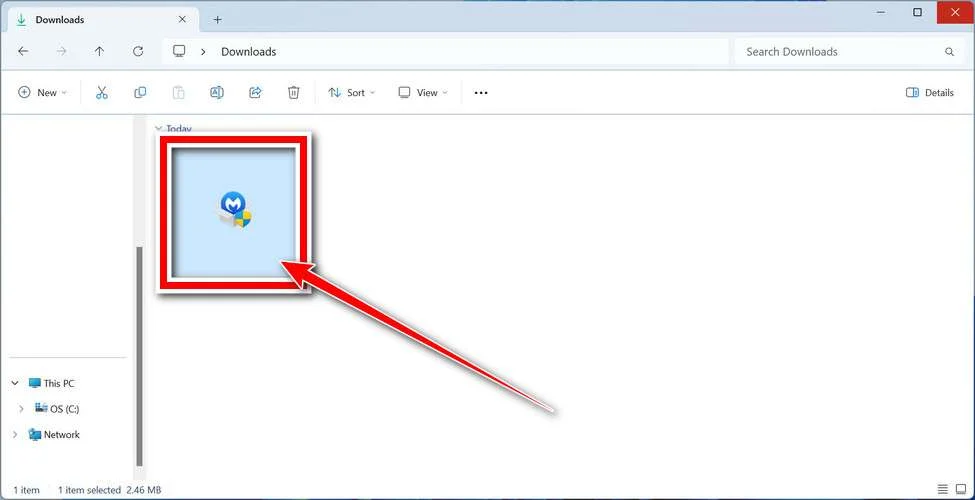
Follow the On-Screen Prompts to Install Malwarebytes
The setup wizard will walk you through a few quick screens:
-
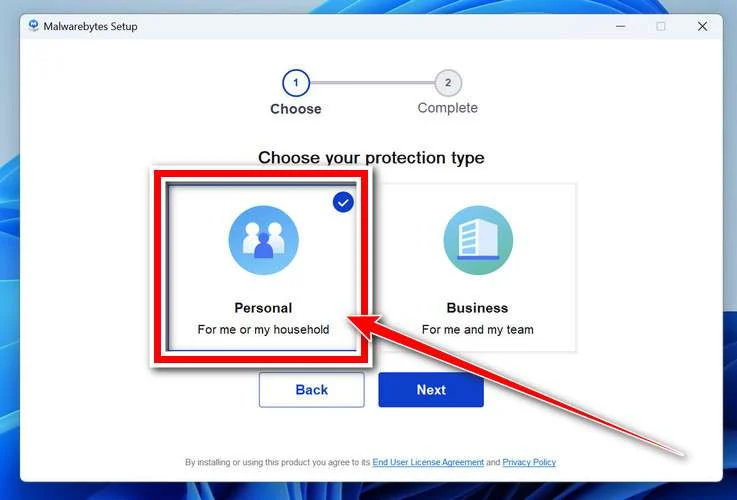
Choose where you’re installing the program — “Personal Computer” or “Work Computer” — then click Next.
-
Malwarebytes will now install on your device. This usually takes under a minute.

-
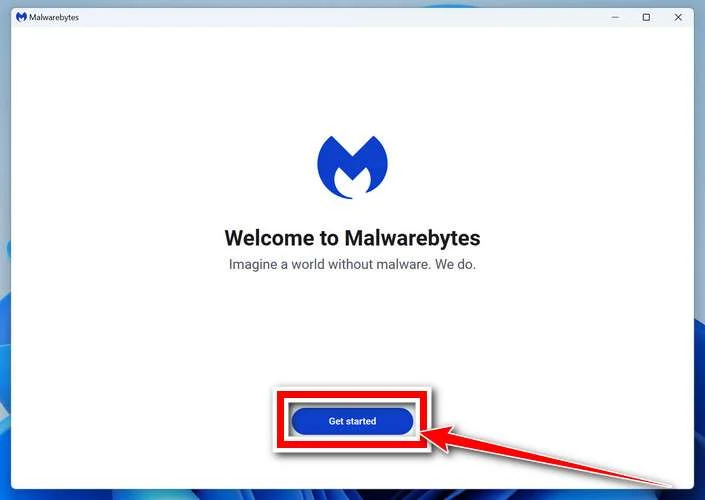
When installation is complete, the “Welcome to Malwarebytes” screen will open automatically.
-
On the final screen, click Open Malwarebytes to launch the program.

-
Enable “Scan for Rootkits”
Before scanning, turn on rootkit detection so Malwarebytes can find even the most hidden threats. Click the Settings gear icon on the left side of the screen.
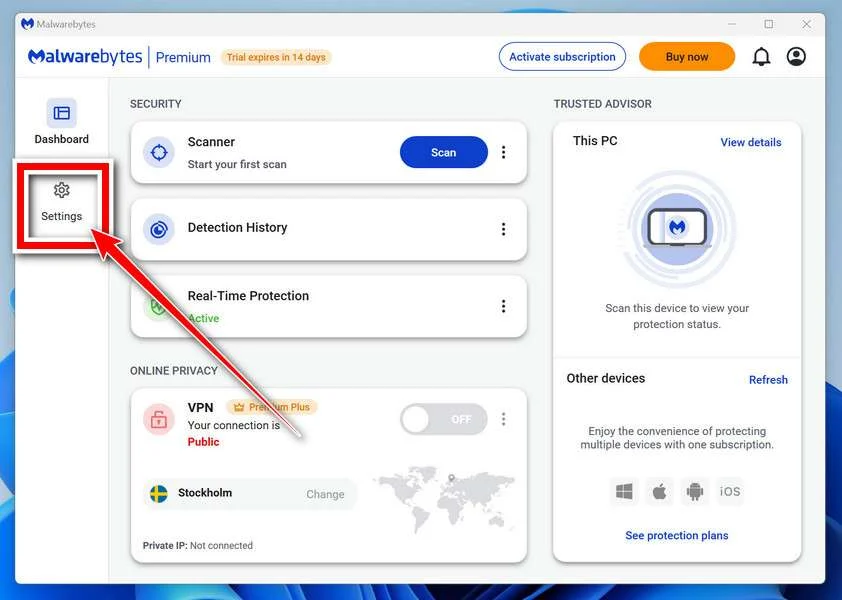
In the settings menu, find “Scan for rootkits” and click the toggle so it turns blue.

Done? Click “Dashboard” in the left pane to return to the main screen.
Start the Scan
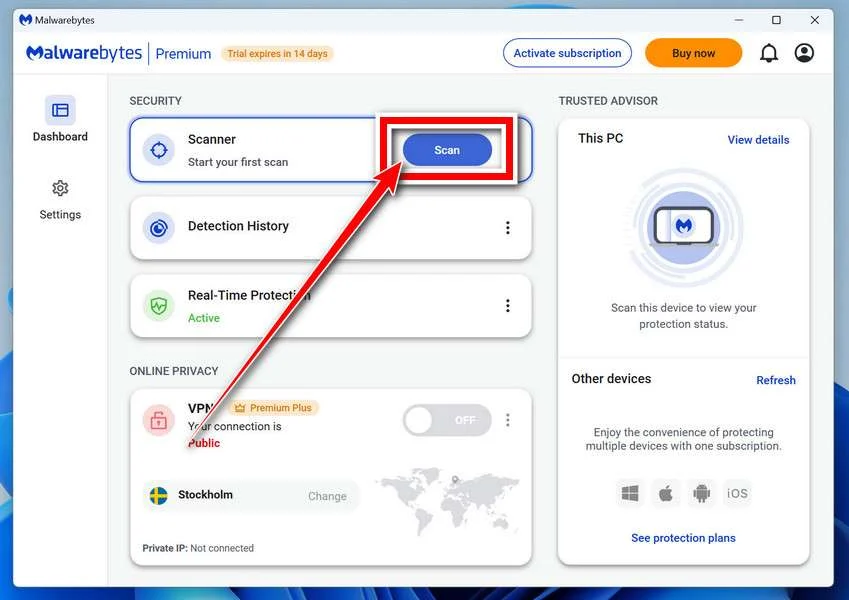
Click the blue Scan button. Malwarebytes will automatically update its virus database and start checking your computer for malware.
-
Wait for the Scan to Finish
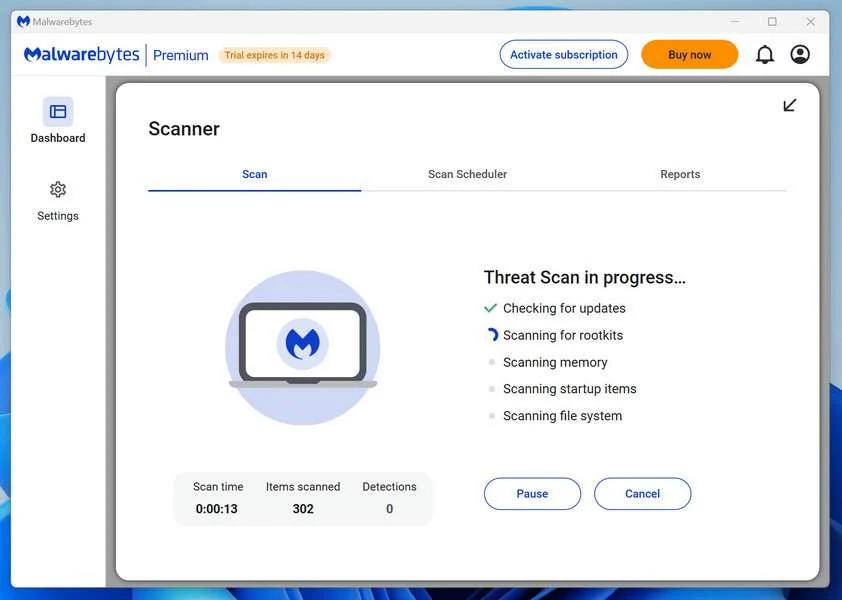
The scan checks your entire system for browser hijackers and other malicious programs, so it can take 5 to 20 minutes depending on your computer. Feel free to do something else — just check back occasionally to see the progress.
-
Quarantine the Detected Threats
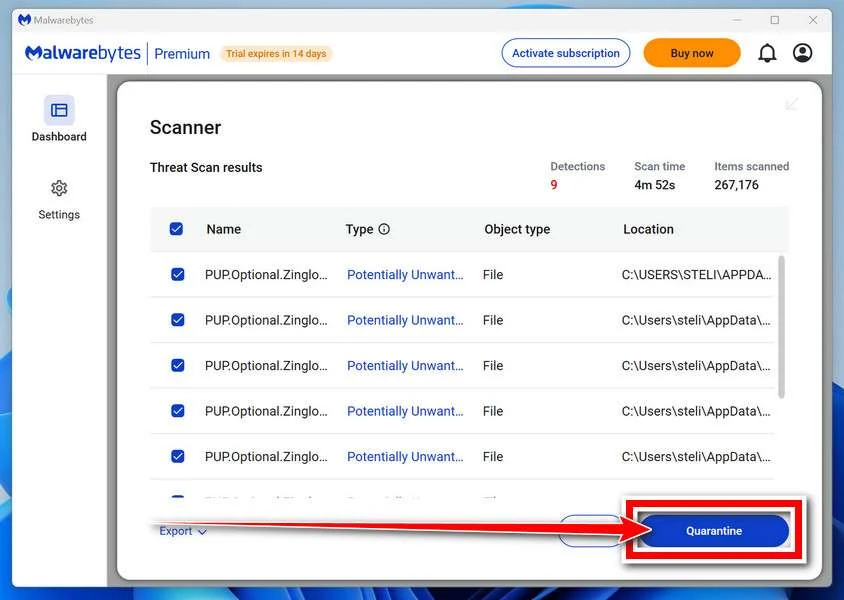
When the scan is done, you’ll see a list of everything Malwarebytes found — malware, adware, and potentially unwanted programs. Click the “Quarantine” button to remove all of them at once.
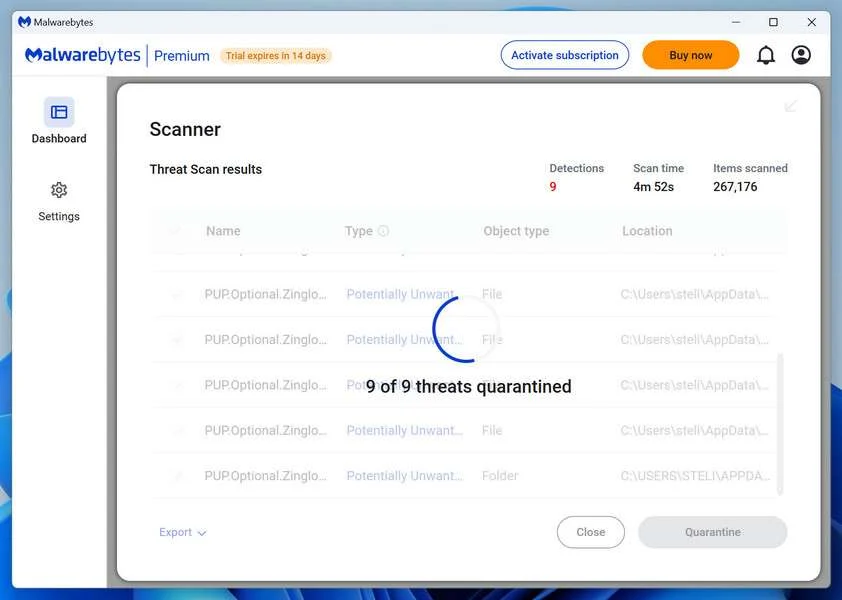
Malwarebytes will now remove the malicious files and registry entries and move them safely into quarantine.
-
Restart Your Computer
Some threats can only be fully removed after a reboot. If Malwarebytes asks you to restart, click Yes. Once you’re logged back in, Malwarebytes has finished removing the threats it found.
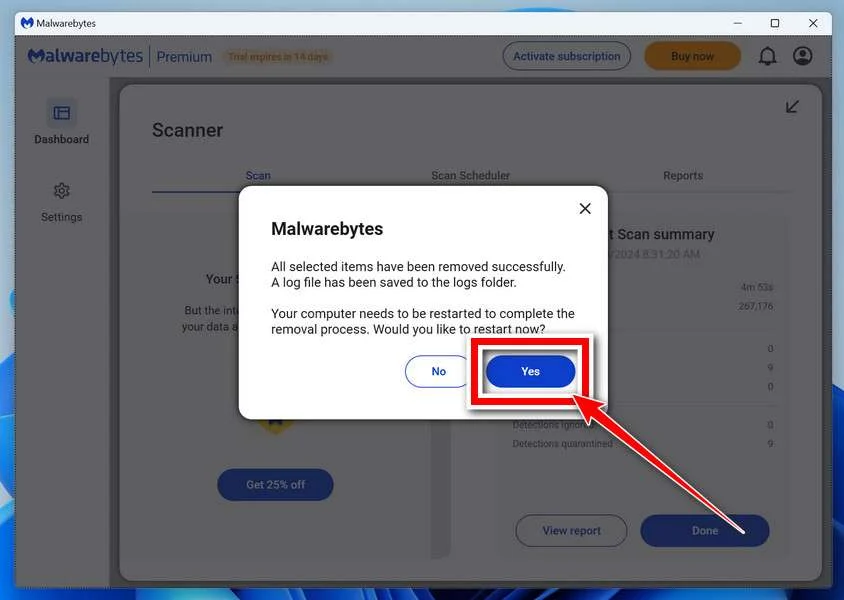
That’s it — your Windows PC is now clean of trojans, adware, and other malware, and should be back to running smoothly.
If you are still having problems with your computer after completing these instructions, then please follow one of the steps:
- Run a computer scan with ESET Online Scanner
- Ask for help in our Windows Malware Removal Help & Support forum.
Run a Malware Scan with Malwarebytes for Mac
Malwarebytes for Mac is a free on-demand scanner that removes the malware other security software tends to miss — adware, browser hijackers, and unwanted programs included. Cleaning an infected Mac with Malwarebytes has always been completely free, and it’s our go-to recommendation. Follow the steps below to scan and clean your Mac in just a few minutes.
-
Download Malwarebytes for Mac
Click the button below to download the latest version of Malwarebytes for Mac.
Download MalwarebytesOfficial installer for macOS. Your download starts right away.Want real-time protection? See Malwarebytes PremiumMalwarebytes Free for MacScans and removes malware at no cost -
Open the Malwarebytes setup file
When the download finishes, open your Downloads folder and double-click the setup file to begin the installation.
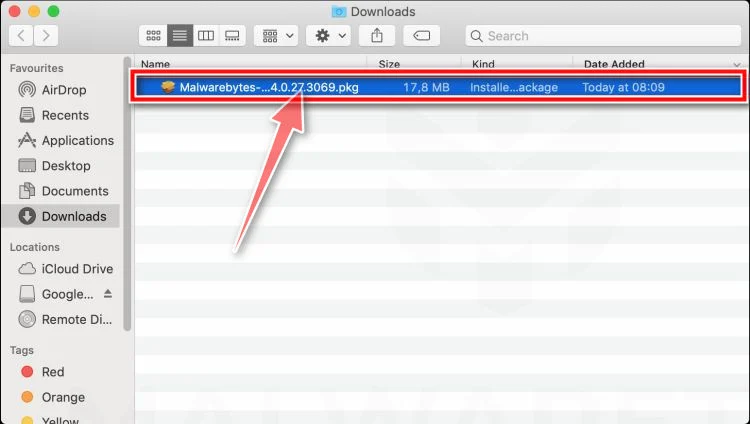
-
Follow the On-Screen Prompts to Install Malwarebytes
The Malwarebytes for Mac Installer will guide you through a few quick screens. Click “Continue” and keep following the prompts until the installation completes.
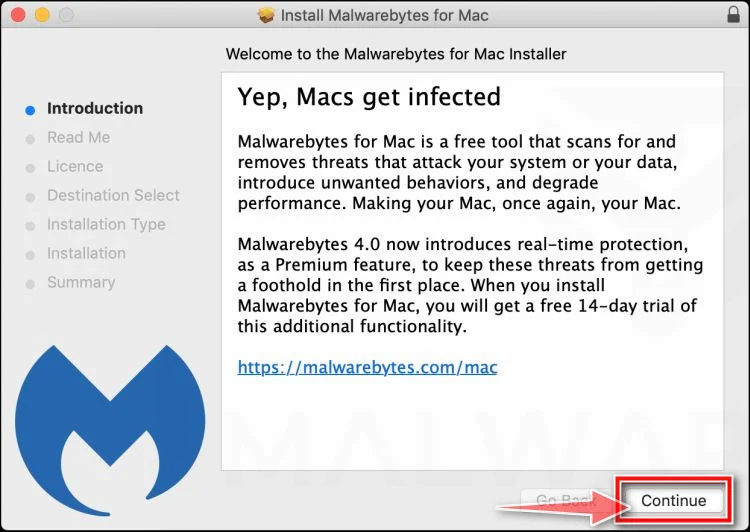
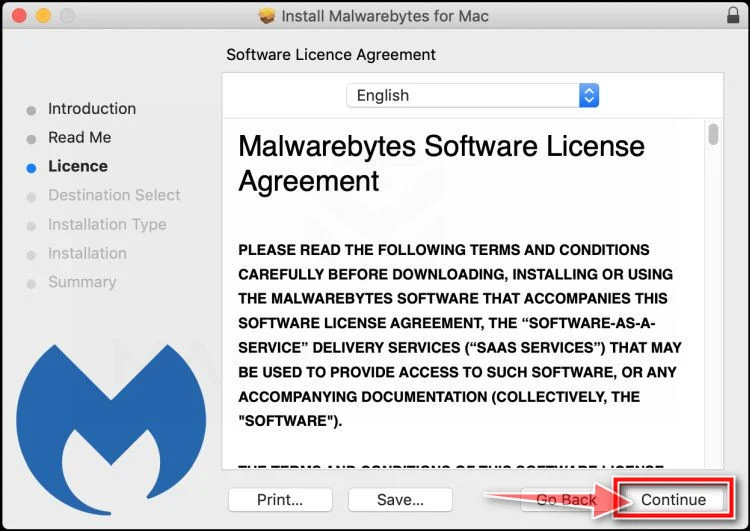
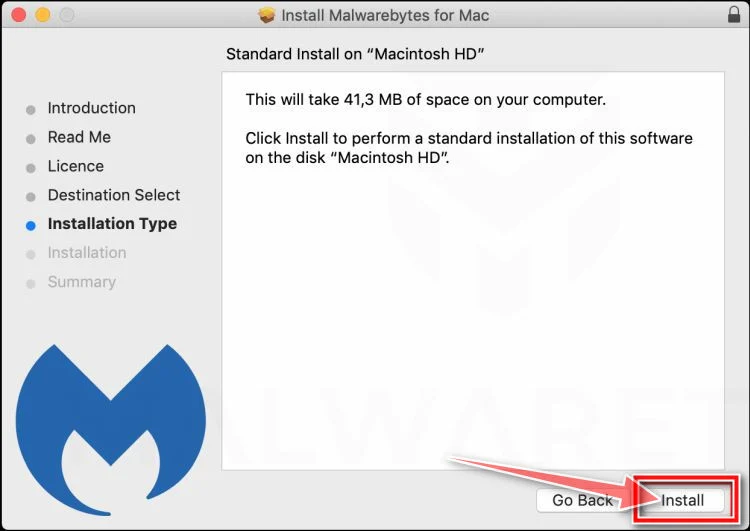
When the installation is complete, Malwarebytes opens to the Welcome to Malwarebytes screen. Click “Get started“.
-
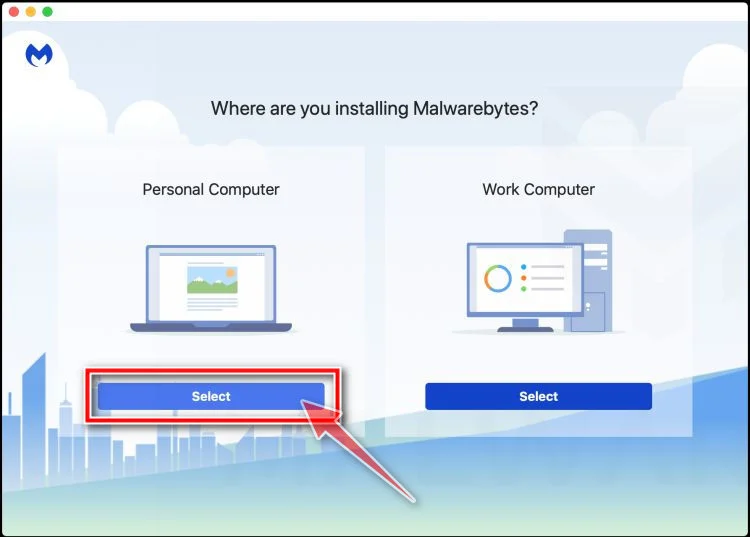
Select “Personal Computer” or “Work Computer”
Malwarebytes will ask what type of computer you’re installing it on. Click either Personal Computer or Work Computer, whichever applies.
-
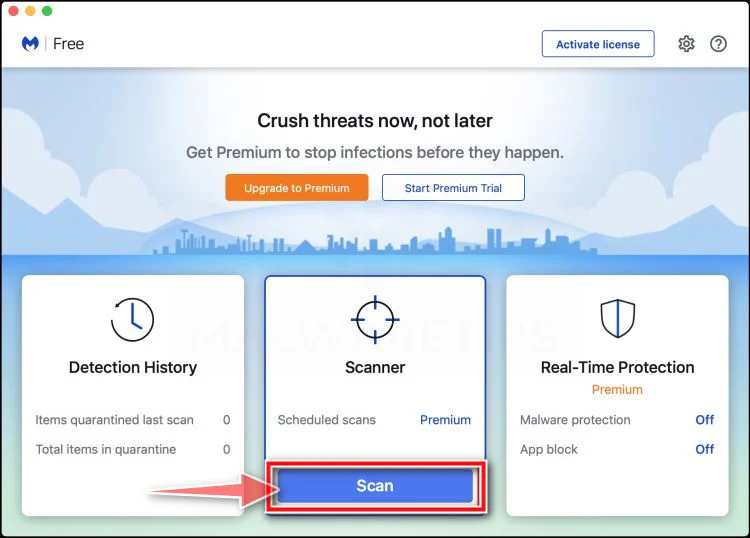
Start the Scan
Click the “Scan” button. Malwarebytes will automatically update its detection database and begin checking your Mac for malware.
-
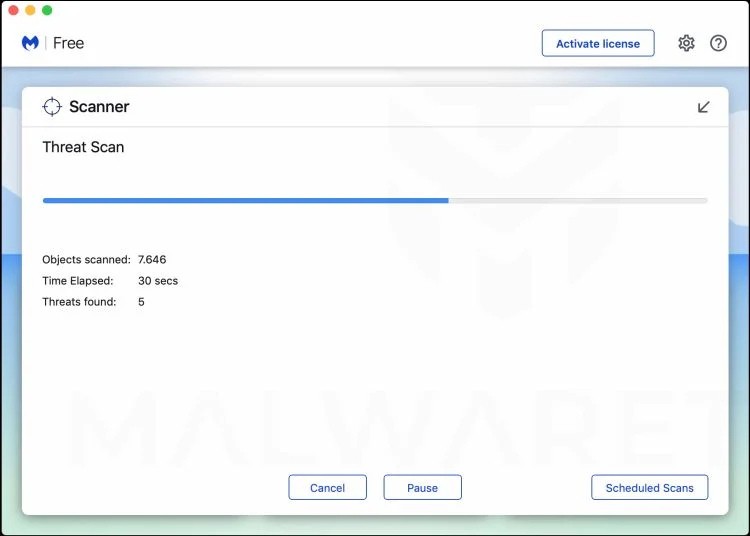
Wait for the Scan to Finish
Malwarebytes will scan your Mac for adware, browser hijackers, and other malicious programs. This can take a few minutes, so feel free to do something else — just check back occasionally to see the progress.
-
Quarantine the Detected Threats
When the scan is done, you’ll see a list of everything Malwarebytes found. Click the “Quarantine” button to remove all the threats at once.
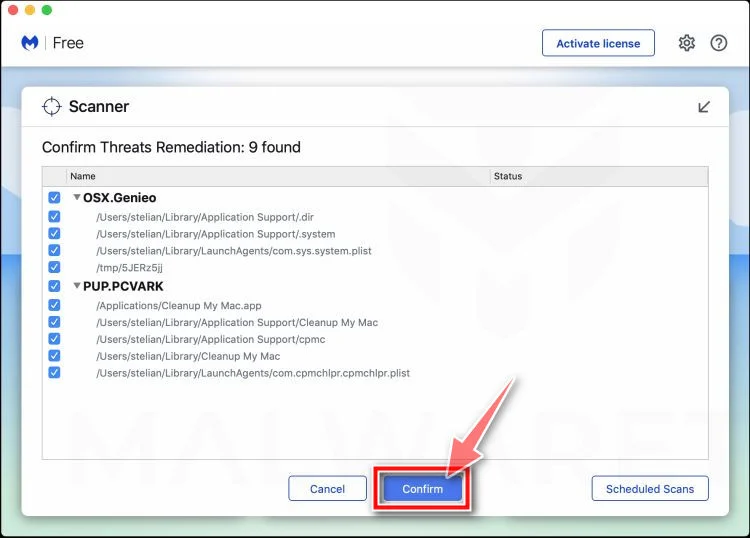
-
Restart Your Mac
Malwarebytes will now remove all the malicious files it found. Some threats can only be fully removed after a reboot — if Malwarebytes asks you to restart, allow it. Once you’re logged back in, your Mac is clean.
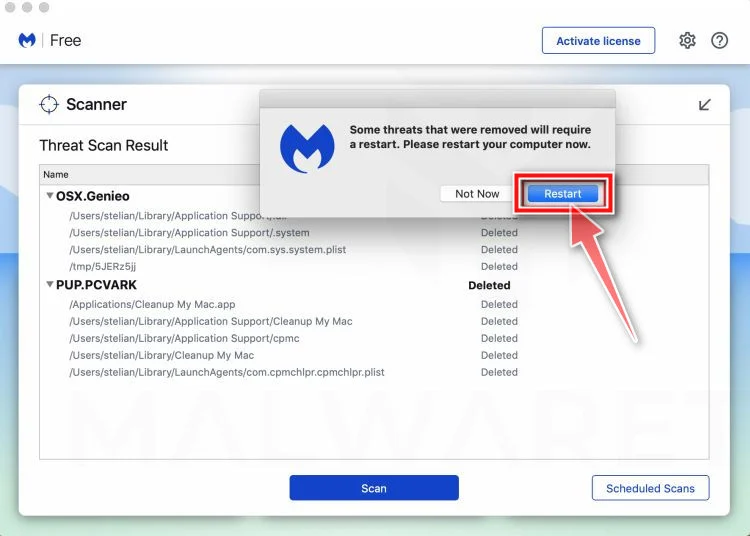
That’s it — your Mac is now free of adware, rogue browser extensions, and other potentially harmful software.
If you are still experiencing problems while trying to remove a malicious program from your computer, please ask for help in our Mac Malware Removal Help & Support forum.
Run a Malware Scan with Malwarebytes for Android
Malwarebytes for Android automatically detects and removes dangerous threats like malware and ransomware so you don’t have to worry about your most-used device being compromised. Aggressive detection of adware and potentially unwanted programs keeps your Android phone or tablet running smooth.
-
Download Malwarebytes for Android.
You can download Malwarebytes for Android by clicking the link below.
Get Malwarebytes for AndroidOpens Google Play in a new tab.Want real-time protection? See Malwarebytes Premium for AndroidMalwarebytes for AndroidScans your phone and removes malware at no cost -
Install Malwarebytes for Android on your phone.
In the Google Play Store, tap “Install” to install Malwarebytes for Android on your device.

When the installation process has finished, tap “Open” to begin using Malwarebytes for Android. You can also open Malwarebytes by tapping on its icon in your phone menu or home screen.

-
Follow the on-screen prompts to complete the setup process
When Malwarebytes will open, you will see the Malwarebytes Setup Wizard which will guide you through a series of permissions and other setup options.
This is the first of two screens that explain the difference between the Premium and Free versions. Swipe this screen to continue.
Tap on “Got it” to proceed to the next step.
Malwarebytes for Android will now ask for a set of permissions that are required to scan your device and protect it from malware. Tap on “Give permission” to continue.
Tap on “Allow” to permit Malwarebytes to access the files on your phone.
-
Update database and run a scan with Malwarebytes for Android
You will now be prompted to update the Malwarebytes database and run a full system scan.

Click on “Update database” to update the Malwarebytes for Android definitions to the latest version, then click on “Run full scan” to perform a system scan.

-
Wait for the Malwarebytes scan to complete.
Malwarebytes will now start scanning your phone for adware and other malicious apps. This process can take a few minutes, so we suggest you do something else and periodically check on the status of the scan to see when it is finished.

-
Click on “Remove Selected”.
When the scan has been completed, you will be presented with a screen showing the malware infections that Malwarebytes for Android has detected. To remove the malicious apps that Malwarebytes has found, tap on the “Remove Selected” button.

-
Restart your phone.
Malwarebytes for Android will now remove all the malicious apps that it has found. To complete the malware removal process, Malwarebytes may ask you to restart your device.
That’s it — your Android phone is now clean — no more malicious apps, adware, or browser redirects.
If you are still having problems with your phone after completing these instructions, then please follow one of the steps:
- Restore your phone to factory settings by going to Settings > General management > Reset > Factory data reset.
- Ask for help in our Mobile Malware Removal Help & Support forum.
Stay Protected: Block Ads and Malicious Sites
Now that your device is clean, keep it that way. Most infections start with a malicious ad or a fake download button — so blocking them at the source is your best defense.
We recommend AdGuard, which blocks malicious ads, phishing pages, and dangerous redirects before they can reach you.
👉 Download AdGuard and browse safely
The Bottom Line
The Walmart Fraud Prevention scam calls are not really about Walmart.
They are about using Walmart’s name to create fear, then pushing victims into a fake tech support and refund scam that can lead to remote device access, stolen account information, and demands for gift cards or other payments.
Your instinct to hang up was exactly right.
If you remember only a few rules, make them these:
- Do not trust caller ID
- Do not press 1 on suspicious robocalls
- Do not call back numbers from unexpected fraud messages
- Never give remote access to a stranger
- Gift card payment requests always mean scam
When in doubt, stop the call and contact Walmart, your bank, or the company directly using the official app or website. That one step breaks the scam before it can do real damage.
FAQ
Is Walmart really calling me about fraud?
Maybe, but you should never trust the number shown on caller ID. Scammers can spoof numbers. If you are concerned, hang up and contact Walmart directly through the official app or website.
Is it a scam if the caller gives a specific amount like $2,499.00?
Not always, but scammers often use exact amounts to make the call sound legitimate. A specific amount does not prove the call is real.
What should I do if the recording tells me to press 1?
Do not press 1. Hang up. Pressing buttons on scam robocalls can connect you to scammers and may lead to more scam calls.
What if I already called the number back?
Stop contact immediately. Do not share any more information. Then check your Walmart account and bank accounts using official channels only.
Can Walmart Fraud Prevention ask for remote access to my phone or computer?
No legitimate fraud department should ask you to install remote access tools like AnyDesk to fix a purchase issue. That is a major scam warning sign.
Why do scammers ask for gift cards?
Because gift card payments are hard to reverse and easy for scammers to cash out. No real Walmart fraud team will ask for gift card codes.
What if I gave them remote access?
Disconnect your device from the internet, uninstall the remote access app, run a full security scan, and change your passwords. Contact your bank immediately if you logged into financial accounts during the session.
What if I already sent gift card codes or shared bank details?
Act fast. Contact your bank or card issuer, report the fraud, and contact the gift card company right away. Save receipts, screenshots, and call details for your reports.
Where should I report this scam?
Report it to the FTC, Walmart support (through official channels), and the FBI IC3 if money or personal information was involved. Reporting helps track scam patterns and warn others.

Join the discussion
12 commentsShare your experience or ask a question about this article.
Discussion
Received the phone call today. Pretty obvious scam, as phone # not connected to a name, and the phone # they want you to call is not the same. They say this is connected to your Walmart account but they don’t mention my name or account info.
Caller phone # Oklahoma 1-539-800-3602
Message phone # 1-459-982-5002
Interesting to note the call back # has this info when searched: Area code 459 is currently inactive and does not have any assigned location data. It may be reserved for future use but cannot be used for phone calls or text messages at this time.
In reply to Ricky Jr
That detail about the 459 number is a useful one – unassigned or invalid area codes turn up constantly in these scripts, because the callback number only has to look plausible for a few seconds. The number that called you will be spoofed, so there is little point trying to trace it. The tell you spotted is the right one: a genuine fraud department already knows your name and can reference your account, and it will never ask you to ring a number supplied in the message rather than the one printed on your card or on the retailer’s official site. Thanks for posting both numbers, it helps the next person who searches for them.
In reply to Ricky Jr
That is a sharp catch on the 459 area code – a callback number in an unassigned range is one of the most reliable tells there is, along with a “fraud department” that cannot name you or your account. No genuine retailer asks you to ring a number given in a robocall; you would always use the number on their official site or app. Thank you for posting both numbers, it helps other readers recognise the same call, and it is worth two minutes to report it to the FTC as well.
Had it happen to me yesterday. They hung up when I questioned their credentials, I.E., How do I know your Employee ID number & case number isn’t fake, after their questions started getting to personal.
In reply to Gene Short
Asking how you could verify the employee ID and case number is exactly the right move, and the hang-up is your confirmation – a genuine caller from an agency or a bank has no reason to end the call over that question. Nobody legitimate is offended by verification.
The most useful thing to know is that the ID and case numbers are always fake, and that they cannot be checked on the call itself, however plausible the person sounds. So the rule to keep is simpler than interrogating them: hang up and ring back on a number you look up yourself – from your card, a statement, or the agency’s official website. Never a number the caller gives you, and never a number from a search advert. If they are real, that call reaches them. Nothing is lost by hanging up on someone genuine.
The other tell you noticed is the important one: the questions getting personal. A real agency or bank already has your details and does not need your Social Security number, date of birth or card number read back to them, and any request to “confirm” those is the point to stop. Same with anything involving urgency, secrecy, gift cards, crypto or a transfer to keep your money safe.
Worth reporting at reportfraud.ftc.gov. If they claimed to be from a federal agency, the relevant Inspector General also takes reports – the Social Security IG at oig.ssa.gov, for instance – and those reports are how the scripts get tracked.
Scam call from: 302-846-7323 (Delaware). Wal-Mart, questioning a $989.64 which was not made. Listened to the V-M and simply did nothing except for calling W-M and making them aware. Second time AND THEY ARE GOOD at making everything sound official!
In reply to Robynne
Hi Robynne, thank you for reporting that number. You handled it correctly by not engaging. These fake Walmart fraud calls sound official because they are designed to create panic over a large purchase. Calling Walmart directly through official channels was the right move.
In reply to Robynne
Hi Robynne, thank you for reporting the number.
You handled it correctly by not calling back and contacting Walmart through safer channels. These fake Walmart fraud calls are designed to sound official and create panic over a large purchase. Your report helps others recognize the same script.
Got a second scam call to (830) 402-3601, for your information.
In reply to Philip Wayne
Hi Philip, thank you for reporting that number.
That fits the same fake Walmart fraud alert pattern: a suspicious call, a large supposed purchase amount, and pressure to respond quickly. It is helpful to have the number documented here so other readers can compare what they received.
Scammer asked me to call (475) 284-4917 regarding a suspect $2900.00 Walmart purchase. I did not respond, suspecting a scam. I am reporting this number to you for your information. I had no monetary loss.
In reply to Philip Wayne
Hi Philip, thank you for posting that.
You handled it exactly the right way by not responding. These scam calls are designed to create panic over a fake purchase so the target will call back and hand over personal or financial information. Sharing the number helps warn others.