

The text looks official, the deadline is tomorrow, and it mentions Washington law by name.
You are told this is your “Final Notice” for an unpaid toll fee and that your license and registration are at risk if you do not pay right now through a link.
Before you tap that button and type in your card details, pause. In the next few minutes you will see why this message is not what it claims to be and how a tiny toll can turn into a very expensive mistake.
Scam Overview
The “Final Notice Unpaid Toll Fee – Payment Required” text is a classic example of a modern phishing and smishing scam. Scammers copy the style, tone, and vocabulary of real government tolling agencies, then use fear and urgency to push people into handing over their personal and financial information.
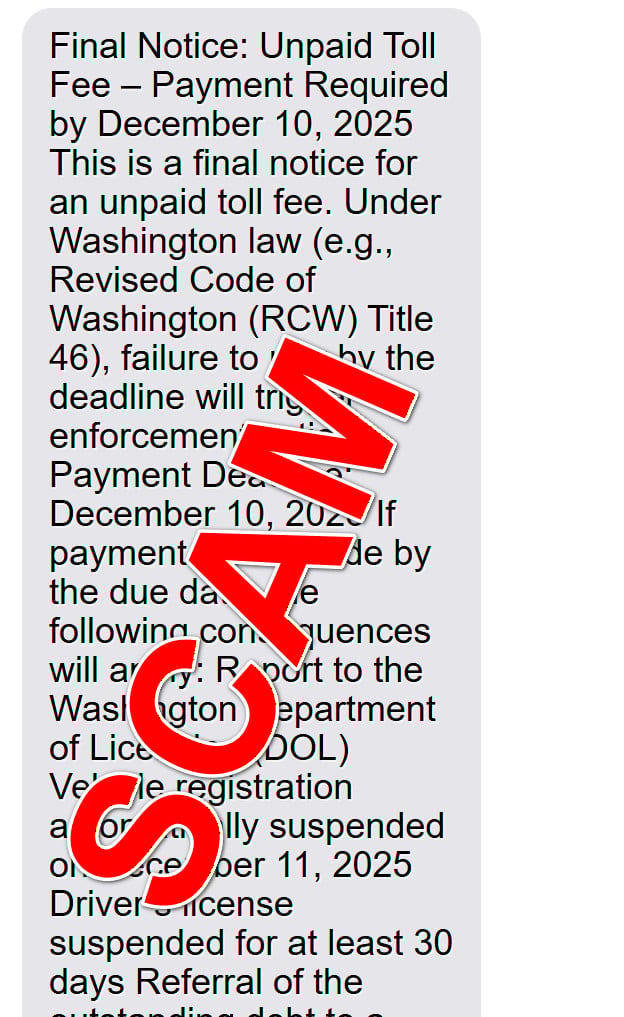
The text you received might look something like this:
“Final Notice: Unpaid Toll Fee – Payment Required by December 10, 2025
This is a final notice for an unpaid toll fee. Under Washington law (e.g., Revised Code of Washington (RCW) Title 46), failure to pay by the deadline will trigger enforcement actions.
Payment Deadline: December 10, 2025
If payment is not made by the due date, the following consequences will apply:
- Report to the Washington Department of Licensing (DOL)
- Vehicle registration automatically suspended on December 11, 2025
- Driver’s license suspended for at least 30 days
- Referral of the outstanding debt to a collections agency, with an additional fee of up to 35%
- Potential legal proceedings and adverse credit reporting
To avoid these penalties, please settle your payment immediately through our official payment portal: [link].”
At first glance this looks legalistic and serious.
It references Washington law, the Department of Licensing, collection agencies, and specific dates. The goal is to overwhelm you with the appearance of authority so that you never stop to question whether the message is real.
In reality, this is not how legitimate tolling agencies typically contact drivers.
Real toll agencies or transportation departments usually send paper mail to the address on file with the Department of Licensing or equivalent. They do not send threatening texts with clickable links that demand instant payment within 24 or 48 hours.
They also do not normally threaten immediate suspension of your driver’s license the very next day over a single missed toll, especially for a tiny amount like $3.95 or $5.
The scam has several key characteristics:
- Imitation of authority The message impersonates Washington state agencies, toll authorities, or well known toll brands such as:
- E-ZPass
- PA Turnpike Toll
- Peach Pass
- GeauxPass
- VDOT or Virginia Department of Transportation
- Aggressive warnings and “final notice” language Phrases like “Final Notice,” “Immediate Payment Required,” “Enforcement Actions,” or “Suspension on December 11, 2025” are designed to spike your anxiety. Scammers know that fear of losing a driver’s license or vehicle registration is powerful. Most people need their car for work, family responsibilities, and everyday life. When that is threatened, critical thinking can switch off for a moment.
- Specific law references for extra credibility The example text invokes “Revised Code of Washington (RCW) Title 46.” Scammers often sprinkle in real sounding law references and acronyms to make the message feel more legitimate. They know very few people will actually look up the cited law, especially when there is a ticking deadline.
- A hyperlink to a fake “official payment portal” This is the heart of the scam. The text includes a shortened or suspicious link that leads you to a fake payment website. These scam pages often:
- Use domains that end in .xyz, .shop, .xin, or other generic extensions
- Include words like “toll,” “pay,” “notice,” “violation,” or “portal”
- Copy the logos, colors, and layout of real toll websites
- Display a small “amount due,” often between $3.95 and $10
- Data harvesting disguised as a quick toll payment The small fee, such as $3.95 or $5, is a psychological trick. A low amount seems harmless. Many people think, “Even if this is a mistake, it is easier to pay a few dollars than to challenge it.” The real goal is not the $5. The real goal is your card number, expiration date, CVV, and contact details. With that information, scammers can:
- Make fraudulent online purchases
- Sell your card details on criminal marketplaces
- Attempt larger unauthorized transactions later
- Use your personal data for further phishing or identity theft
- No prior contact or obvious connection Many victims have never used a toll road, or they live far from the state mentioned in the message. For instance, they might receive a “Washington unpaid toll” message even though they live in another state or have never driven through a Washington toll facility. Scammers send these texts in bulk to thousands or millions of numbers. They do not care whether you actually drove through a toll road. They play the odds that some recipients will have used toll roads recently and will worry that they may have missed a payment.
- Cloned website layouts The scam web pages often include:
- Progress bars like “55% complete”
- Multi step “account opening” forms where you first enter your name, address, and contact info
- A second step where you submit card number, expiration date, and CVV
- Buttons labeled “Pay Toll Now,” “Payment,” or “Continue”
The combination of legal language, official sounding names, urgent consequences, and a low payment amount is very effective. Even people who are careful online can fall for this when they receive it during a busy day, while commuting, or late at night.
Understanding the structure of this unpaid toll fee scam is the first step in protecting yourself and those around you.
How The Scam Works
To really protect yourself, it helps to walk through the scam step by step and see how each part is designed to manipulate your emotions and behavior.
Step 1: Mass text blasting using stolen or random phone numbers
The operation usually starts with scammers acquiring phone numbers.
They might buy lists of numbers from shady data brokers, scrape them from hacked databases, or generate them automatically. Then they use bulk messaging tools or compromised systems to send thousands of texts in a short period.
These texts are often customized for different regions. One batch might mention Washington, another might mention Texas, Pennsylvania, Virginia, or Georgia. The only parts they change are:
- State name
- Law references
- Deadline date
- Toll agency or brand name
Everything else is copy and paste.
Because the messages are sent in massive waves, scammers only need a small percentage of people to click the link for the scheme to be profitable.
Step 2: Triggering fear with a “Final Notice” and fake legal consequences
The wording of the text is carefully engineered.
By calling it a “Final Notice,” the message implies there were previous attempts to contact you that you somehow “ignored.” This plays on guilt and worry that you might have missed something important in the mail.
The message then lists severe sounding consequences that will supposedly take effect if you do not pay by the deadline:
- Report to the Department of Licensing
- Automatic suspension of vehicle registration
- Suspension of your driver’s license for at least 30 days
- Referral to a collections agency with an extra fee of up to 35%
- Possible legal proceedings and negative marks on your credit report
All of these consequences are chosen because they sound serious and complicated.
Even if you suspect the amount is small, you might fear that ignoring it could create a chain of problems with your car, your license, and your credit score.
The scammers are not interested in explaining how toll enforcement actually works. They want you to feel cornered into doing the fastest and easiest thing: clicking the link and paying.
Step 3: Directing you to a fake “toll payment portal”
The text includes a link that claims to go to an “official payment portal.”
If you look closely, the domain will usually not belong to a real government or tolling authority. Instead, it might be:
- A random looking domain like
toll-pay-notice.xyzorviolations-payment.shop - A domain with a toll related word but odd extension like
.xinor.top - A domain that mimics a real toll site but is slightly off, such as a misspelled name or extra characters
The scammers rely on the fact that most people do not inspect the URL carefully, especially on a small phone screen.
When you tap the link, you arrive on a site that is visually convincing. Many of these pages use:
- Toll road imagery like bridges, highways, or toll booths
- Logos that resemble E-ZPass, PA Turnpike, Peach Pass, GeauxPass, or other legitimate brands
- Clean, minimalist forms and clear “Pay Now” buttons
- Small print mentioning “late fees” or “additional penalties”
In some cases, there is a progress bar at the top, such as a green bar showing “55%.” This suggests you are partway through an official process and nudges you to keep going.
Step 4: Collecting personal information under the guise of “verification”
Many of these fake portals are intentionally multi step.
In the first step, you might see a form that asks for:
- Full name
- Address
- City and ZIP code
- Phone number
- Email address
- Date of birth
The site may frame this as necessary to “locate your toll record” or “verify your account.”
The goal here is to gather as much personally identifiable information as possible. This data has value on its own. It can be used for identity theft, sold in criminal markets, or combined with other stolen data to open fraudulent accounts.
Because the questions look similar to what a real toll or government site might ask, many people fill them out without suspicion.
Step 5: Asking for a small toll payment with full card details
Once you have provided personal information, the site moves you to the payment page.
Here you are told that your total amount due is a very small number, often around $3.95, $5, or $8.95. The page might show a note like:
“To avoid a bill with excessive late fees, please complete payment now. Total Amount Due: $3.95”
Underneath that, the payment form asks for:
- Card number
- Card expiration date
- CVV security code
- Name on the card
This setup is intentional.
The small fee makes people think, “This is not worth arguing about. I will just pay it and move on.”
But when you type your full card details into a website controlled by scammers, you are effectively giving them a blank check.
They can instantly attempt:
- Online purchases for hundreds of dollars
- Subscription signups that repeatedly charge your card
- Transfers to digital wallets or prepaid cards
Even if the site actually charges you only $3.95 or $5 as a first step, that transaction is just a technical test to confirm your card is active and the details are correct.
Step 6: Optional “success” screen and quiet theft behind the scenes
After you submit payment, the site often shows a friendly confirmation message such as:
“Payment Successful. Your toll violation has been settled. Thank you.”
This message is meant to reassure you so that you do not immediately suspect anything is wrong. You close the browser and go back to your day.
Behind the scenes, your card data is either:
- Automatically sent to the scammers’ systems for immediate use
- Saved into a database that will be sold to other criminals
- Tested with small transactions to see which cards still work
Some victims notice fraudulent charges within hours. Others notice only when their bank statement arrives or when their bank sends a fraud alert.
By the time suspicious activity is detected, the scammers have usually abandoned the domain and moved on to a new one.
Step 7: Reusing the same template for different states and toll brands
This scheme is highly reusable.
Because the text and website are generic, scammers can easily adapt them for:
- Washington tolls
- Texas or California tolls
- E-ZPass corridors in the Northeast
- State specific systems like PA Turnpike, Peach Pass, GeauxPass, or VDOT
All they need to change are a few names and deadlines.
Often, multiple domains are registered around the same time, all with similar designs. When one domain is reported and taken down, they simply send new texts with a different URL and keep going.
Step 8: Targeting people repeatedly once they engage
If you click the link or especially if you enter any information, your phone number and data may be tagged as “responsive.”
Scammers love responsive victims, because these are people who open messages and take action.
That can lead to:
- More unpaid toll scams in the future
- Fake package delivery texts
- Phony bank alerts
- Crypto or investment scams
In other words, once you respond to one scam, you may receive more, because your number is now considered valuable.
This is why it is so important not only to avoid entering payment details, but also to block the sender and report the scam when possible.
Understanding each step of the process helps you recognize the pattern, even when the wording changes slightly. Any message that combines a surprise toll fee, a tight deadline, and a request to pay through a link should raise a red flag.
What To Do If You Have Fallen Victim to This Scam
If you clicked the link or even entered your card details, you are not alone. Many people fall for this type of scam every day.
The most important thing is not to panic. There are clear, practical steps you can take to limit the damage and protect yourself.
Below is a calm, step by step checklist you can follow.
1. Immediately contact your bank or card issuer
As soon as you realize that the toll text was a scam, call the number on the back of your credit or debit card.
Explain clearly:
- That you received a fake “Final Notice Unpaid Toll Fee” text
- That you followed the link and entered your card details on a fraudulent site
- Whether any unauthorized charges have already appeared
Ask your bank to:
- Cancel or block the card number used on the site
- Issue you a new card with a different number
- Review recent transactions for fraud
- Help you dispute any unauthorized charges
Most banks and card issuers deal with this situation frequently. They can walk you through the process and monitor your account for suspicious activity.
2. Review all recent transactions and set up alerts
Log into your online banking or card account.
Carefully scan recent transactions for:
- Small test charges that you do not recognize
- Online purchases from unfamiliar merchants
- Foreign transactions or unusual payment processors
If you see anything suspicious, report it to your bank immediately.
While you are there, enable transaction alerts by text or email if your bank offers them. These alerts can notify you quickly about new charges, which is extremely helpful in catching fraud early.
3. Change passwords associated with the same email or phone number
If the fake toll site collected your email address and phone number, those details could be used in other scams.
It is a good idea to change the passwords for any accounts that:
- Use the same email address you provided
- Are connected to that phone number
- Share similar passwords
Focus first on:
- Online banking and financial accounts
- Email accounts (Gmail, Outlook, Yahoo, etc.)
- Shopping sites where your card might be stored
- Cloud services that contain personal documents
Choose strong, unique passwords and consider using a reputable password manager.
4. Enable multi factor authentication (MFA) where possible
Multi factor authentication adds an extra layer of security.
When MFA is turned on, a criminal who has your password still cannot log in without a one time code or second factor.
Enable MFA on:
- Your primary email accounts
- Banking or investment accounts
- Large retailers or digital wallets you use regularly
This greatly reduces the chance that stolen data from the toll scam can be used to break into your accounts.
5. Report the scam text to your carrier and relevant agencies
Reporting the scam helps authorities and service providers track patterns and take down fraudulent domains more quickly.
You can:
- Forward the text to your mobile carrier’s spam reporting number (commonly 7726 in many regions)
- Report it to your state’s attorney general’s office through their consumer complaint page
- File a report with the Federal Trade Commission (if you are in the United States) through their fraud reporting portal
- Notify your local tolling agency so they can warn other drivers
Include screenshots of the message and the website if possible. This evidence is useful for investigations.
6. Freeze your credit or place a fraud alert if a lot of data was exposed
If the scam website collected not only your card details, but also:
- Full name
- Address
- Date of birth
- Possibly even partial Social Security number in some versions
Then it may be wise to consider a credit freeze or fraud alert through the major credit bureaus in your country.
A credit freeze blocks new creditors from pulling your credit report, which can help prevent criminals from opening new accounts in your name. It does not affect your existing accounts or your credit score.
A fraud alert tells lenders to take extra steps to verify your identity before opening new credit lines.
Check the process for your country or region and choose the protection level that matches the information you shared.
7. Keep screenshots and notes for your records
Document everything related to the scam:
- Screenshot of the original text message
- Screenshot of the website you visited
- The URL of the site
- The time and date you entered information
- Any charges that appeared on your statement
Store these records in a safe place.
They can be helpful if:
- Your bank needs more context for a dispute
- Law enforcement requests details
- You later discover related identity theft and need to show a timeline
8. Monitor your credit reports and accounts over the next months
Data harvested in a scam is not always used immediately.
Criminals sometimes wait weeks or months before making their move, or they sell your information to others who might use it later.
For at least several months after the incident:
- Regularly check your bank and card statements
- Review your credit reports when possible
- Watch for mail or calls about accounts you did not open
If you notice anything strange, address it quickly with the relevant company or agency.
9. Educate family members and colleagues
Scammers rarely target only one person.
If you received the “Final Notice Unpaid Toll Fee” text, there is a good chance people close to you have received it as well or will receive similar messages.
Share what happened with:
- Family members, especially older relatives who may be more trusting of official sounding messages
- Friends who drive frequently or use toll roads
- Colleagues or neighbors
Explain how the text looked, how convincing the site was, and the steps you took afterward. Your experience could prevent someone else from falling into the same trap.
10. Take it as a learning experience, not a failure
It is very important to understand that these scams are crafted by professionals who study human behavior.
They know how to push buttons like fear, urgency, and confusion. Falling for a well designed scam does not mean you are careless or unintelligent.
What matters most is how quickly you respond once you realize something is wrong.
By taking the steps above, you can usually limit or undo much of the damage, and you come away better prepared to spot similar scams in the future.
The Bottom Line
The “Final Notice Unpaid Toll Fee – Payment Required” text scam is a sophisticated smishing scheme that weaponizes anxiety about toll violations, government penalties, and license suspensions.
It starts with a frightening text that looks official and cites Washington law or other state regulations. It continues with a fake online payment portal that uses realistic branding from toll services like E-ZPass, PA Turnpike, Peach Pass, GeauxPass, or VDOT. The small fee, often $3.95 to $10, is just bait to collect your name, address, phone number, and full credit card data.
Once scammers have your information, they can attempt fraudulent charges, sell your card details, and even target you with more scams.
The good news is that you are not powerless.
By learning how these messages work, double checking URLs, avoiding links in unsolicited texts, and going directly to official toll websites or your paper mail for verification, you can avoid becoming a victim. And if you already entered your details, rapid action with your bank, along with monitoring and reporting, can greatly reduce the harm.
Stay skeptical of any text that claims to be a final notice, demands urgent payment, and directs you to a website you have never seen before. When in doubt, close the message, look up the agency on your own, and contact them using trusted information.
FAQ
What is the “Final Notice Unpaid Toll Fee – Payment Required” text?
It is a fraudulent text message that claims you owe an unpaid toll and must pay by a specific deadline, often mentioning Washington law or RCW Title 46. The text threatens serious consequences such as license suspension, registration suspension, collections, and legal action if you do not pay through a link in the message. The goal is to push you into visiting a fake payment site and entering your personal and card details.
Is this text really from a toll agency or the Washington Department of Licensing?
No. Legitimate toll agencies and departments of licensing usually send official notices by postal mail to the address on file, not by unsolicited text with a clickable payment link. Real agencies also use official domains, not random sites on .xyz, .shop, .xin, or similar extensions. If you want to confirm a toll, you should visit the official agency website by typing the address yourself or use a phone number printed on a mailed notice.
Why does the message mention RCW Title 46 and other legal language?
Scammers add real sounding law references such as “Revised Code of Washington (RCW) Title 46” to make the message feel official and urgent. Most people do not look up the law, so the legal language works as a scare tactic. The presence of legal citations in a text does not prove it is genuine.
What happens if I click the link in the text?
If you click the link, you are taken to a fake “toll payment portal” that imitates branding from services like PA Turnpike Toll, Peach Pass, GeauxPass, E ZPass, VDOT, or similar systems. The site will usually ask for your name, address, phone number, and then your full credit card details in order to pay a small fee such as $3.95 or $5. The site is controlled by scammers who use this information to steal money and possibly your identity.
Why do scammers ask for such a small payment amount?
A small amount, usually between $3.95 and $10, feels harmless and easy to pay. Many people think it is simpler to pay the fee than to investigate the notice. Scammers use this psychology to lower your guard. Their real profit comes from storing or selling your card details, not from the small toll amount.
How can I tell if a toll notice text is a scam?
Red flags include:
- A surprise “final notice” when you have not received any previous mail
- Threats of immediate suspension of your license or registration the very next day
- A request to pay only through a link in a text message
- A domain that is unfamiliar or uses strange endings like .xyz, .shop, .xin, or .top
- Use of generic branding that imitates E ZPass, PA Turnpike, Peach Pass, GeauxPass, or VDOT but does not match the official website
If anything looks off, do not click the link. Instead, go directly to the official toll agency website or call them using a verified phone number.
I already entered my card details on the site. What should I do now?
Contact your bank or card issuer immediately using the number on the back of your card. Tell them you entered your card information on a fraudulent site related to an unpaid toll text. Ask them to block or replace the card, review recent transactions, and help you dispute any unauthorized charges. Then monitor your statements and consider enabling transaction alerts so you receive notifications of future activity.
Could my identity be stolen from this scam?
Yes, it is possible. Many scam sites collect more than just card details. They may ask for your full name, address, phone number, email, and sometimes even date of birth. This information can be combined with data from other breaches to commit identity theft or open accounts in your name. If a lot of personal information was exposed, consider checking your credit reports and placing a fraud alert or credit freeze, depending on local options.
Does this scam affect only Washington drivers?
No. While the sample text references Washington law and the Department of Licensing, the same scam template is reused for many states and toll systems. Scammers simply swap the state name and toll brand. People across the United States have reported nearly identical texts claiming unpaid tolls from E ZPass, PA Turnpike, Peach Pass, GeauxPass, and other agencies.
Should I reply to the text or ask for proof?
Do not reply. Responding confirms that your number is active and may lead to more scam attempts. Ignore the message and delete it after you have reported it to your carrier or relevant authority. If you want to check whether you actually owe a toll, contact the toll agency directly through its official website or a phone number from a mailed bill.
How can I report this unpaid toll scam?
You can usually:
- Forward the message to your mobile carrier’s spam reporting number (often 7726 in many regions)
- File a report with your state attorney general’s consumer protection office
- Report it to the Federal Trade Commission if you are in the United States
- Notify your local toll agency that scammers are using their name
Reporting helps investigators identify patterns, shut down fraudulent domains, and warn other drivers.
How can I protect myself from similar text scams in the future?
Use these habits:
- Be skeptical of urgent texts that demand immediate payment or threaten severe penalties
- Never enter card details on a site reached through a random text link
- Type official website addresses yourself instead of clicking links
- Enable alerts from your bank so you see new charges quickly
- Educate family members, especially older relatives, about these scams
Staying cautious and verifying messages through trusted channels is the best defense against the “Final Notice Unpaid Toll Fee – Payment Required” scam and other similar text based frauds.

Join the discussion
0 commentsShare your experience or ask a question about this article.
Discussion
Start the conversation
Have a question or something useful to share? Add the first comment.