

Imagine opening a crypto-related website only to be greeted by a terrifying message: “WARNING! Your wallet has been flagged as a MEV Bot.” Panic sets in, and you’re told to verify your wallet to avoid consequences. Before you know it, you’ve handed over access to your entire crypto portfolio. This is not a rare occurrence—it’s a rapidly spreading scam targeting unsuspecting users in the decentralized finance (DeFi) space.
This article unpacks the “Your Wallet Has Been Flagged As A MEV Bot” scam in detail, explaining how it works, who is behind it, and most importantly, how you can protect yourself.
Scam Overview
Maximal Extractable Value (MEV) is a concept in the blockchain world, particularly within Ethereum. MEV refers to the profit that miners or automated programs (called searchers) can extract by reordering, including, or excluding transactions within a block. It’s a byproduct of how decentralized finance operates.
When a DeFi user executes an action—be it a token swap, staking, or NFT minting—those actions are broadcast as pending transactions. MEV bots scan these pending transactions and exploit them for profit by:
- Front-running: Placing their own transaction before yours.
- Back-running: Following up on your transaction to benefit from the market effect.
- Sandwich attacks: Placing one transaction before and one after yours to manipulate asset prices.
MEV is not illegal, but it is controversial because it creates an uneven playing field. It’s also highly technical, which leaves many casual users vulnerable to misinformation.
How Scammers Are Exploiting MEV Confusion
Scammers have created fake websites mimicking legitimate crypto tools or wallets. These pages falsely warn users that their wallet has been flagged as an MEV bot—implying they’re part of unethical or malicious behavior. They then prompt users to “verify” ownership of the wallet to clear their name.
This scam is effective because:
- It leverages fear: No one wants to be labeled a fraud.
- It uses technical jargon: The average user doesn’t fully understand MEV.
- It appears official: With clean UI design, fake logos, and branding from known wallets like Phantom, Trust Wallet, or Ledger.
The goal is simple: trick users into submitting their private key or seed phrase. Once scammers have that, they can gain full access to the wallet and transfer out all assets.
Real-World Example
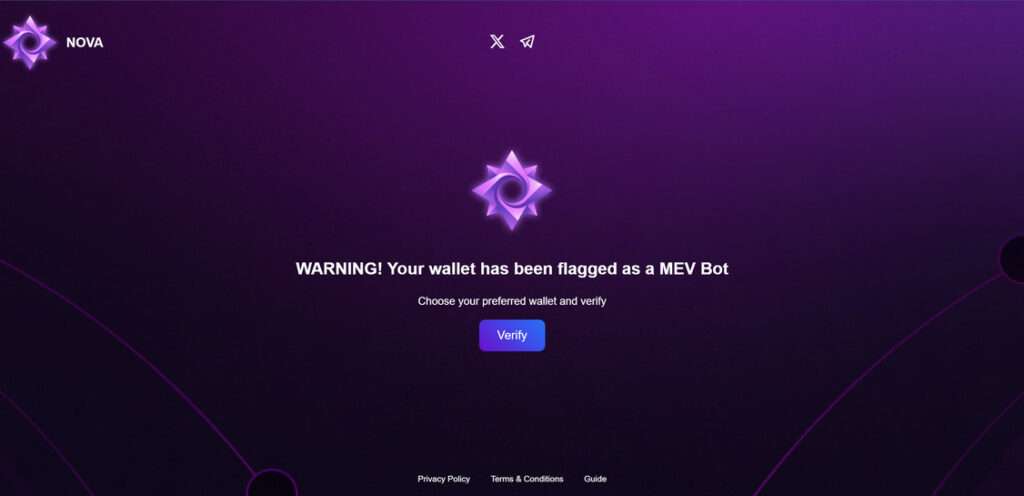
One example is the site https://novaverification.pages.dev/. The page displays a popup:
“WARNING! Your wallet has been flagged as a MEV Bot. Choose your preferred wallet and verify.”
It then lists several well-known wallet providers, each redirecting to a fake login interface where the user is prompted to input sensitive data.
This is a phishing attack disguised as a security warning.
Victims Have No Recourse
Once funds are stolen, they are gone forever. Cryptocurrency transactions are irreversible, and wallets are non-custodial—meaning there is no company or help desk that can retrieve your funds.
Worse still, these scams are spreading rapidly across social media, Discord, Telegram, and even Google ads.
Who Is Being Targeted?
- New DeFi users who are unfamiliar with MEV.
- NFT collectors eager to mint or claim drops.
- Crypto traders who frequently interact with dApps.
No one is immune, but lack of awareness increases the risk exponentially.
How the Scam Works
Understanding how this scam unfolds can help you avoid it. Here’s a detailed breakdown of each stage:
Step 1: Traffic Generation
Scammers direct users to fake sites through several methods:
- Fake social media posts mimicking official wallet or DeFi accounts.
- Phishing ads on Google that rank above the actual wallet sites.
- Direct messages on Telegram or Discord with urgent warnings.
These messages use scare tactics, suggesting the user’s wallet is blacklisted or at risk.
Step 2: The Fake Alert
Upon visiting the scam site, users are greeted with a popup:
“WARNING! Your wallet has been flagged as a MEV Bot.”
This message is designed to spark fear and urgency, prompting users to act quickly without verifying legitimacy.
Step 3: The Verification Request
The site prompts users to select a wallet provider from a list:
- Phantom
- Trust Wallet
- Ledger
- Solflare
- Slope
Each selection leads to a fake login interface, complete with logos and branding.
Step 4: The Trap — Private Key Request
Once users choose their wallet, the page requests them to:
- Enter their seed phrase or
- Input their private key to “prove” they are not an MEV bot.
These credentials are never needed for verification in legitimate platforms.
Step 5: Theft in Seconds
As soon as the information is submitted:
- The scammers gain full control of the wallet.
- Funds are transferred to anonymous addresses.
- Often, automated scripts empty the wallet in under a minute.
Users may see a loading spinner or verification animation to buy time.
Step 6: Disappearing Act
The site may redirect to a blank page or show a success message, but the damage is already done. Some victims only realize hours or days later that their funds are gone.
What To Do If You’ve Fallen Victim to the Scam
If you’ve already submitted your private key or seed phrase, immediate action is critical. Here’s what to do:
1. Transfer Remaining Funds Immediately
If you still have access to your wallet, transfer any remaining funds to a brand-new wallet that you control.
- Do not use the same seed phrase or private key.
- Use a different device if possible to avoid malware or keyloggers.
2. Revoke Token Approvals
Go to a tool like Revoke.cash to remove any token approvals that might allow scammers future access to your assets.
- Connect your wallet
- Review and revoke suspicious approvals
3. Report the Scam Site
Flag the site to:
- Google Safe Browsing
- Cloudflare (if applicable)
- PhishTank
- Your crypto wallet’s support channels
This helps prevent further victimization.
4. Inform Your Community
Post about the scam on:
- Twitter/X
- Discord
The more users are aware, the harder it becomes for scammers to operate.
5. Scan Your Device for Malware
Run a full scan with updated antivirus software. Consider reformatting your device if you suspect it was compromised.
6. Create a New Wallet
Do not reuse compromised credentials. Set up a brand-new wallet using a reputable source. Secure your new seed phrase:
- Write it down on paper (not stored digitally)
- Store it in a fireproof safe or secure location
7. Consider a Hardware Wallet
A hardware wallet like Ledger or Trezor adds a significant layer of security. Always purchase from official sources, not third-party sellers.
8. Report the Crime
While law enforcement’s ability to recover funds is limited, reporting helps build data on criminal trends. Contact:
- Your country’s cybercrime unit
- Websites like IC3.gov in the U.S.
FAQ: Your Wallet Has Been Flagged As A MEV Bot Scam
What does “Your wallet has been flagged as a MEV bot” mean?
This is a fake alert designed to scare users into believing their crypto wallet is involved in malicious activity. It is not a legitimate warning and is part of a phishing scam. MEV (Maximal Extractable Value) is a real concept in crypto, but being “flagged” for it is not something any wallet provider or site does.
Is MEV illegal or bad?
MEV itself is not illegal. It refers to the profit that can be made by reordering transactions within a block. However, it’s controversial because it can disadvantage regular users and be exploited by automated bots. Scammers exploit the technical nature of MEV to confuse and manipulate people.
How do scammers trick users?
Scammers create fake websites or impersonate trusted platforms and display a warning that a user’s wallet is “flagged.” They then ask users to “verify” ownership of the wallet by entering their private key or seed phrase. Once entered, scammers gain full access to the wallet.
What happens if I enter my private key?
Entering your private key or seed phrase gives scammers full control of your wallet. They can and will immediately transfer out all of your crypto assets. These transactions are irreversible, and in most cases, the funds are impossible to recover.
Can I get my crypto back after falling for this scam?
Unfortunately, no. Crypto transactions are final, and there is no central authority to reverse them. However, quick action can prevent further damage if not all assets were stolen.
What are the signs of a scam website?
- Unsolicited warnings or alerts
- Requests for your seed phrase or private key
- Poor grammar or unusual domain names
- Pressure to act quickly
- Imitation of well-known brands without official URLs
How do I stay safe from this type of scam?
- Never enter your seed phrase or private key on a website
- Always verify URLs before connecting your wallet
- Use hardware wallets for added security
- Bookmark official wallet and DeFi sites
- Educate yourself about common scams and phishing techniques
I visited a scam site but didn’t enter any information. Am I still at risk?
If you didn’t input any sensitive data or connect your wallet, you are likely safe. However, it’s a good idea to clear your browser cache and run a malware scan just in case the site attempted to run malicious scripts.
Can legitimate platforms flag my wallet as a MEV bot?
No legitimate crypto wallet or DeFi platform will ever flag you as an MEV bot or require wallet verification via private key. If you see such a message, it is always a scam.
Where can I report scam websites?
You can report scam sites to:
- Google Safe Browsing
- PhishTank
- MetaMask or your wallet provider
- Cybercrime authorities in your country
Spreading the word also helps prevent others from falling victim.
The Bottom Line
The “Your Wallet Has Been Flagged As A MEV Bot” scam is one of the more insidious crypto phishing attacks out there today. It preys on confusion around technical blockchain concepts and uses fear to trick users into revealing sensitive information.
Awareness and caution are your best defenses. Always verify the authenticity of websites before entering wallet details. And remember—no legitimate service will ever ask for your private key or seed phrase.
Stay alert, stay informed, and share this information with others in the crypto community.

Reviews & discussion
0 commentsShare a firsthand experience, or ask a question.
Community reviews
Your Wallet Has Been Flagged As a MEV Bot
Moderated reader experiences, not an editorial verdict.
Start the conversation
Have a question or something useful to share? Add the first comment.