

The MalwareTips app
Your community, one tap away.
Open MalwareTips from your Home Screen or desktop. Follow discussions, find answers and pick up where you left off.
- Home Screen access
- Optional push alerts
- Your community
You're ready to explore.Explore what's new
Installation instructions
iPhone & iPad
- Open MalwareTips in Safari and tap Share. You may need to open the Page Menu first.
- Choose Add to Home Screen. If it is not listed, use Edit Actions to add it.
- Keep Open as Web App enabled if shown, then tap Add.
Android
- Open MalwareTips in Chrome or another browser that supports app installation.
- Open the browser menu and look for Install app, Install and create shortcut, or Add to Home screen.
- Choose Install and confirm. Wording varies by browser.
Desktop
- Chrome: use the install icon in the address bar, or the menu under Cast, save and share.
- Edge: open the menu, then More tools, Apps and Install this site as an app.
- Safari on Mac: choose Share or File, then Add to Dock. Firefox on Windows: look for the web apps button in the address bar.
If you cannot find an install option, update your browser or use its bookmark option to keep MalwareTips close.
Keep up with your conversations
After installation, open the app and sign in. Enable push notifications in Preferences if you want alerts. On iPhone and iPad, push requires a Home Screen web app and iOS or iPadOS 16.4 or later.
Sign in to manage notificationsInstallation is optional. Your notification settings stay under your control.
You are using an out of date browser. It may not display this or other websites correctly.
You should upgrade or use an alternative browser.
You should upgrade or use an alternative browser.
New Update 360 Total Security Updates

Hi all
360 Total Security 10.6.0.1338
Improved: Sandbox
Enhanced: Performance Improvement
Fixed: Bug fixes
Changelog site
 www.360totalsecurity.com
Download site
 www.360totalsecurity.com
 www.360totalsecurity.com
With best Regards
Mops21
360 Total Security 10.6.0.1338
Improved: Sandbox
Enhanced: Performance Improvement
Fixed: Bug fixes
Changelog site
Version History | 360 Total Security
Check out what's new for the latest release of free antivirus 360 Total Security and its version history.
Download site
360 Total Security: Free Antivirus Protection | Virus Scan & Removal for Windows, Mac and Android
Free antivirus 360 Total Security is a leader in antivirus software. With a billion active internet users, 360 has earned a strong reputation for excellence.
Clean Up Your PC & Improve Performance | 360 Total Security
Learn how the free antivirus 360 Total Security can protect your computer, clean up all the unnecessary data, and speed up your PC.
With best Regards
Mops21
Hi all
360 Total Security 10.6.0.1352
Improved: New false positive Feedback
Fixed: Bug fixes
Changelog site
www.360totalsecurity.com
And here can you download the File
www.360totalsecurity.com
With best Regards
Mops21
360 Total Security 10.6.0.1352
Improved: New false positive Feedback
Fixed: Bug fixes
Changelog site
Version History | 360 Total Security
Check out what's new for the latest release of free antivirus 360 Total Security and its version history.
And here can you download the File
Clean Up Your PC & Improve Performance | 360 Total Security
Learn how the free antivirus 360 Total Security can protect your computer, clean up all the unnecessary data, and speed up your PC.
With best Regards
Mops21
Hi all
360 Total Security 10.6.0.1353
Fixed: Bug fixes
Changelog site
www.360totalsecurity.com
And here can you download the File
www.360totalsecurity.com
With best Regards
Mops21
360 Total Security 10.6.0.1353
Fixed: Bug fixes
Changelog site
Version History | 360 Total Security
Check out what's new for the latest release of free antivirus 360 Total Security and its version history.
And here can you download the File
Clean Up Your PC & Improve Performance | 360 Total Security
Learn how the free antivirus 360 Total Security can protect your computer, clean up all the unnecessary data, and speed up your PC.
With best Regards
Mops21

RoboMan
Level 39
Verified
Honorary Member
Top Poster
Content Creator
Well-known
High Reputation
Forum Veteran
Has anyone tried or does anybody use 360 Premium version and has some feedback to share?

the sandbox bug is still working and they don't wanna fix it.
I've been using it for some time. It's doesn't really offer any better protection than the free version. You get scheduled scans and a practically useless firewall. The main advantage over the free version is that it lacks the annoying advertising. There are some other features like a driver updater and storage analyser, which have got nothing to do with security. There's an option to update to new versions ASAP, which would be nice if it worked. But more often than not, it usually takes a few days after a new version is released, before it is able to automatically. I usually use Patch My PC to update to new versions, as they are very quick to add support for new releases.Has anyone tried or does anybody use 360 Premium version and has some feedback to share?


Anyone noticed that Qihoo is now using the 360 sandbox in an auto mode in some circumstances? I received a Qihoo alert a few weeks ago asking if I would like to sandbox during an installation. I think I was installing a monitoring program (maybe benchmarking) which wanted to add a driver if I recall correctly, but I didn't use the Qihoo sandbox to contain it then, since I knew the program. Haven't seen this type of alert since then. Also, anyone concerned about detection now that Bitdefender signatures have been removed?
I haven't seen it happen yet. I not too worried about the lack of Bitdefender signatures, as even its own signatures are pretty good and the Avira signatures seem to be updating with no issues.Anyone noticed that Qihoo is now using the 360 sandbox in an auto mode in some circumstances?
Thanks @roger_m. I updated this morning and had to say goodbye to Bidefender  . I will stick with 360 although I have been tempted by WiseVector. On this machine, I keep hanging on to the Qihoo clean. I use CCleaner on boot with the laptop and the other PC I use alot here. Also, I like the input of the full system scan. I'm still using Comodo Firewall behind 360...
Hi all
360 Total Security 10.6.0.1354
Fixed: Bug fixes
Changelog site
www.360totalsecurity.com
And here can you download the File
www.360totalsecurity.com
With best Regards
Mops21
360 Total Security 10.6.0.1354
Fixed: Bug fixes
Changelog site
Version History | 360 Total Security
Check out what's new for the latest release of free antivirus 360 Total Security and its version history.
And here can you download the File
Clean Up Your PC & Improve Performance | 360 Total Security
Learn how the free antivirus 360 Total Security can protect your computer, clean up all the unnecessary data, and speed up your PC.
With best Regards
Mops21
Hi all
360 Total Security 10.6.0.1379
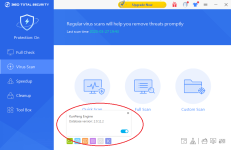
Added: KunPeng AntiVir Engine
Fixed: Bug fixes
360 Total Security 10.6.0.1380
Fixed: Bug fixes
Changelog site
www.360totalsecurity.com
And here can you download the File
www.360totalsecurity.com
With best Regards
Mops21
360 Total Security 10.6.0.1379
Added: KunPeng AntiVir Engine
Fixed: Bug fixes
360 Total Security 10.6.0.1380
Fixed: Bug fixes
Changelog site
Version History | 360 Total Security
Check out what's new for the latest release of free antivirus 360 Total Security and its version history.
And here can you download the File
Clean Up Your PC & Improve Performance | 360 Total Security
Learn how the free antivirus 360 Total Security can protect your computer, clean up all the unnecessary data, and speed up your PC.
With best Regards
Mops21
What's that?Added: KunPeng AntiVir Engine

New engine. Bitdefender deletedWhat's that?
Version History | 360 Total Security
Check out what's new for the latest release of free antivirus 360 Total Security and its version history.
 www.360totalsecurity.com
About time, that one always had issues updating whenever I used Q360, regardless of TS or TSE.New engine. Bitdefender deleted
Never heard of that dev, looking forward to the performance.
Google finds Huawei processors with 64 cores when entering that name
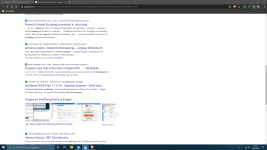


I've never heard about that. It seems to be TS' own engine (Even latest Chinese version does not have this). Interesting.
Its engine files seem to be located in /deepscan/AVE/ started with KP*.dll. And AVE is a engine designed for repairing infected exe, so I don't know what KunPeng engine actually does? Advanced repair?
More info about AVE engine: 360自主研发成果揭秘——360启发式引擎_360社区
Just notice .1379 and .1380 version disappeared from change log and also for installers. What are they doing?
Join the discussion
Write your reply below. You'll create a free account or log in before it's posted.
Recently browsing
Members who viewed this thread in the last 5 minutes
You may also like...
-
 Software Review Qihoo 360 Total Security 2026 Free
-

-
-
Software Review Avira Free Security 2026
-
