


uMatrix-style third-party traffic control via Declarative Net Request
3P-Matrix-lite gives you control over third-party traffic in your browser using a simple five-level slider. It is inspired by the classic uMatrix extension but built entirely on Chrome's native Declarative Net Request (DNR) API, which means all filtering happens inside the browser engine itself — no background script reading your traffic, no interception, no data leaving your device.
The idea is straightforward: most privacy and security problems on the web come from third-party scripts and frames that load silently in the background when you visit a page. Trackers, fingerprinting scripts, ad networks, and malicious injections all arrive this way. 3P-Matrix-lite lets you decide how much of that you allow, and makes it easy to dial it back when something breaks.
Open source: GitHub - Kees1958/3P-Matrix-lite: uMatrix-style third-party traffic control via Declarative Net Request
Chrome store: 3P-Matrix-lite - Chrome Web Store
How it works
When you install the extension, it starts in Easy mode — allow all, which applies no restrictions and lets you observe the default browsing experience. From there you move the slider right to increase protection.
Level 1 — Easy mode - allow all. At first start this extension uses Easy Mode (allow all) as startup mode. You can change the startup mode by clicking on the one (1) in the green rounded square/rectangle in the upper right corner.
Level 2 — Easy mode with enhanced security blocks the most obviously dangerous categories: connections to raw IP addresses (a common sign of malicious infrastructure), connections on non-standard ports (allow 80, 8080, 443 and 8443), and third-party frames. Whitelisted domains always pass through regardless of level. Option to blacklist much abused TLD's.
Level 3 — Easy medium mode adds script blocking on top of level 2. Only domains whose top-level domain is on your TLD whitelist are allowed to load 3P-scripts and frames. On a fresh install your TLD whitelist is pre-populated with common TLDs (com, org, io, net etc.) and with the country TLDs of your browser's language settings — so a Dutch browser gets .nl added automatically.
Level 4 — Medium mode — trust CDN's keeps the same blocking rules as level 5 but makes an exception for any URL that contains "cdn" in the hostname or path. This is a practical compromise for sites that load their own assets from a CDN host rather than their own domain. Without this exception, many sites break even though their CDN is perfectly legitimate. Your domain whitelist applies at this level.
Level 5 — Medium mode is the strictest setting. All third-party scripts and frames are blocked. Only domains you have explicitly added to your domain whitelist are allowed through. Use this when you want maximum control and are prepared to whitelist what you need.
New features
Level 1: has a feature to import domains (just copy-paste the domain names from a text editor, one domain per line) and lock the websites at level 1 (allow all)
Level 2 and 3: now also have the option to add domains to the whitelist (level 4 and 5 already had this)
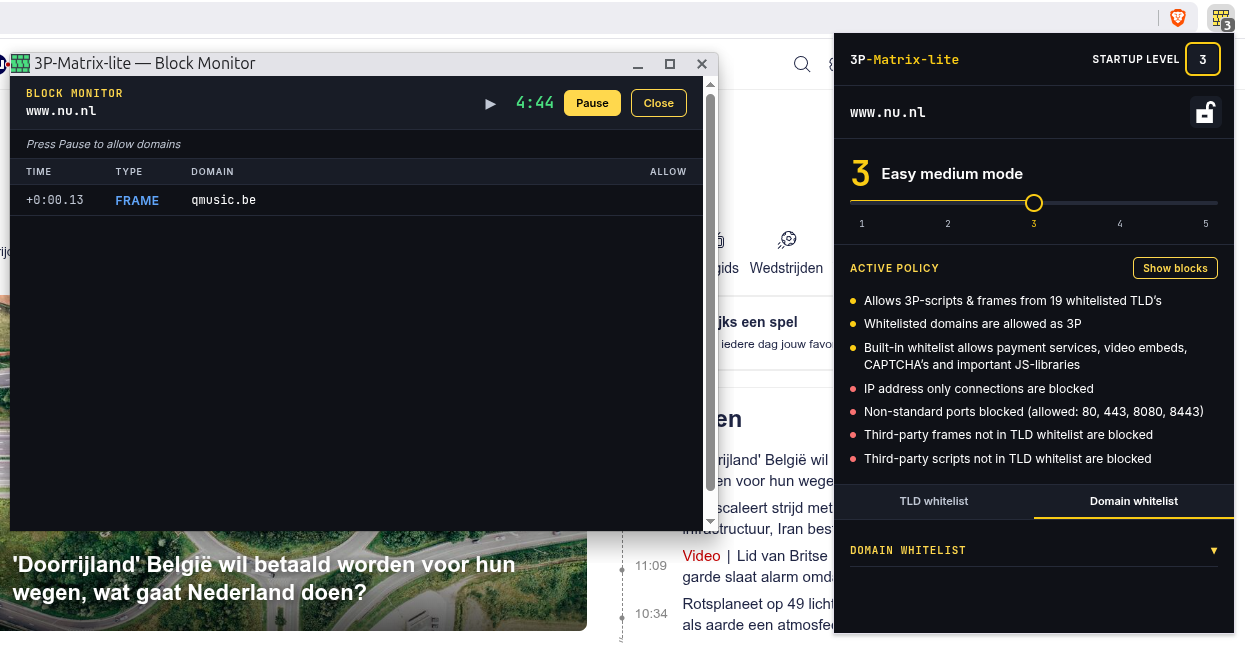
Killer features (what makes 3P-Matrix-lite really easy to use).
1. Use of a slider with presets for easy on the fly adjustment with visual feedback of the icon changing color
(1=green, 2=blue, 3=amber, 4=orange, 5=red)
2. Startup mode
When you switched to a high level in your previous browsing session, in the next (new browsing) session the startup mode will be automatically applied to prevent website breakage (set it al level 1 to be absolutely certain, move it to 2 or 3 when you are familiar with 3P-Matrix-lite and locked all your important websites to allow all).
3. Lock website
Dodgy websites can be locked at level 4 (most adult websites) with fallback to level 3 (easy medium mode). Next time you open this website the 3P-mitigations will be applied
4. Level 3 auto add country codes
Level 3 has most used generic TLD's on the whitelist and it automaticallt adds the country code of the languages enabled in your browser. It has a slider to extend it to the continent (e.g. when you speak German also whitelist AT=Austria and CH=Zwitserland) or world (e.g when you speak Portuguese also put BR=Brasil on the TLD whitelist).
5. Uses internal whitelists to prevent website breakage.
Suggested use
1. Import all important websites to lock them at level 1 (or surf to them one by one and lock website).
2. Surf to dodgy websites and lock them to level 4 (when it breaks fall back to level 3) or
(only for hardcore NoScript and former uMatrix users) move it to level 5 and hand pick the domains you want to whitelist using SHOW BLOCKS button.
3. Use it for two weeks with startup level 1 and switching to level 3 during a browsing session (fallback to level 2 when it breaks) and lock more websites at level 1 or
adjust the TLD blacklist/Domain whitelist (level 2) or adjust TLD whitelist/Domain Whitelist (level 3).
4. When comfortable with 3P-Matrix-lite functions and usage, move startup slider to level 3
This reduces 50% of 3P-attack surface while 99,99% of the websites from EU+5Eyes should work normally. Additionally locking important websites to level 1 (for 100% compatibility) and dodgy websites to level 4 (for maximum security) provides real world protection without breaking surfing/viewing only functionality.
3P-Matrix-lite gives you control over third-party traffic in your browser using a simple five-level slider. It is inspired by the classic uMatrix extension but built entirely on Chrome's native Declarative Net Request (DNR) API, which means all filtering happens inside the browser engine itself — no background script reading your traffic, no interception, no data leaving your device.
The idea is straightforward: most privacy and security problems on the web come from third-party scripts and frames that load silently in the background when you visit a page. Trackers, fingerprinting scripts, ad networks, and malicious injections all arrive this way. 3P-Matrix-lite lets you decide how much of that you allow, and makes it easy to dial it back when something breaks.
Open source: GitHub - Kees1958/3P-Matrix-lite: uMatrix-style third-party traffic control via Declarative Net Request
Chrome store: 3P-Matrix-lite - Chrome Web Store
How it works
When you install the extension, it starts in Easy mode — allow all, which applies no restrictions and lets you observe the default browsing experience. From there you move the slider right to increase protection.
Level 1 — Easy mode - allow all. At first start this extension uses Easy Mode (allow all) as startup mode. You can change the startup mode by clicking on the one (1) in the green rounded square/rectangle in the upper right corner.
Level 2 — Easy mode with enhanced security blocks the most obviously dangerous categories: connections to raw IP addresses (a common sign of malicious infrastructure), connections on non-standard ports (allow 80, 8080, 443 and 8443), and third-party frames. Whitelisted domains always pass through regardless of level. Option to blacklist much abused TLD's.
Level 3 — Easy medium mode adds script blocking on top of level 2. Only domains whose top-level domain is on your TLD whitelist are allowed to load 3P-scripts and frames. On a fresh install your TLD whitelist is pre-populated with common TLDs (com, org, io, net etc.) and with the country TLDs of your browser's language settings — so a Dutch browser gets .nl added automatically.
Level 4 — Medium mode — trust CDN's keeps the same blocking rules as level 5 but makes an exception for any URL that contains "cdn" in the hostname or path. This is a practical compromise for sites that load their own assets from a CDN host rather than their own domain. Without this exception, many sites break even though their CDN is perfectly legitimate. Your domain whitelist applies at this level.
Level 5 — Medium mode is the strictest setting. All third-party scripts and frames are blocked. Only domains you have explicitly added to your domain whitelist are allowed through. Use this when you want maximum control and are prepared to whitelist what you need.
New features
Level 1: has a feature to import domains (just copy-paste the domain names from a text editor, one domain per line) and lock the websites at level 1 (allow all)
Level 2 and 3: now also have the option to add domains to the whitelist (level 4 and 5 already had this)
Killer features (what makes 3P-Matrix-lite really easy to use).
1. Use of a slider with presets for easy on the fly adjustment with visual feedback of the icon changing color
(1=green, 2=blue, 3=amber, 4=orange, 5=red)
2. Startup mode
When you switched to a high level in your previous browsing session, in the next (new browsing) session the startup mode will be automatically applied to prevent website breakage (set it al level 1 to be absolutely certain, move it to 2 or 3 when you are familiar with 3P-Matrix-lite and locked all your important websites to allow all).
3. Lock website
Dodgy websites can be locked at level 4 (most adult websites) with fallback to level 3 (easy medium mode). Next time you open this website the 3P-mitigations will be applied
4. Level 3 auto add country codes
Level 3 has most used generic TLD's on the whitelist and it automaticallt adds the country code of the languages enabled in your browser. It has a slider to extend it to the continent (e.g. when you speak German also whitelist AT=Austria and CH=Zwitserland) or world (e.g when you speak Portuguese also put BR=Brasil on the TLD whitelist).
5. Uses internal whitelists to prevent website breakage.
Suggested use
1. Import all important websites to lock them at level 1 (or surf to them one by one and lock website).
2. Surf to dodgy websites and lock them to level 4 (when it breaks fall back to level 3) or
(only for hardcore NoScript and former uMatrix users) move it to level 5 and hand pick the domains you want to whitelist using SHOW BLOCKS button.
3. Use it for two weeks with startup level 1 and switching to level 3 during a browsing session (fallback to level 2 when it breaks) and lock more websites at level 1 or
adjust the TLD blacklist/Domain whitelist (level 2) or adjust TLD whitelist/Domain Whitelist (level 3).
4. When comfortable with 3P-Matrix-lite functions and usage, move startup slider to level 3
This reduces 50% of 3P-attack surface while 99,99% of the websites from EU+5Eyes should work normally. Additionally locking important websites to level 1 (for 100% compatibility) and dodgy websites to level 4 (for maximum security) provides real world protection without breaking surfing/viewing only functionality.
Last edited:


