



Hi open source 3P-Matrix-lite: version 2 has arrived in the webstore 3P-Matrix-lite - Chrome Web Store
What it does: offers 5 levels of protection with build-in whitelists to prevent website breakage.
3P-Matrix is very user friendly with presets and build-in whitelists which can be changed on the fly using a slider.
It has two smart extra features original uMatrix did not had:
- startup mode (default on 1), can be changed using drop down option to 2 to 5, but best practice is keep it at 1)
- lock website mode: protection level can be locked for a website, next time you visit this website the protection level will be set to the locked value.
this is very useful for adult websites, most work perfectly on level 4, locking it at 4, makes browsing dodgy websites a lot safer.
Level 1: allow all
Level 2: easy mode with enhanced security:
Level 3: easy medium mode (as often explained by @Jan Willy with static AG Mv3 rules).
Level 4: medium mode trusting domains with CDN in URL
This is an open source project with very privacy friendly usage policy.
The readme explains above with pictures: GitHub - Kees1958/3P-Matrix-lite: uMatrix-style third-party traffic control via Declarative Net Request
Privacy policy: 3P-Matrix-lite/privacy.md at main · Kees1958/3P-Matrix-lite
As posted I am nearly 68, was a developer some 45 years ago, so still learning. I noticed one quirk in the show blocks. It also shows the domains blocked by other extensions. I have to dive into it. It is a bug which is also a feature
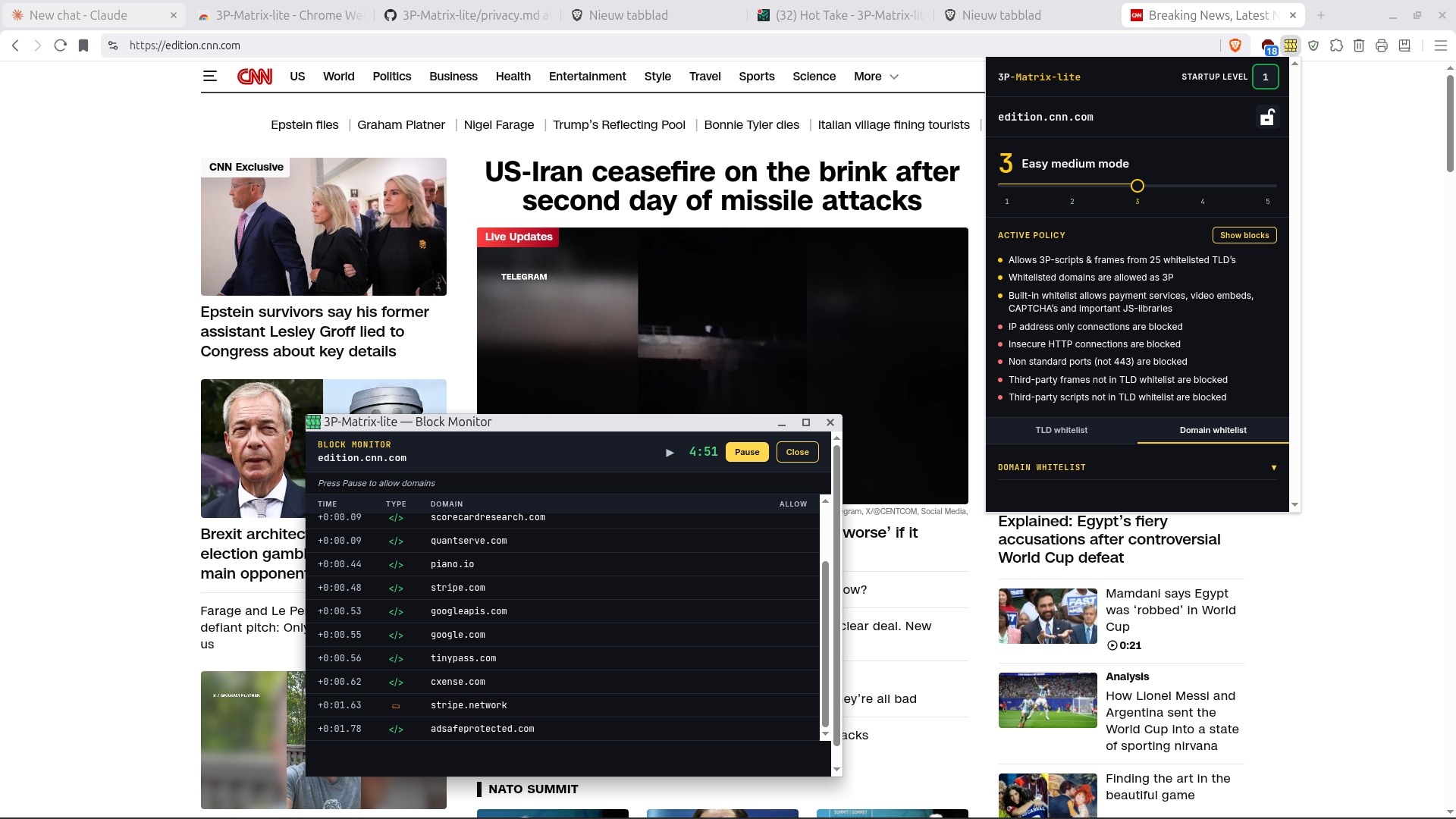
What it does: offers 5 levels of protection with build-in whitelists to prevent website breakage.
3P-Matrix is very user friendly with presets and build-in whitelists which can be changed on the fly using a slider.
It has two smart extra features original uMatrix did not had:
- startup mode (default on 1), can be changed using drop down option to 2 to 5, but best practice is keep it at 1)
- lock website mode: protection level can be locked for a website, next time you visit this website the protection level will be set to the locked value.
this is very useful for adult websites, most work perfectly on level 4, locking it at 4, makes browsing dodgy websites a lot safer.
Level 1: allow all
Level 2: easy mode with enhanced security:
- Build in whitelists to prevent website breakage
- IP-address only third-party is blocked
- HTTP third-party is blocked
- Non-standard ports are blocked (only default port 443 is allowed)
- Blocks all 3P-frames (except whitelisted)
- Optionally blocks 3P-scripts on blacklisted Top Level Domains
using a slider with 4 presets: none - user - generic - generic + country code's which are on the much abused TLD list - Optionally allows user to add domains to the whitelist using the tab or the show-blocks panel
Level 3: easy medium mode (as often explained by @Jan Willy with static AG Mv3 rules).
- Same protection IP-address, HTTP, non-standard port protection and build-in whitelists as level 2, with one difference
- In stead of blocking all 3P-frames and blacklisted 3P-scripts it blocks all 3P-frames and 3P-scripts with option to whitelist TLD's
using a slider with 4 presets: none - browser - continent - world:
- none (meaning no additional country codes) = only common general TLD's (which user can add or remove)
- browser = adds the country code's of the languages enabled in the browser (some browser prevent fingerprinting)
- continent = adds the country code's of other countries speaking the same language on the continent:
e.g. when language is German, Austria and Zwitserland will be added
- world = same mechanism applies, when language is Portuguese, country code Brazil will be added also
note these advanced functions only work for extented EU-zone and 5 Eyes countries. - Optionally allows user to add domains to the whitelist using the tab or the show-blocks panel
Level 4: medium mode trusting domains with CDN in URL
- Same protection IP-address, HTTP, non-standard port protection and build-in whitelists as level 2 and 3
- Blocks 3P-scripts and 3P-frames except on the internal whitelist and URL's containing CDN
- Optionally allows user to add domains to the whitelist using the tab or the show-blocks panel
- Same protection IP-address, HTTP, non-standard port protection and build-in whitelists as level 2 and 3
- Blocks 3P-scripts and 3P-frames
- Optionally allows user to add domains to the whitelist using the tab or the show-blocks panel
This is an open source project with very privacy friendly usage policy.
The readme explains above with pictures: GitHub - Kees1958/3P-Matrix-lite: uMatrix-style third-party traffic control via Declarative Net Request
Privacy policy: 3P-Matrix-lite/privacy.md at main · Kees1958/3P-Matrix-lite
As posted I am nearly 68, was a developer some 45 years ago, so still learning. I noticed one quirk in the show blocks. It also shows the domains blocked by other extensions. I have to dive into it. It is a bug which is also a feature
Last edited:


