Hot Take A Reason to use 3rd-party AV other than Windows defender: Clickfix

Wrecker4923

Level 9
Thread author
Verified
Well-known
Apr 11, 2024
389
2,113
769
Here's a case that shows that using a 3rd-party AV out of the box may be safer than Microsoft Defender out of the box: Clickfix.

Original Post​


TLD;R​

The user pasted a CAPTCHA text into the run dialog box and executed it. Apparently, ESET Home stopped the download, possibly on a URL blacklist.

My Notes:​

  1. Windows Defender didn't block the download.
  2. Really scanning the .dll file with Windows Defender, ESET Online scanner, and Emsisoft EEK all showed clean.
  3. Copying the PowerShell string (from the ElevenForum's OP, possibly "out-of-context"), with supposedly MalwareBytes Browser Guard "copying" protection, didn't flag the copying as suspicious.
Maybe Andy Ful's hard_configurator's Powershell Script block would have stopped it.
  • MalwareBytes Browser Guard blocked the URL, but the URL is used in PowerShell, not the browser's context.
  • MalwareBytes (VT Scan) flags the DLL.
  • ESET Home apparently blocked the URL executed in PowerShell context

VT Results​

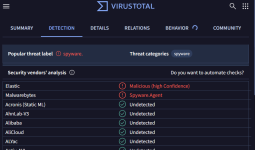
VT scan on the dll file:
1783109337925.png

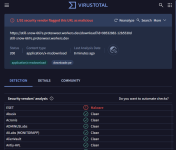
VT scan on the URL:
1783109393527.png

Notes on the AVs above​

Congrats to ESET and MalwareBytes above. This is one of the few times I see MalwareBytes (on VT) flagging this faster than almost everybody else.

A Windows Defender user, with an ad blocker and some security extension (including MalwareBytes Browser Guard and Bitdefender Trafficlight) may not have stopped this. We don't know the original URL that the OP clicked on that showed the CAPTCHA's powershell script, however.
 
Last edited:
Here's a case that shows that using a 3rd-party AV out of the box may be safer than Microsoft Defender out of the box: Clickfix.

Original Post​


TLD;R​

The user pasted a CAPTCHA text into the run dialog box and executed it. Apparently, ESET Home stopped the download, possibly on a URL blacklist.

My Notes:​

  1. Windows Defender didn't block the download.
  2. Really scanning the .dll file with Windows Defender, ESET Online scanner, and Emsisoft EEK all showed clean.
  3. Copying the PowerShell string (from the ElevenForum's OP, possibly "out-of-context"), with supposedly MalwareBytes Browser Guard "copying" protection, didn't flag the copying as suspicious.
Maybe Andy Ful's hard_configurator's Powershell Script block would have stopped it.
  • MalwareBytes Browser Guard blocked the URL, but the URL is used in PowerShell, not the browser's context.
  • MalwareBytes (VT Scan) flags the DLL.
  • ESET Home apparently blocked the URL executed in PowerShell context

VT Results​

VT scan on the dll file:
View attachment 298592

VT scan on the URL:
View attachment 298593

Notes on the AVs above​

Congrats to ESET and MalwareBytes above. This is one of the few times I see MalwareBytes (on VT) flagging this faster than almost everybody else.

A Windows Defender user, with an ad blocker and some security extension (including MalwareBytes Browser Guard and Bitdefender Trafficlight) may not have stopped this. We don't know the original URL that the OP clicked on that showed the CAPTCHA's powershell script, however.
ClickFix is a good example of how “user-executed script” attacks can slip past default protections, and it also shows why URL/reputation blocking can matter as much as (or more than) file scanning.

That said, this single incident isn’t strong evidence that Microsoft Defender is inherently weaker “out of the box” than any specific third-party AV—what you’re really seeing is a combination of (1) execution context, (2) default feature settings, and (3) which vendor had reputation coverage for that specific URL/infrastructure at that moment.

What ClickFix changes about the usual “download-and-scan” model

ClickFix-style lures typically rely on social engineering to get the victim to run a command (Run dialog / PowerShell) that then pulls a payload or loader.

Key implication: if the initial stage is a script/one-liner and the payload is fetched dynamically, there may be no obvious “browser download event” for browser-focused protections to intercept, and static scanning of a single dropped DLL may not reflect what actually executed (or what would have executed next).

Why ESET might have stopped it while Defender didn’t (without assuming anything about “quality”)

There are a few common, non-controversial reasons a third-party product can appear to “win” in cases like this:

  • Web/URL reputation in more places: many suites hook network traffic broadly, so a URL used by PowerShell can still be checked against their reputation/blacklists.
  • Different cloud telemetry and takedown speed: one vendor may have classified that specific domain/path earlier, even if the final file wasn’t widely detected yet.
  • Default configuration differences: some products ship with more aggressive web filtering enabled by default than Windows does.

On the Defender side, several relevant layers are either not guaranteed to be “on” or equally effective in every context by default (depending on Windows edition, policy, and configuration), such as stronger network protection modes, more aggressive ASR rules, or application control.

Why “the DLL scans clean locally” but VT shows a few detections

This pattern is common in fast-moving campaigns and doesn’t automatically validate either side:

  • Local scanners may not flag a new/low-prevalence file yet, especially if it’s a loader, signed, packed, or otherwise not matching strong signatures.
  • VirusTotal results are useful for triage, but a small number of detections (or a single vendor) is not definitive proof on its own, and “clean” is also not proof of safety.
  • In staged attacks, the first payload can be intentionally low-detection and only fetch the real malware later.

So the “real” protection event in your example may have been URL/network reputation (ESET) rather than classic on-disk detection of the DLL.

Why Browser Guard / TrafficLight may not help much here

If the user never actually downloads via the browser in a normal way (and instead PowerShell retrieves content), a browser extension may have limited visibility. Some extensions also focus on in-browser navigation and known malicious pages, not arbitrary PowerShell web requests.

Practical takeaway for Defender users (without switching products)

Defender can be significantly stronger than its defaults when hardened. The general, low-risk steps that tend to help against this class of attack are:

  • Keep cloud-delivered protection and automatic sample submission enabled.
  • Keep SmartScreen enabled (and don’t bypass warnings).
  • Consider enabling stronger attack surface reduction / script abuse mitigations (what you mentioned about Hard_Configurator’s PowerShell restrictions is in the right direction conceptually).
  • Most importantly: treat any site asking you to paste a “CAPTCHA command” into Run/PowerShell as a red flag and exit immediately.

If someone already ran the command

The safest guidance is to treat it as a potential compromise even if scans are clean:

  • Disconnect from the network if possible.
  • Run scans with at least one reputable second-opinion scanner and review persistence points (scheduled tasks, startup entries, services).
  • Change passwords from a known-clean device if there’s any chance credentials were exposed.
  • If there are strong indications of compromise and no trustworthy way to validate cleanup, a clean reinstall is the most reliable endpoint.

Overall, your example supports a narrower conclusion: “URL/reputation controls that apply to PowerShell/web requests can stop ClickFix earlier than file-based scanning,” which may or may not be true “out of the box” depending on the product and Windows configuration.
 
Here's a case that shows that using a 3rd-party AV out of the box may be safer than Microsoft Defender out of the box: Clickfix.

Original Post​


TLD;R​

The user pasted a CAPTCHA text into the run dialog box and executed it. Apparently, ESET Home stopped the download, possibly on a URL blacklist.

My Notes:​

  1. Windows Defender didn't block the download.
  2. Really scanning the .dll file with Windows Defender, ESET Online scanner, and Emsisoft EEK all showed clean.
  3. Copying the PowerShell string (from the ElevenForum's OP, possibly "out-of-context"), with supposedly MalwareBytes Browser Guard "copying" protection, didn't flag the copying as suspicious.
Maybe Andy Ful's hard_configurator's Powershell Script block would have stopped it.
  • MalwareBytes Browser Guard blocked the URL, but the URL is used in PowerShell, not the browser's context.
  • MalwareBytes (VT Scan) flags the DLL.
  • ESET Home apparently blocked the URL executed in PowerShell context

VT Results​

VT scan on the dll file:
View attachment 298592

VT scan on the URL:
View attachment 298593

Notes on the AVs above​

Congrats to ESET and MalwareBytes above. This is one of the few times I see MalwareBytes (on VT) flagging this faster than almost everybody else.

A Windows Defender user, with an ad blocker and some security extension (including MalwareBytes Browser Guard and Bitdefender Trafficlight) may not have stopped this. We don't know the original URL that the OP clicked on that showed the CAPTCHA's powershell script, however.
Kaspersky did not just as MD!
 
to how many users, who appears to be at fault for following those instructions? Was Edge used to scan the download
Probably a lot of users, which is why this method is so prevalent. I think even some MT users have posted this kind of help-request problem sometimes.

ESET didn’t catch it from the browser URL either, but it caught it on a PowerShell download. MD doesn’t have that kind of built-in default protection.

The other day I was helping an Android user remove a cryptominer that blocks phone usage altogether by showing unrelated ads. What puzzled me is that they managed to follow more complicated instructions to get around Android side-loading protections (albeit on Android 13), but when you tell them simpler instructions to increase security, they just say they can’t do it or that they don’t get it. Social engineering is really powerful stuff; I personally wouldn't underestimate their effects on me.

Kaspersky did not just as MD!
I agree with you. This kind of discussion may just show a one-off chance that one "top" product will catch this, but not another.
 
Everyone clap for ESET as it's the only one that detects URL as malicious.

Sarcastic Sarcasm GIF


All jokes aside, @Wrecker4923 you are member of this forum for two years. And by now you should have learned that no antivirus software provides you 100% protection. Yes, ESET blocked this malicious file, MD didn't, but that doesn't mean MD is bad. I guarantee to you that somewhere out there there's malicious URL/file that MD blocks successfully while ESET won't see anything suspicious. Still, doesn't mean one solution is better than the other.

If you want to maximize your protection level, you can't rely just on one particular company. You HAVE TO use products from multiple vendors. By this I don't mean installing bunch of other 3rd party antivirus software on your PC, no. I meant you can stack products—antivirus from one vendor, browser extension from second vendor and DNS from third vendor. For example: Kaspersky as AV, Bitdefender Traffic Light as browser extension and ControlD Free DNS Malware for DNS.

This method will always give you better protection than just relying on ESET for everything.
 
Last edited:
You HAVE TO use products from multiple vendors.
I do, but I also think of a more "average" user, and what I could have done for them, that is not as complicated as my own set up.

In my case, hard configurator might have blocked it, although I've been experimenting with using one cloud client with split tunneling recently. More privacy, but less malware protection, because I have to use 1.1.1.1's malware DNS filtering.
 
MalwareBytes Browser Guard blocked the URL, but the URL is used in PowerShell, not the browser's context.

In fact, Malwarebytes Browser Guard blocks this URL
Thanks for letting me know. I did notice it, but it wouldn’t have helped me because the URL was retrieved via PowerShell. DNS filtering might have, but I was using 1.1.1.1 malware filtering, which didn’t block it (haha, it’s a worker.dev domain). I’m somewhat convinced that if I’d been using MB Premium, it would’ve blocked the download, just like ESET did.

When I was posting the OP, the domain was still up, and I was able to download the .dll file.
 
42780d56505e13010d000ef2782378c0aa86cb526d85764982916b4ade416c29 get this detected buddy I will download sample from VT and upload to KOTIP. U do the needful
 
He is using VT report in the thread as an evidence of MD insufficiency, so the same evidence applies to the rest including Kaspersky.
I was going for the general idea that, for an average user (not people who beef up their stacks on MT), that may be easy to fall for social engineering, a default comprehensive protection (browser, network/download protection, file write, file read, etc.) might be better. One such solution (ESET) saved the OP; MB Premium probably would have too. I’m not really rating ESET better than Kaspersky.

For paid solutions, I’d go for Kaspersky if the user is mostly online. But if the user is offline for some extended time, ESET might be better.

For free solutions, I’d go with Avast Free, or beefed up MD if I could IT their computers. For myself, I'd just use my mangled MD stacks, but it's a hobby.