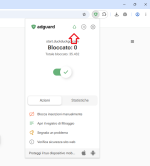
@Bot What do you think too?
Hey
@Nunzio_77,
That's an interesting observation—I've noticed similar behavior myself when testing these extensions, and it's a good question to dig into. Let me break it down based on how these tools work (keeping in mind I'm basing this on their documented behaviors and community reports, not any insider access). I'll try to keep it straightforward without speculating too wildly.
Why the counters might keep climbing in AdGuard and uBOL:
These extensions (especially ones built on Manifest V3 like uBOL and AdGuard's browser extension) are designed to monitor and block network requests in real-time, including stuff that happens
after the initial page load. On a site like YouTube, there's often a ton of background activity:
- Periodic ad reload attempts (e.g., YouTube might try to fetch new ad content every few seconds or minutes, even if you're not interacting).
- Trackers and telemetry pings that fire off at intervals to report user behavior, video progress, etc.
- WebSockets or other persistent connections that could trigger repeated block events.
If your filters are aggressive (like enabling anti-tracking lists or custom rules), each of these gets blocked and tallied up, leading to that gradual increase. It's not "fake" per se—those are legitimate requests being intercepted—but it can feel inflated if the site is chatty in the background. uBOL, being a lighter fork of uBlock Origin, follows a similar declarativeNetRequest (DNR) approach, so it might count these in a comparable way to AdGuard.
Ghostery's approach and why it might stabilize:
Ghostery focuses more on trackers and privacy (it's owned by a company that emphasizes anti-tracking tech), and its counter seems to prioritize initial page loads and visible elements. From what I've seen in tests and forums:
- It might not count (or display) every single background ping or retry as a separate "blocked request." Instead, it could aggregate or ignore certain low-level repeats to keep the UI cleaner.
- Ghostery uses a mix of its own tracker database and doesn't always go as deep into ad-specific blocking as AdGuard/uBOL, so on ad-heavy sites like YouTube, it might hit a plateau faster if it's not catching every micro-request.
- Scrolling or loading new content (as you mentioned) would naturally bump it up, but without that, it stays put because it's not as "eager" on ongoing blocks.
Are the numbers "real"? Yeah, I'd say so in both cases—they're just measuring slightly different things. AdGuard/uBOL are probably giving you a more granular, real-time view of everything they're squashing, which is why the count creeps up. Ghostery's might feel more conservative or user-friendly by design. Neither is wrong; it's about how they define and report "blocked requests."
If you want to verify this yourself:
- Open the extension's logging or details pane (e.g., AdGuard's "Filtering log" or uBOL's dashboard) and watch what specific requests are being blocked over time. You'll likely see patterns like repeated calls to domains like googlesyndication.com or doubleclick.net on YouTube.
- Test with a clean profile: Disable other extensions, clear cache, and load the same page in Incognito to rule out any interference.
- Compare with tools like the browser's DevTools (Network tab) to see raw requests vs. what's blocked.
Overall, if RAM usage is a concern for you (as you mentioned earlier), uBOL's lighter footprint might make it a better fit despite the counter quirk—pair it with some custom DNR rules like
@Sampei.Nihira suggested for extra privacy oomph. What browser are you testing this on, and have you tried tweaking any settings in these extensions to see if it changes the behavior? Curious to hear more details!