



Gandalf_The_Grey
Level 86
Verified
Honorary Member
Top Poster
Content Creator
Well-known
Forum Veteran
Have you ever received an email and, just a few minutes later, had the impression that the sender somehow already knew you had opened it? Maybe it was a marketing email that instantly followed up with another message. Maybe a newsletter suddenly became more “personalized.” Or maybe you simply noticed ads related to something you had only read about in an email… Sounds creepy? That’s because it is.
Most people don’t realize that many emails contain invisible tracking tools designed to monitor what happens after you open a message. And unlike regular ads or popups, these trackers work completely silently in the background. That’s why we’re introducing AdGuard Mail Tracking Protection, a brand-new filter designed to block email tracking pixels and protect your privacy inside email apps and webmail clients.
The new AdGuard Mail Tracking Protection filter blocks requests used to track user activity in emails. That means tracking pixels can no longer silently report back to senders when you open a message.
The filter works both in email apps protected by AdGuard and browser-based email clients through AdGuard Ad Blocker. It can help protect you while using apps and webmail services such as Apple Mail, Outlook, Spark, The Bat!, and Thunderbird.
For Gmail, and Outlook Web, effectiveness is limited: these services route email images through their own proxy servers, replacing original tracker URLs before the browser makes a request.
Apple Mail has a feature called Mail Privacy Protection (MPP) that preloads the tracking pixel automatically in the background, making open rates unreliable and often inflated.
To activate the filter, you’ll need to enable the option AdGuard Mail Tracking Protection. To do it:
- In AdGuard for Windows v8, go to Protection → Ad Blocking → Filters.
- In AdGuard for Windows v7.22, go to Protection → Ad Blocking → Add a filter.
- In AdGuard for Mac, go to Settings… → Filters → + button.
For AdGuard for Android, AdGuard for iOS, and AdGuard Browser Extension, the Mail Tracking Protection filter will be included in an upcoming update.
To maintain the same level of privacy protection, we recommend enabling Mail Protection Filter if you’re already using Tracking Protection Filter, as some rules have been migrated from the latter to the former.

AdGuard launches Mail Tracking Protection: stop invisible trackers in your inbox
Meet the new AdGuard Mail Tracking Protection filter! It blocks requests used to track user activity in emails so tracking pixels can no longer silently report back to senders when you open a message.



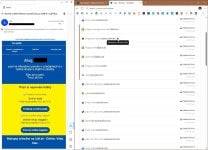
 What Mail Tracking Protection Actually Blocks


