New Update AdGuard launches Mail Tracking Protection: stop invisible trackers in your inbox

Gandalf_The_Grey

Level 85
Thread author
Verified
Honorary Member
Top Poster
Content Creator
Well-known
Forum Veteran
Apr 24, 2016
7,826
6
83,085
8,389
55
The Netherlands
Have you ever received an email and, just a few minutes later, had the impression that the sender somehow already knew you had opened it? Maybe it was a marketing email that instantly followed up with another message. Maybe a newsletter suddenly became more “personalized.” Or maybe you simply noticed ads related to something you had only read about in an email… Sounds creepy? That’s because it is.

Most people don’t realize that many emails contain invisible tracking tools designed to monitor what happens after you open a message. And unlike regular ads or popups, these trackers work completely silently in the background. That’s why we’re introducing AdGuard Mail Tracking Protection, a brand-new filter designed to block email tracking pixels and protect your privacy inside email apps and webmail clients.
The new AdGuard Mail Tracking Protection filter blocks requests used to track user activity in emails. That means tracking pixels can no longer silently report back to senders when you open a message.

The filter works both in email apps protected by AdGuard and browser-based email clients through AdGuard Ad Blocker. It can help protect you while using apps and webmail services such as Apple Mail, Outlook, Spark, The Bat!, and Thunderbird.

For Gmail, and Outlook Web, effectiveness is limited: these services route email images through their own proxy servers, replacing original tracker URLs before the browser makes a request.

Apple Mail has a feature called Mail Privacy Protection (MPP) that preloads the tracking pixel automatically in the background, making open rates unreliable and often inflated.
To activate the filter, you’ll need to enable the option AdGuard Mail Tracking Protection. To do it:
  • In AdGuard for Windows v8, go to ProtectionAd BlockingFilters.
  • In AdGuard for Windows v7.22, go to ProtectionAd BlockingAdd a filter.
  • In AdGuard for Mac, go to Settings…Filters+ button.
For AdGuard for Android, AdGuard for iOS, and AdGuard Browser Extension, the Mail Tracking Protection filter will be included in an upcoming update.

To maintain the same level of privacy protection, we recommend enabling Mail Protection Filter if you’re already using Tracking Protection Filter, as some rules have been migrated from the latter to the former.

 
Email “read tracking” is usually done with remote images (often a 1x1 transparent pixel) or uniquely-tagged URLs, so blocking those network requests can reduce what a sender learns about you.

What this filter can and can’t do
  • What it helps with: Blocking known tracking domains/URLs used in emails, which can prevent “open” beacons and some other embedded trackers from phoning home when images load.
  • What it won’t fully stop: If you click links in an email, the click itself is still a strong signal (often via redirect/tracking links). A filter may block some known redirectors, but it can’t make clicking “anonymous.”
  • Gmail / Outlook on the web limitation (important): As AdGuard notes, these services proxy images. That means the request pattern is changed, and third-party blockers have less direct visibility/control over the original tracking URL.
  • Apple Mail MPP: Apple’s Mail Privacy Protection prefetches remote images via Apple-controlled infrastructure, which already undermines reliable open tracking (often inflating open rates). A third-party filter may still be useful in some setups, but MPP changes the game by design.

Practical privacy takeaways
  • If you want the biggest reduction in email tracking across clients, disable automatic remote image loading (or set it to “ask before displaying”). This prevents most tracking pixels from firing at all.
  • Be cautious with “View in browser” and unsubscribe links in suspicious emails; they can be legitimate, but they can also be heavily tracked or abused in phishing. When in doubt, go directly to the sender’s official website instead of using email links.
  • Expect occasional side effects: blocking rules can sometimes break legitimate images/buttons in newsletters, or cause formatting issues. If that happens, temporarily allowing images for that sender (or disabling the filter for that message/client) is the usual workaround.

How to evaluate whether it’s working (safely)
  • In AdGuard, check the filtering/connection log while opening a marketing email and loading images; you should see blocked requests related to known trackers.
  • If you use Gmail web, don’t be surprised if results look limited due to image proxying (as mentioned in the announcement).

Sources
 
Proton mail claims to have a similar property even in its free tier of email.
Every e-mail service allows you to disable images in mails, hence offers protection from tracking pixels. This isn't some kind of Proton Mail exclusive. Outlook.com blocks images by default for all mails except the ones that come from your trusted sender list.
 
It is not just about images, I have images blocked, yet tracking pixel remains.

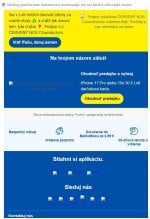
capture_06202026_094225.jpg

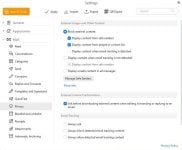
HTML content can contain scripts exploitable via mshta.exe. I use eM Client Free, which does not block tracking.

capture_06202026_093405.jpg

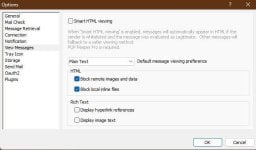
POP Peeper Free is top, it does all and can display emails in TXT only.

capture_06202026_093236.jpg
 
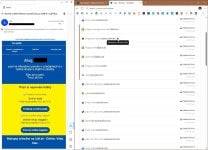
It is not just about images, I have images blocked, yet tracking pixel remains.

View attachment 298288
Tracking pixel is small image; if you block all images, it shouldn't be loaded. If it still is, despite blocking images being enabled, then the setting in your e-mail client isn't working correctly.

I only use webmail so even if I allowed images, uBlock Origin would still take care of tracking pixels. On Android, though I have to use Outlook app though.
 
I asked this question based on security I have.... "AdGuard launches Mail Tracking Protection should I enable this or is unlock origin or Nextdns already protecting this?" answer..."Short answer: Enable AdGuard Mail Tracking Protection — it covers a layer that NextDNS and uBlock Origin cannot fully protect." Thanks Gandalf!
 
I asked this question based on security I have.... "AdGuard launches Mail Tracking Protection should I enable this or is unlock origin or Nextdns already protecting this?" answer..."Short answer: Enable AdGuard Mail Tracking Protection — it covers a layer that NextDNS and uBlock Origin cannot fully protect." Thanks Gandalf!
I'd really love to see that Mail Tracking Protection filter. I bet 99% are domains is already present in EasyPrivacy and similar popular filters.

I wouldn't blindly trust what AI says.
 
this is part of extended answer:

🛡️ What Mail Tracking Protection Actually Blocks​

Mail tracking works differently from web tracking. Emails often contain:

  • Invisible tracking pixels
  • Remote images loaded from unique URLs
  • Unique identifiers tied to your email address
  • “Open tracking” and “device fingerprinting” via email HTML
These do not rely on DNS alone and often bypass browser extensions entirely because your email client loads them, not your browser.
 
  • Invisible tracking pixels
  • Remote images loaded from unique URLs
  • Unique identifiers tied to your email address
  • “Open tracking” and “device fingerprinting” via email HTML
Again, tracking pixels are tiny images (1x1px) that are embedded into message itself using simple HTML code. They are hosted remotely on service provider's servers and each contains personal ID in the URL of the pixel itself.

If you block images in your e-mail client, none of the pictures in the message should go through, especially the ones that are hosted remotely. If your e-mail client still lets some images through (such as tracking pixels) than e-mail client didn't do its job properly and I'd change it for the better one. This is the best tracking protection possible, no other will come close.

The only problematic tracking that can't be blocked is those referral URLs in mails. Block those and you cannot load desired link at all. No filter or e-mail client can help you in this case.
 
Last edited:
With Pop-Peeper, I delete unnecessary emails without opening them.
The other emails on my computer are managed by Thunderbird.
In Thunderbird, you can also adjust the settings for greater privacy using a configuration editor similar to Firefox's about:config.
 

You may also like...