
AI-generated passwords are a security risk

If a PowerShell script is correctly implemented with a cryptographically secure generator, it can be a good option. In practice, for those of us who do not have those skills, without reviewing the code there are no guarantees, and it is usually more reliable to use the built-in generator of a recognized password manager, because it eliminates doubts about the quality of the algorithm and entropy.🔐📊🌐

Well, personally I would not be able to make the script he made for me a few years ago, it works great for me. Incase someone else wants to take look and/or try it, this is what he made for me back then.

$PasswordLength = 32
$PasswordString = ''

# Define character sets
$lowercase = 'abcdefghijkmnpqrstuvwxyz' # Excluded: l, o
$uppercase = 'ABCDEFGHJKLMNPQRSTUVWXYZ' # Excluded: I, O
$numbers = '23456789' # Excluded: 0, 1
$symbols = '!@#$%^&*()_+-=[]{}|;:,.<>?'

# Combine all allowed characters
$allChars = $lowercase + $uppercase + $numbers + $symbols

# Ensure at least one character from each set
$PasswordString += $lowercase[(Get-Random -Minimum 0 -Maximum $lowercase.Length)]
$PasswordString += $uppercase[(Get-Random -Minimum 0 -Maximum $uppercase.Length)]
$PasswordString += $numbers[(Get-Random -Minimum 0 -Maximum $numbers.Length)]
$PasswordString += $symbols[(Get-Random -Minimum 0 -Maximum $symbols.Length)]

# Fill the rest randomly
while ($PasswordString.Length -lt $PasswordLength) {
$PasswordString += $allChars[(Get-Random -Minimum 0 -Maximum $allChars.Length)]
}

# Shuffle the password to mix the required characters
$PasswordString = ($PasswordString.ToCharArray() | Sort-Object {Get-Random}) -join ''

Write-Host $PasswordString
 
Well, personally I would not be able to make the script he made for me a few years ago, it works great for me. Incase someone else wants to take look and/or try it, this is what he made for me back then.

$PasswordLength = 32
$PasswordString = ''

# Define character sets
$lowercase = 'abcdefghijkmnpqrstuvwxyz' # Excluded: l, o
$uppercase = 'ABCDEFGHJKLMNPQRSTUVWXYZ' # Excluded: I, O
$numbers = '23456789' # Excluded: 0, 1
$symbols = '!@#$%^&*()_+-=[]{}|;:,.<>?'

# Combine all allowed characters
$allChars = $lowercase + $uppercase + $numbers + $symbols

# Ensure at least one character from each set
$PasswordString += $lowercase[(Get-Random -Minimum 0 -Maximum $lowercase.Length)]
$PasswordString += $uppercase[(Get-Random -Minimum 0 -Maximum $uppercase.Length)]
$PasswordString += $numbers[(Get-Random -Minimum 0 -Maximum $numbers.Length)]
$PasswordString += $symbols[(Get-Random -Minimum 0 -Maximum $symbols.Length)]

# Fill the rest randomly
while ($PasswordString.Length -lt $PasswordLength) {
$PasswordString += $allChars[(Get-Random -Minimum 0 -Maximum $allChars.Length)]
}

# Shuffle the password to mix the required characters
$PasswordString = ($PasswordString.ToCharArray() | Sort-Object {Get-Random}) -join ''

Write-Host $PasswordString
The one critical flaw, Get-Random.

Just like the Python random module I discussed earlier, PowerShell's Get-Random command is a standard pseudo-random number generator (PRNG). It is designed to be fast, not secure. A dedicated attacker who observes enough outputs from Get-Random could theoretically predict future outputs. For a cryptographic password, this is the weak link in an otherwise great script.

To fix the flaw, we need to swap Get-Random for .NET's built-in Cryptographically Secure Pseudorandom Number Generator (CSPRNG).

Here is your refactored script. I added a small helper function at the top to generate secure random numbers, and applied it to your exact logic to keep the script highly compatible across all PowerShell versions.

Code:
$PasswordLength = 32

# Define character sets
$lowercase = 'abcdefghijkmnpqrstuvwxyz' # Excluded: l, o
$uppercase = 'ABCDEFGHJKLMNPQRSTUVWXYZ' # Excluded: I, O
$numbers = '23456789' # Excluded: 0, 1
$symbols = '!@#$%^&*()_+-=[]{}|;:,.<>?'
$allChars = $lowercase + $uppercase + $numbers + $symbols

# Helper function to get a cryptographically secure random index
function Get-SecureRandomIndex([int]$Max) {
    $bytes = New-Object Byte[] 4
    $rng = [System.Security.Cryptography.RandomNumberGenerator]::Create()
    $rng.GetBytes($bytes)
    $rng.Dispose()
    # Convert the secure bytes to a positive integer and wrap it to the max length
    return [Math]::Abs([BitConverter]::ToInt32($bytes, 0)) % $Max
}

# Start building as an array to make shuffling easier
$PasswordArray = @()

# Ensure at least one character from each set
$PasswordArray += $lowercase[ (Get-SecureRandomIndex $lowercase.Length) ]
$PasswordArray += $uppercase[ (Get-SecureRandomIndex $uppercase.Length) ]
$PasswordArray += $numbers[ (Get-SecureRandomIndex $numbers.Length) ]
$PasswordArray += $symbols[ (Get-SecureRandomIndex $symbols.Length) ]

# Fill the rest securely
while ($PasswordArray.Length -lt $PasswordLength) {
    $PasswordArray += $allChars[ (Get-SecureRandomIndex $allChars.Length) ]
}

# Securely shuffle the password array (Fisher-Yates shuffle)
for ($i = $PasswordArray.Length - 1; $i -gt 0; $i--) {
    $j = Get-SecureRandomIndex ($i + 1)
    
    # Swap characters
    $temp = $PasswordArray[$i]
    $PasswordArray[$i] = $PasswordArray[$j]
    $PasswordArray[$j] = $temp
}

# Join the array back into a final string
$PasswordString = -join $PasswordArray
Write-Output "Generated Password: $PasswordString"
 
The one critical flaw, Get-Random.

Just like the Python random module I discussed earlier, PowerShell's Get-Random command is a standard pseudo-random number generator (PRNG). It is designed to be fast, not secure. A dedicated attacker who observes enough outputs from Get-Random could theoretically predict future outputs. For a cryptographic password, this is the weak link in an otherwise great script.

To fix the flaw, we need to swap Get-Random for .NET's built-in Cryptographically Secure Pseudorandom Number Generator (CSPRNG).

Here is your refactored script. I added a small helper function at the top to generate secure random numbers, and applied it to your exact logic to keep the script highly compatible across all PowerShell versions.

Code:
$PasswordLength = 32

# Define character sets
$lowercase = 'abcdefghijkmnpqrstuvwxyz' # Excluded: l, o
$uppercase = 'ABCDEFGHJKLMNPQRSTUVWXYZ' # Excluded: I, O
$numbers = '23456789' # Excluded: 0, 1
$symbols = '!@#$%^&*()_+-=[]{}|;:,.<>?'
$allChars = $lowercase + $uppercase + $numbers + $symbols

# Helper function to get a cryptographically secure random index
function Get-SecureRandomIndex([int]$Max) {
    $bytes = New-Object Byte[] 4
    $rng = [System.Security.Cryptography.RandomNumberGenerator]::Create()
    $rng.GetBytes($bytes)
    $rng.Dispose()
    # Convert the secure bytes to a positive integer and wrap it to the max length
    return [Math]::Abs([BitConverter]::ToInt32($bytes, 0)) % $Max
}

# Start building as an array to make shuffling easier
$PasswordArray = @()

# Ensure at least one character from each set
$PasswordArray += $lowercase[ (Get-SecureRandomIndex $lowercase.Length) ]
$PasswordArray += $uppercase[ (Get-SecureRandomIndex $uppercase.Length) ]
$PasswordArray += $numbers[ (Get-SecureRandomIndex $numbers.Length) ]
$PasswordArray += $symbols[ (Get-SecureRandomIndex $symbols.Length) ]

# Fill the rest securely
while ($PasswordArray.Length -lt $PasswordLength) {
    $PasswordArray += $allChars[ (Get-SecureRandomIndex $allChars.Length) ]
}

# Securely shuffle the password array (Fisher-Yates shuffle)
for ($i = $PasswordArray.Length - 1; $i -gt 0; $i--) {
    $j = Get-SecureRandomIndex ($i + 1)
   
    # Swap characters
    $temp = $PasswordArray[$i]
    $PasswordArray[$i] = $PasswordArray[$j]
    $PasswordArray[$j] = $temp
}

# Join the array back into a final string
$PasswordString = -join $PasswordArray
Write-Output "Generated Password: $PasswordString"

Damn, thank you very much. :cool:
 
I use Proton Pass too, but at times I found it a little "glitchy" where it may not remember a new password I created, so I open F-Secure's in Chrome, and in Brave or the desktop app I open Proton, edit a password and copy and paste the new one in, and make sure it takes. I still have the Chrome browser open so I can verify it in Proton, the newly created password before I close out of it.
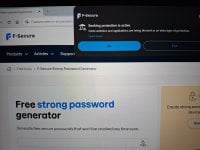
And since I'm not able to take a Windows screenshot (camera image below), there is an advantage to having one tab open using F-Secure Banking/Scam Protection Internet Security in my case, when generating a new password from the browser.

What about passphrases? Our creating 4 to 5 random words with random keyboard symbols in-between or/and at the beginning and end, for those who may not use, want to use or instruct AI?
Also, is the idea of how many words are in a dictionary and the combinations (with symbols in-between) compared to a keyboard, even though we could create a 20-32 alpha numeric length password?

20260219_153624.jpg
 
Last edited:
And since I'm not able to take a Windows screenshot (camera image below), there is an advantage to having one tab open using F-Secure Banking/Scam Protection Internet Security in my case, when generating a new password from the browser.

In short, by recognizing its own password generator as a sensitive site, F-Secure is automatically providing a "clean room" environment. This significantly reduces the risk of your new, strong password being compromised at the very moment it's created. Your workflow of using this secure tab to generate and copy the password before saving it in Proton Pass is a very secure practice.

Also, is the idea of how many words are in a dictionary and the combinations (with symbols in-between) compared to a keyboard, even though we could create a 20-32 alpha numeric length password?
That is a brilliant question about Information Entropy. Mathematically, a fully random 20 to 32-character password pulling from all ~94 keyboard keys does result in vastly more combinations than 5 words pulled from a 10,000-word dictionary. But in cybersecurity, we look at the 'threshold of uncrackability.' A 6-word passphrase (or 5 words with random symbols) reaches a level of entropy that creates more combinations than there are atoms in the universe, taking even supercomputers eons to guess. Since a 32-character random string and a 6-word passphrase are both mathematically uncrackable, we default to the passphrase because it doesn't force the user to write their password down somewhere unsafe.
 
Well, personally I would not be able to make the script he made for me a few years ago, it works great for me. Incase someone else wants to take look and/or try it, this is what he made for me back then.

$PasswordLength = 32
$PasswordString = ''

# Define character sets
$lowercase = 'abcdefghijkmnpqrstuvwxyz' # Excluded: l, o
$uppercase = 'ABCDEFGHJKLMNPQRSTUVWXYZ' # Excluded: I, O
$numbers = '23456789' # Excluded: 0, 1
$symbols = '!@#$%^&*()_+-=[]{}|;:,.<>?'

# Combine all allowed characters
$allChars = $lowercase + $uppercase + $numbers + $symbols

# Ensure at least one character from each set
$PasswordString += $lowercase[(Get-Random -Minimum 0 -Maximum $lowercase.Length)]
$PasswordString += $uppercase[(Get-Random -Minimum 0 -Maximum $uppercase.Length)]
$PasswordString += $numbers[(Get-Random -Minimum 0 -Maximum $numbers.Length)]
$PasswordString += $symbols[(Get-Random -Minimum 0 -Maximum $symbols.Length)]

# Fill the rest randomly
while ($PasswordString.Length -lt $PasswordLength) {
$PasswordString += $allChars[(Get-Random -Minimum 0 -Maximum $allChars.Length)]
}

# Shuffle the password to mix the required characters
$PasswordString = ($PasswordString.ToCharArray() | Sort-Object {Get-Random}) -join ''

Write-Host $PasswordString
@Morro , thanks for sharing your script; it’s clear that it has been useful to you in practice. The idea of ensuring there are always lowercase, uppercase, numbers, and symbols is very good, and the length of 32 characters gives it solid strength.

The only thing worth remembering is that the engine it uses (Get-Random) isn’t designed for cryptographic security, and that’s where a weak spot can appear. @Divergent already pointed this out and gave the right solution: replacing it with a secure .NET generator keeps the logic of your script but strengthens the actual security.

Your contribution is valuable as a practical example, and with that adjustment already mentioned by Divergente, it’s a solid option for anyone who wants to experiment with PowerShell. 👏💯👍
 
Also, is the idea of how many words are in a dictionary and the combinations (with symbols in-between) compared to a keyboard, even though we could create a 20-32 alpha numeric length password?
From a password cracking perspective, the entropy of the password is what’s under consideration. Password entropy can be computed based on the process of randomly generating a password or passphrase, depending on the selection set's size and length.

With a regular set of lowercase, uppercase, alphanumeric, and special characters, a 10-character password would have an entropy of 65.55 bits. In contrast, using the popular 7,776-character EFF long list, a 5-word passphrase (averaging 35 characters without separators) would have an entropy of 64.6 bits. If you don’t need to remember or type the password, use a randomly generated password. If you do, use a randomly generated passphrase.

Although from a practical standpoint, length is likely enough to prevent password cracking, viewing it from a technical standpoint, entropy, hashing algorithms, and the cost of computation may provide a more solid guarantee against cracking. See theoretical cost computations (along with entropy and hashing) for passwords and passphrases here:
 
Last edited:
Although from a practical standpoint, length is likely enough to prevent password cracking, viewing it from a technical standpoint, entropy, hashing algorithms, and the cost of computation may provide a more solid guarantee against cracking.
11111111111111111111111111111111111111111111111111111111111111111111111111
is long, but easily crackable.
 
  • HaHa
Reactions: Zero Knowledge
11111111111111111111111111111111111111111111111111111111111111111111111111
is long, but easily crackable.
A Strawman fallacy occurs when someone takes another person's argument, distorts or exaggerates it into an extreme version (the "straw man"), and then attacks the extreme version instead of the actual point.

When discussing password length in any serious context, there is an implicit assumption of a randomized or semi-randomized character set. You violated the baseline rules of the conversation to score a cheap rhetorical point.
 
  • Like
Reactions: simmerskool
A Strawman fallacy occurs when someone takes another person's argument, distorts or exaggerates it into an extreme version (the "straw man"), and then attacks the extreme version instead of the actual point.

When discussing password length in any serious context, there is an implicit assumption of a randomized or semi-randomized character set. You violated the baseline rules of the conversation to score a cheap rhetorical point.
I'm occupied re-reading CD thread; may be later.
 
Agreed completely. It's a terrible idea for OPSEC, but I only stepped in because the author claimed AI is technically incapable of generating them, which is demonstrably false.
Yes I agree, A.I is a great tool but for passwords it's a solid no for me. You don't know how those prompts will be used or the passwords generated by them.
 
AI generated password, 30 characters:

7v#G9!p[2Kz*Q&m_5R^tXw@8L+s=B)

Entropy = 188.86 bit

KeePassXC generated password, same length:

u#;\~F-P$/uL??v3C@w"sd)Y;nT^<"

Entropy = 188.05 bit
Here is the Python script I used in the sandbox to generate a 30-character password.

Python:
import secrets

import string


def generate_secure_password(length=30):

    alphabet = string.ascii_letters + string.digits + string.punctuation


    while True:

        password = ''.join(secrets.choice(alphabet) for _ in range(length))


        has_lower = any(c.islower() for c in password)

        has_upper = any(c.isupper() for c in password)

        has_digits = any(c.isdigit() for c in password)

        has_special = any(c in string.punctuation for c in password)


        if has_lower and has_upper and has_digits and has_special:

            break


    return password


secure_pw = generate_secure_password(30)

print(secure_pw)

Sandbox Output
,Net*,jR+h|DMJ@jC3wtZGr'0MM"aJ

The Raw Score (Entropy)Character Pool

The script used 94 possible characters (uppercase, lowercase, numbers, and symbols).

Length
30 characters.

Entropy Per Character
log_2(94) = 6.55 bits.

Total Entropy
30 characters x 6.55 bits =196.5 bits

Because the Python script used a Cryptographically Secure Pseudorandom Number Generator (CSPRNG), every single character was chosen with maximum unpredictability.

Most experts consider 128 bits to be completely uncrackable by any technology existing or theoretically possible in the near future.

At 196 bits, this password is roughly 150% of the way to the "impossible to crack" finish line. It is astronomically stronger than it needs to be.

Squeezing more entropy out of 30 standard keyboard characters is mathematically impossible.
 

You may also like...