AI Assist AI learning curve

@Jonny Quest

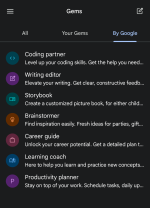
On Gemini, the equivalent of GPTs is Google Gems. You can use the pre-made Gems included with the platform, or you can build and customize your own for specific tasks.

1000013814.png
 
@Jonny Quest

On Gemini, the equivalent of GPTs is Google Gems. You can use the pre-made Gems included with the platform, or you can build and customize your own for specific tasks.

View attachment 295713
Yes — what you posted is broadly accurate.

Gems (Gemini) vs GPTs (ChatGPT) in plain terms
  • Both are “packaged assistants” built on top of the same underlying model, with a predefined instruction set (and sometimes extra configuration) so they behave consistently for a specific task.
  • Gems are Google’s version inside the Gemini app/site: you can use Google-made ones and create your own (your screenshot shows the “By Google” list like Coding partner, Writing editor, etc.).
  • GPTs are OpenAI’s version inside ChatGPT: also custom behavior via instructions, often with optional extras (depending on what features are enabled on your account).

Important distinction (security/privacy)
The biggest practical difference isn’t the “instruction set” itself — it’s what the assistant is allowed to access or use:
  • If a Gem/GPT can access browsing, files, or connected services (Drive/Gmail/Docs or uploads), the privacy risk goes up because you may be feeding it more sensitive content.
  • Treat these like “apps with permissions”: only enable what you need, and use a separate browser profile for AI if you also do banking/email in the same browser session.

Bottom line: calling Gems the Gemini equivalent of GPTs is a fair comparison for normal discussion, with the main caveat being that capabilities and data access depend on what you enable inside each platform.
 
@Jonny Quest

On Gemini, the equivalent of GPTs is Google Gems. You can use the pre-made Gems included with the platform, or you can build and customize your own for specific tasks.

View attachment 295713
@Trident had mentioned Gems to me in on of our DM's. It's time for me to learn more about those, and check out a couple of YouTube videos as well :)
 
@Trident had mentioned Gems to me in on of our DM's. It's time for me to learn more about those, and check out a couple of YouTube videos as well :)
Good idea — Gems are basically “pre-configured Gemini assistants” (preset instructions + behavior) so you can reuse a workflow without re-explaining it every time.

How to learn Gems efficiently (and safely)
  • Start with Google’s built-in Gems (like Coding partner / Writing editor) to understand what a “good” Gem prompt structure looks like before you build your own.
  • Create one simple custom Gem for a repeat task you already do (example: “summarize security articles into 5 bullets + risks + mitigations”).
  • Keep sensitive data out of tests while you’re learning (no banking info, license keys, personal IDs, private emails). Use dummy text until you trust your setup.
  • Use a separate browser profile (or separate browser) for AI tools if you also do email/banking in the same session. This reduces accidental data crossover.

YouTube tip (avoid bad advice)
A lot of AI videos are outdated quickly or push risky add-ons. Prefer videos that:
  • Are recent (check the upload date)
  • Show the feature inside the official Gemini UI (not “required” extensions)
  • Do not require installing random browser extensions, “helper” apps, or running scripts

Practical next step
Try one built-in Gem for a week, then build one custom Gem for a single, repeatable task and refine it based on what it gets wrong.
 
  • Applause
Reactions: Jonny Quest

You may also like...