

The MalwareTips app
Your community, one tap away.
Open MalwareTips from your Home Screen or desktop. Follow discussions, find answers and pick up where you left off.
- Home Screen access
- Optional push alerts
- Your community
You're ready to explore.Explore what's new
Installation instructions
iPhone & iPad
- Open MalwareTips in Safari and tap Share. You may need to open the Page Menu first.
- Choose Add to Home Screen. If it is not listed, use Edit Actions to add it.
- Keep Open as Web App enabled if shown, then tap Add.
Android
- Open MalwareTips in Chrome or another browser that supports app installation.
- Open the browser menu and look for Install app, Install and create shortcut, or Add to Home screen.
- Choose Install and confirm. Wording varies by browser.
Desktop
- Chrome: use the install icon in the address bar, or the menu under Cast, save and share.
- Edge: open the menu, then More tools, Apps and Install this site as an app.
- Safari on Mac: choose Share or File, then Add to Dock. Firefox on Windows: look for the web apps button in the address bar.
If you cannot find an install option, update your browser or use its bookmark option to keep MalwareTips close.
Keep up with your conversations
After installation, open the app and sign in. Enable push notifications in Preferences if you want alerts. On iPhone and iPad, push requires a Home Screen web app and iOS or iPadOS 16.4 or later.
Sign in to manage notificationsInstallation is optional. Your notification settings stay under your control.
You are using an out of date browser. It may not display this or other websites correctly.
You should upgrade or use an alternative browser.
You should upgrade or use an alternative browser.
Solved All bookmarks open in new tabs
-
 Thread starter
n8chavez
Thread starter
n8chavez
- Start date
- 11 Replies
- 998 Views

It is usually caused by a browser setting, an extension, or the way the bookmark is being opened.Here's something interesting, every bookmark in the bookmarks bar opens in a new tab and not the existing one. I can't find out why, or how to disable that "feature." Anyone have any ideas?
Things to check first
- Try a normal left-click on the bookmark. That should normally open in the current tab.
- If you are using the mouse wheel click or middle-click by accident, that opens bookmarks in a new tab.
- Check whether Ctrl or Shift is being held down or if the keyboard has a stuck key. Ctrl+click often opens a new tab.
Possible causes
- Extension behavior
A tab manager, mouse gesture extension, bookmark tool, or productivity extension can change how links and bookmarks open. - Browser setting
Some browsers or custom builds may have a setting related to opening bookmarks, tabs, or the address bar behavior. - Corrupted profile or preference
If it started suddenly, a damaged browser preference can cause unusual tab behavior.
Safe troubleshooting order
- Test in a private/incognito window
If the problem does not happen there, an extension is a likely cause. - Disable extensions one by one
Start with anything related to tabs, mouse actions, bookmarks, or session management. - Test with a different mouse
A faulty middle mouse button can trigger new-tab opens. - Create a new browser profile
If the new profile works normally, the issue is likely in the old profile settings. - Reset browser settings
Use this only after checking extensions, because it may remove custom preferences.
Browser-specific note
The exact fix depends on which browser you are using: Chrome, Edge, Firefox, Brave, Vivaldi, or another one. The behavior is not normal in most default configurations, so something has likely changed.
Conclusion
The most likely causes are a stuck Ctrl/middle-click input, an extension, or a changed browser preference. Testing in private mode and then disabling extensions is the safest place to start.

I think that happened to me once. Forgot what I did in response, probably close Firefox and re-started it. Didn't happen again.
Are you using Firefox ? Up to date version ? Windows or Linux ? I was on Linux Firefox, and I update Fedora every day. But that might have been a fresh Linux install.
Are you using Firefox ? Up to date version ? Windows or Linux ? I was on Linux Firefox, and I update Fedora every day. But that might have been a fresh Linux install.

I think that happened to me once. Forgot what I did in response, probably close Firefox and re-started it. Didn't happen again.
Are you using Firefox ? Up to date version ? Windows or Linux ? I was on Linux Firefox, and I update Fedora every day. But that might have been a fresh Linux install.
Hmmm. I thought I started this thread in the Brave sub-forum. Perhaps nor Anyway, I'm using Brave on Windows 11. I know it's not anything to do with extensions, because I have none right now. I know it's not the mouse, because this behavior is limited to this browser.

On my end, if I highlight the Bookmarks and lists, and open a link from there, it opens in the same tab. If I use the Open bookmarks manager, it opens those links in a new tab. I've never used or liked using Show bookmarks/ Always, or the side panel option. This is on Windows laptop, and I'm not sure if the below search result is gospel.
In Brave, left-clicking a bookmark on the Bookmarks Bar will automatically open it in the same tab. There is no global setting to change this behavior.
Last edited:

Do you have a bookmark management extension? That might be the reason.

It was already mentioned to try private mode, check extensions and even create a new profile. On top of that, I’d add that Brave might be interpreting the Ctrl key as if it were stuck, which makes bookmarks always open in new tabs; you can press both Ctrl keys a few times to unlock it. It’s also worth checking if your mouse software (Logitech, Razer, etc.) created a special profile for Brave that changes the click behavior. With these steps you cover the most common causes 

for me too.@Halp2001 "Like" (option isn't showing).
Halp2001 has entered the matrix and removed likes.
There are not extensions to disable. I don't have any. As for starting with a new profile, doing so had to affect either. But I did end of solving it. Apparently, it synced settings from CatsXP. I didn't know that was possible, but seeing as how CatsXP is a fork of Brave (with more features) I guess it makes sense.
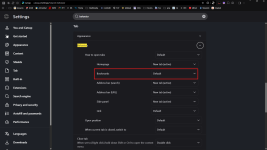
Migrating back to CatsXP, altering that setting, at re-migrating back to Brave worked.
Migrating back to CatsXP, altering that setting, at re-migrating back to Brave worked.
Recently browsing
Members who viewed this thread in the last 5 minutes

