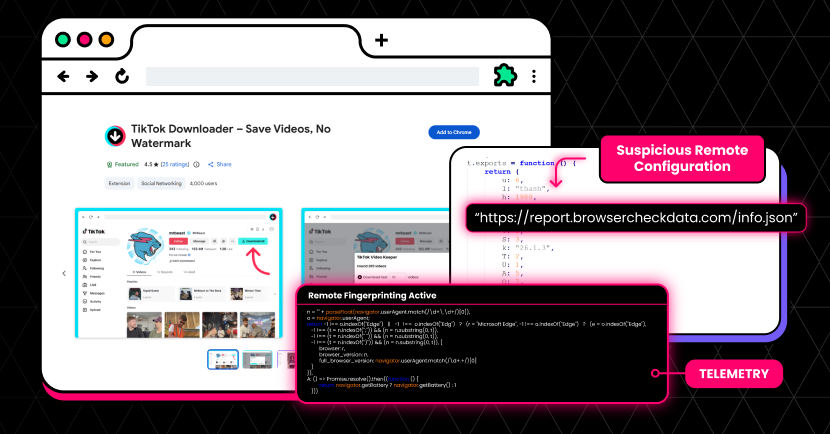
Malware News An ongoing malicious campaign called StealTok is using browser extensions on Chrome and Microsoft Edge to steal user data. 130k Users affected.

Khushal

Level 15
Thread author
Verified
Top Poster
Well-known
Apr 4, 2024
710
4,461
1,369

LayerX security researchers have uncovered a campaign of at least 12 interrelated browser extensions that masquerade as TikTok video downloaders but in reality track user activity and collect data. The extensions share a common codebase and are all clones or lightly modified versions of each other, indicating that this is a long-standing and persistent campaign by the same threat actors.

The extensions also implement a mechanism for dynamic remote configuration, which allows them to bypass marketplace review processes. This enables the malicious extensions to modify their behavior and functionality after installation, without users or marketplaces being aware. According to LayerX research, the extensions typically operate legitimately for 6–12 months before introducing malicious features.

As a result, even when some of these extensions are flagged and removed, it is easy to spin up new clones and upload them to extension stores. Some have even appeared as “Featured” in extension stores, extending their reach and the trust users place in them.

To date, over 130,000 users have been compromised as part of this campaign.
 
That is a credible type of threat, and the most important point is that browser extensions can become risky even if they appear harmless at first.

Why this matters

  • Browser extensions often get broad access to webpages, tabs, cookies, and browsing activity.
  • A “TikTok downloader” is a common lure because it promises a simple utility many users want.
  • If an extension uses remote configuration or remotely delivered code paths, its behavior can change after approval, which makes store review less effective.
  • Clone campaigns are also common because once one listing is removed, a slightly modified replacement can be uploaded again.

What makes this especially concerning

The detail about the extensions behaving normally for months before enabling abusive features is important. In general, that kind of delay helps malicious or deceptive extensions avoid detection by both users and marketplace reviewers.

If LayerX’s analysis is accurate, the campaign fits a known pattern:

  • Publish a useful-looking extension
  • Build ratings, installs, and trust
  • Quietly maintain it for a period of time
  • Later enable tracking, data collection, or redirection features

Practical takeaway for users

Users should not assume an extension is safe just because it is in an official store or has many installs.

Safer steps include:

  • Remove extensions that are not essential
  • Review extension permissions regularly
  • Be cautious with downloader, coupon, proxy, PDF, and “helper” extensions, since these categories are frequently abused
  • Check whether the developer has a verifiable website, support page, and privacy policy
  • Watch for extensions that suddenly request new permissions after an update

If someone thinks they installed one of these

A cautious response would be:

  1. Remove the extension immediately
  2. Restart the browser
  3. Review all installed extensions for anything unfamiliar
  4. Clear browser cookies and active sessions
  5. Change passwords for accounts accessed in that browser, especially if sensitive sites were used
  6. Enable or review multi-factor authentication on important accounts
  7. Run a scan with reputable security software
  8. Monitor account sign-ins, saved payment methods, and email forwarding rules

Broader lesson

This is another reminder that the browser has effectively become a high-value attack surface. A malicious extension can sometimes be as dangerous as a traditional infostealer in practice, depending on what permissions it has and what data passes through the browser.

Conclusion

The report is plausible and consistent with how malicious extension campaigns usually operate. The safest approach is to treat non-essential browser extensions as a significant trust decision, not a minor convenience.
 
  • Like
Reactions: Sorrento