App Review AppCheck AntiRansomware

It is advised to take all reviews with a grain of salt. In extreme cases some reviews use dramatization for entertainment purposes.
I thought that the video a few videos before this was your last one 'till January.
Can't get enough, so can't I.
Thank you for the heads up @HarborFront, and @cruelsister for taking your time to produce another vid this year!

Looks like a worthy solution, did very well IMO!

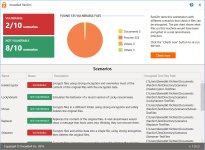
EDIT: Does pretty nice against RanSim! 8/10
AppCheck.JPG
 
Last edited:
SHvFI- God, you are GOOD! I really should have pointed this out but I forgot- if you go to 0:23 of the video you can see that other folders can be backed up automatically; so if you have Documents on the D drive it can be added. But the one thing that is good about this application over others that it will by default protect the Program Files directory against Fortress class ransomware (ransomware that encrypt and trash exe's all over the drive). I rarely see this with the typical anti-ransom product.

Terra- I thought I was finished also, but my schedule has changed. The Government is trying too draw me back in, and I have to see what they have to say...
 
SHvFI- God, you are GOOD! I really should have pointed this out but I forgot- if you go to 0:23 of the video you can see that other folders can be backed up automatically; so if you have Documents on the D drive it can be added. But the one thing that is good about this application over others that it will by default protect the Program Files directory against Fortress class ransomware (ransomware that encrypt and trash exe's all over the drive). I rarely see this with the typical anti-ransom product.

Terra- I thought I was finished also, but my schedule has changed. The Government is trying too draw me back in, and I have to see what they have to say...
Ok i missed that screen because of the weird way i watch videos. Sorry.
This feature shown makes it even more interesting in general. Thanks for the video.
 
Well this freeware combined with MBRFilter freeware of Cisco might be a good freeware combo against ransomware.

I am in another city until 1st of January, so can't check whether they are compatible in a VM, maybe one of the forum Members would be so kind to try them together in a Virtual Machine.

AppCheck download

MBRFilter download (scroll down)
 
Well this freeware combined with MBRFilter freeware of Cisco might be a good freeware combo against ransomware.

I am in another city until 1st of January, so can't check whether they are compatible in a VM, maybe one of the forum Members would be so kind to try them together in a Virtual Machine.

AppCheck download

MBRFilter download (scroll down)
Don't have the setup to test ransomware against the combo but they do indeed install together without issues.
 
@SHvFl

So you installed them side by side without problems, great thanks

Regards Kees
Yep installed both together and the seem to work. At least appcheck that has a gui which i can check.
No reason not to tbh. MBRFilter is just a driver doing something the free version of AppCheck doesn't protect.
 
Hi CS

Thank you for making the video.

The only gripe I have of this software is that the starting screen's display wordings are just too small on my MS SP4 which has a default 200% screen resolution of 2736x1824. I have feedback to the developer but was told to increase my screen size. It'll be good for those who have a FHD screen and not for QHD/QHD+/4K screen
 
Last edited:
Yep installed both together and the seem to work. At least appcheck that has a gui which i can check.
No reason not to tbh. MBRFilter is just a driver doing something the free version of AppCheck doesn't protect.

Confirmed working!
MS Defender is OK with it but Comodo FW autosandboxes the application, so one have to manually set the files to "Trusted".
 
When I am home, I will put it on my business desktop. In contingency management the current best practice is to put your money on 1 prevention, 2 damage control, 3 disaster recovery. I have 1 (UAC, SRP, ACL) and 3 (quick and full NAS backup), but have not found good and light damage control. With those two freebies I have all my bases covered including damage control.
 
Thank you for all your interests, guys!
We are planning to release international version. Currently we are internally discussing about pricing and plans.
I'll let you know when it's available.
Nice, very interested in testing the Pro version.
Thank You for keeping us in the loop and welcome to a very serious
security community. :)

@Ikko
Does CheckMal have a Twitter page ?
 
Last edited by a moderator:
Heads Up,
Pro is 58, 400 Won, that's roughly 50.00 US dollars, a year ?
Priced like that they will find it very hard to penetrate the US market with the prices W.A.R
& other competitors offer. I am very curious though.
I was going to go ahead and buy it, but I am having a very hard time translating the Purchase Page: 체크멀(CheckMAL)
Pro Adds these additional features:
MBR protection
Protecting against malicious code and Ransomware modifying MBR

● ●

Shared Folder File Protection
Remote PC infected with Ransomware protects files in shared folders

● ●

Automatic treatment
Automatic malware detection and automatic malware detection

● ●

Automatic backup
Periodically automatic backup and folder protection of specified folder by file history method

● ●

Custom Protection Extensions
Modified and added protection extensions specified by default

● ●

Update Stable
Up to 24 hours delay update to provide stable update version

● ●

Server OS Support
Server OS support for Windows Server 2008 R2 or later

 
Last edited: