Advanced Security Aries91's Security Configuration 2025

Last updated
Apr 3, 2025
Main use of this computer
For home and private use
Operating system
Windows 11
On-device encryption
Not applicable
Device sign-in security
    • Account password
Security updates
Allow security updates and latest features
Update channels
Allow stable updates only
User Account Control (UAC)
Always notify
Smart App Control
Off
Network firewall
N/A
Real-time protection
Norton 360
Device firewall
Other - Internet Security (3rd-party)
Custom security settings
NORTON 360 standard settings
Periodic malware scanners
hitmanpro
malwarebytes
drweb.cureit
emsisoft emergency scanner
adwcleaner
Malware sample testing
I do not participate in malware testing
Environment for malware testing
N/A
Browsers and extensions
Chrome with:
  • onetab
  • click&clean
  • freedownloadmanager
  • nortonsafeweb
  • ublock origin
  • smart https

-
Secure DNS
cloudflare dns
Desktop VPN
cyberghost vpn
Password and passkey manager
Bitwarden
Maintenance tools
ccleaner
wisecleaner365
geek uninstaller
autoruns
File and photo backups
external hd
Subscriptions
    • None
System recovery
Easeus todo backup free (manual backup)
Usage and exposure
    • Visiting familiar websites
    • Working from home
    • Making audio/video calls
    • Opening email attachments
    • Online shopping and card payments
    • Logging into my bank account
    • Downloading software and files from reputable sites
    • Sharing and receiving files and torrents
    • Requesting and accepting remote access
    • Gaming
    • Gaming with third-party mods
    • Streaming audio/video content from trusted sites or paid subscriptions
    • Streaming from untrusted sites
    • Coding and development
Computer specs
  • Asus aspire a515-44 series
  • amd ryzen 5 4500u with radeon graphics 2,38Ghz, 8GB RAM
  • SSD 500GB
Feedback preference

Detailed suggestions and alternatives welcome

aries91

Level 2
Verified
hello everyone,
this is my configuration for this year.
I decided to reduce the number of active security programs as much as possible so as not to overload the pc.
I also decided to don't change too much the windows settings or the norton security suite settings so as not to mess things up.
In any case, any suggestions for further improvements are welcome.
thanks

aries91
 
Last edited:
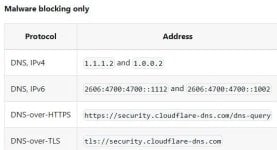
cloudflare dns
I guess you are using Cloudflare Malware blocking?!

capture_04032025_203452.jpg
  • Basic account password (insecure)
Why not MSA? You are already using Apple account.
 
  • smart https
I don't think you need extensions for HTTPS mode anymore, as it is built in now in almost every browser.

To enable HTTPS-only mode in Chrome, click the three-dot icon in the top-right corner and go to Settings > Privacy and Security > Security. Scroll down to the Secure Connections section and turn on the "Always Use Secure Connections" toggle.
 
I don't think you need extensions for HTTPS mode anymore, as it is built in now in almost every browser.

To enable HTTPS-only mode in Chrome, click the three-dot icon in the top-right corner and go to Settings > Privacy and Security > Security. Scroll down to the Secure Connections section and turn on the "Always Use Secure Connections" toggle.
thanks I took your tips.
 
thanks I took your tips.
I just noticed that you are "Looking for maximum feedback", so if you want more tips a can recommend some:

With browser extensions, the golden rule is "Less is more" which means fewer extensions gives more security, privacy and performance.

Now, I don't know how exactly you use the extensions I will mention, so I will rely on their basic functions:
  • onetab:
    • if you just use it to save pages to read later, I recommend using Google Chrome "reading list" feature instead:
    • To read a page later, add it to your reading list.
      1. On your computer, open Chrome.
      2. Go to a page you want to read later.
      3. At the top right, select More
        More
        and then
        Bookmarks and lists
        and then
        Reading list.
      4. Select Add tab to reading list.
      Tip: You can also add a tab to your reading list by right-clicking on the tab
      and then
      Add tab to reading list.
    • source for more info: Read pages later & offline - Computer - Google Chrome Help
  • click&clean
    • if you just use it to clean cache, history and cookies, you have CCleaner and Wise Care 365 which do the same functionality, so it is just redundant.
  • ublock origin
 
I just noticed that you are "Looking for maximum feedback", so if you want more tips a can recommend some:

With browser extensions, the golden rule is "Less is more" which means fewer extensions gives more security, privacy and performance.

Now, I don't know how exactly you use the extensions I will mention, so I will rely on their basic functions:
  • onetab:
    • if you just use it to save pages to read later, I recommend using Google Chrome "reading list" feature instead:
    • To read a page later, add it to your reading list.
      1. On your computer, open Chrome.
      2. Go to a page you want to read later.
      3. At the top right, select More
        More
        and then
        Bookmarks and lists
        and then
        Reading list.
      4. Select Add tab to reading list.
      5. Tip:
      You can also add a tab to your reading list by right-clicking on the tab
      and then
      Add tab to reading list.
    • source for more info: Read pages later & offline - Computer - Google Chrome Help
  • click&clean
    • if you just use it to clean cache, history and cookies, you have CCleaner and Wise Care 365 which do the same functionality, so it is just redundant.
  • ublock origin
Of course I am open to evaluate any advice, so I thank you in advance.
I completely agree with you and the principle less is better is also valid for me.
The problem is that sometimes I open many tabs with chrome at the same time and I don't wanna lose the references for reading it later.
with onetab I just click on a button and it saves all the tabs instantly. With the method you suggest I should do it manually for every tab ,it seems to me, and so is the restoration of the single tab, right?
as for ublock lite I heard that it is quite limited compared to origin in particular the filters are not updated automatically but as soon as the version of the app is updated.
In addition you have a smaller number of filters available, I would not like to find every website inundated with advertising junk .
 
Last edited:
Of course I am open to evaluate any advice, so I thank you in advance.
I completely agree with you and the principle less is better is also valid for me.
The problem is that sometimes I open many tabs with chrome at the same time and I don't wanna lose the references for reading it later.
with onetab I just click on a button and it saves all the tabs instantly. With the method you suggest I should do it manually for every tab ,it seems to me, and so is the restoration of the single tab, right?
as for ublock lite I heard that it is quite limited compared to origin in particular the filters are updated not automatically but as soon as the version of the app is updated.
In addition you have a smaller number of filters available, I would not like to find every website inundated with advertising junk .
I can understand you well, I know how much OneTab extension convenient in saving multiple tabs with only one click, i myself used to use it daily on Vivaldi browser until I discovered how to add multiple tabs to reading list in one click "I don't think it could be done in Google Chrome" so I just removed it recently.

About uBlock Origin, you are right about filtering, but using the light version with "complete filtering mode" will give you the same result in my experience.

Anyway, nothing wrong or unsafe in your setup, it is just about personal preferences.
 

Recently browsing

Members who viewed this thread in the last 5 minutes

You may also like...

Continue exploring the conversation.

Back
Top