Avast HIPS can work well in the offline case

Status
Not open for further replies.

Online_Sword

Level 12
Thread author
Verified
Honorary Member
Top Poster
Well-known
Mar 23, 2015
558
1,780
1,077
In the past, I have tested the capability of Avast Hardened Mode in the offline case : Regarding the Avast Aggressive Hardened Mode

As mentioned in that thread, I am also curious about the offline capability of the HIPS module.

But at that time, I have not found a "safe" way to test HIPS. Please note that HIPS is more difficult to test than Hardened Mode, because we can easily trigger the latter one with a new program.

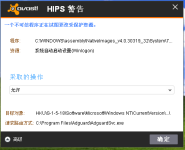
Just now, I find that installing AdGuard in the online case can trigger Avast HIPS when I set the level of HIPS to the maximum level. It is a safe way to test it.

So in another virtual machine, I turn off the network connection and install AdGuard again.

This time, Avast HIPS still pops up when AdGuard tries to add new services and new startup items.:)

It is a good news for users who may not have a good network connection to the cloud servers of avast like me.:p
 
Last edited:
Generally HIPS should really work well no matter its online or offline as long if something made a changes based on possible behaviour available. ;)

Still Avast is a fully packed antivirus that have lots of plans which better than nothing. :P
 
Generally HIPS should really work well no matter its online or offline

I do not think so.

The HIPS module, if intelligent enough, should have the capability of determining which program is completely safe, and which program might be suspicious.

Otherwise, it may generate too many pop-ups.

For a security software, one approach to make decision here is to connect the cloud server to get the reputation information.

If so, the HIPS module of this software will surely depend on the network connection.

I think this is why the Hardened Mode highly depends on the network -- because it is based on a whitelist, while I guess most part of that whitelist, if not all, should be stored in the cloud server.

I am not sure how avast HIPS makes its decision, but I guess it uses some local database and local algorithm to do it.
 
Last edited:
Do you have screenshots of Avast HIPS; where it's located in the settings and it's notification to the user? Thanks. :)
 
  • Like
Reactions: Online_Sword
@Huracan : Here is a screenshot (in Chinese) that the service of AdGuard triggers the HIPS module of avast :
Avast HIPS.PNG

You can find the settings of HIPS in "File System Protection -> Sensitivity". (I am not very sure about the English names of these options because I am using the Chinese version.)

Its HIPS settings are still simple. Users can only adjust the sensitivity (three levels).
 
HIPS (Host Based Intrusion Prevention System) analyzes the behavior of running programs, in particular it is able to "detect" the changes on the system because it "realize" when you are installing a program and asks, but it depends on how it is configured, the user permission to perform the operation.
This mechanism requires a user who knows the operation of the PC.
To help you in making the decision whether or not to authorise the installation of the program on the OS, It access to its own database (whitelist).

The HIPS detection routines are coded in the program and they work according to pre-defined algorithms but they are also updated with new definitions, to help the decision user.
If you are offline, HIPS works with Its algorithm and even with the latest reputation definitions stored in the cache, of course they will be obsolete after some time.

So HIPS works online and offline.

In the case of Avast, for what I remember, the cloud-scanning and analysis features examine suspicious files using different tracking techniques, looking for suspicious code behavior.
This algorithm uses technology to learn what is suspect from previous analyses and uses this technology for future surveys.

Hardened Mode function automatically locks the running apps that are not in the whitelist (aggressive mode) or have a low reputation (moderate mode).
In aggressive mode, it completely ignores the files on the system behavior and strictly obeys the whitelist. Everything that is not on the whitelist is blocked.
 
Not sure if this will be helpful to anyone, but here is my first ever encounter with AVAST HIPS Warning - connected to the Internet.

upload_2016-4-26_18-1-8.png


AVAST Free Antivirus 2016 (custom) - see below:
  • ON: File Shield
  • ON: Reputation services
  • ON: DeepScreen (No secure VM installed)
  • OFF: Hardened mode
  • ON: PUP
  • ON: Sus. Behav. HIPS (3 bar)
 
Some time ago I wrote to the avast sides should work well ofline. They wrote that it was not required, and after half a year here it is haha lol
 
  • Like
Reactions: XhenEd
Status
Not open for further replies.