Avast Malware Like Behavior...Worst AV

  • Thread starter Thread starter Deleted member 2913
  • Start date Start date
Status
Not open for further replies.
D

Deleted member 2913

Thread author
I did Custom Install with File/Web Shield Only.
Next day, Chrome asked me to enable/disable Avast Online Shield.
A day after, Chrome asked me to enable/disable Safe Price.

And I read in Avast forum, Safe Zone Browser, etc gets auto-installed.

Whats the purpose of Custom Install if post install Avast any way is going to install the not installed stuffs?

Avast Behavior is like Malware...Once a reputed AV behaves like Fake AV...It has become Worst AV with sneaky, intrusive, etc... behavior.

Uninstalled the Fake AV Avast by Avast Software a.s
 
Last edited by a moderator:
I did Custom Install with File/Web Shield Only.
Next day, Chrome asked me to enable/disable Avast Online Shield.
A day after, Chrome asked me to enable/disable Safe Price.

And I read in Avast forum, Safe Zone Browser, etc gets auto-installed.

Whats the purpose of Custom Install if post install Avast any way is going to install the not installed stuffs?

Avast Behavior is like Malware...Once a reputed AV behaves like Fake AV...It has become Worst AV with sneaky, intrusive, etc... behavior.
It auto updated the install, with out any input ?
If it did that is a serious concern seeing malware could utilize that avenue to trigger malicious installs. wow
 
Yes, Avast Online Shield & Safe Price installed without input i.e When I opened Chrome, it asked me...New extension added...Do you want to enable/disable?
Kaspersky does that too. :D
Personally, I don't find that annoying. But, yeah, I get your point that extensions should be installed only with users' consent, maybe during installation of the AV. :)
 
Kaspersky does that too. :D
Personally, I don't find that annoying. But, yeah, I get your point that extensions should be installed only with users' consent, maybe during installation of the AV. :)
With users consent too, the option should be "Opt-In".

Sometime they ask users But the option is "Opt-Out" And average users get the bloats.
 
I did not have this happen to me @Yash Khan :confused:
On Sept 7th I finally let the AU onto my system,and had a problem with Avast's background services connection..
I uninstalled Avast,and cleaned up...I then custom reinstalled Avast again.
I selected to Install the following Components..
  • File System Shield
  • Mail Shield
  • Web Shield
  • Software Updater
  • Home Network Security
....and I chose not to Install these Components..
  • Browser Cleanup
  • Rescue Disk
  • Safe Zone Browser
  • Security Browser Extension
  • SafePrice Browser Extension
  • Secureline VPN
  • Passwords
This was 10 days ago and I have not had any of the components that I chose not to Install appear on my system/browser since.
 
Yes,Chrome is my Primary Browser....and I recently started using Vivaldi too.

I did not get any of the Avast Browser extensions added to either browser after my recent re-installation of Avast on Sep 7th.
When I previously installed Avast (which was about 4 months or so ago the last time) I did get the Avast extensions added without my being able to opt-out.
I think that the opt-out options for the Avast Browser/extensions are quite a recent addition,and were I think part of the Nitro update.
I am not sure why these opt-outs work for some people and not others,but due to it being quite a recent addition it may be that there are bugs that need reporting.
 
Logethica & others,

Can you please check your Chrome & Vivaldi & any Chrome Clone Browser extension page?

On Vivaldi, it was a silent install i.e no Vivaldi notification & Avast extension was there in extension, disabled.
 
Last edited by a moderator:
Most security software have the same behavior.
Can you please share your experience & other products?

I have used Comodo Internet Security & CCAV...anything always required user input here.
Avira Free...not tried recently...but tried previously And browser addon required user input here i.e use to get popup in the tray to install or not the addon...if I remember correctly.
Qihoo 360 Essentials...Tried for a short time...after install when I opened Chrome, was asked to install extension & I didn't...later was never asked or installed...though I admit used for short time only i.e couple days.

XhenEd, above mentioned Kaspersky...I have no experience i.e I have used KIS, no custom install with KIS And have not tried removing Kaspersky extension & disabling in the settings to see if it ask again or auto-install again.

Avast provide custom install to not install not needed stuffs.
So post install Avast installing those not installed stuffs makes custom install redundant.
Its a prob, not a prob for me, I know to handle stuffs But prob for average users or those users for whom we custom install & set Avast, only to find later not installed stuffs auto-installed by Avast & added craps in their system.
 
Last edited by a moderator:
Logethica & others,

Can you please check your Chrome & Vivaldi & any Chrome Clone Browser extension page?

On Vivaldi, it was a silent install i.e no Vivaldi notification & Avast extension was there in extension, disabled.
Hi @Yash Khan
I have just checked my Chrome and Vivaldi extensions and there are no Avast extensions there.
My Chrome is 32bit not 64bit & my Vivaldi is desktop rather than portable... I can't see this making a difference but I thought it best to say just in case.
 
Can you please share your experience & other products?

I have used Comodo Internet Security & CCAV...anything always required user input here.
Avira Free...not tried recently...but tried previously And browser addon required user input here i.e use to get popup in the tray to install or not the addon...if I remember correctly.
Qihoo 360 Essentials...Tried for a short time...after install when I opened Chrome, was asked to install extension & I didn't...later was never asked or installed...though I admit used for short time only i.e couple days.

XhenEd, above mentioned Kaspersky...I have no experience i.e I have used KIS, no custom install with KIS And have not tried removing Kaspersky extension & disabling in the settings to see if it ask again or auto-install again.

Avast provide custom install to not install not needed stuffs.
So post install Avast installing those not installed stuffs makes custom install redundant.
Its a prob, not a prob for me, I know to handle stuffs But prob for average users or those users for whom we custom install & set Avast, only to find later not installed stuffs auto-installed by Avast & added craps in their system.

AVG, Comodo Cloud AV (in the update pop-up), AdAware, Avira, Panda Cloud.
 
AVG, Comodo Cloud AV (in the update pop-up), AdAware, Avira, Panda Cloud.
I haven't tried AVG & AdAware for a long time.

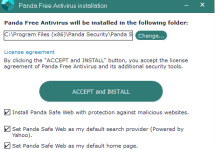
Panda Cloud, I tried couple months back...If I remember during install there is an option to not install the toolbar...do you mean if the toolbar is not installed during install then the toolbar is automatically installed without user input sometime later?

CCAV...in the update popup...this means user input is there & not auto-installed, right?
 
Panda Cloud, I tried couple months back...If I remember during install there is an option to not install the toolbar...do you mean if the toolbar is not installed during install then the toolbar is automatically installed without user input sometime later?
As long as you make sure you uncheck the following 3 boxes (they are checked by default) before clicking on Accept and Install, your browser will not be hijacked with toolbars etc.
Panda uncheck.PNG
 
Status
Not open for further replies.