Advice Request AVG Internet Security Cloud Protection

Please provide comments and solutions that are helpful to the author of this topic.

Divine_Barakah

Level 41
Thread author
Verified
Top Poster
Well-known
Forum Veteran
May 10, 2019
3,072
12,702
3,969
Gaza Strip
AVG Internet Security 19.8.4257.552 is currently installed on 2/3 of my family devices. It is fast and does not cause any systems slowdown (all devices are equipped with SSDs). I always test the functionality of security products with AMTSO.ORG samples. AVG passed all the tests except "Cloud Protection" test. AVG does not block the download nor the file on-access. The sample is only detected by right-click scan. I have not tried running the sample. Anyway, I have replicated the process on most of the devices and the result is the same. Is there any option I need to change? Or Is it just the way AVG works? Thank you!
 
Is there any option I need to change?

Are you using default config? I seem to remember custom settings for reputation check but I haven't used it in a long time. Check this video by @Evjl's Rain. It's a bit old but most still apply AFAIK. Avast custom setup He includes many performance tweaks as well, so pick and choose.
 
Are you using default config? I seem to remember custom settings for reputation check but I haven't used it in a long time. Check this video by @Evjl's Rain. It's a bit old but most still apply AFAIK. Avast custom setup He includes many performance tweaks as well, so pick and choose.

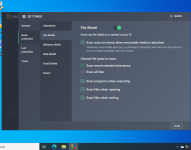
The only relevant settings
Screenshot (2).png

AVG settings seem to be different from Avast's
 
Did you open "Old settings"? Or maybe it's "Old GUI"?
I'm afraid I did not get what you mean by old settings 😅

Stop using AVG/Avast Should I replace Avast with Windows Defender? - Anti-Virus, Anti-Malware, and Privacy Software its pretty much malware these days in how they show threatening pop ups, sells your data to advertisers and monitors everything you do on the internet.

I am using the paid version of AVG and I dont get any pop ups. Disabled unnecessary options in privacy tab.
 
  • Like
Reactions: Dave Russo
AVG Internet Security 19.8.4257.552 is currently installed on 2/3 of my family devices. It is fast and does not cause any systems slowdown (all devices are equipped with SSDs). I always test the functionality of security products with AMTSO.ORG samples. AVG passed all the tests except "Cloud Protection" test. AVG does not block the download nor the file on-access. The sample is only detected by right-click scan. I have not tried running the sample. Anyway, I have replicated the process on most of the devices and the result is the same. Is there any option I need to change? Or Is it just the way AVG works? Thank you!

I seem to observe the same behaviour, and I also seem to remember that it used to work years ago.

To my knowledge, it should still work on-execution and the AMTSO detection should appear when you try to execute it. Try it and let me know.
 
  • Like
Reactions: Divine_Barakah
I seem to observe the same behaviour, and I also seem to remember that it used to work years ago.

To my knowledge, it should still work on-execution and the AMTSO detection should appear when you try to execute it. Try it and let me know.

Unfortunately I have uninstalled AVG from all of my devices. As far as I remember, the file is detected by right-click scan. I have never tried executing the file.