
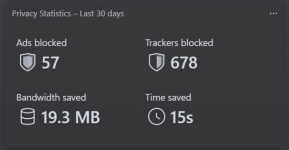
HaGeZi's DNS filtering seems to do an excellent job of blocking ads; I was surprised to see that Vivaldi's ad blocker barely blocks anything.


Open MalwareTips from your Home Screen or desktop. Follow discussions, find answers and pick up where you left off.
If you cannot find an install option, update your browser or use its bookmark option to keep MalwareTips close.
After installation, open the app and sign in. Enable push notifications in Preferences if you want alerts. On iPhone and iPad, push requires a Home Screen web app and iOS or iPadOS 16.4 or later.
Sign in to manage notificationsInstallation is optional. Your notification settings stay under your control.


Awesome! You're on Control D Hagezi Pro resolver? Have you tried Hagezi Pro Plus one?HaGeZi's DNS filtering seems to do an excellent job of blocking ads; I was surprised to see that Vivaldi's ad blocker barely blocks anything.
View attachment 300041
@lokamoka820
I lost track of your configuration. Do you have local DNS? Which? What Hagezi filter have you enabled?
My current DNS setup is NextDNS configured via YogaDNS. Why? When using NextDNS through the built-in Windows DNS settings, I handle around 7,000 queries per day, while with YogaDNS it's around 2,000, which I don't understand. I've enabled all non-experimental security settings and only set the HaGeZi Pro Plus filter in the privacy settings (I removed the NextDNS filter). If I were to switch to a local DNS, I would definitely choose AdGuard Home, which is my backup plan in case my current setup exceeds the free queries limit for NextDNS.Awesome! You're on Control D Hagezi Pro resolver? Have you tried Hagezi Pro Plus one?

Less RAM and CPU usage?My current DNS setup is NextDNS configured via YogaDNS. Why? When using NextDNS through the built-in Windows DNS settings, I handle around 7,000 queries per day, while with YogaDNS it's around 2,000, which I don't understand. I've enabled all non-experimental security settings and only set the HaGeZi Pro Plus filter in the privacy settings (I removed the NextDNS filter). If I were to switch to a local DNS, I would definitely choose AdGuard Home, which is my backup plan in case my current setup exceeds the free queries limit for NextDNS.
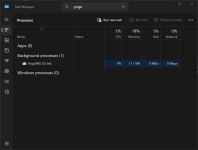
If you are asking about YogaDNS, it does not use the CPU and does not cause disk writing, and its RAM is as shown in the screenshot below.Less RAM and CPU usage?
DNS cache. The domains you already "visited" are saved by YogaDNS so the app doesn't send DNS requests for domains that already are in cache.When using NextDNS through the built-in Windows DNS settings, I handle around 7,000 queries per day, while with YogaDNS it's around 2,000, which I don't understand.
The only reason why I'm not using NextDNS is the limited number of queries. Sometimes I generate more of them, sometimes less and I'd absolutely hate having constant checks to see if I went below or beyond the limit.If I were to switch to a local DNS, I would definitely choose AdGuard Home, which is my backup plan in case my current setup exceeds the free queries limit for NextDNS.
Control D is also an excellent option, but I preferred NextDNS over it in my current setup because it uses servers closer to my geographical location than Control D. This is the first time I have used NextDNS, so I don't know if I will exceed the limit of the free plan or not, and if I do, I will have to switch to another DNS service.That's the reason why I chose Control D in the first place it has unlimited queries so I don't have to worry about limits.
I sent an email to Quad9 yesterday and got a reply within 50 minutes, so I figured maybe my email to Control D wasn’t received or something. I decided to send another email to Control D support, and today I got the following reply:Did Control D support get back to you? What did they tell you regarding latency?
Hey,
Thanks for contacting Control D Support.
Can you please tell us how long you've been experiencing this issue, and if it varies during different times of day?
Is this a new issue that has just presented itself? If so, what were your previously reported latency numbers?
Thanks,
UPDATE:I sent an email to Quad9 yesterday and got a reply within 50 minutes, so I figured maybe my email to Control D wasn’t received or something. I decided to send another email to Control D support, and today I got the following reply:
Hey,
Thanks for confirming.
Unfortunately we are not able to directly influence the routing from your ISP to our network edge at this time. Managing an anycast network is quite difficult, primarily because making changes in one region (seemingly for the better) can cause negative impacts in other regions. This is particularly problematic when there is no common IP transit providers in use at each of those locations.
Control D was spending a lot of time "wack-a-moling" these types of customer reports in the past. We have partnered with NetActuate, a global anycast network platform, so that we can reduce global average latencies between our customers and our edge which has resulted in fewer problems like these. The tradeoff is that while our global user base strongly benefits, it gives us less granular control to fix one-off exceptions (such as with your ISP). With that said, we have documented your case and will reach out if any adjustments are made to our network that will help you in the future.
Cheers,
Johnny
Control D Support
While it's true they cannot do much here, what they can do is ask your ISP to route traffic to nearest location. You could do the same, however, they are likely not to budge when user reports this. There are higher chances ISP will do something once a service provider or an network owner contacts them directly.UPDATE:
Members who viewed this thread in the last 5 minutes

