

Don't use privacy software, but I am open to suggestions.
BigD1 Config
- Thread starter BIgD1
- Start date
You are using an out of date browser. It may not display this or other websites correctly.
You should upgrade or use an alternative browser.
You should upgrade or use an alternative browser.

Great config! PowerTools its good? Thanks for sharing your config 

Very good and solid config, thanks for sharing
M
Manzai
Very good config
Trend Micro => Extreme Sensibility ?
Trend Micro => Extreme Sensibility ?
Great config! PowerTools its good? Thanks for sharing your config
Yes Power Tools is good. Been using Jv16 Power Tools registry cleaner all the way back to windows XP. Just using the free Power Tools Lite 2013 for now.
Thank you, I've heard good reviews about of this program but I've never tried it, I think it's time to try it.Yes Power Tools is good. Been using Jv16 Power Tools registry cleaner all the way back to windows XP. Just using the free Power Tools Lite 2013 for now.
I
illumination
Config looks good! Basis are covered.


High BigD1, and thank you for your configuration. It speaks to me of safety, and I like it ...especially when you're in "Shadow Mode", lol!!
Now, let's talk about privacy. CCleaner does help. Since you are a LastPass devotee with Shadow Defender, why not try LastPass' Universal Binary download? It operates quite smoothly since it's an application, and can be used with every browser, particularly Internet Explorer. As you know, Shadow Mode can let you test drive it without having to worry about uninstalling it later.
I've often read VPNs are the way to go to encrypt your connections. Some day I shall try one, but in the meantime I use ZENMATE extension for Google.
Do you know about Google Chrome's built in 3rd party cookie blocker?
To activate the third party cookie blocker in Chrome, find it under "Settings".
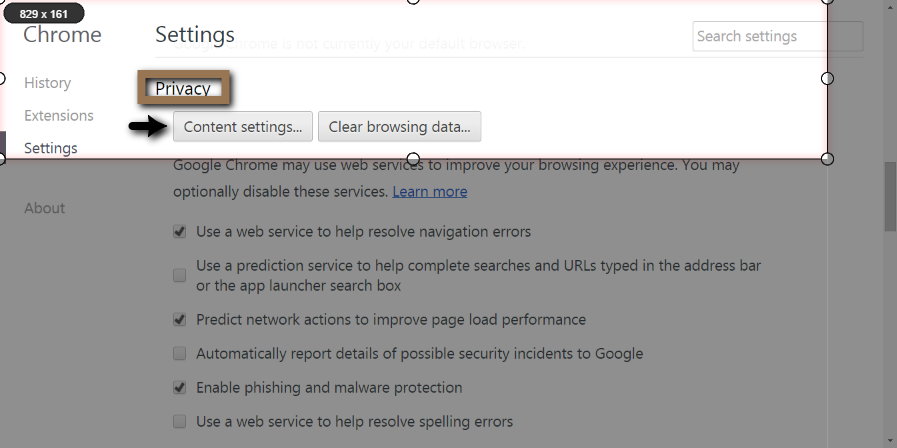
BTW, for privacey I now un-check everything(up above) except for "Enable phishing and malware protection".
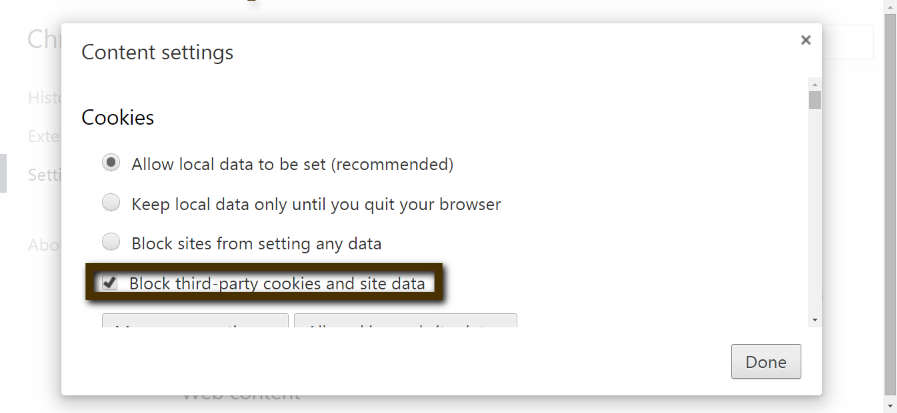
3. Check the box "Block third party cookies and site data".
Edit: To protect your data, check "Keep local data only until you quit..browser". It's similar to "Incognito"
...especially when you're in "Shadow Mode", lol!!Now, let's talk about privacy. CCleaner does help. Since you are a LastPass devotee with Shadow Defender, why not try LastPass' Universal Binary download?
It operates quite smoothly since it's an application, and can be used with every browser, particularly Internet Explorer. As you know, Shadow Mode can let you test drive it without having to worry about uninstalling it later.I've often read VPNs are the way to go to encrypt your connections. Some day I shall try one, but in the meantime I use ZENMATE extension for Google.
Do you know about Google Chrome's built in 3rd party cookie blocker?
To activate the third party cookie blocker in Chrome, find it under "Settings".
- Scroll down to the bottom, & <click> Advanced Settings
- Beneath "Privacy" <click> Content settings
BTW, for privacey I now un-check everything
(up above) except for "Enable phishing and malware protection".3. Check the box "Block third party cookies and site data".
Edit: To protect your data, check "Keep local data only until you quit..browser". It's similar to "Incognito"
Last edited:

High BigD1, and thank you for your configuration. It speaks to me of safety, and I like it
Now, let's talk about privacy. CCleaner does help. Since you are a LastPass devotee with Shadow Defender, why not try LastPass' Universal Binary download?
I've often read VPNs are the way to go to encrypt your connections. Some day I shall try one, but in the meantime I use ZENMATE extension for Google.
Do you know about Google Chrome's built in 3rd party cookie blocker?
To activate the third party cookie blocker in Chrome, find it under "Settings".
- Scroll down to the bottom, & <click> Advanced Settings
- Beneath "Privacy" <click> Content settings
BTW, for privacey I now un-check everything
3. Check the box "Block third party cookies and site data".
Edit: To protect your data, check "Keep local data only until you quit..browser". It's similar to "Incognito"
@Cats-4_Owners-2 Thanks, never knew about the universal installer from LastPass and Zenmate will check that out sounds useful! thanks for the share boss!

Looks Good !! Thanks for sharing your config
You may also like...
-
 Advanced Plus Security Devjit’s Gaming PC 2026
- Started by devjitdutta2025
- Replies: 44
-
 Advanced Plus Security Divine_Barakah's Second Laptop Security Config
- Started by Divine_Barakah
- Replies: 93
-
 Question Are there any apps that assist with automatic identity and privacy management?
- Started by AyushSarvr47
- Replies: 1
-
 Hot Take Stop Microsoft Edge From Opening Your Browser History at Startup
- Started by lokamoka820
- Replies: 6
-
