Advanced Plus Security Divine_Barakah's Second Laptop Security Config

Last updated
Jan 19, 2026
How it's used?
For work or educational use
Operating system
Windows 11
On-device encryption
BitLocker Device Encryption for Windows
Log-in security
    • Biometrics (Windows Hello PIN, TouchID, Face, Iris, Fingerprint)
Security updates
Allow security updates
Update channels
Allow stable updates only
User Access Control
Always notify
Smart App Control
On
Network firewall
Enabled
About WiFi router
ISP-provided router.
Real-time security
Trend Micro Maximum Security
Firewall security
Microsoft Defender Firewall
About custom security
Hypersensitive Mode enabled
Periodic malware scanners
EEK
Malware sample testing
I do not participate in malware testing
Environment for malware testing
None
Browser(s) and extensions
Vivaldi
Firefox ESR
Secure DNS
Adguard Private DNS systemwide
Desktop VPN
Adguard VPN
Password manager
Password Boss
Maintenance tools
Kerish Doctor
Smarty Uninstaller
Hard Disk Sentinel Pro
Lenovo Vantage (Commercial)
File and Photo backup
Koofr
Filejump
Google Photos
Subscriptions
    • Google One AI Premium 2TB
System recovery
AOMEI Backupper Pro
Risk factors
    • Browsing to popular websites
    • Working from home
    • Making audio/video calls
    • Opening email attachments
    • Buying from online stores, entering banks card details
    • Logging into my bank account
    • Downloading software and files from reputable sites
    • Streaming audio/video content from trusted sites or paid subscriptions
Computer specs
Lenovo Thinkpad X13 Gen 3
What I'm looking for?

Looking for maximum feedback.

Hello,


I have got a new Lenovo Thinkpad X13 Gen 3 and I use it for teaching.

I am keeping the config as simple as possible.
Congratulations for your new laptop.

Trend Micro detection rate is very good, but it is bundled with very high FP detections; might cause some annoyance with less prevalent installers or script files.

Fort firewall allows more precise control than W firewall; however, firewall, regardless of how good is it, can be easily bypassed by code injection into an allowed system exe or process.

Apart from those two, the rest of configuration is very good.
 
Congratulations for your new laptop.

Trend Micro detection rate is very good, but it is bundled with very high FP detections; might cause some annoyance with less prevalent installers or script files.

Fort firewall allows more precise control than W firewall; however, firewall, regardless of how good is it, can be easily bypassed by code injection into an allowed system exe or process.

Apart from those two, the rest of configuration is very good.
Thanks man.

Regarding FPs, it won't be an issue as I mainly use this device for teaching which means I am only using some well-known apps (very essential ones).

Regarding WF, TM already have Firewall booster and I do trust the BB in TM, so I believe that is covered in my setup. Hypersensitive mode will help too.
 
I havent had single fp on trend micro, with hyper sensitive enabled for months. even it has run on my sisters laptop for over year, and she works alot with files.

Sure it has some false positives when you test against 10000 files compared to other antiviruses
 
I havent had single fp on trend micro, with hyper sensitive enabled for months. even it has run on my sisters laptop for over year, and she works alot with files.

Sure it has some false positives when you test against 10000 files compared to other antiviruses
I am impressed with how light it is on system resources.
 
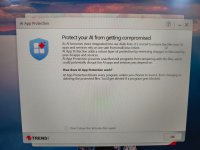
A new feature in TM

IMG_20260119_162248936.jpg
 
Not very new, it’s been almost a year since they released it.

It uses the same technology like folder shield to protect your AI agents and IDEs (things like ChatGPT Codex, Claude Code and so on) and their respective output from malicious modifications.

It is like anti-ransomware for your source code.

It is light on system resources indeed, for the 2026 they seem to have made several updates to the application lightness.

But in terms of detection, it is lagging behind others.
 
@Trident what do you think of TM's Firewall Booster? I see that it offers IDS, Anti-botnet protection and Generic Stream Scan.
It all sounds very nice but the IDS only blocks a handful of attacks through a pattern that was last updated ~2 years ago.

This IDS is not the same IDS offered by business products.

The business version can block system-wide connection to untested domains and IPs whilst the home one only blocks connection to known malicious.

The hypersensitive mode enables totally different configuration for all engines, but as it has been proven, even this connection is ok until you start playing around with malware.

It does have HTTP scanning.

McAfee’s execution of the cloud-based concept is way better than the one found in Trend.
 
When you long for a light and simple antivirus like me, Trend Micro has a lot of attractive qualities. I do enjoy their branding and sense for UX design, and the idea of a well-executed cloud antivirus can be very promising.

Unfortunately, I haven't had enough assurances of its actual ability to detect and protect. I'll still watch for improvements.
 
When you long for a light and simple antivirus like me, Trend Micro has a lot of attractive qualities. I do enjoy their branding and sense for UX design, and the idea of a well-executed cloud antivirus can be very promising.

Unfortunately, I haven't had enough assurances of its actual ability to detect and protect. I'll still watch for improvements.
I believe unless you hunt for malware, you'd be OK with it.
 
Correction, it supports HTTPS scanning, I’ve missed the S.

Between Trend Micro and McAfee, both cloud based, one has a massive network, the other one performs regular network cleanup.

McAfee is also updated more often, it has less roots in kernel mode than Trend, the web blocking is somewhat better executed.

Trend Micro beats in terms of UX, in fact, I’ve learned some lessons from them myself.