
Advanced Plus Security Divine_Barakah's Second Laptop Security Config

Last updated
Jan 19, 2026
How it's used?
For work or educational use
Operating system
Windows 11
On-device encryption
BitLocker Device Encryption for Windows
Log-in security
    • Biometrics (Windows Hello PIN, TouchID, Face, Iris, Fingerprint)
Security updates
Allow security updates
Update channels
Allow stable updates only
User Access Control
Always notify
Smart App Control
On
Network firewall
Enabled
About WiFi router
ISP-provided router.
Real-time security
Trend Micro Maximum Security
Firewall security
Microsoft Defender Firewall
About custom security
Hypersensitive Mode enabled
Periodic malware scanners
EEK
Malware sample testing
I do not participate in malware testing
Environment for malware testing
None
Browser(s) and extensions
Vivaldi
Firefox ESR
Secure DNS
Adguard Private DNS systemwide
Desktop VPN
Adguard VPN
Password manager
Password Boss
Maintenance tools
Kerish Doctor
Smarty Uninstaller
Hard Disk Sentinel Pro
Lenovo Vantage (Commercial)
File and Photo backup
Koofr
Filejump
Google Photos
Subscriptions
    • Google One AI Premium 2TB
System recovery
AOMEI Backupper Pro
Risk factors
    • Browsing to popular websites
    • Working from home
    • Making audio/video calls
    • Opening email attachments
    • Buying from online stores, entering banks card details
    • Logging into my bank account
    • Downloading software and files from reputable sites
    • Streaming audio/video content from trusted sites or paid subscriptions
Computer specs
Lenovo Thinkpad X13 Gen 3
What I'm looking for?

Looking for maximum feedback.

I use SP to follow the update release of apps, but when I want to dowload the new installer, I move to the app official website.

I know SP is trustworthy, but I prefer to stay more secure and avoid any 3rd party website for installers.
You can check the link and you will be able to verify it is coming from the official source. Try downloading Avast offline installer from Softpedia and check the link.

Btw there is a fantastic hack when using SP. Create an account there and add the programmes you are using to your wishlist. Now whenever there is any updates for the programmes you added to the wishlist, you receive a notification email from SP.

The email looks like this
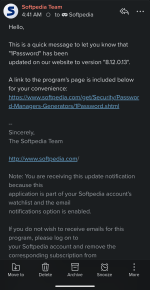
Screenshot_20260120-112231.png
 
You can check the link and you will be able to verify it is coming from the official source. Try downloading Avast offline installer from Softpedia and check the link.

Btw there is a fantastic hack when using SP. Create an account there and add the programmes you are using to your wishlist. Now whenever there is any updates for the programmes you added to the wishlist, you receive a notification email from SP.

The email looks like this

View attachment 294846
I use very few number of apps, but I like to explore all apps on SP for curiosity; sometimes I get stumbled on a new interesting app; if W reinstall is planned soon, I try all.
 
Night Eye has been my favorite dark mode extension for quite a while now. It does a better job of transforming websites than the others I tried.

It's a polished product.
Does it have free and pro versions?

I have installed the free extension to try minutes ago: page loading and scrolling are slower compared to dark reader, with higher cpu utilization.

Uninstalled it immediately.

May be the performance of the pro version is different.
 
Last edited:
Does it have free and pro versions?

I have installed the free extension to try minutes ago:
- Colors are washed; after applying oled mode, it is good, but no fine tuning of brightness, contrast, and sepia.
- Page loading and scrolling are slower compared to dark reader, with higher cpu utilization.

Uninstalled it immediately.

May be the performance of the pro version is different.
I never experienced any issues on my IPS screen. The only difference between pro and free is the ability to configure unlimited websites. It's very limited in this regard for the free version.
 
I never experienced any issues on my IPS screen. The only difference between pro and free is the ability to configure unlimited websites. It's very limited in this regard for the free version.
This is the one I have tried

 
This is the one I have tried

I just double-checked my desktop browser for everything available, and the extension does offer quite a bit of per-site configurability: brightness, contrast, saturation, blue light (like sepia), dim, and custom CSS. You can also adjust the default values for any site you visit.
 
I just double-checked my desktop browser for everything available, and the extension does offer quite a bit of per-site configurability: brightness, contrast, saturation, blue light (like sepia), dim, and custom CSS. You can also adjust the default values for any site you visit.
Yes, I have found it; not under settings, on the main interface; it has even more options for tuning than dark reader.

Still has the issue of slow scrolling.
 
On my Lenovo the Jan security update was offered in Windows Updates and was installed successfully. On my Dell it seems the update was paused.

I believe MS issued a hotfix, but it was not pushed to my Lenovo.

It seems the update causes issues only on a handful of devices?