Installed BN 2.02 over the top of BN 1 and it is running good as expected.
Regards Eck
Regards Eck


Open MalwareTips from your Home Screen or desktop. Follow discussions, find answers and pick up where you left off.
If you cannot find an install option, update your browser or use its bookmark option to keep MalwareTips close.
After installation, open the app and sign in. Enable push notifications in Preferences if you want alerts. On iPhone and iPad, push requires a Home Screen web app and iOS or iPadOS 16.4 or later.
Sign in to manage notificationsInstallation is optional. Your notification settings stay under your control.

Thank you, I appreciate that! BTW, I forgot to uncomment the code where there computer beeps twice when it wakes the drives. It might be good to leave it in for this version, and remove it next version, that way everyone will get an idea of when WakeAllDrives method is called. It really should not beep that often at all, but if it does, just use 2.01 instead for now.Installed BN 2.02 over the top of BN 1 and it is running good as expected.
Regards Eck

Hi Dan,
I've noticed a difference in RAM usage values in the Bottleneck app and Task Manager
View attachment 288396


 malwaretips.com
I think it's a great little tool, but the discrepancies between Task Manager and BottleNeck had me scratching my head, so I uninstalled it.
New Update - BottleNeck
I am in the process of adding real-time S.M.A.R.T drive error detection and the feature to wake additional drives (not C) when the user is actually using the computer to BN. This is going to be very interesting, there are many programs that monitor S.M.A.R.T in real time, their problems are...
 )
)
You said:
I have a C# app that utilizes PerformanceCounters to track CPU, RAM and HDD usage. It works, but the results do not necessarily align with the Windows Task Manager utilization. What could account for the discrepancy? Which one is more accurate overall?
ChatGPT said:
Discrepancies between PerformanceCounter readings and Task Manager values in Windows are common and can be due to several factors. Here's a breakdown of potential reasons and which one is more "accurate" depending on context:
Why the Discrepancy?
- Sampling Rate and Timing
- PerformanceCounters measure usage over a short interval, and your code determines when the samples are taken.
- Task Manager smooths data and averages usage over time (typically 1-second or more intervals), which can cause differences, especially during CPU/RAM spikes or dips.
- Processor Time Calculation
- % Processor Time from PerformanceCounter is based on total elapsed time across all cores, so on a multi-core CPU, it can exceed 100% (e.g., 400% on a quad-core). Task Manager usually shows a normalized average (0–100%) unless you break it down by logical processor.
- Measurement Scope
- Task Manager includes more detailed internal logic and may exclude or include certain processes (like system or idle time) differently.
- PerformanceCounter may not always perfectly represent system-wide or process-specific usage, especially if incorrectly scoped (e.g., _Total, specific instance, or per core).
- Virtualization and Measurement Overhead
- On virtual machines or systems with hyperthreading, the counters may report differently than Task Manager, which integrates additional metrics from the OS scheduler and hardware abstraction layer.
- Disk Usage Differences
- Task Manager shows Active Time (percentage of time the disk is active), while PerformanceCounter might report Disk Bytes/sec or similar. These are different metrics.
- RAM Usage Definitions
- Task Manager differentiates between used memory, available, cached, committed, etc., whereas PerformanceCounter might only show Available MBytes or % Committed Bytes In Use.
Task Manager is generally:
Which One is More Accurate?
PerformanceCounters are:
- More user-friendly and higher-level, showing smoothed and normalized values.
- More in line with what end users expect when interpreting "CPU usage" or "RAM usage".
- Uses additional internal Windows APIs and heuristics that may not be directly available to PerformanceCounter.
- Accurate for low-level telemetry, if used correctly.
- Better for customized, automated, or programmatic monitoring where exact raw values are needed over time.
- Subject to greater implementation variance, meaning it’s easier to get misleading values if not interpreted carefully.
Would you like help comparing your specific PerformanceCounter code with Task Manager's metrics for accuracy?
- If you want your app to closely match Task Manager, consider using WMI (e.g., Win32_PerfFormattedData_*) or PDH APIs (Performance Data Helper) with proper normalization.
- For modern or more precise monitoring, consider using Windows Performance Recorder/Analyzer APIs or ETW (Event Tracing for Windows).
. Thank you guys!
well my experience going back a few years ago when you first coded it, I thought Bottleneck was somewhat heavy even though that was not your intent, since you asked. If Bottleneck could be optimized for lightness, for me that would be more important than exactly matching taskmanager, as long as Bottleneck is a true accurate measure (my 2 cents fwiw).After doing some quick research, it looks like PerformanceCounters still might be our best bet overall... we might just need to include an option to normalize the data if the user wants it to more closely match the Windows Task Manager. It looks like ETW and PDH might have higher CPU utilization / overhead, and the last thing we want to do is to slow down the computer, just to get the hardware metrics.
But the question is... do we normalize all three CPU, RAM and SSD? I will play around with it this week and figure out what works best. I will also try the ETW and PDH methods, because now I am curious
Thank you @danb as that was what I was wondering when I posted this:Here is an explanation from ChatGPT... In short, Windows Task Manager is "More user-friendly and higher-level, showing smoothed and normalized values." and BottleNeck is more accurate for any given moment in time / real-time results.
Does BottleNeck show truer CPU and Memory use than Task Manager?
We can make BottleNeck as light as you want... all we have to do is adjust the frequency of the polling, or we can make it user adjustable. That is the only component that has any overhead at all. It runs great on my i3 8100... 1% CPU or less all the time. What CPU's are you guys using where it is higher than that? It might be slower on a VM as well, I have not checked, just a thought.well my experience going back a few years ago when you first coded it, I thought Bottleneck was somewhat heavy even though that was not your intent, since you asked. If Bottleneck could be optimized for lightness, for me that would be more important than exactly matching taskmanager, as long as Bottleneck is a true accurate measure (my 2 cents fwiw).
No problem at allThank you @danb as that was what I was wondering when I posted this:
With what you are doing to improve this app, and when I installed TaskbarPlus, the thought came to mind that you should bundle these two together and suggest price for both of them. I would gladly consider paying for them. And thank you for not taking my uninstall badly, sometimes I'm not very considerate and didn't have to say a thing considering all that you've been doing to improve this app
. That is kind of the point of MT... to try different software and see what works best for you. Yeah, I was going to bundle BottleNeck into TaskbarPlus, but we have already add way too many hardware type features to BottleNeck, and besides, they both need their own tray icon and having a separate executable is probably wise. Having said that, we could bundle the executables together in a package, and one can start the other. Something like that?
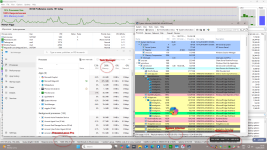
I installed Bottleneck 2.03 on win10_VM (VMware WS 17) -- prior to the install Taskmanager memory was reading 23% -- I also had process_explorer 17.04 open and its commit charge was 23.14% I assume that's the same thing? Then closed procexp, installed Bottleneck and Taskmanager is reading 24% and bottleneck RAM is reading 24.8%. Then closed Taskmanager so only it is running and Bottleneck reading RAM dropped a 24.5%Hey guys, here is a version where the metrics are normalized to match the Windows Task Manager as closely as possible. On my 3900X and i3 8100, they match perfectly, so I am curious how well they match on your systems. I am also getting 1% or less CPU utilization for BottleNeck.exe on my 8100 system, and 0% on my 3900X system... if these values are higher for anyone, we can back off on the polling a little and the number should still be accurate. Also, the wake drives feature should be working great now as well. Thank you guys!
It is now sitting in the System Tray more quietly, not as noticeable (bar heights) as before with some of its previous, occasional higher numbers. This is a different notebook (below image) than the other 8GB RAM notebook I was using, which will show a higher RAM graph by default. BottleNeck is only using 20.8MB of MemoryIn short, Windows Task Manager is "More user-friendly and higher-level, showing smoothed and normalized values." and BottleNeck is more accurate for any given moment in time / real-time results.

Members who viewed this thread in the last 5 minutes