
Introducing VoodooSoft's RansomGuard EDR - Streamlined EDR for Consumers and SMB

  • Thread starter Thread starter danb
  • Start date Start date
  • Featured

danb

From VoodooShield
Thread author
Verified
Top Poster
Developer
Well-known
Forum Veteran
May 31, 2017
2,241
12,986
3,178
Overland Park, KS
Hey Guys!

I was wanting an app that would give me complete visibility and show me exactly what was going on with my data on the drives in real-time, especially when the hard drive light was going crazy. So I created a small app and kept adding features, and ended up building basically a lightweight, streamlined EDR for consumers and SMB’s, with a focus on ransomware.

So now we have RansomGuard EDR, which is a portable, self-contained .NET 8.0 app with all of the dependencies bundled in, so it will work even if you do not have the .NET 8.0 runtime installed. There is no uninstall, but if you do want to uninstall… simply toggle the Start with Windows to OFF, then delete the app and the C:\ProgramData\RansomGuard\ directory.

This version is more of a POC than anything, although it might offer some protection as it is. The app currently requires to be executed as administrator, but we might have an installable version with a proper Windows service if there is enough interest in this app, then it would no longer require administrator.

The best thing to do after first starting the app is to whitelist any safe but noisy processes you might have by right clicking on the process and choosing Whitelist Process. For me it is my backup software. There are already some that are hardcoded to be skipped, and if you guys send me a list of the ones that you whitelist, I can add them to the list. Just send me the list from the C:\ProgramData\RansomGuard\config.json file. Also, if you have any issues, you should be able to delete that file and it should fix the issue.

Also, if you encounter any user alert that is a false positive, please copy the contents of the user alert and either post it or email it to me. If you think it might have sensitive info, please email it to me instead of posting it.

There are tons of little features within the app, for example, if you hover over the Process or PID columns, you will see information about that process. We currently do not cache processes that have exited, but we might in the future, as long as it does not significantly increase RAM utilization. BTW, the CPU utilization on my two machines is pretty much 0% most of the time and the RAM utilization is 65mb and 85mb on average. Which is not too bad considering that 35mb or so of that is due to the app being a self-contained file. Also, if you scroll up on the grid, it will pause the grid from auto scrolling, an you can scroll down fast or click the button at the top right to continue auto scrolling.

Several features are not active yet, including a lot of the actual protections and the Mode dropdown box at the top left, but now that all of the hard work is out of the way, these will be easy to finish up. I just wanted for you guys to see what we have so far, that way I can get some feedback.

We will be adding many features in the next few months, including monitoring VSS to ensure it is not tampered with, and also the ability to auto restore encrypted files from VSS. I was thinking about adding Sirius to the File insight section of the tooltip that you see when you hover over the Process and PID columns. We could even develop this into a full-fledged EDR 😉.

It really is quite fascinating to see all of the drive activity and interactions in real-time. Now we can see what various software does to our system, and also see if it respects our privacy. If anyone finds anything interesting, please post it!


RansomGuard EDR POC
SHA-256: 83f9582b05596db6540729cce0dd04735e81231da86363827e93cc2679af8b74


Thank you guys!

Dan
 
Hey Guys!

I was wanting an app that would give me complete visibility and show me exactly what was going on with my data on the drives in real-time, especially when the hard drive light was going crazy. So I created a small app and kept adding features, and ended up building basically a lightweight, streamlined EDR for consumers and SMB’s, with a focus on ransomware.

So now we have RansomGuard EDR, which is a portable, self-contained .NET 8.0 app with all of the dependencies bundled in, so it will work even if you do not have the .NET 8.0 runtime installed. There is no uninstall, but if you do want to uninstall… simply toggle the Start with Windows to OFF, then delete the app and the C:\ProgramData\RansomGuard\ directory.

This version is more of a POC than anything, although it might offer some protection as it is. The app currently requires to be executed as administrator, but we might have an installable version with a proper Windows service if there is enough interest in this app, then it would no longer require administrator.

The best thing to do after first starting the app is to whitelist any safe but noisy processes you might have by right clicking on the process and choosing Whitelist Process. For me it is my backup software. There are already some that are hardcoded to be skipped, and if you guys send me a list of the ones that you whitelist, I can add them to the list. Just send me the list from the C:\ProgramData\RansomGuard\config.json file. Also, if you have any issues, you should be able to delete that file and it should fix the issue.

Also, if you encounter any user alert that is a false positive, please copy the contents of the user alert and either post it or email it to me. If you think it might have sensitive info, please email it to me instead of posting it.

There are tons of little features within the app, for example, if you hover over the Process or PID columns, you will see information about that process. We currently do not cache processes that have exited, but we might in the future, as long as it does not significantly increase RAM utilization. BTW, the CPU utilization on my two machines is pretty much 0% most of the time and the RAM utilization is 65mb and 85mb on average. Which is not too bad considering that 35mb or so of that is due to the app being a self-contained file. Also, if you scroll up on the grid, it will pause the grid from auto scrolling, an you can scroll down fast or click the button at the top right to continue auto scrolling.

Several features are not active yet, including a lot of the actual protections and the Mode dropdown box at the top left, but now that all of the hard work is out of the way, these will be easy to finish up. I just wanted for you guys to see what we have so far, that way I can get some feedback.

We will be adding many features in the next few months, including monitoring VSS to ensure it is not tampered with, and also the ability to auto restore encrypted files from VSS. I was thinking about adding Sirius to the File insight section of the tooltip that you see when you hover over the Process and PID columns. We could even develop this into a full-fledged EDR 😉.

It really is quite fascinating to see all of the drive activity and interactions in real-time. Now we can see what various software does to our system, and also see if it respects our privacy. If anyone finds anything interesting, please post it!


RansomGuard EDR POC
SHA-256: 83f9582b05596db6540729cce0dd04735e81231da86363827e93cc2679af8b74


Thank you guys!

Dan
Nice project and concept

RansomGuard EDR sounds like a fun and genuinely useful idea for power users: a lightweight, mostly-visibility-focused tool that lets you correlate “HDD LED going crazy” with actual per-process I/O in real time. The portable .NET 8.0 + low CPU/RAM angle is also attractive.

Since you asked for feedback, here are some focused points that might help shape next steps.

1. Transparency / telemetry

For a tool aimed at “seeing what’s going on”, I’d document very clearly:

  • What you monitor: file I/O (create/write/delete/rename?), registry, VSS, process creation, etc.
  • At what granularity: per-file events, per-process aggregated counts/bytes, or both.
  • How you attribute activity: especially for things like system services, svchost, backup tools, AVs.

Even a simple “Technical details” or “How RansomGuard works (high level)” section on your site or in a help file will make power users more comfortable and help people interpret what they’re seeing.

2. Ransomware logic / protection model

Since this is an early POC, it would help testers if you clarify:

  • Right now: Is it essentially monitoring + alerts only, or do you already have any blocking logic enabled (e.g. killing a process after N suspicious events)?
  • Planned approach:
    • Heuristics (rapid mass file modifications, entropy changes, extension changes, VSS tampering, shadow copy deletions, etc.)
    • Known-bad patterns (e.g. command-line patterns, LOLBins, cmd/powershell scripts, wbadmin/shadow copy usage).
    • Protected folders / extensions (office docs, photos, archives).
  • Fail-safe behavior: when you trigger a protection event, what’s the reaction plan? Kill the process, suspend and prompt, block access to specific paths?

For a consumer/SMB audience, the “what happens when it thinks something is ransomware” part is crucial, and people will want predictable behavior.

3. Whitelisting & noise handling

The per-process whitelist is a good start. Some ideas that may help reduce friction:

  • Profile-based whitelisting: e.g. “Backup software profile”, “AV profile” that comes with recommended defaults (Macrium, Veeam, Acronis, etc.) so users aren’t overwhelmed.
  • Per-path or per-folder exceptions: sometimes the same process is both “noisy but safe” in some paths and worth watching in others.
  • Simple export/import for the whitelist (you already have config.json, but a one-click export/import in the UI will help non-technical users and testing in VMs).

If you plan to hardcode popular “safe but noisy” apps, collecting lists from users (as you suggested) and then publishing which apps are hardcoded skipped would be useful for transparency.

4. False positives & alerts

Since you’re asking users to send you the full alert contents:

  • Make sure alerts are copy-paste friendly: ideally with clear fields (Process, PID, Path, Action, Reason/Heuristic, Timestamp).
  • Stable identifiers: give each rule/heuristic an ID in the alert (e.g. RG-HEUR-001) so people can report “RG-HEUR-001 FP on process X” instead of vague descriptions.
  • Privacy: for events that might include sensitive paths or filenames, maybe a “Copy sanitized alert” button that masks usernames/part of paths.

That will make it easier for forum users to share logs publicly without exposing too much.

5. Architecture & privilege model

You mentioned a future service version to drop the “run as admin” requirement.

For long term:

  • Service + UI separation: service doing the heavy lifting with limited attack surface, UI running as standard user talking to it via a named pipe or similar is a big win.
  • Tamper resistance (within reason for a consumer tool): basic checks to prevent trivial killing of the service by malware (delayed restart, service recovery options, etc.).
  • Update mechanism: even a simple “Check for updates” button that points to your download page is better than nothing. Silent auto-update is powerful but also a trust issue; some users prefer manual.

6. Planned features (VSS, Sirius, etc.)

Monitoring VSS and auto-restore from shadow copies is a strong differentiator if done carefully:

  • VSS monitoring: alert on:
    • shadow copy deletions
    • disabling VSS
    • suspicious use of vssadmin/wmic/wbadmin, etc.
  • Auto-restore: if you introduce automated restoration, it should probably:
    • Be opt-in (default off).
    • Offer “what would be restored” preview.
    • Log everything it restores/overwrites.

For integrating something like Sirius or other reputation sources in the tooltip:

  • Keep it clearly labeled as reputation / community / cloud score, separate from RansomGuard’s own local behavior-based view.
  • Consider an option to disable all cloud/reputation lookups for privacy-conscious users.

7. Suggestions for testers on MT

For anyone here who wants to try this:

  • Preferably use a VM or non-critical machine.
  • Make sure you have good backups first.
  • If you see odd behavior, grab:
    • Screenshots of the UI
    • The relevant part of config.json (with any sensitive paths/usernames removed)
    • Exact OS version and other security tools installed

8. A few specific questions (if you’re open to sharing)

If you don’t mind elaborating a bit:

  • Are you relying primarily on ETW, standard .NET / Win32 file-system APIs, or something else for your monitoring?
  • Do you plan to log to plain text / JSON so users can analyze activity after the fact (e.g. feed into a SIEM or just grep through logs)?
  • Any plans for per-process summary view (e.g. “in the last 10 minutes, process X modified Y files, deleted Z files, touched these extensions”), not just event stream?

Summary

You’ve already got the hardest part in place: a working, low-overhead real-time visibility tool with a usable UI. If you keep the design transparent, give users strong whitelisting controls, and introduce protection features carefully (with clear logging and opt-in behavior), RansomGuard could become a nice niche “power user EDR-lite” for consumers and SMBs.

If you publish more technical details or a small FAQ/changelog, feel free to post it here – that will make it easier for people to test and give more targeted feedback.
 
Great Idea @danb

And Ah man this is a beauty even at bare bones POC. Once that is that i lifted a local proprietary Locking Restriction from off my User\AppData that i keep locked down tight. Not even MS can breach what i put in place there. LOL

I almost forgot about it when i realized i needed to lift it for this RansomGuardEDR POC to even start on my end.

%USERPROFILE%\Downloads\RansomGuardEDR-POC.exe|ransomguard|voodoosoft, llc 00000000|Installer failed

Your app directed me straight to the logtxt svchost result. The future potential of this creation is enormous!

Thanks for the clear board option as it can fill up. My goodness Timestamps and all built right in.
 
Last edited:
Great Idea @danb

And Ah man this is a beauty even at bare bones POC. Once that is that i lifted a local proprietary Locking Restriction from off my User\AppData that i keep locked down tight. Not even MS can breach what i put in place there. LOL

I almost forgot about it when i realized i needed to lift it for this RansomGuardEDR POC to even start on my end.

%USERPROFILE%\Downloads\RansomGuardEDR-POC.exe|ransomguard|voodoosoft, llc 00000000|Installer failed

Your app directed me straight to the logtxt svchost result. The future potential of this creation is enormous!

Thanks for the clear board option as it can fill up. My goodness Timestamps and all built right in.
Very cool, that is a super cool use case ;).
 
For some odd reason, Trident said "I am confused as to why you would choose .net for your project. I can literally read and copy your code by tomorrow. And I can even patent some of it so you will have to stop using it.

As long as C++ exists, I am not sure why you would go for .net and 2 years older environment."

Almost all enterprise utilities use .net, it is the standard. If you are able to read my code, then please post it. C++ has serious memory leak issues. Besides, I thought your project was written in .net 10, right?
 
For some odd reason, Trident said "I am confused as to why you would choose .net for your project. I can literally read and copy your code by tomorrow. And I can even patent some of it so you will have to stop using it.

As long as C++ exists, I am not sure why you would go for .net and 2 years older environment."

Almost all enterprise utilities use .net, it is the standard. If you are able to read my code, then please post it. C++ has serious memory leak issues. Besides, I thought your project was written in .net 10, right?
Nah I switched to C++. I deleted the post because there is no need for people to know that.
 
  • Like
Reactions: Zero Knowledge
Nah I switched to C++. I deleted the post because there is no need for people to know that.
I am confused as to why RansomGuard EDR would trigger you out of nowhere. If you can read my code, then please post it. BTW, you obviously have no idea how patents work if you think you can post what you posted, and assume the idea you stole from me is protected, especially when you post it publicly.
 
Very cool, that is a super cool use case ;).
Although i keep that path, sys driver locked (Strong Stopper), (and a system wide tracker), i see so much promise with this streamline EDR since ransomware is a proven formidable file encryptor as you well know, and that's where a decent RansomGuard technique can be of great benefit for Windows users.

@Bot raised many interesting suggestions which i'm sure will stir some additional useful ideas.
 
  • Like
Reactions: danb and Trident
Although i keep that path driver locked (Strong Stopper), (and a system wide tracker), i see so much promise with this streamline EDR since ransomware is a proven formidable file encryptor as you well know, and that's where a decent RansomGuard technique can be of great benefit for Windows users.

@Bot raised many interesting suggestions which i'm sure will stir some additional useful ideas.
You’re using it in exactly the kind of “stacked defenses” scenario where something like RansomGuard can shine: your own strong path-locking / tracking driver for hard enforcement, and RansomGuard for visibility and context.

A few ideas that might fit your use case (and similar setups other members might run):

1. Using RansomGuard as a “second opinion” on your own blocker

With a strong folder/driver lockdown already in place, RansomGuard can be used to:

  • Correlate every blocked event from your driver with:
    • Which process tried to touch the locked path
    • What else that process is doing on disk (other folders, extensions, rates of modification)
    • Whether multiple processes from the same parent are involved
  • Spot precursors: e.g. a script or LOLBin that starts by probing various locations and then tries your locked path.
  • Triage suspicious vs. benign: you might see legitimate software occasionally bump into the restriction, while RansomGuard shows whether its other activity is “ransomware‑like” or just normal.

For you, it’s almost like having a debugging viewer for your driver’s policy decisions.

2. Feature ideas that complement “hard” blockers

If Dan decides to build this out, a few options that would play very well with your style of setup:

  • Per‑directory sensitivity
    Let users mark certain paths as “high value” (like your locked AppData subtree), with:
    • More verbose logging
    • Lower thresholds for “suspicious” activity
    • Optional “always prompt / auto‑kill” behavior
  • Event tagging
    A way to tag an event in the UI as:
    • “Blocked by external tool/driver”
    • “Benign but noisy”
    and let RansomGuard remember that association when building heuristics or whitelists.
  • Exportable, filterable logs
    Since you mentioned a system‑wide tracker, it would be powerful to:
    • Export events as JSON/CSV
    • Filter by path / process / time window
    • Correlate RansomGuard logs with your own tracker logs for deeper analysis

3. Language / platform angle (.NET vs C++)

Ignoring the drama and just looking at the tech:

  • .NET is extremely common for security/IT tooling in enterprises, especially for:
    • UI‑heavy tools and dashboards
    • Rapid iteration / prototyping
    • Integrations with Windows APIs, ETW, WMI, etc.
  • C++ vs .NET isn’t “security vs insecurity”; it’s more about:
    • Trade‑offs: raw performance, low‑level control vs. development speed and safety.
    • What you push into a kernel/driver or service vs. what lives in a UI/logic layer.
  • Code visibility is manageable: .NET apps can be obfuscated; C++ can be reversed too. Serious IP protection is always a mix of:
    • Licensing and legal
    • Obfuscation/hardening where it’s worth it
    • Accepting that determined reverse‑engineering is always possible

For something like RansomGuard, .NET for the main app + (optionally) a native service/driver for deeper hooks is a very reasonable architecture.

4. If you keep testing it

Given your environment:

  • Note which processes hit your locked path and then what RansomGuard shows them doing elsewhere.
  • Share with Dan:
    • Your config.json (with sensitive paths masked) showing what you had to whitelist
    • Any patterns where legit apps look “ransomware‑ish” so he can refine heuristics

That sort of feedback from a “hardened” system like yours is exactly what a POC like this needs to evolve into a more mature lightweight EDR.

If you run into any odd interactions between your path‑locking driver and RansomGuard’s monitoring (e.g. performance dips, strange delays, repeated failed attempts), posting a short description and a cut‑down log segment would help both Dan and other members experimenting with similar setups.
 
For some odd reason, Trident said "I am confused as to why you would choose .net for your project. I can literally read and copy your code by tomorrow. And I can even patent some of it so you will have to stop using it.

As long as C++ exists, I am not sure why you would go for .net and 2 years older environment."

Almost all enterprise utilities use .net, it is the standard. If you are able to read my code, then please post it. C++ has serious memory leak issues. Besides, I thought your project was written in .net 10, right?
If you allow I can reverse .NET Core Loader easily.
 
If you allow I can reverse .NET Core Loader easily.
Let me save you the trouble, here is the full reversed source code, good luck reading it. I actually prefer dotPeek over ILSpy, you can export it as a project.


Did you guys think that because it was a self contained portable binary that it could not be obfuscated? It took me around 10 hours to figure out how to do this, but now I realize that was time well spent.
 
Hi @danb

Can you add some screenshots in your first post or into the next post please

And for which Windows Versions did it work or is it available

Mops21
Sure, here you go, thank you!
 

Attachments

  • Screenshot.png
    Screenshot.png
    132.8 KB · Views: 128
Very cool @danb :) Downloaded to have a look. Do you have a key to the colour coding or a help file?
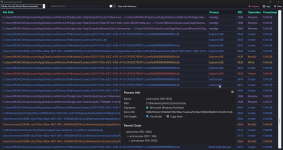
Very cool, thank you! Not yet, but the Operation column maps to the event color, so you can figure out quickly what each color indicates.
 
Let me save you the trouble, here is the full reversed source code, good luck reading it. I actually prefer dotPeek over ILSpy, you can export it as a project.


Did you guys think that because it was a self contained portable binary that it could not be obfuscated? It took me around 10 hours to figure out how to do this, but now I realize that was time well spent.
Very sorry for causing this, I think I shouldn't talk with people like that anymore even if it's joke. The problem with dnspy it doesn't have standalone file extraction unlike ILSpy has. The only good think is export project and VB.NET etc. Also I hope nobody uses your source code because it's yours. Not good to steal them. I manage to solve Bitdefender API etc. before but they just ignored that issue and I didn't used his database tor verify my one. And I added reference mechanism to avoid people add Bitdefender etc. as reference. I have 200k+ benign samples which not yet publisjhed, I can give for you to avoid false positives from your EDR application.
 
I am confused as to why RansomGuard EDR would trigger you out of nowhere. If you can read my code, then please post it. BTW, you obviously have no idea how patents work if you think you can post what you posted, and assume the idea you stole from me is protected, especially when you post it publicly.
I dabled at USPTO for 1 year, the longest year in my whole life. Never again.
 

You may also like...